



Rank 7
May 20, 2025

RTS Meter replaced successfully with new smart meter!

  • May 20, 2025
  • 59 replies
  • 1673 views

Had an appointment today to have my new meter fitted. I chose a single rate meter and th standard variable rate due to my set up.

My old meter set up was this
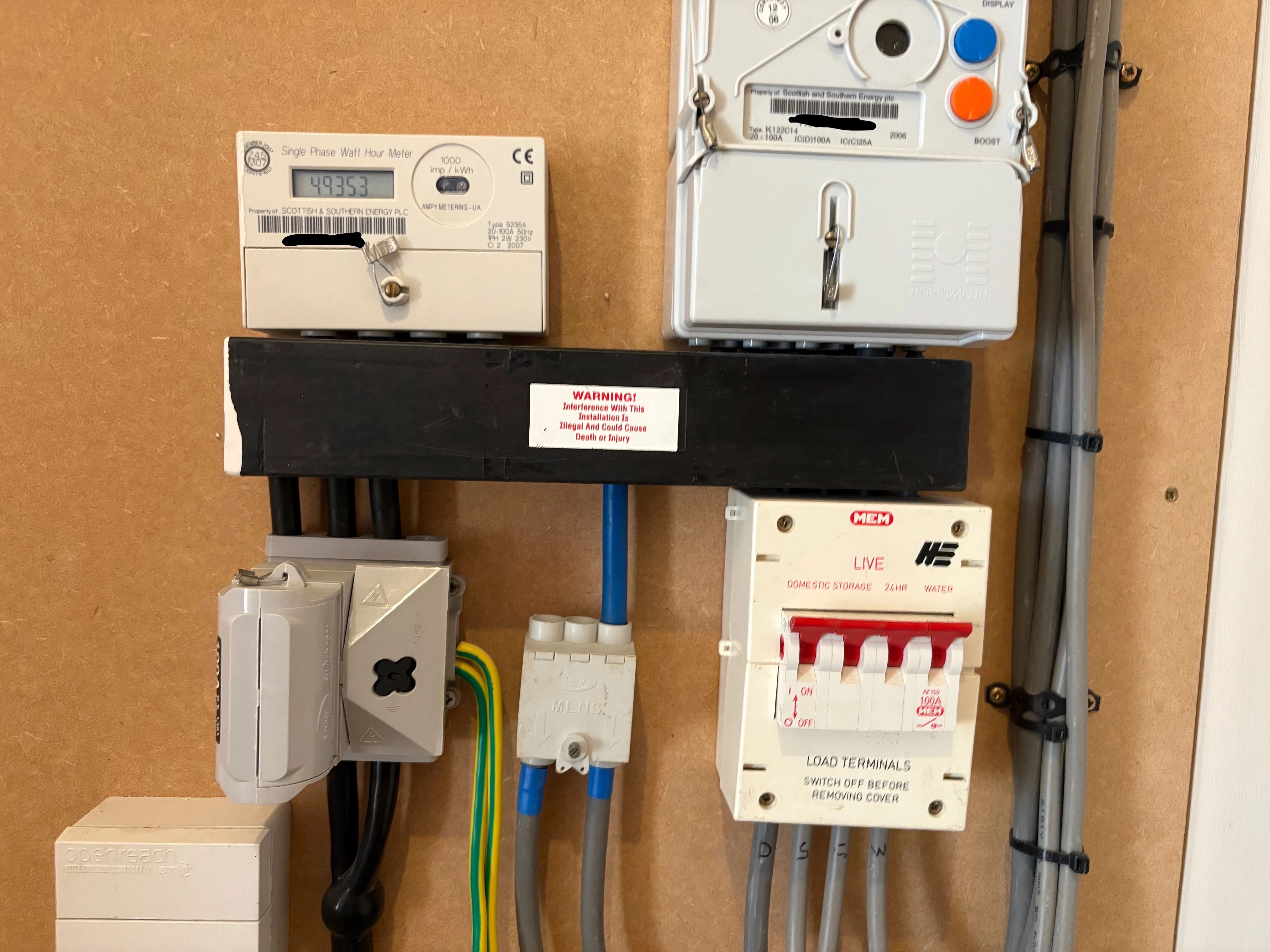
 

When the engineer arrived I asked hime what he was installing and he started talking about two rate and time switching. I said that that was not what I asked for so he got in touch with OVO and they said that off peak had to go to off peak on the new meter and peak to peak. Again I said that I dod not want that so he got in touch with a colleague from SMS who I talked to on the phone and we agreed that I could have what I wanted and the new meter was installed see below.
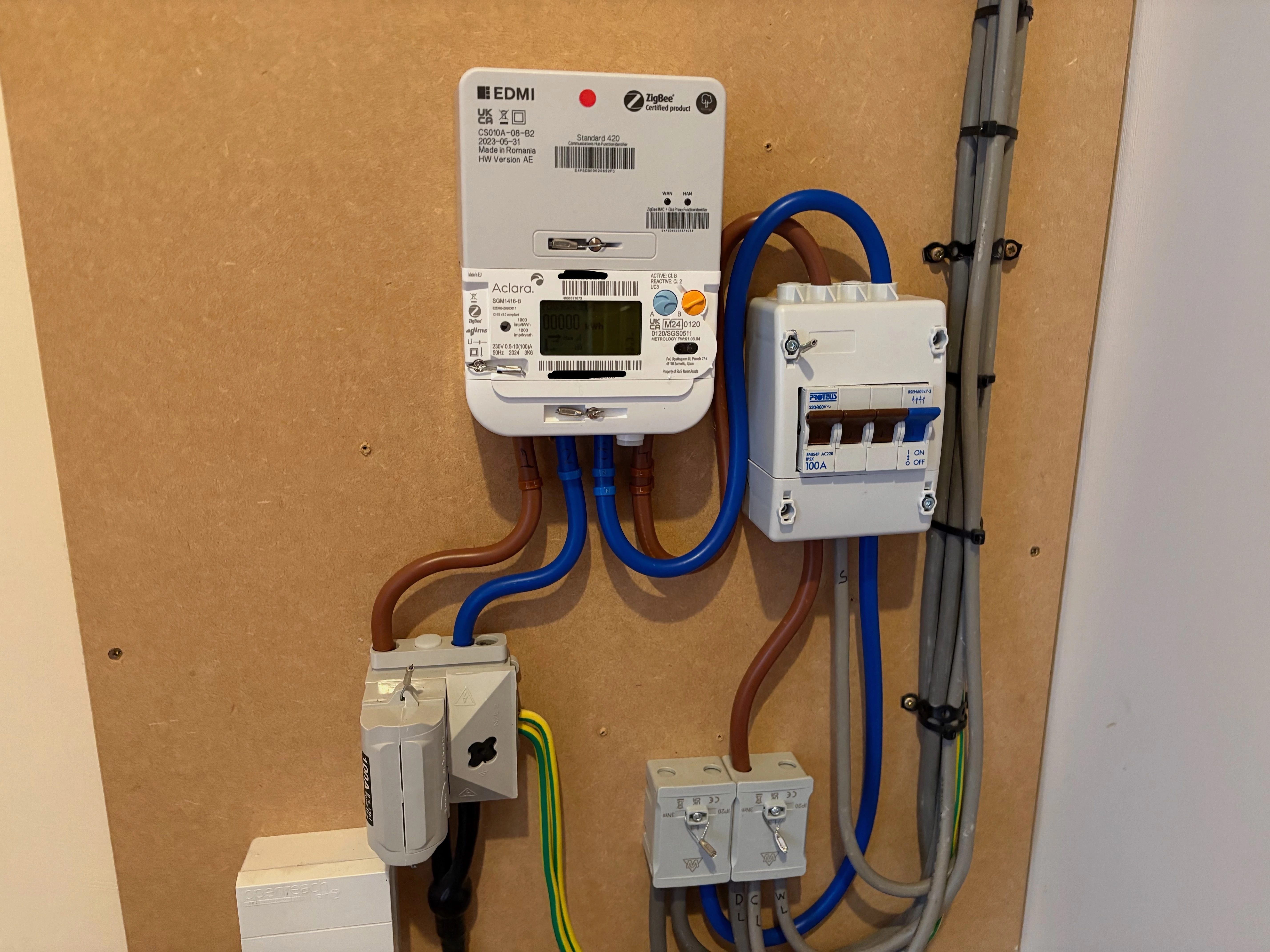


I’m not sure what tariff I am on yet or how to read the meter. I do have an issue with my water but I think that is the time switch the electric put in not anything to do with the meter.


So I think it was successful. Thanks to Malek from SMS who managed to get it done.

 

59 replies

Firedog
Super User
Super User
May 20, 2025

You seem to have got what you asked for. The meter is a multi-rate capable one, but there is no connection to a switched circuit for offpeak heating equipment. That could be added later if you were to change your mind, but the change would not necessarily be free of charge. 

The two little LED lights on the communications hub (the grey EDMI box on top of the white Aclara meter) tell you how the connections to the smart meter network (the WAN) and the In-House Display (the HAN) are behaving. If they’re not flashing at regular 5-second intervals, it’s possible that something’s not right.

Reading the meter is quite simple. If you can’t read the display, touch a button to turn the lights on. Then watch; the display scrolls through several of its internal registers, but some of them will just be zero. The ones you’re interested in are Total Active Import and (possibly) TOU Rate 1 and TOU Rate 2. If you tell us what you see, we’ll be better able to explain.

The tariff rates should arrive at the meter (assuming that communications are working properly) within the first couple of days after installation, although it might take longer or indeed happen earlier. Once the meter has them, they should also get through to the IHD. If you asked for the standard variable tariff, the current prices (paid by Direct Debit) appear to be 26.99 p/kWh and 60.87 p/day. Check here: Our prices | OVO Energy

It might take six weeks or more for everything to fall into place after a major metering change like this, so please don’t panic until six weeks have passed.   

Noel | I have no official status; I'm just a volunteer who comes here to help other customers. My gear: Aclara SGM 1416-B Electricity-only E7 meter; Chameleon IHD3-PPMID-AAA | It may look as if I know what I’m talking about, but don’t let that fool you. |
Abby_OVO
Community Manager
Community Manager
May 21, 2025

Hey ​@awills61 


Glad to see that’s been installed successfully and you were able to get what you wanted sorted out! 


Firedog has left some really good advice already about your tariff and reading your new meter, if you’re still unsure about either of those don’t hesitate to ask us more questions. The following topics may also be helpful:


As Firedog did also mention, it can take up to 6 weeks for things to fully settle down after a smart meter is installed. If you still have any issues after that time, do let us know.

Currently Playing: She's Electric
awills61Author
Rank 7
May 21, 2025

@Firedog The LEDs are both flashing at approx. 5 second intervals.

When I press button ‘A’ I get the following 4 screens


The IHD does have tariff rates


and these match the values you gave give or take a decimal rounding but I don’t see them on the meter.

Firedog
Super User
Super User
May 21, 2025

That’s perfect. All your usage is being recorded on the first TOU register, so TOU Rate 1 and Total Active Import are the same. This means that you can see the instantaneous meter reading to the nearest Wh on the IHD as well.

Have you managed to sort out the water heating?

Noel | I have no official status; I'm just a volunteer who comes here to help other customers. My gear: Aclara SGM 1416-B Electricity-only E7 meter; Chameleon IHD3-PPMID-AAA | It may look as if I know what I’m talking about, but don’t let that fool you. |
awills61Author
Rank 7
May 21, 2025

@Firedog hopefully electrician will be coming today. I can cope at the moment as we have solar heating and I can still use the boost. 
 

Where will the tariff details appear in the meter?

Firedog
Super User
Super User
May 21, 2025

​Where will the tariff details appear in the meter?
 

That’s not easy to say, because the menus on the meter display are configurable. I can only tell you where they are on my own meter, which is of exactly the same type: repeated presses of the orange button B cycles through several items, most of which it’s safest to ignore. One of them is Active Tariff Price and another Standing Charge. Both amounts (in pence) include VAT. The active price will always be the same for you; for those with peak/offpeak rates, the appropriate price would be shown at the appropriate times.


Noel | I have no official status; I'm just a volunteer who comes here to help other customers. My gear: Aclara SGM 1416-B Electricity-only E7 meter; Chameleon IHD3-PPMID-AAA | It may look as if I know what I’m talking about, but don’t let that fool you. |
awills61Author
Rank 7
May 21, 2025

@Firedog Pressing button ‘B’ I get the following

Mode of Operation currently showing Credit Mode

R1BL1 kWh currently showing 00000 kWh

Engineering Menu which says Press & Hold A to Enter

Event Log which says Press & Hold A to Enter

Meter Signal Strength currently showing -6 dBm

Active TOU Number currently showing 1

Privacy PIN Menu which says Press A to Enter

and it then goes back to TOU Rate 1.


Firedog
Super User
Super User
May 21, 2025

I did say that the menus were configurable, so we can’t expect yours will be the same as mine. That said, the idea is that button B shifts from one menu to the next, so try with each one - B, then A repeatedly to cycle through all the items there, then B again and A again and so on. I’m fairly sure the two figures you’re looking for will be there somewhere. I should steer clear of the Engineering, Privacy PIN and Event Log menus, though. 


Noel | I have no official status; I'm just a volunteer who comes here to help other customers. My gear: Aclara SGM 1416-B Electricity-only E7 meter; Chameleon IHD3-PPMID-AAA | It may look as if I know what I’m talking about, but don’t let that fool you. |
awills61Author
Rank 7
May 21, 2025

@Firedog They are under ‘Mode of Operation’. Electrician been and fixed the water heating.

awills61Author
Rank 7
May 22, 2025

Readings from smart meter now arriving in OVO account.
