



Transparent
Rank 20
Rank 20
March 15, 2019
Tutorial

OVO SMETS2 (S2) Smart Meter installation - Member Guide
  • March 15, 2019
  • 60 replies
  • 91517 views
OVO SMETS2 (S2) Smart Meter installation - Member Guide

Updated on 17/04/26 by Abby_OVO


Member’s Guide to OVO SMETS2 (S2) smart meter installation


Having a new smart meter installed is something which most customers only experience once. This topic shows what the process involves and highlights particular issues with the newer SMETS2 meters which OVO started installing widely in March 2019.

You must be present for a smart meter installation. The engineer needs access to the house, even if both gas and electricity meters are in external enclosures. There is an initial survey of the state of gas appliances and your electric consumer unit. Photographs are taken and any gas boiler is turned off.

The electricity meter is usually changed first. The installer is permitted to snip the seal on the main fuse and can reseal it without needing to call your Distribution Network Operator (DNO).
 

ece44fa3-0693-4c6a-8339-412ab1a3af8b.jpg


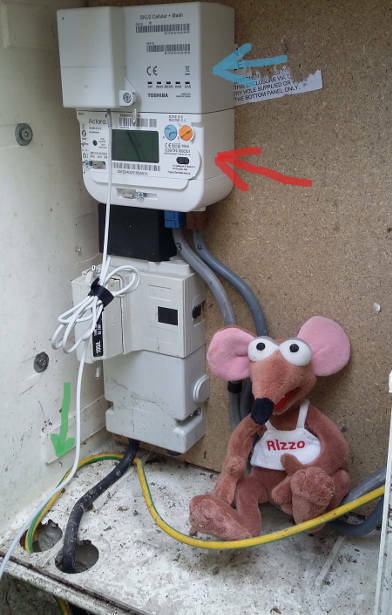
Here my SMETS2 meter is indicated with a red arrow. This one is made by a US Company called Aclara. It has two buttons marked A & B rather than the keypad of the earlier SMETS1 meters, which were manufactured by Secure.

Above the meter itself there is a communications module (blue arrow) which allows data transfer via the mobile phone network. There are several versions. As I'm in a rural area of Devon with relatively poor signals, this Toshiba unit is a Mesh Network device. It connects to an external aerial via the wire marked with a green arrow.
 

bcff455c-f97b-47a8-ab19-e68458f4df72.jpg


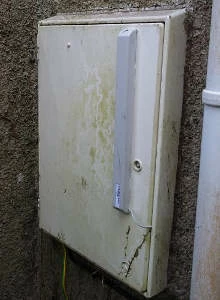
The aerial is the tall rectangular box which is literally stuck onto the outside of the door.

Your gas meter may be in a wall mounted enclosure, or buried in a "semi-concealed" box as is mine.

The installer first removes the old meter including the round regulator (orange arrow), and then screws a steel mounting frame in place, shown here with a green arrow.
 

81ec209b-e31e-4321-be23-36ba8fff2a8f.jpg


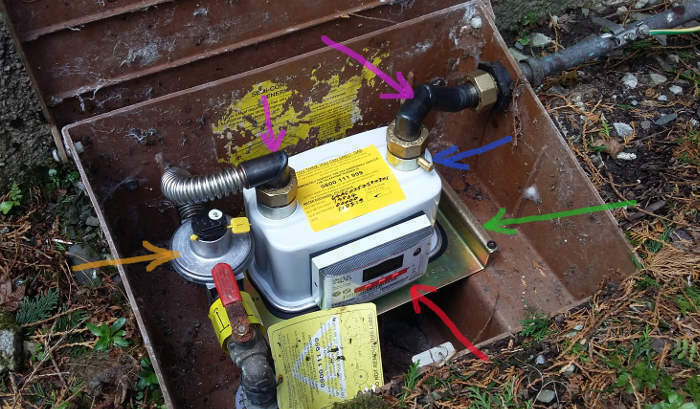
The meter may seem a relatively large device, but it's actually two items. The actual SMETS2 smart meter is indicated with the red arrow, and slots into the larger outer body.


My new gas meter is manufactured by Uniflo. Because there is no electricity available, it contains an inbuilt Lithium battery which should last around 10 years. A gas smart meter spends most of its time in sleep-mode to conserve power, waking up every few seconds to send a signal to the SMETS2 electricity meter.

OVO have designed and fabricated right-angled steel pipes marked here with purple arrows. These minimise the height required and allow the enclosure lid to properly close.

During the commissioning process, the installer connects a manometer to the test point identified with the blue arrow. The gas pressure pushes the fluid up one side of the u-shaped tube. If it remains steady over a two-minute timed period, then there are no leaks.

The installation engineer will now take another set of photographs which get inserted into relevant places in the electronic "form" on his mobile phone. There is a minimum set of 23 pictures which must accompany any installation.

As the exact installation process may evolve over time, please note that these SMETS2 meters were installed on 11th March 2019.


This guide continues in the comments below, or click on the headings below to go directly to that comment:


Commissioning Process


Wifi Interference


Bill and Statements


Smart meter communications network


SMETS1 Upgrades


Taking a manual electricity reading


Taking a manual gas reading


I can smell gas!


Communications Hub - Toshiba


Communications Hub Device Variations - South & Central Territories


OVO member but not got a smart meter yet? - Book today!

Smart meter not communicating? Fill in this Online Form

Interested but not yet an OVO member? - Check out our plans!

60 replies

Newcomer
March 15, 2023

Your OVO Electricity Tariff card states your Economy 7 Peak and Off-peak unit rate times. Your Remote Display shows the current Economy 7 Tariff unit rate OVO is charging you - ours changes to Off-peak at 00:00 GMT and back to Peak unit rate at 07:00 GMT daily. How can consumers check that the correct ECAUL times have been programmed by OVO into their Aclara SMETS2 meter?

Blastoise186
Super User
Super User
March 15, 2023

Accessing those settings is only possible via SMETS Commands. There’s no way to access them locally for security and anti-tamper reasons. This applies regardless of supplier and regardless of what meter you have

Securing energy by zapping security bugs... For that is The Blastoise Way! Remember, I'm just like you - AI Powered Evil Geniuses aren't Staff!
Newcomer
March 15, 2023

Considering how much data the Aclara SMETS2 meters can display, it seems strange that perhaps the most important information - Economy 7 Off-peak unit times OVO has programmed into your “smart” meter - can not even be viewed by the consumer. Has anybody else figured out which key(s) to press yet?

Blastoise186
Super User
Super User
March 15, 2023

Trust me. I stand by what I said. I got my information directly from Aclara and have the entire technical user manual for the meter you’ve got.

You can press any combination of keys you want, but it won’t reveal configurations that are purely managed via SMETS Commands like the ECAUL settings.

Also, just so you’re aware… You won’t get any additional SEO to your blog by posting links to it here. Your links get automatically tagged with nofollow, norefer and ugc attributes which tell search engines to ignore them.

Securing energy by zapping security bugs... For that is The Blastoise Way! Remember, I'm just like you - AI Powered Evil Geniuses aren't Staff!
Newcomer
March 19, 2023

Somewhere in 2020 OVO replaced my SMETS1 smart meter (not from OVO) with a new SMETS2 Meter.

24 Hours later the remote display was still showing nothing useful.  I phoned OVO to tell them it wasn’t working and they said I needed to wait 24 hours… 

I waited a week and called back.  This the person on the phone said they ran a test and it was indeed not working correctly….  It was the pandemic… there was no follow up.  It’s still not working.

At Christmas 2022, OVO suddenly found my back dated daily electricity readings. I guess they had rummage down the back of the sofa and found some data.  I hadn’t submitted anything manually for a while so I got a lovely bill at Christmas for an extra £500.  Great timing OVO. Thanks!

Gas readings are coming through daily (at least since Christmas) but electricity meter readings are still not coming through. Despite the fact you clearly know something is wrong because you back dated a correction.

This doesn’t look like a technical fault with the meter

Now I know the way these work is that the gas meter actually connects to the servers through the electricity meter.  So BOTH must have connectivity if the gas meter readings are coming through.

It is possible the electricity meter is sending nothing, but then where on earth did you find the back dated data if it wasn’t.


OVO: This is called a “smart meter”.  You can read it.

When you can’t read it there’s a problem!  Why wait for me to chaise a third time to tell you?


I’ve tried telling you but…

I’ve never once managed to get through on the phone.  Every time I try on the chat line it takes so long that my phone self locks and I’m silently kicked out of the queue.

This is really terrible service OVO.  I shouldn’t have to wait hours staring at a text screen on on a phone call to tell you something you already know!


Tim_OVO
OVO Staff
OVO Forum Legend
March 20, 2023

Hi @Couling and thanks for sharing this negative experience. I’m sorry to hear of the long time these smart meter communications issues have been going on for, and for the difficulties you’ve had in getting through to our Support team. I’d recommend a web chat the next time you need to get Support team help


Before that, you should be able to complete a ‘smart meter health check’ form yourself, if the results indicate an issue the results get sent to the right team at OVO:


Carbon neutral - we need a community to get there! My green tech: Aclara SGM 1411-B smart meter, Chameleon IHD6
Newcomer
March 20, 2023

Thanks @Tim_OVO 

Just a few actionable points for OVO to consider:

  • Suggest to your tech team: Identifying anomalous readings should be relatively trivial.  When I worked with metering data we would run scripts monthly to check for weird behaviour.  This saves you money in the long run by taking the pressure of your call staff.  Either of these checks would have identified my meter readings as anomalous with minimal false positives:
    • Smart meter with no data / zero data and customer submission
    • Smart meter with sizeable gas meter readings but missing / zero electricity meter readings.
  • The web chat by mobile needs fixing.  Locking the phone should not silently kick you out of the queue, instead it should raise a notification while the phone is locked that it’s your turn (iPhone).
  • Do everything you can to never drop a case. If someone reports a fault, that should be on your system and not closed until it is actually fixed.  Benefit of the doubt here that it was the pandemic, but still unacceptable.
Blastoise186
Super User
Super User
March 21, 2023
  • The web chat by mobile needs fixing.  Locking the phone should not silently kick you out of the queue, instead it should raise a notification while the phone is locked that it’s your turn (iPhone).


That sounds like an iOS behaviour. If it is, then I’m afraid OVO wouldn’t be able to do anything about it.

Securing energy by zapping security bugs... For that is The Blastoise Way! Remember, I'm just like you - AI Powered Evil Geniuses aren't Staff!
Tim_OVO
OVO Staff
OVO Forum Legend
March 21, 2023

I am surprised to hear of this locked-screen out of the queue behaviour… let me try and replicate

Carbon neutral - we need a community to get there! My green tech: Aclara SGM 1411-B smart meter, Chameleon IHD6
Blastoise186
Super User
Super User
March 21, 2023

I think it may depend on how long the device is locked for. A few seconds and not much would happen. But more than that and the device probably goes to sleep and cuts the connection.

Securing energy by zapping security bugs... For that is The Blastoise Way! Remember, I'm just like you - AI Powered Evil Geniuses aren't Staff!
