



Rank 1
November 29, 2023
Solved

OVO Smart Meter fitted- Off-peak circuit always OFF?

  • November 29, 2023
  • 153 replies
  • 5801 views

Hello,

I'm an ex-SSE customer that was migrated to OVO in June 2023.
I had a new smart meter fitted on the 16th of December 2022 by SSE and since then I had an issues with the Economy 7 tariff.

Initially, all appliances connected to the off-peak rate circuit (port 5) were always ON instead of turning on and off during rate changes.

After contacting SSE support and later on OVO support multiple times, on the 17th of July 2023, OVO sent an engineer that supposedly fixed our issue but instead it changed to the opposite way:
All appliances connected to the off-peak rate circuit (port 5) are now always OFF during both peak and off-peak hours.

Our heating system consists of storage heaters which are all connected to this off-peak circuit so we are now effectively without heating.

We contacted the OVO support multiple times about this issue with no luck.
They sent multiple emergency and non-emergency engineers and none of them was able to fix our issue beside worsening it on the 17th of July.

By going through other posts on this forum, I came to the conclusion that our problem is probably due to a misconfiguration of our smart meter that could be fixed remotely by OVO, specifically the ECAUL and ALCS config via SMETS commands.

I tried to mention this possible fix and those commands multiple times during phone calls and chats with support but they don't seem to understand what I'm talking about or flat out ignore it.


Both yesterday and today they sent an emergency engineer that as aforementioned were unable to do anything about it and told us to ask for an OVO engineer.
I tried this but the earliest would be the 29th of January which is ridiculous as we would be without heating for 2 more months during winter.

I’m not sure what to do at this point. I also raised formal complaint through the webchat but that seems not to do anything.
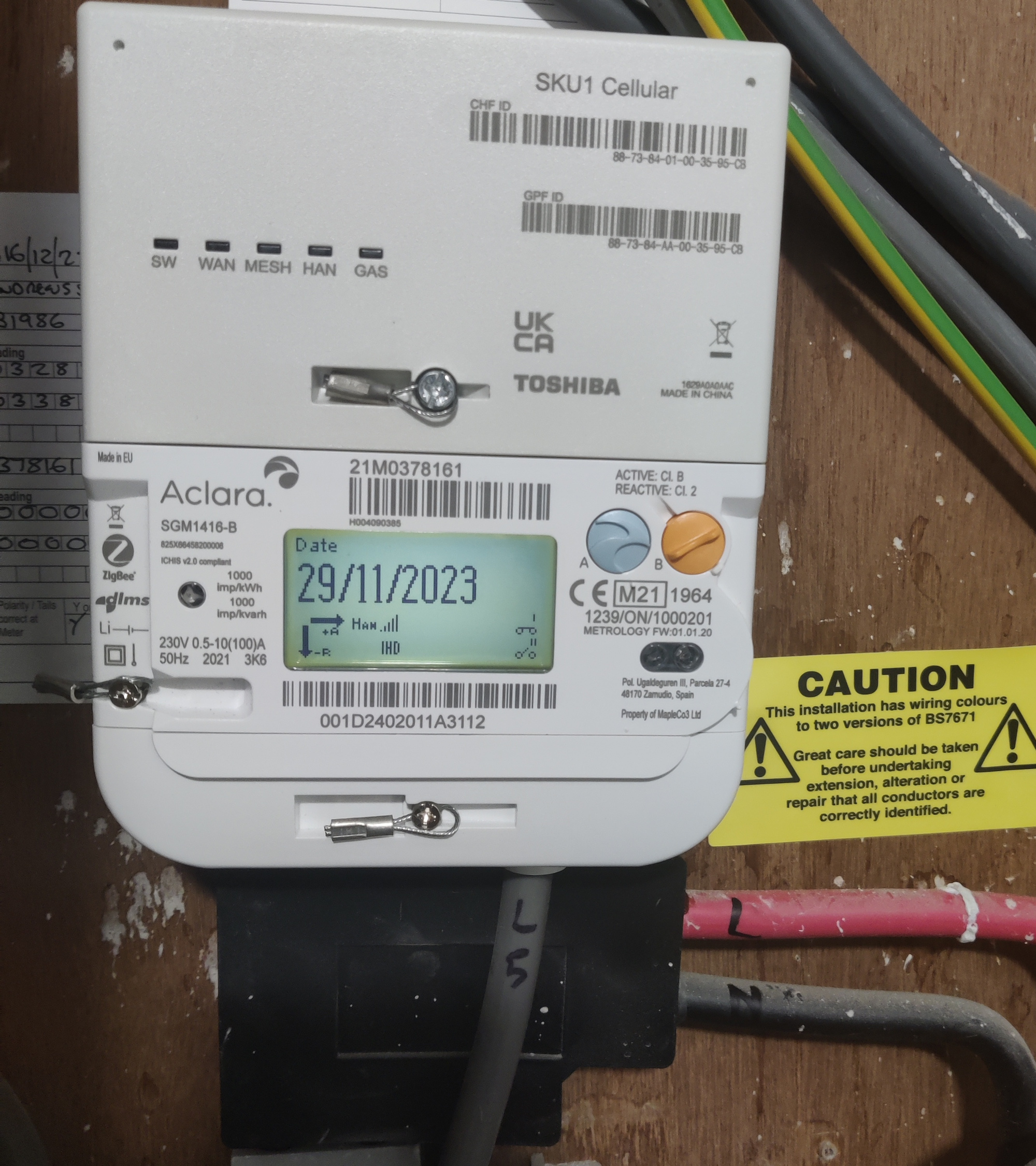

 

The smart meter that we got fitted.


Best answer by Emmanuelle_OVO

Updated on 03/04/25 by Ben_OVO:

Hey @insoctek,


Sorry for the issues you’re having, 


It might be worth speaking to the support team via webchat and sending them this topic. It is something we’ve seen on the Forum several times but might not be something agents are aware of.


They need to ask smart support team to send the ECAUL command to update the ALCS configuration.


Hope this helps. 

153 replies

Newcomer
February 9, 2025

Hi all I think I'm having issues or a similar issue to this post I switched from British gas back to OVO I have just electricity as I have storages heaters and my peak and off peak are correct on the meter but not on OVOs app I'm on an economy 7 tariff but my peak according to OVOs app is higher then my off peak witch makes no sense as no one's home in the day and we always use more over night due to the heaters and water tank here are some pictures as you can see I think my meter has not been set up correctly any help would be great as I'm going to end up being charged way more than I should


To add I'm also not getting any usage updates on the app just says unable to read


Firedog
Super User
Super User
February 9, 2025

Your first picture shows that a Load Control switch (LC2) is closed (i.e. the circuit it controls is live). If the picture was taken during the peak period - i.e. during the day - then something’s wrong. 

It would be helpful to see a wider picture showing all the cables to and from the meter. The LC2 switch will normally power an external contactor, but if none is present, then it should really be disconnected inside the meter.

Perhaps you didn’t notice the post immediately before yours where I pointed out why it’s important to give your location. Without knowing where you live, we can’t tell when your offpeak periods are. Without knowing that, we can’t suggest just when you should take another picture or two of the meter’s display so we can see just what’s wrong. 

Noel | I have no official status; I'm just a volunteer who comes here to help other customers. My gear: Aclara SGM 1416-B Electricity-only E7 meter; Chameleon IHD3-PPMID-AAA | It may look as if I know what I’m talking about, but don’t let that fool you. |
Newcomer
February 9, 2025

Hiya thanks for the reply I'm in Staffordshire this was taken at about 10.37am this morning I'm in a flat here is some pictures of the hole box setup my other people's meters have two symbols like some I have seen on this post 1 and a 2 open and closed 


My meter is the one in red on the hole picture shot


At the top that's a picture of what neighbours look like taken from and early post they all have the symbols 1 and 2 but I only have the lc2 logo


Newcomer
February 9, 2025

A quick explanation of what's happened so I was on OVO and my contract came to an end and I switched to British gas as they was offering a better tariff that's when all this started going wrong as I was getting changed crazy amounts that's also when I noticed my meter had changed so I switched back to OVO hoping it would go back to how it was set up before plus I happened to get a better tariff then previously offered but I'm still getting charged wrong and the meter is still not right I went onto a economy 7 British gas tariff so I'm unsure why they have messed around with my settings or whatever they've done 

Firedog
Super User
Super User
February 9, 2025

What a mess! I’m glad I’m not an electrician.

A few comments:

  1. I’ve learnt over time that if BG can get something wrong, they will.
  2. This is illuminating:


    TOU 2 is normally offpeak, although it may not be. If the picture was taken at 10:37, I think that would be during the peak period for any tariff. It’s possible that your TOU registers are the wrong way round. 
      
    The bottom load control icon shows that the auxiliary circuit isn’t live, so there should be no power to your heating equipment.  

    It would be helpful if you could take another photo at 07:00 tomorrow morning (perhaps a few minutes earlier, but no later). That should be towards the end of your Economy 7 offpeak period. Navigate to the Active TOU Number screen again before taking the photo. Make a note of the TOU Rate 1 and TOU Rate 2 readings at the time. Take another pair of readings in the evening so we can see which register is recording daytime usage.
     

  3. You posted a photo earlier showing LC2 where the bottom load control icon is now. This tells me that at the time, the meter’s load control switch was closed and the heating circuit should be live. Was it?
      
    As I wrote earlier, when LC2 is active, it only sends a little signal to an external contactor to switch on the heating. Because it’s a low-current (2A) switch, the cable from it would normally be a much thinner one, not the full-fat meter tail labelled L5. It really depends where this cable leads to, because the external contactor for the heaters might be in your flat somewhere, or in that sturdy box at the top-right of your picture with the red circle. 


Let’s see your new photos before we dig into your billing. To do that, it would be best to see screenshots from your online account, using a browser (not the app):

  1. Your Plan page Plan - OVO Energy 
  2. Your recent readings history Meter readings history - OVO Energy
  3. Your latest billing details Billing details - OVO Energy


Nobody said it would be easy to sort this out!

Noel | I have no official status; I'm just a volunteer who comes here to help other customers. My gear: Aclara SGM 1416-B Electricity-only E7 meter; Chameleon IHD3-PPMID-AAA | It may look as if I know what I’m talking about, but don’t let that fool you. |
Newcomer
February 9, 2025

Ok this picture I sent is not my meter I was using this as an example of what my neighbours meters looks like with the two symbols


These below are mine with the LC2 symbol these two pictures was taken at 10.37am like I said I have a feeling my meter is setup wrong from what I have been reading I also have no meter readings coming though or usage so something is clearly messed up I'm planning on giving them a call tomorrow but how I explain all this is the big question 😂


Newcomer
February 10, 2025

Ok a little update first picture was at 11pm second picture was at 12.05am the TOU changed but the LC2 and the other icon didn't could this be my issue? 

Firedog
Super User
Super User
February 10, 2025

OK, thank you. Your picture of the neighbour’s meter really was a red herring - I should have noticed that it wasn’t your meter.

It looks as if your load control switch is always closed - the circuit it controls is always live. That’s not right. The switch should change at the same time as the TOU Rate. 

Did you discover where the cable labelled L5 goes to? Does it just disappear into the big white box above? 

Can you tell when your storage heaters are charging up? Some have a red indicator lamp on them or on the box on the wall where the charging power comes from. It’s often possible to hear when they’re charging - buzzed and clicks as the metal expands. I suspect that they’re always on charge, so it’s just they’re internal thermostats that are deciding when to switch them on and off. This isn’t how Economy 7 is supposed to work, and it would explain why your peak time usage is so high.

Since they’re charging when LC2 is closed, there is almost certainly an external contactor to switch the heaters on and off. Since LC2 is always closed, the contactor is never activated to turn them off. It should be possible for Support to get this changed; it would be best if they could get the smart team to update the ALCS to match the Economy 7 timings for your account. The smart people would have to be aware that your meter uses LC2 to activate the heating circuit. You may be able to persuade Support to connect you to the smart team if you use the webchat option. You would then be able to upload your last two photos, which illustrate the problem that needs fixing.

Please let us know how you get on.  

Noel | I have no official status; I'm just a volunteer who comes here to help other customers. My gear: Aclara SGM 1416-B Electricity-only E7 meter; Chameleon IHD3-PPMID-AAA | It may look as if I know what I’m talking about, but don’t let that fool you. |
Newcomer
February 10, 2025

So update I spoke to the web chat they say it's going to take 14 days for the smart team to get back to me I was hoping to set the the ECAUL command to update the ALCS configuration sooner

Firedog
Super User
Super User
February 10, 2025

Thanks for the update. It’s good that Smart have apparently got the message. It’s not so good, though, that a task that should only take a few minutes for a tech who knows what he’s doing should take so long. The trouble is that it’s probably at the bottom of a teetering pile of few-minute tasks, and all those minutes add up.

Meanwhile, you could start work on estimating what the error has cost you. You might refer to earlier bills to see just what proportion of your usage in kWh was offpeak last winter, say. Unless something else has changed, that proportion should still apply now.


Noel | I have no official status; I'm just a volunteer who comes here to help other customers. My gear: Aclara SGM 1416-B Electricity-only E7 meter; Chameleon IHD3-PPMID-AAA | It may look as if I know what I’m talking about, but don’t let that fool you. |

