


Rank 2
November 3, 2025
Solved

aclara sgm 1422-b smart meter

  • November 3, 2025
  • 43 replies
  • 620 views

I manuaaly topped up my smart meter and I saw the message saying it was accepted, but when it returned to the main menu, it didn’t show my current balance at all. Did I navigate back to the wrong screen?

TIA

Best answer by Firedog

The display menus on these Aclara meters (SGM-1400 series) are supplier-configurable, so it’s not possible to say just how your menus are laid out. The user manual gives some idea, though. These are the menus revealed by repeated presses of button ‘B’:
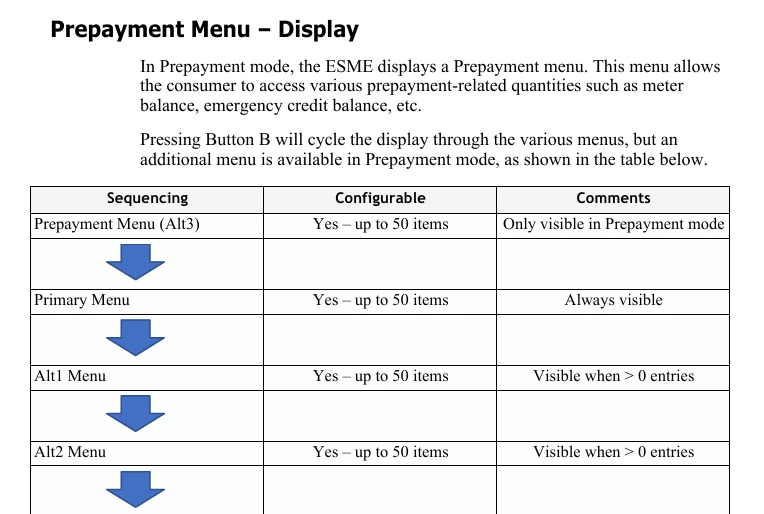


You’ll see that the first is Prepayment. When that shows, pressing button ‘A’ should display what you’re looking for. This is a typical prepayment menu:
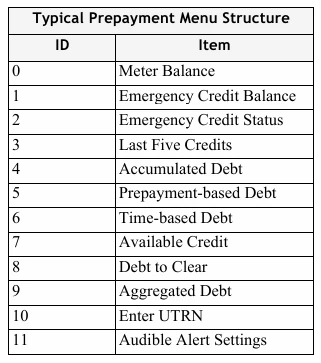


It would be good to hear whether this helps.


PS ‘ESME’ is Electricity Smart Metering Equipment, technical jargon for ‘meter’.

43 replies

Firedog
Super User
Super User
November 5, 2025

Voyager 1 continues to send back data from beyond the Sun's heliosphere. 
 

Yes, I’m afraid SP’s tech staff aren’t quite in the NASA class. They seem to be learning as they go along with twin-element meters for domestic supplies, but they’ll probably get there one day (not beyond the heliosphere, though). 


Noel | I have no official status; I'm just a volunteer who comes here to help other customers. My gear: Aclara SGM 1416-B Electricity-only E7 meter; Chameleon IHD3-PPMID-AAA | It may look as if I know what I’m talking about, but don’t let that fool you. |
Hajni10Author
Rank 2
November 5, 2025

I didn’t ask them about the MPAN. 

Yes, I have two MPAN numbers on my last prepayment bill.

I assume the new meter was commissioned, since it worked for three days.

I turned off my IHD after I went through all the troubleshooting steps at lest 3 times (it stopped working after 3 days just like the app).

Side-note: It seems like smart meter communication issues have been around for a long time and are pretty common. What do you think is causing it? Cheap devices, not enough communication hubs/capacity issues, lack of engineers - or a mix of everything? What’s happening? 

Firedog
Super User
Super User
November 5, 2025

Yes, I have two MPAN numbers on my last prepayment bill.
  

OK. I take it you can’t find the current one on your online SP account because it hasn’t yet been updated and confirmed. Do you get the same Homebrew result trying both of the old ones?


It seems like smart meter communication issues have been around for a long time and are pretty common. What do you think is causing it? 


I’ve no idea. The Smart Meter Wide Area Network is an incredibly complex affair, complicated by its multiple layers of security to protect your precious data. Complex systems are often more prone to errors than simple ones, just because there are so many things that could go wrong. ‘Pretty common’ is perhaps not really accurate - there are after all some 37 million smart meters out there, so I’m sure most of them are communicating just as expected. No-one writes to the papers or posts on social media just to say ‘my meter’s working perfectly’, after all.

It’s true, though, that the transition from RTS to smart metering has not been as smooth as anyone could wish for all those affected. It’s a completely new ball game that’s replacing a system introduced more than 40 years ago - teething troubles have been and will continue to be unavoidable for some time to come. We can only hope that SP will get their act together before too long. 

My own guess would be that your case is waiting to reach the top of the pile in the in-tray of some poor overworked minion at Elexon, where the national database lives. Once it does that and he does his stuff, assuming he gets it right, SP can start working out how to get your meter communicating again.

Hang in there!

Noel | I have no official status; I'm just a volunteer who comes here to help other customers. My gear: Aclara SGM 1416-B Electricity-only E7 meter; Chameleon IHD3-PPMID-AAA | It may look as if I know what I’m talking about, but don’t let that fool you. |

