


Solved

aclara sgm 1422-b smart meter

  • November 3, 2025
  • 43 replies
  • 383 views

I manuaaly topped up my smart meter and I saw the message saying it was accepted, but when it returned to the main menu, it didn’t show my current balance at all. Did I navigate back to the wrong screen?

TIA

Best answer by Firedog

The display menus on these Aclara meters (SGM-1400 series) are supplier-configurable, so it’s not possible to say just how your menus are laid out. The user manual gives some idea, though. These are the menus revealed by repeated presses of button ‘B’:
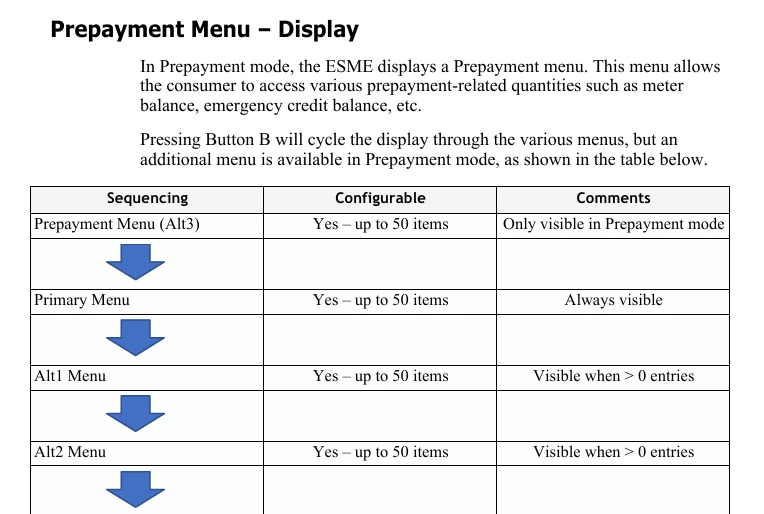


You’ll see that the first is Prepayment. When that shows, pressing button ‘A’ should display what you’re looking for. This is a typical prepayment menu:
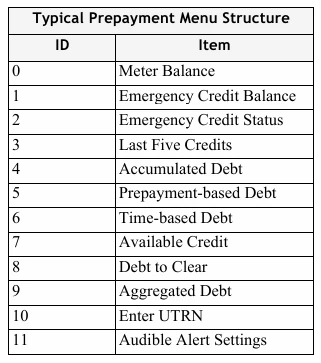


It would be good to hear whether this helps.


PS ‘ESME’ is Electricity Smart Metering Equipment, technical jargon for ‘meter’.

43 replies

Blastoise186
Super User
Forum|alt.badge.img+8
  • Super User
  • November 3, 2025

Hi ​@Hajni10 ,

If you got the Accepted message, the top-up almost certainly went through. With the screen backlight off (for sleep mode) press A a few times to see the credit balance. :)


  • Author
  • Rank 2
  • November 3, 2025

Thank you for your quick reply. I tried, but still nothing. 


  • Author
  • Rank 2
  • November 3, 2025

In the bottom right corner, there used to be two little “gate” icons (one of them open) and now instead it shows “LC2” - and still no balance.


Blastoise186
Super User
Forum|alt.badge.img+8
  • Super User
  • November 3, 2025

That sounds like you’re on a Multi-Rate setup like Economy 7 - the LC2 basically means the Meter is managing the secondary load such as storage heaters.

Do you have an IHD? That’ll show your balance.


  • Author
  • Rank 2
  • November 3, 2025

I don’t have storage heater. And - of course - my IDH and app (Scottish power) do not work at all. How can I navigate back to the original main menu? 


Blastoise186
Super User
Forum|alt.badge.img+8
  • Super User
  • November 3, 2025

Gotcha.

If you leave the meter alone for a few minutes, it’ll return to standby - you can then get back to the balance from there IIRC.


  • Author
  • Rank 2
  • November 3, 2025

Since 9:00am I can’t get back to the right main menu to see my balance. I left alone the meter for 5 hours but still nothing. And of course I can’t call them for help.


Blastoise186
Super User
Forum|alt.badge.img+8
  • Super User
  • November 3, 2025

Ok, bear with me - I’ll dig the manual for this meter out of my files.

It may take a couple of hours so I’ll come back to you.


  • Author
  • Rank 2
  • November 3, 2025

I have a manual but unfortunately no mention about this issue. Thanks for your help, really appreciate it.

https://web-content.scottishpower.co.uk/files/pdf/terms-and-conditions/SMETS2_Smart_PAYGO_Aclara_elec_guide_Oct20.pdf


Blastoise186
Super User
Forum|alt.badge.img+8
  • Super User
  • November 3, 2025

Hehehe, I have a much bigger one thanks to an Engineer I know. :)


  • Author
  • Rank 2
  • November 3, 2025

Wooow, lucky you :)


Blastoise186
Super User
Forum|alt.badge.img+8
  • Super User
  • November 3, 2025

Ok, I’m back.

I’ve checked the Sekrit Manual for the Aclara SGM1400 Series - it’s the one Aclara totally doesn’t want me to have but I have it anyway. :P

You should absolutely be able to get to the Meter Balance screen by pressing A or by letting it auto-scroll in sleep mode. The fact you can’t suggest something’s not right here.

I’d suggest you ask Scottish Power to investigate. If they refuse, you may want to switch supplier and have someone else take a look.


Firedog
Super User
Forum|alt.badge.img+7
  • Super User
  • Solved
  • November 3, 2025

The display menus on these Aclara meters (SGM-1400 series) are supplier-configurable, so it’s not possible to say just how your menus are laid out. The user manual gives some idea, though. These are the menus revealed by repeated presses of button ‘B’:


You’ll see that the first is Prepayment. When that shows, pressing button ‘A’ should display what you’re looking for. This is a typical prepayment menu:


It would be good to hear whether this helps.


PS ‘ESME’ is Electricity Smart Metering Equipment, technical jargon for ‘meter’.


  • Author
  • Rank 2
  • November 3, 2025

Thank you so much for your answers. I’ll carefully try these tomorrow morning, although I’m a bit scared to keep pressing buttons when I have no idea how these electric gadgets work. I’ll definitely write in the morning to let everyone know what happened. Fingers crossed :)


Abby_OVO
Community Manager
Forum|alt.badge.img+4
  • Community Manager
  • November 4, 2025

Hey ​@Hajni10 


I’m glad to see a couple of our community members already stopped by with some really helpful advice for you on this. I just wanted to add on the following topic guide which might be helpful:


Do let us know how you get on, it hopefully shouldn’t be stuck on that screen. 


  • Author
  • Rank 2
  • November 4, 2025

Good morning, I’ve started working on solving my problem again. Unfortunately, nothing so far. The smart meter display is still going through the same circle without showing my balance. I also found the longer manual online, and I’m trying to understand it, but I’m not an expert...yet. 

Ps: what I can see: 

Total Act Import kwh -2

Total act export kwh -2

local date

R1BL1 kwh

Engineering menu

Scottish Power

Meter signal strength

Prime. Active TOU number (1)

Sec. Active TOU number (1)


  • Author
  • Rank 2
  • November 4, 2025

The previous display circle I would like to navigate back:

Total act export kwh -1

Tou rate 1

Tou rate 2

Total act import kwh -2

Total act export kwh -2

Second TOU rate 1

Debt to clear

Accumulated debt

Aggregated debt

Audible alert settings

Meter Balance (!!!!!!)

Emergency credit is not available

Available credit

Enter top up code

Last 5 credit


  • Author
  • Rank 2
  • November 4, 2025

BPLightlog
Super User
Forum|alt.badge.img+9
  • Super User
  • November 4, 2025

Make sure you look at the display in each case.

It looks like you are in the wrong part of the menu. You should be able to change menus by pressing button B

Continue to press B until you see the start of the menu sequence you want.


  • Author
  • Rank 2
  • November 4, 2025

“Continue to press B until you see the start of the menu sequence you want.” - This was my first thought, however, as clueless old cow, how will I know which is the start of my original menu sequence?  

When I start pressing the B button, as its cycles through the menu items, I don’t see any exit option that would take me back to the original menu. 


Blastoise186
Super User
Forum|alt.badge.img+8
  • Super User
  • November 4, 2025

IIRC you can hold the button to go back up a level - usually B, but it might be A


  • Author
  • Rank 2
  • November 4, 2025

If I’m pressing the B button: 

Total Act Import kwh -2

Total act export kwh -2

local date

R1BL1 kwh

Engineering menu

Scottish Power

Meter signal strength


Blastoise186
Super User
Forum|alt.badge.img+8
  • Super User
  • November 4, 2025

Makes me feel as if SP has messed with configs...


BPLightlog
Super User
Forum|alt.badge.img+9
  • Super User
  • November 4, 2025

“Continue to press B until you see the start of the menu sequence you want.” - This was my first thought, however, as clueless old cow, how will I know which is the start of my original menu sequence?  

When I start pressing the B button, as its cycles through the menu items, I don’t see any exit option that would take me back to the original menu. 

There is no exit option - it just moves to the start of the next menu.

When you’ve pressed button B, pressing button A takes you through options in that menu sequence . If your required item doesn’t show, press button B again then press button A repeatedly to read through its options 


  • Author
  • Rank 2
  • November 4, 2025

Blastoise186 - Thank you so much for your help and support.  

While I’m thinking and trying not to make things worse (with brainless button pushing), I Also wrote an email to the Aclara support team. There’s nothing to lose.


Feedback

