Rank 1
July 17, 2020
Solved

Where do I find my Meter Point Administration Number (MPAN) on my OVO online account? - I need to know it for my EV charger installation!

  • July 17, 2020
  • 13 replies
  • 3183 views

Hi Folks

Looking to get a podpoint installed and they need my MPAN.  In my Ovo profile I see no mention of MPAN at all.  How can I find out what it is?  I have a barcode on the front of my electricity meter but I’m not sure if that’s it.


Thanks

Best answer by Ben_OVO

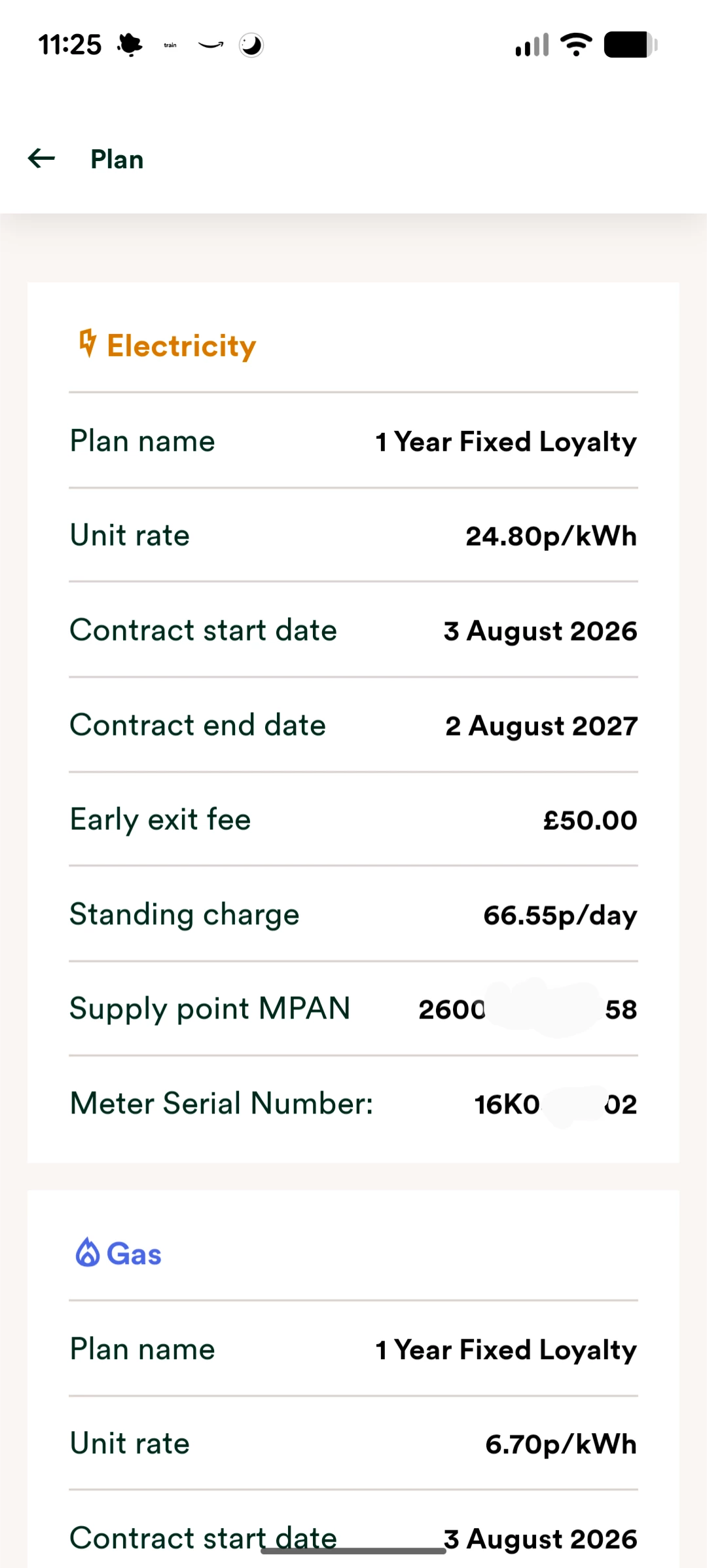
The best place to find your your Meter Point Administration Number (MPAN) is on the ‘Plan’ page of your online account or OVO app (download for Android or iOS). 


Exact appearance may vary


You can also find the MPAN labelled on your bills, which you can download and view via your online account and app. The MPAN is shown on page 2 ‘Electricity in detail’. The guides below show you how to view the ‘Plan’ section, and how to view your statements:


13 replies

Newcomer
August 25, 2024

Oh actually, just clicked on the last link you sent me and I think I was able to find it!


Thank you so much 😊

Blastoise186
Super User
Super User
August 25, 2024

Make sure you have the right one - the second link is for Gas, not Electricity.

Securing energy by zapping security bugs... For that is The Blastoise Way! Remember, I'm just like you - AI Powered Evil Geniuses aren't Staff!
Ben_OVO
Community Manager
Ben_OVOBest Answer
Community Manager
September 8, 2026

The best place to find your your Meter Point Administration Number (MPAN) is on the ‘Plan’ page of your online account or OVO app (download for Android or iOS). 


Exact appearance may vary


You can also find the MPAN labelled on your bills, which you can download and view via your online account and app. The MPAN is shown on page 2 ‘Electricity in detail’. The guides below show you how to view the ‘Plan’ section, and how to view your statements:


Powered by the Sun