Best answer by NinjaGeek

Updated on 19/08/25 by Abby_OVO


Got issues registering or resetting a password for your OVO app or online account? We’ve made a recent change that might help:


OVO customers should ideally complete these steps in the web portal (online account) first. Once complete, these details will be copied over and available for use in the OVO App.


  • On the login page click ‘set up account’
  • Enter your email address when prompted
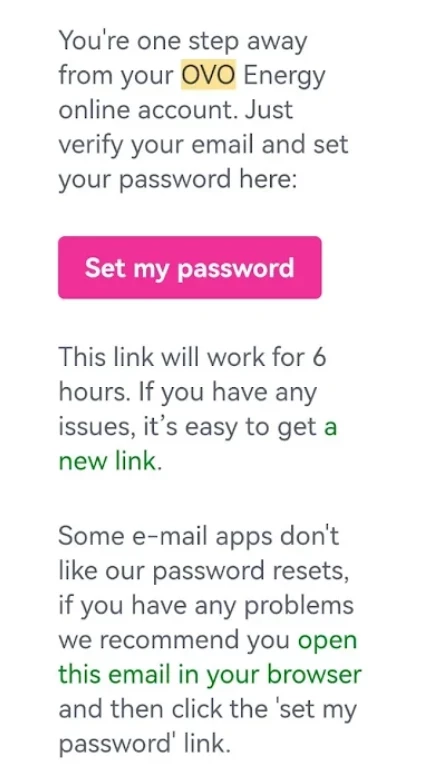
  • You’ll be sent a link from which to set a new password
  • Once you’ve set the password you’ll have access to the online account
  • You’ll then be able to log into the app using the same email address and password


If the above steps don’t work, go back into the password reset email, scroll down and select the option at the bottom of the reset email "open this email in your browser"


This should then allow you to follow the steps as prompted and login into your account.


Please note: This has been extensively tested and in the vast majority of cases will resolve the issue. However, there are still some issues with users of any Microsoft email domains such as Hotmail, Live, Outlook, Microsoft. We are working on the resolution for these customers and will update once a fix is made available.


There may still be issues for other customers with different email domains but these could be related to something else. Let us know in the comments below if you still have an issue resetting your password. Alternatively our Support team may be able to advise with this. 


17 replies

Blastoise186
Super User
Super User
January 25, 2021

Perfect, you’re definitely using Microsoft Edge Chromium then, which is the one that’s supported. The other one was Microsoft Edge Legacy which breaks half the internet and chokes on almost everything that Internet Explorer did.

Thanks for bringing this up @spindrift63 ! I’ll get @Tim_OVO to pass this on in the morning. I’m unable to spin up a test account to verify this myself, but I think I can do a summary anyway. Does this sound about right?

What’s the problem?

Newly created account bricks MyOVO and the OVO Energy apps prior to the new member coming on-supply with OVO.

How can I make it happen?

  1. Set up a new account with OVO via any route (such as switching)
  2. Create an online account within MyOVO
  3. Attempt to login using both MyOVO via Microsoft Edge Chromium on Windows 10 and the OVO Energy apps on iOS/Android

What should happen when I do this?

I should either get a message telling me that my account is still onboarding and to check back later.

What happens instead?

Both MyOVO and the OVO Energy apps completely brick and I can’t use them

Is there anything else that you think might be useful to know?

Yes. The reporter has tested using Microsoft Edge Chromium on Windows 10, which is considered a supported browser. There may be possible relations with previous reports from Blastoise186 (please check Blastoise’s previous bug reports and account notes for details). However, this also appears to be new as there’s been no other recent reports on the forums. An initial triage has already been done via the forum.

In addition, this bug report comes from a forum thread at:


Further details can be found there, along with the discussion so far.

Securing energy by zapping security bugs... For that is The Blastoise Way! Remember, I'm just like you - AI Powered Evil Geniuses aren't Staff!
Newcomer
January 25, 2021

perfect thanks

Newcomer
August 31, 2021

Hello

When I pressed the “switch now” ,   button to start the process of switching


I got the option to create the online account straight away

However  this never worked ,  as it was saying “password reset has expired” each time I tried to set a password

I have a registered email , and I have now received the DD details 

I’m guessing I cannot create an Online Account as yet?  -  

I guess at some point I’m going to need to give a meter read, and I would need an online account to do this  -   

Just want some guidance really on how this all works now,  as I’ve tried to set the password 2 to 3 times without success


Blastoise186
Super User
Super User
August 31, 2021

Hiya @brharwood1 !

That’s a bit weird. If you managed to create a password when you signed up, that one should work. But if you didn’t, you probably need to use the First Time Logging In button to do this particular password reset. Could you give that a try and see if that works?

If it doesn’t, the Support Team will definitely be happy to see if they can help. They’ll also be able to accept the opening readings over the phone if you can’t submit them online for some reason. Hopefully it’ll be fixed by then though.

Hope this helps. We’ll be here if you get stuck with anything else. :)

Securing energy by zapping security bugs... For that is The Blastoise Way! Remember, I'm just like you - AI Powered Evil Geniuses aren't Staff!
Newcomer
September 1, 2021

All good thank you.   I was able to create an account in the end yesterday.    So all is OK


Many Thanks for your help


Blastoise186
Super User
Super User
September 1, 2021

Yay! Nice one. :smile:

If you spot any more bugs down the road, feel free to stop by. Bug hunting is something I absolutely love and I’m always happy to help out with that sort of thing. Plus, any bug reports posted here can be forwarded to the right team on your behalf too by the moderators.

Just before you go, I’d also like to give you this. The OVO Energy app is pretty useful if you want to use your phone to access your account and it’s slightly easier than using the mobile site. Feel free to give it a spin once you’re on-supply.

See you soon!

Securing energy by zapping security bugs... For that is The Blastoise Way! Remember, I'm just like you - AI Powered Evil Geniuses aren't Staff!
Jess_OVO
OVO Staff
OVO Staff
September 1, 2021

Great to hear you’ve managed to sort the login issue out, @brharwood1 - with some great help from our resident bug-hunter, @Blastoise186.


Sounds like it could have been a case of waiting until your welcome email was sent out to be able to get the online account created. I’ve just moved your post over to a similar topic to keep things tidy.


If you haven’t already checked it out there’s advice on what to expect when joining us on this great tutorial.


Welcome to OVO! :grinning:

Powered by Re-knowable Energy!