Why has my online account lost my meter reading history for my non-smart gas meter?
I note that the font has changed on the entry page, so OVO must have made a change to this feature and now that they have made that change, my previous readings have all disappeared.
Morning @TonyS4, and welcome to the OVO Forum community.
I’m sorry to hear what’s happening here. Without having access to your account, I can only speculate as to what the issue is. The issue will either be fixable by a frontline advisor, or will need to be escalated to our IT team. For traditional meters like yours, a more common cause of missing gas reading history is what we call an ‘ambiguous MSN’ (meter serial number). this is when the gas meter serial number isn’t logged on the account correctly.
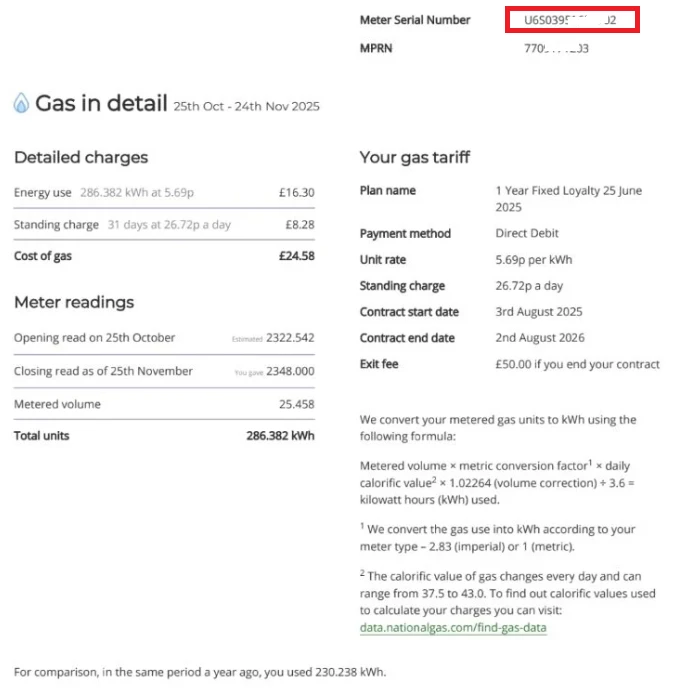
I’d recommend downloading a statement from your online account, and checking the gas meter serial number on the bill against the serial number on your meter. The gas meter serial numbers should match, and it’ll be a mixture of numbers and letters. If the meter serial number listed on your statement is just a couple or three numbers, then this will be the ‘ambiguous MSN’ issue, and the meter serial number on your OVO account will need to be updated to match the serial number on the meter. You’d need to send a photo of the gas meter, clearly showing the reading and serial number, to our Support Team.
The serial number can be found at the top of the statement page titled ‘Gas in detail’. I’ve added a screenshot below of this page on my bill, with the serial number highlighted in red.
I can’t guarantee that this is the cause of the issue, but it’s probably the most common cause, and is also something that some newer advisors may not know about. If you do see that the serial number on the meter doesn’t match up to the number on the bill, get in touch with our Support Team, and you can reference this Forum thread when you speak to them.
@rusty.irussb and @Customer 11 I’m glad to hear your history is looking ok now 👌.
@DJR we’ve seen a few people with the same issue, and I’m waiting to hear back internally about this. I’ll be back in touch if I receive any further news.
If you’re facing any issues, please reach out to our Support Team, and they’ll be happy to raise a ticket for our Tech Team to take a closer look. You can get in touch with them using any of the contact options in the article below. Thanks for your patience!
The missing Gas Meter Reading History problem still seems to be ongoing.
When a logging in via Chrome or Edge I get a message “There are no previous meter readings available for this fuel."
In the mobile app I get the message “We couldn’t load your last reading - We’re working to fix it - please try again later”.
I have a dumb meter and after an initial web chat and then phone call both agents advised me that a Smart Meter will resolve the problem, which it won’t.
I asked the agent I spoke with by phone to pass the issue onto Technical Support.
Morning @TonyS4, and welcome to the OVO Forum community.
I’m sorry to hear what’s happening here. Without having access to your account, I can only speculate as to what the issue is. The issue will either be fixable by a frontline advisor, or will need to be escalated to our IT team. For traditional meters like yours, a more common cause of missing gas reading history is what we call an ‘ambiguous MSN’ (meter serial number). this is when the gas meter serial number isn’t logged on the account correctly.
I’d recommend downloading a statement from your online account, and checking the gas meter serial number on the bill against the serial number on your meter. The gas meter serial numbers should match, and it’ll be a mixture of numbers and letters. If the meter serial number listed on your statement is just a couple or three numbers, then this will be the ‘ambiguous MSN’ issue, and the meter serial number on your OVO account will need to be updated to match the serial number on the meter. You’d need to send a photo of the gas meter, clearly showing the reading and serial number, to our Support Team.
The serial number can be found at the top of the statement page titled ‘Gas in detail’. I’ve added a screenshot below of this page on my bill, with the serial number highlighted in red.
I can’t guarantee that this is the cause of the issue, but it’s probably the most common cause, and is also something that some newer advisors may not know about. If you do see that the serial number on the meter doesn’t match up to the number on the bill, get in touch with our Support Team, and you can reference this Forum thread when you speak to them.
I should have mentioned in my original post that the agent I spoke with via webchat could see all the gas meter reading history on his system, it’s just not displaying for me via Chrome, Edge or mobile app,
I did however check the meter serial number against the bill. The serial number on the meter is of the form nnnnnnn S on the bill it is just nnn. but the numbers on the bill match the last 3 numbers on the physical meter.
This has always been the situation going back to my original bills of 5 years ago and the meter readings have always been showing in my online account until recently.
It therefore looks to be an issue with the front end software.
I should have mentioned in my original post that the agent I spoke with via webchat could see all the gas meter reading history on his system, it’s just not displaying for me via Chrome, Edge or mobile app,
I did however check the meter serial number against the bill. The serial number on the meter is of the form nnnnnnn S on the bill it is just nnn. but the numbers on the bill match the last 3 numbers on the physical meter.
This has always been the situation going back to my original bills of 5 years ago and the meter readings have always been showing in my online account until recently.
It therefore looks to be an issue with the front end software.
As a quick check go and look at some of your old bills to see if they are picking up meter readings.
These are dynamically created.
The website and app front end software releases are not done at exactly the same time so sometimes but rarely issues occur on one but not the other.