Why has my online account lost my meter reading history for my non-smart gas meter?
I note that the font has changed on the entry page, so OVO must have made a change to this feature and now that they have made that change, my previous readings have all disappeared.
Morning @TonyS4, and welcome to the OVO Forum community.
I’m sorry to hear what’s happening here. Without having access to your account, I can only speculate as to what the issue is. The issue will either be fixable by a frontline advisor, or will need to be escalated to our IT team. For traditional meters like yours, a more common cause of missing gas reading history is what we call an ‘ambiguous MSN’ (meter serial number). this is when the gas meter serial number isn’t logged on the account correctly.
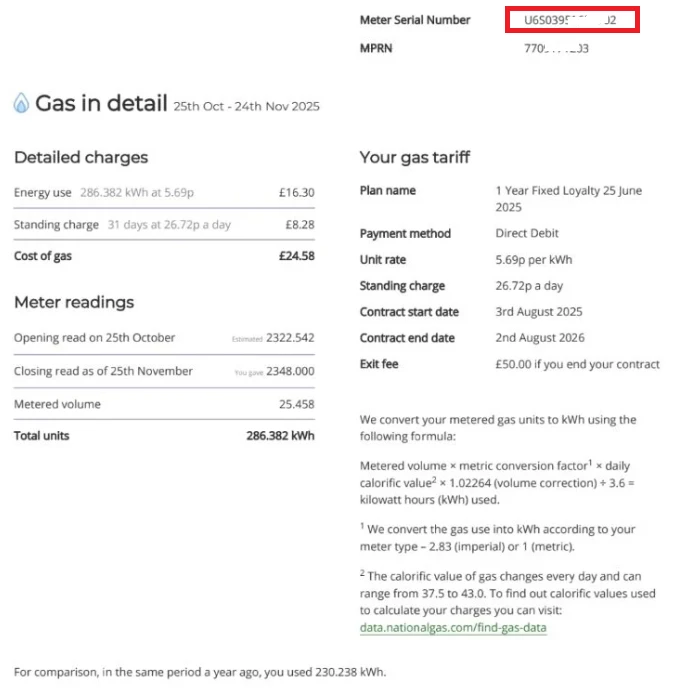
I’d recommend downloading a statement from your online account, and checking the gas meter serial number on the bill against the serial number on your meter. The gas meter serial numbers should match, and it’ll be a mixture of numbers and letters. If the meter serial number listed on your statement is just a couple or three numbers, then this will be the ‘ambiguous MSN’ issue, and the meter serial number on your OVO account will need to be updated to match the serial number on the meter. You’d need to send a photo of the gas meter, clearly showing the reading and serial number, to our Support Team.
The serial number can be found at the top of the statement page titled ‘Gas in detail’. I’ve added a screenshot below of this page on my bill, with the serial number highlighted in red.
I can’t guarantee that this is the cause of the issue, but it’s probably the most common cause, and is also something that some newer advisors may not know about. If you do see that the serial number on the meter doesn’t match up to the number on the bill, get in touch with our Support Team, and you can reference this Forum thread when you speak to them.
Mine is doing the same. It looks like this issue is possibly widespread.
When I view the current billing period, the meter reading I submitted is displayed. So I think it’s just a problem with the meter readings page. I was worried my meter reading didn’t get through.
I’m sorry to hear about this. I checked with a team member and this isn’t a known issue but they have given some recommendations for the next best steps.
As it’s an account specific issue you’ll need to raise this to the Support Team to see if the issue is fixable on their end. If not, they'll be able to raise a case to our IT team to resolve this.
Thank you all for commenting and flagging this, I raised it to one of the team who said, for the app, missing meter reads in history is a known issue should hopefully be fixed end of this month/beginning of November, however it should be fixed in web already.
DJR I know yours is currently still not showing on the web as well as app, is this the same for anyone else here? tim123 I hope yours has stayed fixed!
If any of you could let me know so I can pass this to the team.