Solved

How can I view past statements?

  • June 20, 2024
  • 6 replies
  • 546 views

How do I acquire historic statements specifically 2017-2021?

Best answer by Firedog

Updated on 15/08/25 by Emmanuelle_OVO:

How do I acquire historic statements specifically 2017-2021?


As Blastoise pointed out, these should be stored in your online account, so if you have access to that, you’re good to go.

Statements going back to the day the account was opened should be available, but it depends a bit on whether and when your account was migrated from the old Apollo system to the newer Orion one. This has not been flawless for all customers, but it has for the great majority. Statements from the time on Orion are readily available from the Billing history page if you’re not averse to a bit of scrolling.


Mine are numbered by the system from 1 back in 2020 to 53 for the latest, so my May 2024 statement is on the page https://account.ovoenergy.com/billing-details/53. No. 1 was for a partial month - from the mid-month start date on the old system to the end of the calendar month, since when they’ve conveniently covered each month from the 1st to the last. If you can find a no.1 for you, that will tell you when your account was migrated on to the Orion system.


Orion PDF statements are generated on demand; if you’re sure of the start and end dates of a particular one, you should be able to download the PDF by entering its URL like this (for June 2023, for example): https://smartpaymapi.ovoenergy.com/bal/bill/nnnnnnn?from=2023-06-01&to=2023-06-30. It will only work if you get the dates right. Put your own account number in the URL instead of nnnnnnn. You can also download a portfolio of several months’-worth of statements; just be sure to get the start and end dates right. 


It’s a bit disconcerting that the date on a newly-downloaded statement like this is the date the file was generated, not that when it was originally issued. This has caused problems for some users in dispute; if you feel it’s not quite right, please consider upvoting this idea.


Now, the statements you’re looking for might pre-date Orion, in which case it may be a question of scrolling all the way down the Billing history page (with repeated clicks on the Load more button) until you get to the ones you want. Or, as Blastoise suggested, contact Support. I suspect that scrolling, though time-consuming, would be the quicker option :(

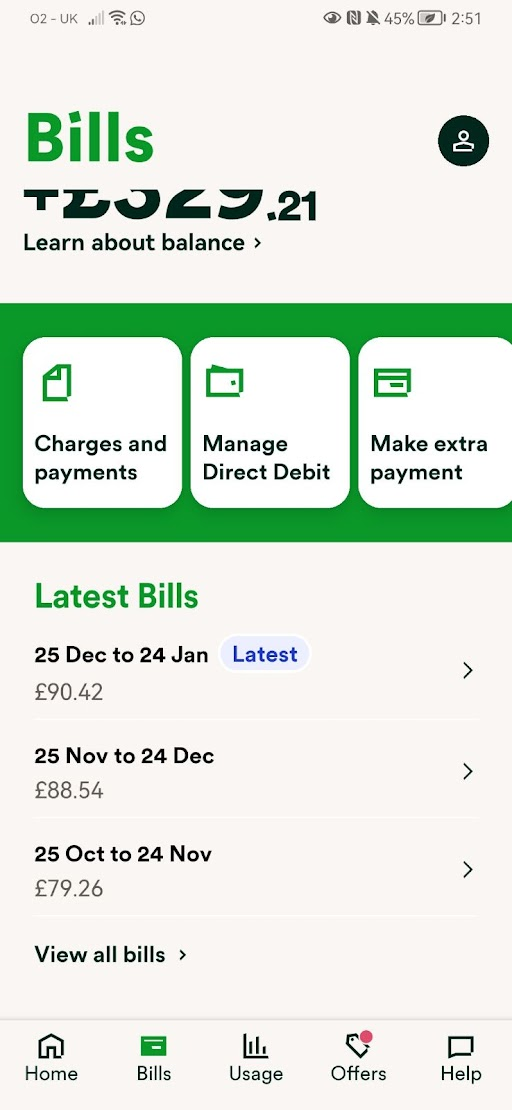
To view previous bills on the app, go to the ‘Bills’ section at the bottom then scroll until you see ‘View all bills’.
 

If you’ve not already got the OVO app, you can download it here for Apple, and here for Android, and manage your account from your smartphone. See OVO’s guide on our app here


6 replies

Blastoise186
Super User
Forum|alt.badge.img+9

Hi @qprtel ,

By default, they should be in MyOVO which you can access via https://my.ovoenergy.com .

If you can’t see them there, please ask Support to take a look: https://ovoenergy.com/help .


Firedog
Super User
Forum|alt.badge.img+8
  • Super User
  • Solved
  • June 20, 2024

Updated on 15/08/25 by Emmanuelle_OVO:

How do I acquire historic statements specifically 2017-2021?


As Blastoise pointed out, these should be stored in your online account, so if you have access to that, you’re good to go.

Statements going back to the day the account was opened should be available, but it depends a bit on whether and when your account was migrated from the old Apollo system to the newer Orion one. This has not been flawless for all customers, but it has for the great majority. Statements from the time on Orion are readily available from the Billing history page if you’re not averse to a bit of scrolling.


Mine are numbered by the system from 1 back in 2020 to 53 for the latest, so my May 2024 statement is on the page https://account.ovoenergy.com/billing-details/53. No. 1 was for a partial month - from the mid-month start date on the old system to the end of the calendar month, since when they’ve conveniently covered each month from the 1st to the last. If you can find a no.1 for you, that will tell you when your account was migrated on to the Orion system.


Orion PDF statements are generated on demand; if you’re sure of the start and end dates of a particular one, you should be able to download the PDF by entering its URL like this (for June 2023, for example): https://smartpaymapi.ovoenergy.com/bal/bill/nnnnnnn?from=2023-06-01&to=2023-06-30. It will only work if you get the dates right. Put your own account number in the URL instead of nnnnnnn. You can also download a portfolio of several months’-worth of statements; just be sure to get the start and end dates right. 


It’s a bit disconcerting that the date on a newly-downloaded statement like this is the date the file was generated, not that when it was originally issued. This has caused problems for some users in dispute; if you feel it’s not quite right, please consider upvoting this idea.


Now, the statements you’re looking for might pre-date Orion, in which case it may be a question of scrolling all the way down the Billing history page (with repeated clicks on the Load more button) until you get to the ones you want. Or, as Blastoise suggested, contact Support. I suspect that scrolling, though time-consuming, would be the quicker option :(

To view previous bills on the app, go to the ‘Bills’ section at the bottom then scroll until you see ‘View all bills’.


If you’ve not already got the OVO app, you can download it here for Apple, and here for Android, and manage your account from your smartphone. See OVO’s guide on our app here


  • Newcomer
  • June 6, 2026

I was a Customer of Evo Energy, I need a copy of my energy bill for poor of address. How do i request one


Forum|alt.badge.img+1
  • Rank 2
  • June 8, 2026

To proof your address you usually need a bill no older than three months. If you had an online account with OVO you should be able to find all your bills there. Your online account should be accessible for longer than three months. My old OVO account that I closed over two years ago is still accessible. If you never had an online account, or for any reason you cannot access it, then contacting Support Team is the only way, I’m afraid. 


Nukecad
Super User
Forum|alt.badge.img+5
  • Super User
  • June 8, 2026

Whoever is asking for proof of address will not accept old bills as such proof.
You could have moved out and be living somewhere else now.

Your current bill with whoever your supplier is now is what you need to prove that you still live there. (Or at least show that you are having your bills sent there).

If you have only just switched supplier and don’t yet have a bill from your new supplier then the ‘Welcome’ letter from them saying that you have switched to them will do the job.


Chris_OVO
Community Manager
Forum|alt.badge.img+4
  • Community Manager
  • June 8, 2026

Hey ​@Spires View,


We’d love to help you out! Could you let us know what you plan to use the proof of address for? That way, we can offer you some tailored advice. 


If you're looking for confirmation of your account closure, you should have received a final statement after it was closed. No worries if you can't find it, just reach out to our support team, and they can resend that statement for you. 


For even more information, feel free to check out the article below: