Answer

How can I download Smart Meter Data from OVO?

  • August 27, 2025
  • 15 replies
  • 209 views

Does anyone know if there has been any progress from OVO in getting electricity usage (half-hourly) data available for those of us with a Smart Meter, as a download (ideally as a .csv)? Thanks.

 

Best answer by Ben_OVO

Hi again ​@HexhamUser,


I can confirm that there are no plans to include a downloadable version of Usage on the browser version of the online account, however this feature is now available on the OVO app.


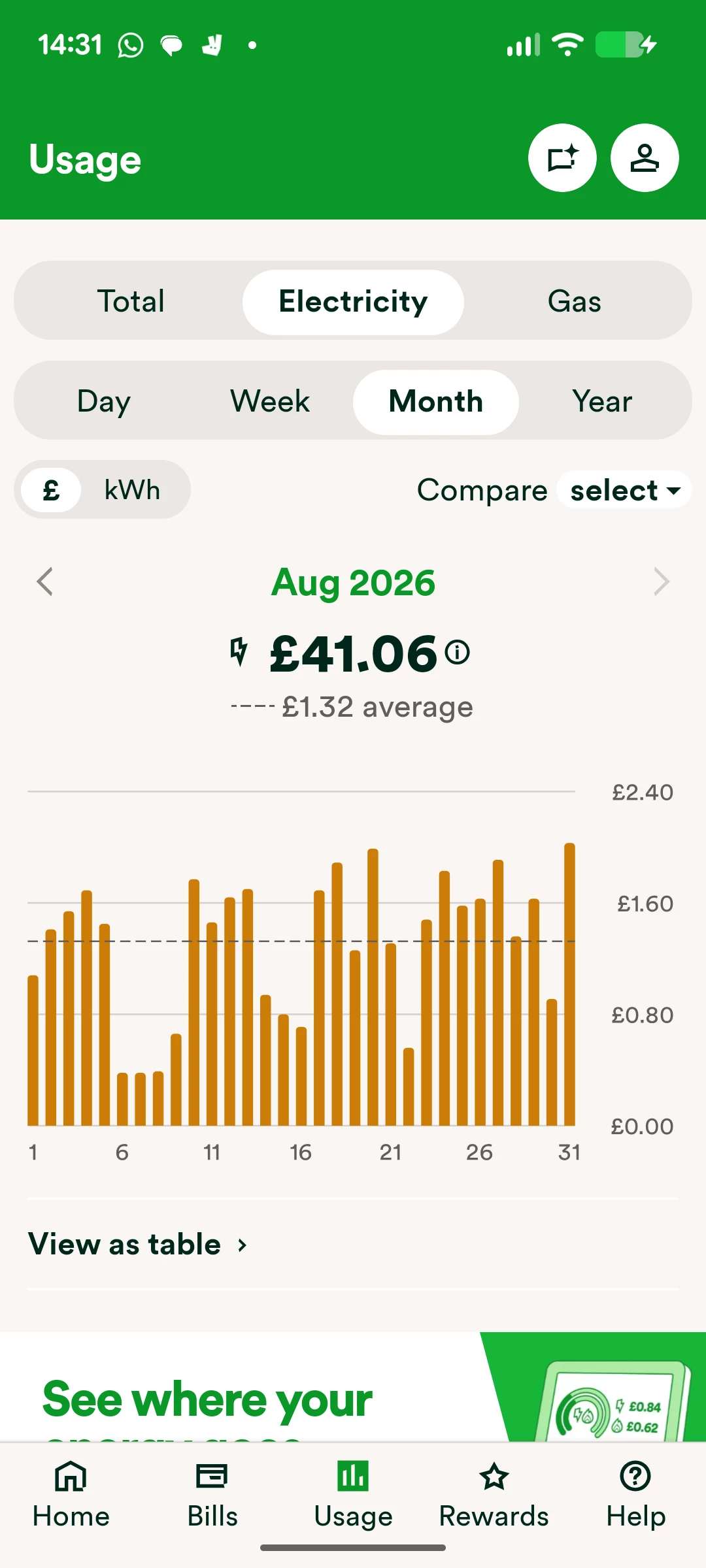
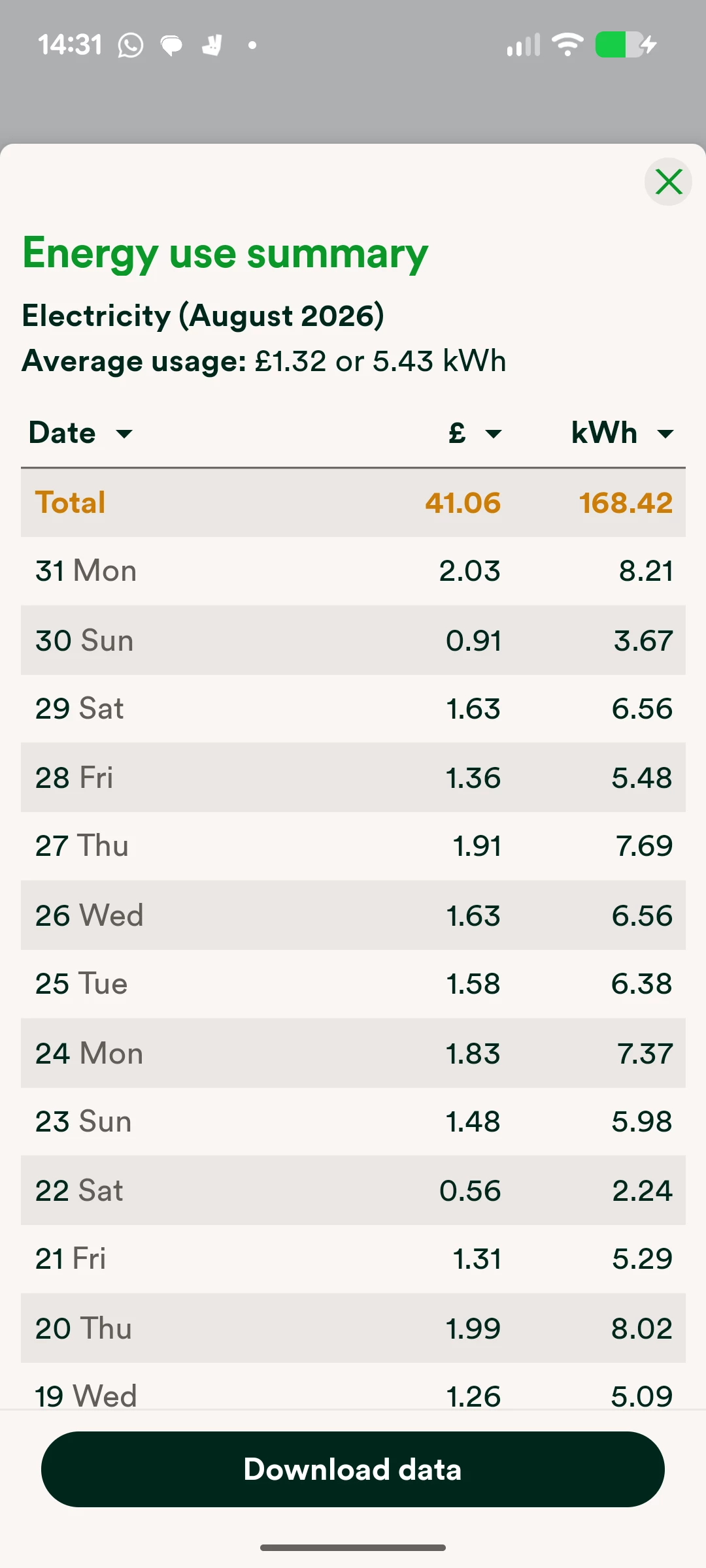
If you log into the app and select ‘Usage’, you can then select ‘View as table’ beneath the usage graph, and then select ‘Download data’. I’ve included some screenshots below:


Exact appearance may vary


I hope this helps!

15 replies

Ben_OVO
Community Manager
  • Community Manager
  • August 28, 2025

Morning ​@HexhamUser, I hope you’re well.


We’ve heard nothing internally on this one, but I will ask the question to our Product team. I’ll reach out if I get an answer.


Cheers!


Ben_OVO
Community Manager
  • Community Manager
  • Answer
  • August 28, 2025

Hi again ​@HexhamUser,


I can confirm that there are no plans to include a downloadable version of Usage on the browser version of the online account, however this feature is now available on the OVO app.


If you log into the app and select ‘Usage’, you can then select ‘View as table’ beneath the usage graph, and then select ‘Download data’. I’ve included some screenshots below:


Exact appearance may vary


I hope this helps!


Firedog
Plan Zero Hero
Forum|alt.badge.img
  • Plan Zero Hero
  • August 28, 2025

Ben could have given the short answer: No!

Here’s a longer one for anyone else who may be interested: there are at least three simple methods, as there have been since this was last up for discussion.

  • OVO’s SmartPAYMAPI, which requires you to know the appropriate URLs to get the data you need. Half-hourly usage data are so far as I’m aware only available for one day at a time, which is tedious to start with but not a problem for regular (e.g. daily) retrievals to keep a database updated. 
    These data are only available after OVO has collected them from your meter via their data collector and DCC; this used to happen in the early hours, but in recent months it’s getting later and later, up to 24 hours after the event.
    Hh data -  substitute your OVO account no. for nnnnnnn:
    smartpaymapi.ovoenergy.com/usage/api/half-hourly/nnnnnnn?date=2025-08-27
      
  • Mike Williams’ handy utility.  This automates collection via the API, so subject to the same delays. It can retrieve many days’ data at a time, though (I recently checked that it could get all my Hh data since March 2017, when my first smart meter was installed).
      
  • Third party utilities like Loop, Bright and n3rgy. The first two now use their own DCC adapters; Bright is still free, but Loop isn’t. n3rgy require authentication via one of their business partners; one of these is Equiwatt both free and effective, giving access to CSV data downloads from n3rgy’s consumer portal. Equiwatt users are required to play in their sandpit occasionally, though. n3rgy seem unable to retrieve my data until after 10:30 each morning, and short of opting for a direct MQTT connection, that’s what I have to put up with.


Ben_OVO
Community Manager
  • Community Manager
  • August 28, 2025

Thanks ​@Firedog,


If you had any feedback as to how you’d like to see the downloadable usage be improved on the app please let me know, and I can pass the feedback onto the Product team.


  • Author
  • August 28, 2025

Thanks ​@Ben_OVO, a comprehensive answer for the app!

I mainly use a PC for analysing data, and of course there isn’t a Windows version of the app. So, using the app on my iPhone is a bit less convenient. If the team were looking for areas for improvement, I’d really like to download half-hour data for multiple days (e.g. specifying a start day and an end day). Doing a day at a time is a bit of a pain. And a version that worked in the browser would of course be desirable! But I’m not holding my breath!

Thanks also ​@Firedog. I’d also been through all of those earlier methods. As far as I could see, the SmartPAYMAPI just gets you JSON data, which can be converted to Excel but you have to use Microsoft’s Power Query editor to deal with the nested JSON data. 

I need to go back and retry Mike WIlliam’s app. The last time I tried was at the start of the new year and something didn’t work. Probably my fault!

I used to use n3rgy but that stopped when the free Hugo app disappeared. I don’t want to have to pay for an app that I’ll never use (or one that requires me to use it). There just seems something wrong in having to pay for something to be able to freely get at what is my DCC data! I’ll have to look at Bright again. Thanks.


Firedog
Plan Zero Hero
Forum|alt.badge.img
  • Plan Zero Hero
  • August 28, 2025

If you had any feedback as to how you’d like to see the downloadable usage be improved on the app please let me know, and I can pass the feedback onto the Product team.
  

To be really useful, the download function should:

  1. Not round the underlying data. Meters will in many cases record and share usage data with three places of decimals, i.e. to the nearest Wh. It’s often important, especially when troubleshooting, to have the maximum available precision.
  2. If costs are included (why?), at least indicate whether standing charges and VAT are included or not. 
  3. Allow for customization of the dataset, e.g. specify the period (not just what happens to be being displayed), the date format, the time zone, the file name …
  4. Allow the user to specify the location of the downloaded file (it may be just me, but I still haven’t found out what happens after clicking on Download data on my Samsung Galaxy A15 with Android 15). 

It takes me just a moment to retrieve the JSON file with a day’s precise usage data using the API on my laptop. The app function by contrast is fiddly and frustrating for fumblefingers here, to achieve a less satisfactory result. 


Ben_OVO
Community Manager
  • Community Manager
  • August 28, 2025

Thanks for this ​@HexhamUser, this is really useful feedback.


There is an option to share the data by email - I’m wondering whether you could email it to yourself and then open it in sheets on the PC?


@Firedog thanks as well for your great feedback here. I was speaking to the team earlier so I’ll make sure this is all passed on.


  • Author
  • August 28, 2025

There is an option to share the data by email - I’m wondering whether you could email it to yourself and then open it in sheets on the PC?

Thanks, yes that is what I did. Even better if I could do multiple days at once 😀


Firedog
Plan Zero Hero
Forum|alt.badge.img
  • Plan Zero Hero
  • August 28, 2025

… the SmartPAYMAPI just gets you JSON data, which can be converted to Excel but you have to use Microsoft’s Power Query editor to deal with the nested JSON data. 
  

I just use standard worksheet functions (find & replace, text to columns, sort and filter) to pick out the bits I need from the JSON data. It helps to have them pretty-printed first, but my browser (Edge) does that for me. 


Nukecad
Plan Zero Hero
  • Plan Zero Hero
  • August 28, 2025

I have my phone linked to share files over wifi to/from my laptop using CX File Explorer on the phone.

So I gave it a go.

I clicked the Download button in the OVO app, that opened a download window in which CX was one of the options.

I selected CX, Network, my laptop name, username, Desktop, Save.

About 2 seconds overall and the usage data csv was on my laptops desktop. Probably faster if I do it again.

Opened it directly into my spreadsheet app on the laptop and copied/pasted the kWh data into my Power Move spreadsheet.

One thing that I did find after checking that the figures were slightly different in the app than in the online account, presumably due to rounding differences in each. Only 0.04 kWh over 24 hours so not really significant as 2-DP figures.


Firedog
Plan Zero Hero
Forum|alt.badge.img
  • Plan Zero Hero
  • August 28, 2025

… using CX File Explorer on the phone.
  

I never imagined that I’d have to install a new app to do something as basic as downloading a file from the Internet … Thanks for the suggestion!
  

… a download window in which CX was one of the options.
  

I got one, too, but no sign of CX File Explorer until I went hunting for it.
    

… the figures were slightly different in the app than in the online account, presumably due to rounding differences in each. Only 0.04 kWh over 24 hours so not really significant as 2-DP figures.
 

They should of course be identical to within a rounding error, and I’d say that 40Wh was too big a difference. You might check the two sets of figures side by side to make sure that the same time stamps apply in both. I can’t remember whether I’ve posted this little comparison before; it demonstrates how important it is to make sure the quantities are accurately timed. The quantities in the table are aligned, but the selection of buckets and their time stamps are different in each case. I suppose I should add the OVO app result into the mix - a job for tomorrow.


I really don’t think that the download function in the app is particularly useful in its current form.


Nukecad
Plan Zero Hero
  • Plan Zero Hero
  • August 29, 2025

I had already put the figured from the app and from the online account side-by -side and the timestamps line up, 24hr clock from the app, AM/PM from the online.

The differences were in four half hour periods when one set said 0.01 where the other set said 0.02. (sorry can’t remember which way round it was, EDIT see the next post).

To me it looks that the 0.01 was from a 3-DP which  had simply been truncated whereas the 0.02 was a rounding up.
(eg. if the figure to 3-DP was 0.017 and to display the 2-DP equivalent one had been truncated but the other rounded).

For my purposes 2-DP is sufficent.
However I will be sticking with the 2-DP figures from one source and not mixing them.
I’ll probably keep using the online account rather than the app, because that’s what I’ve used on my spreadsheets in the past.


Nukecad
Plan Zero Hero
  • Plan Zero Hero
  • August 29, 2025

I’ve now done a comparison of the app vs online account 2-DP  figures for my usage yesterday.
I’ve truncated it to between 08:00 nd 17:30 to show the interesting bit.

As you can see there are again 4-hours that show a difference (a different 4-hours than the previous day).

I still believe that will simply be because the figures in the app are being rounded up or down to the nearest 0.01 whereas those in the Online account are simply being truncated with no rounding.

Which means it’s probably the case that neither of 2-DP figures from either source will be the same as the 3-DP figures.

Unless the 3rd DP was a zero - in which case then both would be the same as the 3-DP.
eg.  If the 08:00 figure shown here was actually  0.110 it would show as 0.11 whether rounded or truncated.

If the 08:00 figure was actually 0.114 then that would also show as 0.11 whether rounded (down) or truncated.

The difference between rounding and truncating will only show up if the 3rd DP was a 5 or above. (generally you round up a ‘5’)
eg If the 10:30 figure was 0.076 then rounded up it would show as 0.08 but truncated as 0.07, which is what we see happening here:


Firedog
Plan Zero Hero
Forum|alt.badge.img
  • Plan Zero Hero
  • August 29, 2025

I doubt that there’s any truncation going on. I just checked my own data for yesterday using the app’s Download data function and scraping the figures from the day’s online Usage table. They were identical, and the totals of both showed a difference of only .002kWh when compared to the 3dp figures retrieved via the API. partials up to .004 are rounded down, .005 and higher are rounded up.


How are you acquiring the online figures? Do you have the 3dp ones for comparison?


Nukecad
Plan Zero Hero
  • Plan Zero Hero
  • August 29, 2025

As said I'm downloading from the app and copy/pasting from the online account.

I am not accessing figures to 3-DP from anywhere, I don't particularly need that level of accuracy.

If I did in future decide that I want more accuracy for some reason then I know where to get the 3-DP figures.

PS. I'm sure that on some/many days my own 2-DP numbers will be the same in both app and online charts, depending on just what the 3rd decimal was each half hour.