Rank 1
March 24, 2018
Solved

How can I change my email address on my OVO account?

  • March 24, 2018
  • 26 replies
  • 5607 views
Hi, just switched to OVO from Scottish Power and I would like to change email address as my partner set up the account using her email but as I will be paying the bills I would like all correspondence sent straight to me rather than having to keep emailing my partner every time there is something to get done. Is this possible Thanks, Alex Aiken
Best answer by Bumblebee

Updated on 19/08/25 by Abby_OVO


Great question to ask about how you’re able to update the email address we’ve got registered on your OVO account.


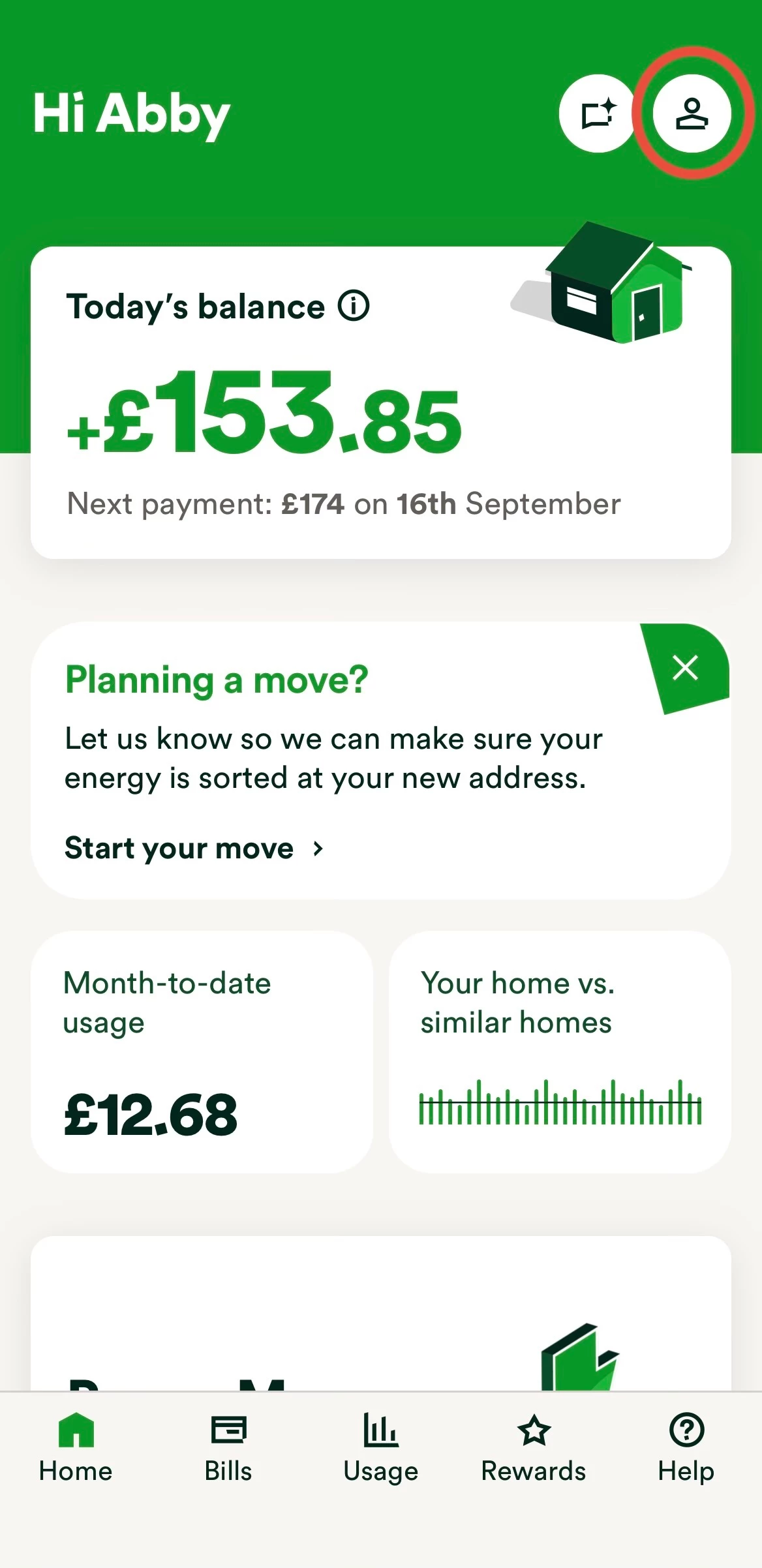
Step 1


On the home page click on the icon of a person (top right).


Exact appearance may vary


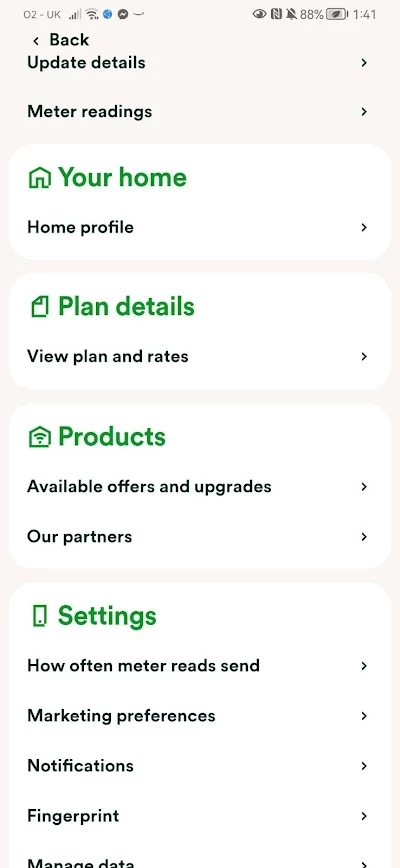
Step 2


Click on ‘update details’ at the top of the screen.


Exact appearance may vary


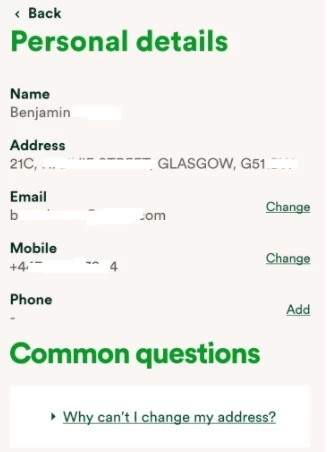
Step 3


Click ‘Change’ next to the contact details you wish to change.


Exact appearance will vary


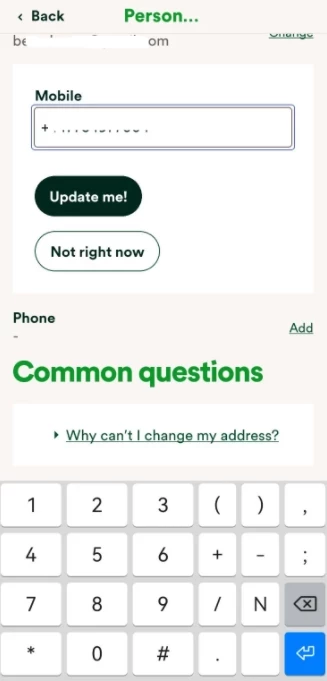
Step 4


Enter the new details and click ‘Update me!’.


Exact appearance may vary


We have a dedicated guide on this in our Library, check it out below:


If you’re unable to access your online account to be able to update these details yourself or you don’t already have an email address linked to the account, reach out to the Support Team who’ll be happy to make the changes.


26 replies

Blastoise186
Super User
Super User
November 10, 2025

Hi ​@highnoon1966 ,

I’m afraid we can’t fix that from here as the Forum can’t access your account.

Please contact OVO via the options in the thread below - this sounds like one for the Tech Team.


Securing energy by zapping security bugs... For that is The Blastoise Way! Remember, I'm just like you - AI Powered Evil Geniuses aren't Staff!
Chris_OVO
Community Manager
Community Manager
November 10, 2025

Hey ​@highnoon1966,


As Blastoise mentioned, we can't access accounts because we're a public forum. But if you click on the link provided, our friendly Support Team will be more than happy to help you get everything sorted out and back to normal.

Renewable energy jokes never get old.
highnoon1966
Rank 2
Rank 2
November 14, 2025

Thank you for the replies, after a conversation with a support team member I ended up having to revert back to the old email BT email address I was previously using on my account and it now works as before. I tried changing it again to my Gmail email address and once again it didn’t work correctly so I once again went back to old BT email address. Very odd as I can’t understand why it doesn’t seem to like me changing to a Gmail email address.

Ben_OVO
Community Manager
Community Manager
November 17, 2025

@highnoon1966 that’s very strange, as our systems are set up to work predominantly with Gmail.


Would you have an old, disused OVO account that was linked to that Gmail address? If so, the email address being linked to the old account could be the problem.


The other issue could be that, when you change the email address, you’re not verifying the new email address (when an email address is changed, an automated email is sent requesting to verify the new address. If it’s not verified then this can cause issues).

Powered by the Sun
highnoon1966
Rank 2
Rank 2
November 17, 2025

Thanks ​@Ben_OVO I treid again just now and it all worked perfectly, I’m certain I did the exact same steps previously when it didn’t work. I have no idea why it worked this time but I have now switched over to the gmail address and it’s workin online and on ovo beyond app.

Ben_OVO
Community Manager
Community Manager
November 18, 2025

Brilliant ​@highnoon1966 that’s great news!


If you ever want to look at some guides for navigating the online account and app, you can find these here:


Powered by the Sun