



Rank 1
April 7, 2023
Solved

Solis app not showing any details other than energy produced since we installed the Solis inverter?

  • April 7, 2023
  • 38 replies
  • 13155 views

Hi,


we recently installed the Solis inverter. However on the app it’s not showing any details other than the energy produced. We have smart meter installed as well. I don’t see the below block at all as in the user manual.
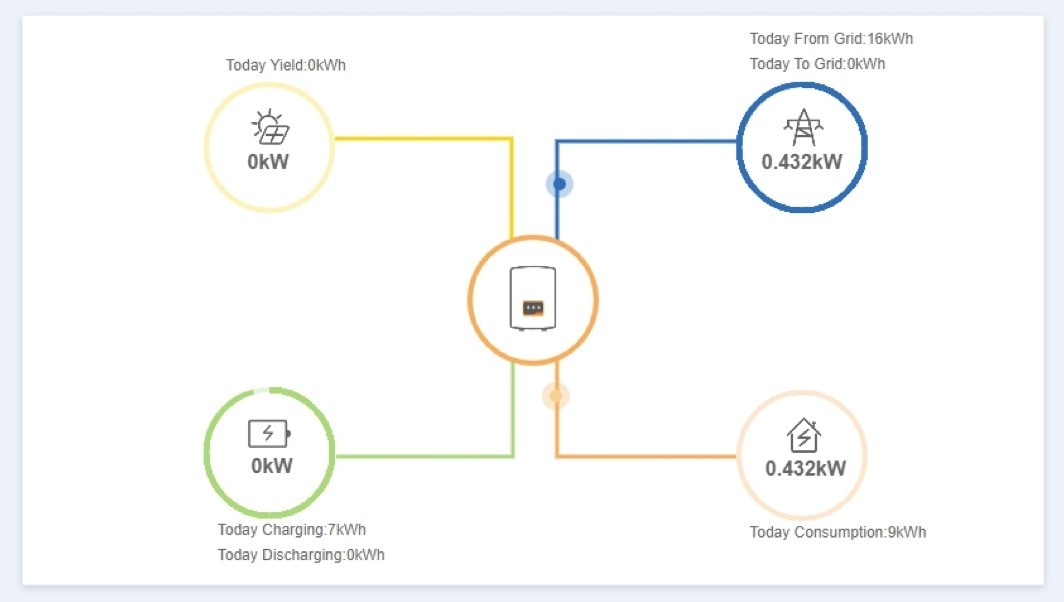



Best answer by BPLightlog

Take a look here @pumpkin section 4

https://www.soliscloud.com/SolisCloud%20Operation%20Manual-UserV1.0.pdf

38 replies

BPLightlog
Super User
Super User
July 17, 2023

So the flow direction of the CT (shown by the arrow) is pointing towards the incoming feed and not the house load. That is the correct orientation I believe. 
I did find this from Solis 

There are also other threads here which might be useful such as 

This is the flow (and connection) for the epm 

https://midsummerwholesale.co.uk/pdfs/solis-export-power-manager-manual-.pdf

Bring me Sunshine ~ E&E {Solar PV, Battery Storage, Hybrid EV, ASHP and Home Assistant automation}
Newcomer
February 20, 2024

Hi, Good day, I would like to ask. Is this diagram applicable only to hybrid setup? I have on grid setup, and I ask my installer why I don't have this diagram in my solis app. He told me that this is only applicable for hybrid with batteries. I just want to confirm with you guys. Thank you very much.


BPLightlog
Super User
Super User
February 20, 2024

Hi, Good day, I would like to ask. Is this diagram applicable only to hybrid setup? I have on grid setup, and I ask my installer why I don't have this diagram in my solis app. He told me that this is only applicable for hybrid with batteries. I just want to confirm with you guys. Thank you very much.


As a complete system, yes. You can see the battery in the bottom left hand corner so if you don’t have batteries you won’t see that. 
But you should have visibility of the consumption, solar yield and any export. 

Bring me Sunshine ~ E&E {Solar PV, Battery Storage, Hybrid EV, ASHP and Home Assistant automation}
Newcomer
March 5, 2024

Hi again. I would like to ask if there are 2 types of solis inverter? CT type and metered type?

I asked our solar installer why there is no diagram of load consumption on our solis app. He told me that our Solis-1P5K inverter is a CT type inverter which only show harvest and doesn’t show load consumption like diagram above. Unlike in metered type inverter which shows the diagram. Is this true? TIA.

BPLightlog
Super User
Super User
March 5, 2024

Hi @Yeahertz , it sounds as if your installer is changing his story.

..,
I have on grid setup, and I ask my installer why I don't have this diagram in my solis app. He told me that this is only applicable for hybrid with batteries. 


most inverters are monitored and CT connected. More often than not, the CT is used to measure the house consumption so that the inverter can adjust its output accordingly. 
The manual for the unit is not useful for information about the monitoring app but it does mention it 

https://www.solisinverters.com/global/1p_inverter3/34584.html

There is also an email address for Solis so it might be good to double check with them. 
As far as I’m aware, Solis use their app to monitor and display all aspects of the solar system so I’m baffled as to why it wouldn’t show the extra detail. I’m presuming that your system has a WiFi dongle connection? (That is optional).

Edit: I found the Solis cloud manual. Although it’s not simple to follow, it does have all the details. If you look at P16, you can see the monitoring screen and I can’t find anything to note about not supporting your inverter. 
There is a video looking at the app if you have 10 mins to spare 

Bring me Sunshine ~ E&E {Solar PV, Battery Storage, Hybrid EV, ASHP and Home Assistant automation}
Newcomer
March 5, 2024

Hi @Yeahertz , it sounds as if your installer is changing his story.

..,
I have on grid setup, and I ask my installer why I don't have this diagram in my solis app. He told me that this is only applicable for hybrid with batteries. 


most inverters are monitored and CT connected. More often than not, the CT is used to measure the house consumption so that the inverter can adjust its output accordingly. 
The manual for the unit is not useful for information about the monitoring app but it does mention it 

https://www.solisinverters.com/global/1p_inverter3/34584.html

There is also an email address for Solis so it might be good to double check with them. 
As far as I’m aware, Solis use their app to monitor and display all aspects of the solar system so I’m baffled as to why it wouldn’t show the extra detail. I’m presuming that your system has a WiFi dongle connection? (That is optional).

Edit: I found the Solis cloud manual. Although it’s not simple to follow, it does have all the details. If you look at P16, you can see the monitoring screen and I can’t find anything to note about not supporting your inverter. 
There is a video looking at the app if you have 10 mins to spare 

It's sad that I cannot maximize my inverter and my installer doesn't idea regarding my concern. As I checked also there is no data of EPM. I don't know why.

I wanted to configure my inverter but can't be, because i'm away from my house, i'm just monitoring thru the app and I don't have much idea regarding solar. Anyway, I will try to email/contact solis. Thanks everyone.

Rank 2
March 17, 2024

@BPLightlog Aftter changing some settings in the solis inverter I am able to see the data in the cloud but it looks the data is incorrect. I suspect it is showing whatever actually consumed as imported.


Hi @pumpkin,

I'm also facing the same issue, could you please tell me what settings you has been done for getting this view?

Emmanuelle_OVO
Retired Moderator
Retired Moderator
March 18, 2024

Hey @najmsaqib,


Do any of the Youtube videos or manuals provided by @BPLightlog help? If not, let me know and I’ll tag other Community Members with Solis.

Renewable Energy? Big Fan.
