



Rank 1
April 7, 2023
Solved

Solis app not showing any details other than energy produced since we installed the Solis inverter?

  • April 7, 2023
  • 38 replies
  • 13155 views

Hi,


we recently installed the Solis inverter. However on the app it’s not showing any details other than the energy produced. We have smart meter installed as well. I don’t see the below block at all as in the user manual.



Best answer by BPLightlog

Take a look here @pumpkin section 4

https://www.soliscloud.com/SolisCloud%20Operation%20Manual-UserV1.0.pdf

38 replies

Newcomer
July 6, 2023

All my friends have just “Plug & Play”

BPLightlog
Super User
Super User
July 6, 2023

I’ve not found an alternative for the inverter but others might have. 
I have a LuxPower inverter and so use their app and web portal. Solis do have a web version as well - I don’t know if that might be better. The sign on should be the same as the app. 

Bring me Sunshine ~ E&E {Solar PV, Battery Storage, Hybrid EV, ASHP and Home Assistant automation}
Newcomer
July 6, 2023

Hi,

I’ve looked on the web portal and can’t see the overview.

Now the overview has disappeared from the app. 

It is flakey!

BPLightlog
Super User
Super User
July 6, 2023

Hi,

I’ve looked on the web portal and can’t see the overview.

Now the overview has disappeared from the app. 

It is flakey!

Sorry, I’m not being much help .. it does seem like a problem with the link to the measurement system. Perhaps someone can check on the new dongle, just to see that it is connecting 

Bring me Sunshine ~ E&E {Solar PV, Battery Storage, Hybrid EV, ASHP and Home Assistant automation}
Newcomer
July 11, 2023

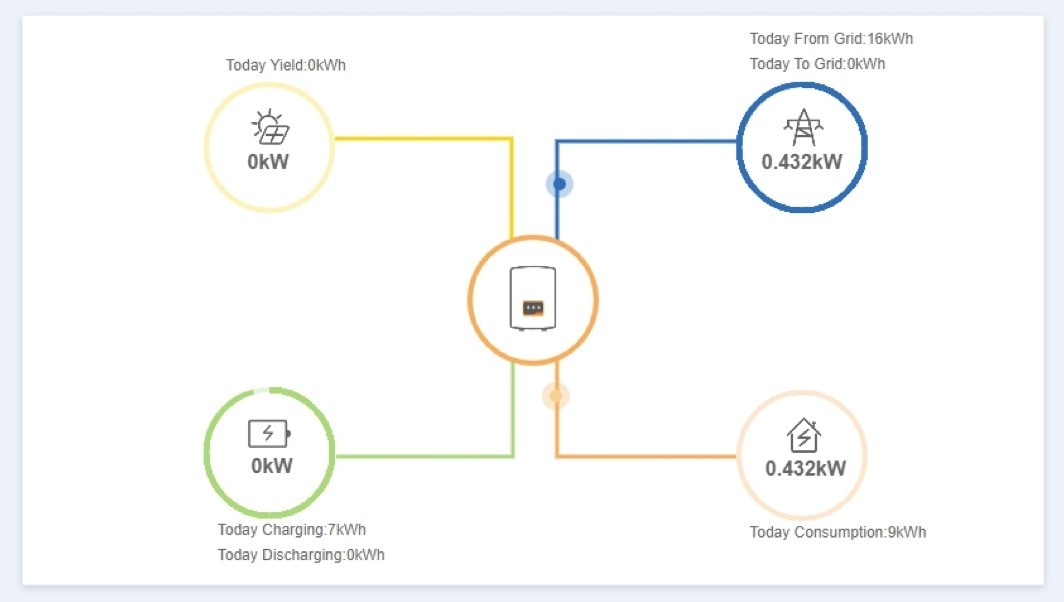
Hi, I have solar with a solis inverter and battery storage. Over the last week I noticed an increase in energy usage on my smart meter. Looking at the plant information on the Solis App it seems to be giving incorrect readings for the house consumption and no data for grid import/export. I have not physically changed anything although interestingly my energy provider did change my tariff last week. The result of this is that the battery doesn't kick in to cover peak usage as the Inverter is not detecting real time usage. Any help would be greatly appreciated. 


BPLightlog
Super User
Super User
July 11, 2023

Hi @Jay1464 , your tariff and smart meter can’t interact with your inverter but it’s interesting to see the changes. Having said that, the graphic from the app suggests very low grid draw - top right (which is what you would expect at this time of year).
There have been a few people ask about updates recently - is the app (or cloud via pc) up to date? Solis did provide an update a while ago. 
Others have been able to reset their inverter .. I’ll try to find their posts

Bring me Sunshine ~ E&E {Solar PV, Battery Storage, Hybrid EV, ASHP and Home Assistant automation}
BPLightlog
Super User
Super User
July 11, 2023

The reset suggested by another user was: The settings changed were first turn off the grid first and then go to internal ep settings and then look for consumption option and toggle it.  Also go to 24h option and enable it. Finally Turn the grid on.

And depending on the spec of your unit, there’s a manual here https://www.solartex.co/tienda/wp-content/uploads/2020/07/Solis-Mini-1kW-DC-Manual-Usuario.pdf

Bring me Sunshine ~ E&E {Solar PV, Battery Storage, Hybrid EV, ASHP and Home Assistant automation}
Newcomer
July 12, 2023

Thanks for the responses. I followed the instructions and togalled the epm on and off. This then brought up a warning saying the epm was limiting export. This indicates to me (after a bit more googling) that the inverter can't see what the house is consuming because the house value on the diagram is generally mirroring what the generation value is. I therefore think the inverter is not getting a correct reading from the CT clamp. I will try calling Solis but the CT clamp on the incoming power cable appears to be wired into the fuse box so I'm not sure how easy it would be to replace?

BPLightlog
Super User
Super User
July 12, 2023

There have been a few issues where the CT clamp is connected in reverse. If you can post a photo, that might be something we can check

Bring me Sunshine ~ E&E {Solar PV, Battery Storage, Hybrid EV, ASHP and Home Assistant automation}
Newcomer
July 17, 2023

Hi and apologies for the delay responding. Attached is a photo showing the direction of the CT clamp on the inbound live cable after the meter. Excuse the Harvi that has its own different CT clamp. So in this image it's connected with the arrow pointing towards the meter

