Rank 5
December 4, 2023
Solved

Ecodan FTC- Had a nightmare trying to balance the house temperature?

  • December 4, 2023
  • 47 replies
  • 3068 views

Hi all,

I’ve just bought a new build with a Ecodan FTC. I have had a nightmare trying to balance the house temps. Too cold. Now too hot. 
I tried the weather comp but my numbers were way out. Downstairs was ok but upstairs was far too cold. 
Yesterday I changed to auto temp which wacked the flow rate up to 45 and in turn got the upstairs to temp (although downstairs is now tropical!)

My understanding is that the auto temp on the Ecodan uses the room temp to make flow adjustments. My issue is that the room temp on the Ecodan is reading like 8 degrees. I imagine this is why it was just flat out all day long.

I see you can change the sensor to be either the FTC which it is set at and no doubt where the temp of 8 is being read from, or the TH1 to use a wireless controller.

This is where I need help. There is a wireless unit attached but I am not sure if this is the correct thing. Used to connect the app.

How can I get the actual house temp to the Ecodan FTC to take advantage of the auto temp feature?

Thanks



Best answer by juliamc

 I think you’re way ahead of me with your controls, I have a Daikin so I’m not familiar with your system. However I’ve been wondering if the wireless sensor you’re using on TH1 either is faulty or is not set up correctly? I’m assuming the controller panel is giving a correct temperature reading around 8 or 9 degrees because it’s in a garage or similar unheated space, hence needing the wireless sensor? If you have another thermometer you can confirm both the controller temp and the wireless temp that would confirm a bit more about what’s going on. Then you could place the wireless sensor alongside the controller panel and check if the readings correspond, ie the wireless should show 8 or 9 deg. 
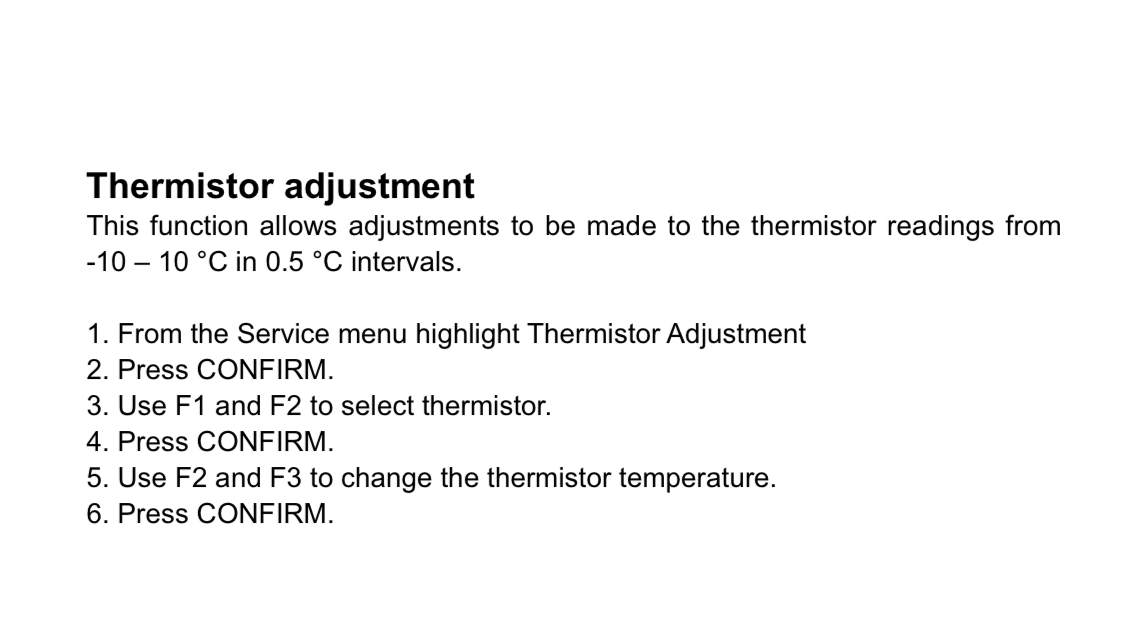
There is this section in settings to adjust the thermistors - this might show if anything odd has been set up.

47 replies

razorAuthor
Rank 5
December 5, 2023

Its UFH both floors with wifi stats in every room.

Frustrating it was set as room adapt when it was never going to work. Told never need to touch it =/

Jeffus
Rank 20
Rank 20
December 6, 2023

Nice ! Why does the controller have Z1 and Z2 if there’s only one zone ? Would you think it was worth getting a remote controller to allow using Auto Adapt ?

It really needs someone with an ecodan to provide some more thoughts and questions for @razor to take back to the builder I think.

If not via this forum then these folk are very helpful, just be prepared for lots of questions and feedback on the setup.

https://renewableheatinghub.co.uk/forums

razorAuthor
Rank 5
December 6, 2023

Does anyone have experience enough to know if it is worth setting up the wireless controller for £170 to use as the room temp mode thermistor?

Jeffus
Rank 20
Rank 20
December 6, 2023

Does anyone have experience enough to know if it is worth setting up the wireless controller for £170 to use as the room temp mode thermistor?

Having a wireless controller always helps as then auto adaption is an option as it needs to know the indoor temperature which it currently appears you don't from the little we know so far. Other than the temperature in your garage.

However I think you need to somehow get a good understanding of what you have and what needs tweaking overall

You should be able to get the system working reasonably smoothly with weather compensation. I would personally focus on that first. For example the large difference in temperature upstairs and downstairs should be fixable without the wireless controller while using weather compensation. Weather compensation doesn't use an indoor thermistor.

You mention WiFi stats in every room. What are they?


razorAuthor
Rank 5
December 6, 2023

Thanks,

I also just noticed this on my energy report. Either I have the most efficient ASHP ever or something here is wrong?


Jeffus
Rank 20
Rank 20
December 6, 2023

@M.isterW @amanda1

@Ecodanwarrior @dgamble731 @James_N  @Whitwop @christianedward @hambrook @Speps @fox 

Are you able to offer any useful advice overall on next steps for @razor 

I think you all have an ecodan?


Rank 2
December 6, 2023

Hi @razor You need to sync your moveable wireless thermostat with the FTC, and keep the wireless thermostat inside the house. There are useful videos on youtube from Mitsubishi about all the syncing stuff. Your moveable wireless thermostat (wireless controller) (PAR WT50 R-E) speaks to the FTC receiver (PAR WR51R-E) to tell it what temperature you want indoors. 

The Melcloud app is not essential to run the Ecodan, but it is extremely useful if you are away and you want to check up on how your ASHP is doing, or to shift the room temperature up a degree in anticipation of your return. There are separate videos on how to sync the app, for which you need to use the tiny hand held thing attached to the FTC - look them up on youtube -  but here are links to the things you need to get the wireless controller up and running:

Here is a link to the manual for the moveable wireless controller: https://www.manualslib.com/manual/1411879/Mitsubishi-Electric-Ecodan-Par-Wt50r-E.html

And here is a link to the youtube video about the wireless thermostat controller: https://youtu.be/KypR1WjDarg?feature=shared

And here is a link to the youtube video about pairing your wireless controller with your FTC https://youtu.be/kid1PGu-2Vo?feature=shared

Heat Geek suggests that you keep all your radiator valves fully open and don’t use zones. Check out the Heat Geek channel on youtube.

At the moment my Ecodan is grappling with lying snow and overnight temperatures of -14C and it is managing to keep the house at my set room temperature (in my case 19C - I would swelter in 21C...) I don’t use timed settings at all. The fan kicks on on and off when the room temperature drops below my set temperature.

juliamc
Rank 20
Rank 20
December 6, 2023

Hi @amanda1 unfortunately @razor doesn’t have the wireless controller. Wow -14 !!! Glad it’s running well 👍🏻

Rank 2
December 6, 2023

@razor read my reply. I have never had a clue what a Thermistor is. I just use layman’s language…..you need to use one of these (see photo 1) to set your room temperature If you do this, then your FTC display should look something like this (see Photo 2) on auto adapt. I gave you some good youtube video links in my last reply that will help you sort this out. Assuming you have actually got the Wireless Controller.


Rank 2
December 6, 2023

@juliamc I thought he mentioned the wireless controller in his first post, but maybe he was referring to the gadget that syncs with Melcloud. My Ecodan (“Hiroheater”) is running well. It is covered in frost in the mornings but this hasn’t affected it (so far) and it is currently using about 23-30 Kwh a day. As opposed to the 50kwh my storage heaters used to consume.