Rank 5
December 4, 2023
Solved

Ecodan FTC- Had a nightmare trying to balance the house temperature?

  • December 4, 2023
  • 47 replies
  • 3068 views

Hi all,

I’ve just bought a new build with a Ecodan FTC. I have had a nightmare trying to balance the house temps. Too cold. Now too hot. 
I tried the weather comp but my numbers were way out. Downstairs was ok but upstairs was far too cold. 
Yesterday I changed to auto temp which wacked the flow rate up to 45 and in turn got the upstairs to temp (although downstairs is now tropical!)

My understanding is that the auto temp on the Ecodan uses the room temp to make flow adjustments. My issue is that the room temp on the Ecodan is reading like 8 degrees. I imagine this is why it was just flat out all day long.

I see you can change the sensor to be either the FTC which it is set at and no doubt where the temp of 8 is being read from, or the TH1 to use a wireless controller.

This is where I need help. There is a wireless unit attached but I am not sure if this is the correct thing. Used to connect the app.

How can I get the actual house temp to the Ecodan FTC to take advantage of the auto temp feature?

Thanks



Best answer by juliamc

 I think you’re way ahead of me with your controls, I have a Daikin so I’m not familiar with your system. However I’ve been wondering if the wireless sensor you’re using on TH1 either is faulty or is not set up correctly? I’m assuming the controller panel is giving a correct temperature reading around 8 or 9 degrees because it’s in a garage or similar unheated space, hence needing the wireless sensor? If you have another thermometer you can confirm both the controller temp and the wireless temp that would confirm a bit more about what’s going on. Then you could place the wireless sensor alongside the controller panel and check if the readings correspond, ie the wireless should show 8 or 9 deg. 
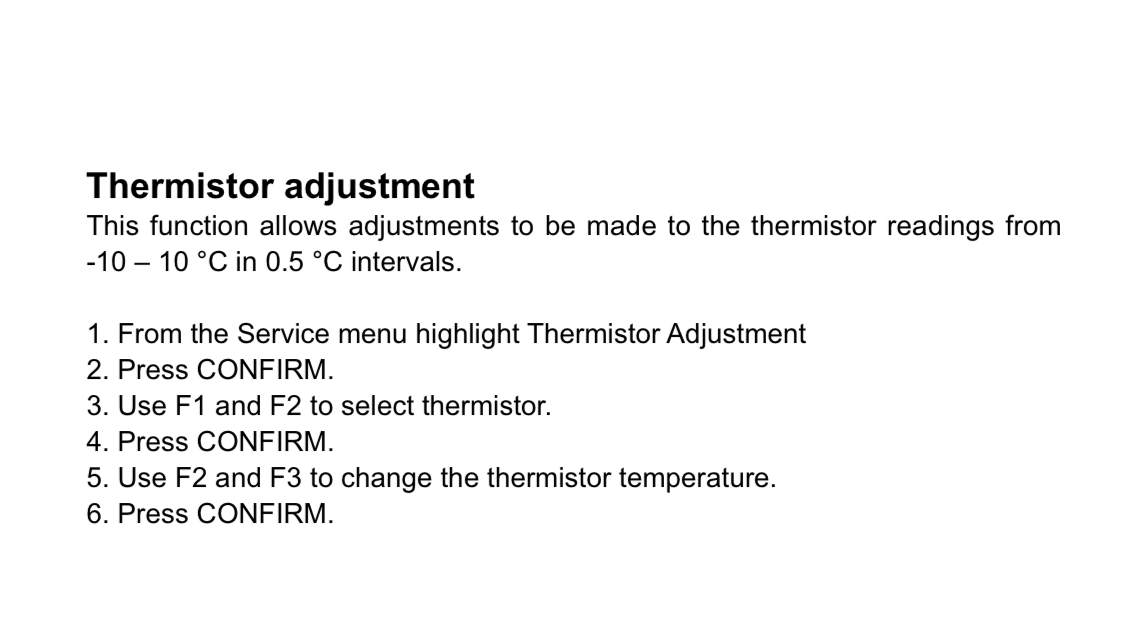
There is this section in settings to adjust the thermistors - this might show if anything odd has been set up.

47 replies

juliamc
Rank 20
Rank 20
December 4, 2023

Is the remote controller in this video the wireless thing you have ?


razorAuthor
Rank 5
December 5, 2023

No, I was referring to this. Which now I read the description is nothing to do with it. :)


juliamc
Rank 20
Rank 20
December 5, 2023

Do you have a wireless receiver like this wired into the system ? 


juliamc
Rank 20
Rank 20
December 5, 2023

If you do have the receiver in prev pic but haven’t been supplied with a remote controller with a temperature sensor for your system maybe the installer never left one at all for your new house or someone’s walked off with it ! I’d get onto the installer asap !! Meanwhile you could set the system up temporarily on a fixed flow (not recommended long term) which would stop the house overheating. Maybe around 35 degrees to start with and adjust using the controller in the garage. 

razorAuthor
Rank 5
December 5, 2023

Yeah, i do not have anytthing like that.

Must be reading directly from the FTC.

Now I set the weather curve to how they reccomend which has sorted out the overall temp.

juliamc
Rank 20
Rank 20
December 5, 2023

So is it ignoring the garage temp and just working with an outdoor sensor ?

razorAuthor
Rank 5
December 5, 2023

Honestly, I don’t know. I can see the flow and return thermistor. I can see one on the tank thermistors and I gather the outside ten is taken from the ashp. 
TH1A and THW5B are however a mystery. 

juliamc
Rank 20
Rank 20
December 5, 2023

Looking through a service manual for Ecodan it seems that TH1A is the room sensor for Zone 1, which suggests you don’t have a sensor for your Zone 2 as there’s no TH1B. However as in your photos it was reading 12 deg, the same as the garage temp I’d say that wasn’t much use at all !

THW5 is supposed to be the hot water tank sensor, but as you have A and B maybe you have two sensors on the tank ?

TH7 is the temperature at the outdoor unit so that’s driving the Weather curve okay, but I think you ought to have a separate remote sensor so that you can operate Auto Adapt. I suppose it’s not lurking in the garage somewhere ? That 12 deg reading is coming from somewhere !!

Jeffus
Rank 20
Rank 20
December 5, 2023

Looking through a service manual for Ecodan it seems that TH1A is the room sensor for Zone 1, which suggests you don’t have a sensor for your Zone 2 as there’s no TH1B. However as in your photos it was reading 12 deg, the same as the garage temp I’d say that wasn’t much use at all !

THW5 is supposed to be the hot water tank sensor, but as you have A and B maybe you have two sensors on the tank ?

TH7 is the temperature at the outdoor unit so that’s driving the Weather curve okay, but I think you ought to have a separate remote sensor so that you can operate Auto Adapt. I suppose it’s not lurking in the garage somewhere ? That 12 deg reading is coming from somewhere !!

THW5A is the upper sensor on the hot water tank

THW5B is the lower sensor on the hot water tank

TH1A will be the temperature in the garage as that is where the FTC is in the setup unfortunately so auto adaption is never going to work currently as the FTC isn't inside the house. So will have to use either weather compensation or fixed flow for now at least.

Looks like there is only 1 Zone for the whole home.

If there are radiators everywhere you could try rebalancing.

I assume there are no TRVs Thermostatic Radiator Valves on the radiators 


juliamc
Rank 20
Rank 20
December 5, 2023

Nice ! Why does the controller have Z1 and Z2 if there’s only one zone ? Would you think it was worth getting a remote controller to allow using Auto Adapt ?