



Solved

Battery not discharging

  • March 23, 2026
  • 11 replies
  • 98 views

Forum|alt.badge.img+1

Bear in mind I’m not solar savvy...I had solar panels installed in July last year and everything worked fine ...using the Fox cloud app etc .

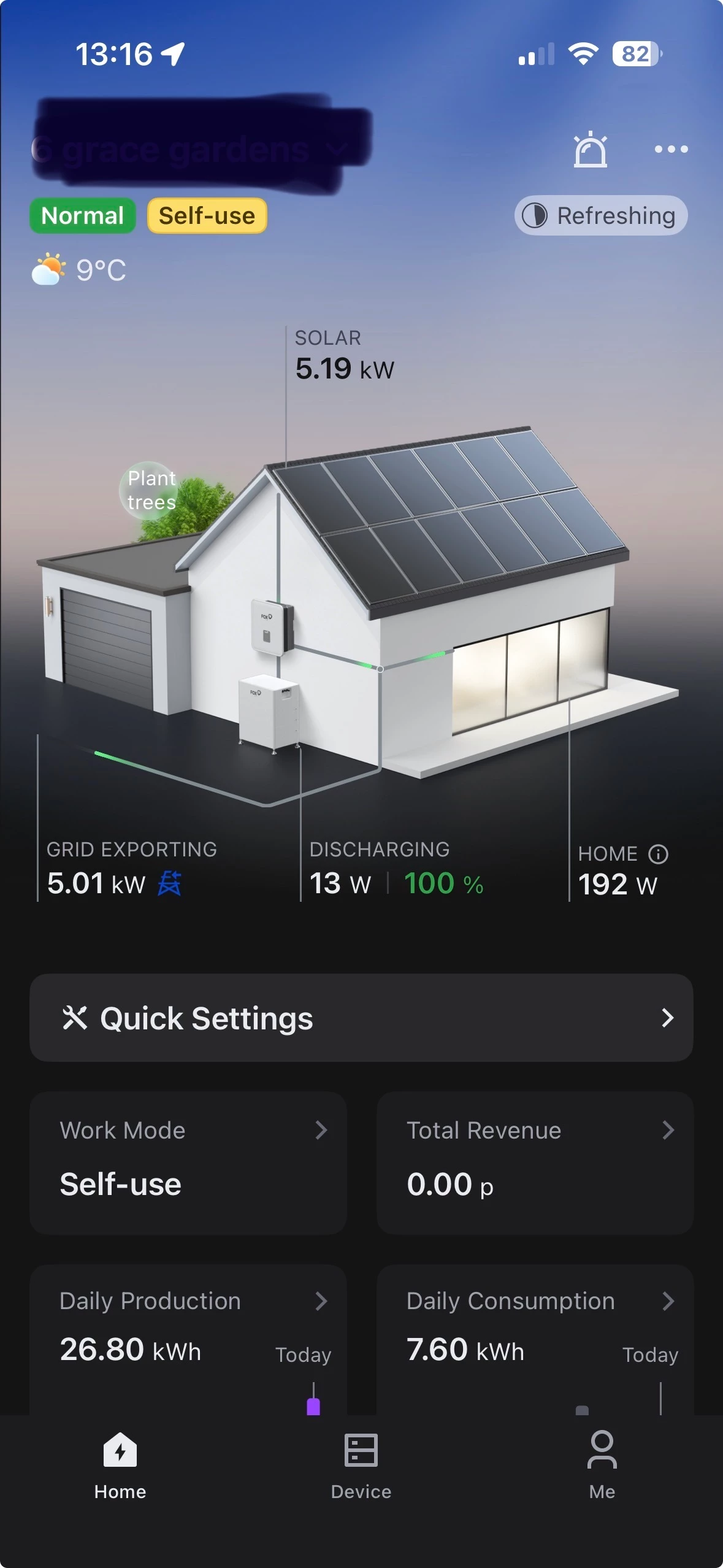
I updated the app and now it appears that my battery is not charging and my daily production is showing the same every day ?


How do I set up my battery again to use the charge during the night?


All the apps shows is my grid importing and the energy being used in y home ?


I find the whole thing bloody confusing as, as the weather has improved eg generating more solar my daily bill is lower but nothing being shown on the app ?


Is there a different app I could use or do I need to get the installers back ?


Cheers in advance 

Andy


Best answer by Andy Miller


11 replies

BPLightlog
Super User
Forum|alt.badge.img+10
  • Super User
  • March 23, 2026

Hi ​@Andy Miller , can you show us some screenshots of exactly what you’re seeing … also a few notes on the inverter type and batteries would help.

Im not sure there’s a different app as manufacturers often tie their unit’s protocol for control.


Chris_OVO
Community Manager
Forum|alt.badge.img+4
  • Community Manager
  • March 23, 2026

Hey ​@Andy Miller,


Welcome to the community! ☀ I’m excited to let you know that I’ve added a solar badge to your profile.


I understand that navigating technology can be quite overwhelming at times, and I truly appreciate your willingness to share your current struggles with us. Any details you can provide will be extremely helpful. 


If you can, please include screenshots of your app and what you’re experiencing as BPLightlog's suggested above. it'll give us a clearer picture of your situation. 


Remember, you're not alone in this! Forums like ours are here to connect people who are going through similar challenges, and we’re all here to support each other with tips and guidance.


Forum|alt.badge.img+1
  • Author
  • Rank 2
  • March 27, 2026

Battery always seems to be in stand by. I used to open the app in the evening and the battery SOC would be reducing ?


Forum|alt.badge.img+1
  • Author
  • Rank 2
  • Solved
  • March 27, 2026


BPLightlog
Super User
Forum|alt.badge.img+10
  • Super User
  • March 27, 2026

I don’t use the same system so I may not be totally correct but it looks as though your battery (on standby) is waiting for ‘instructions’. 
In working mode, isn’t there something like ‘Self-use & Battery feed’? Self use is direct from the solar generation so the system also needs to know to use battery power when available.

Others with the same system as you might be able to help more.

There was another user who had an issue with the inverter set up for the batteries which needed a specific link from the inverter to the battery.


NB - I found the following on the Fox community pages ..

Troubleshooting Fox Cloud Solar System Battery Usage

If your Fox Cloud solar system is not utilizing the battery for power, follow these steps to diagnose and resolve the issue.

Check System Settings

  • Self Use Mode: Ensure your system is set to "Self Use" mode. This mode prioritizes using solar power for your home first, then charges the battery.
  • Battery Settings: Verify that the battery settings are configured correctly. The system should be set to charge the battery from solar only, without grid charging unless necessary.

Reboot the Inverter

If the settings are correct but the battery is still not discharging, a reboot of the inverter may be required. Follow these steps:

  1. Isolate the PV (solar panels).
  2. Isolate the AC (house power).
  3. Power off the battery and open the battery isolator.
  4. Wait for the inverter screen to go blank.
  5. Reverse the process: close the battery isolator, power on the batteries, close the AC isolator, and close the PV isolator.

After rebooting, allow a few minutes for the system to check and start up. The cloud data should begin updating shortly.

Additional Considerations

  • Battery State of Charge (SoC): Ensure that the battery's SoC is above the minimum threshold. If the battery is too low, the system may not discharge it to power the home.
  • Grid Charging: If the system is set to charge from the grid, it may prioritize that over discharging the battery. Adjust settings to prevent grid charging if you want to rely solely on solar and battery power.

Forum|alt.badge.img+1
  • Author
  • Rank 2
  • March 27, 2026

I just need to find the battery charge and battery discharge settings ( I think ) on the app….but there doesn’t appear to be any ? 


BPLightlog
Super User
Forum|alt.badge.img+10
  • Super User
  • March 27, 2026

I just need to find the battery charge and battery discharge settings ( I think ) on the app….but there doesn’t appear to be any ? 

What happens when you tap on the Battery - 1 square shown on your first screenshot?

The user guide is here and if you look at P33 onwards you might be able to check your settings


Forum|alt.badge.img+1
  • Author
  • Rank 2
  • March 27, 2026
This ! Nothing else 


BPLightlog
Super User
Forum|alt.badge.img+10
  • Super User
  • March 27, 2026

Sorry - crossed posts but the user guide P33 onwards might be where to look

https://www.fox-ess.com/Public/Uploads/uploadfile/files/20251202/ENFoxCloud2.0APPUserManualV1.020250730.pdf


Forum|alt.badge.img+1
  • Author
  • Rank 2
  • March 27, 2026

I’ve tried everything now, I cannot seem to call up the prompts on the app, they are just not there ??

I have contacted the installer ...thanks for all your help and advice .


Forum|alt.badge.img+1
  • Author
  • Rank 2
  • March 28, 2026

Spent all day trying everything yesterday and eventually gave up !


then this morning hey presto !!!


don’t know what I did but it’s working now !


thanks for all your help !


just need to work out how to insert my tarrif now !

