



Rank 2
March 23, 2026
Solved

Battery not discharging

  • March 23, 2026
  • 17 replies
  • 451 views

Bear in mind I’m not solar savvy...I had solar panels installed in July last year and everything worked fine ...using the Fox cloud app etc .

I updated the app and now it appears that my battery is not charging and my daily production is showing the same every day ?


How do I set up my battery again to use the charge during the night?


All the apps shows is my grid importing and the energy being used in y home ?


I find the whole thing bloody confusing as, as the weather has improved eg generating more solar my daily bill is lower but nothing being shown on the app ?


Is there a different app I could use or do I need to get the installers back ?


Cheers in advance 

Andy
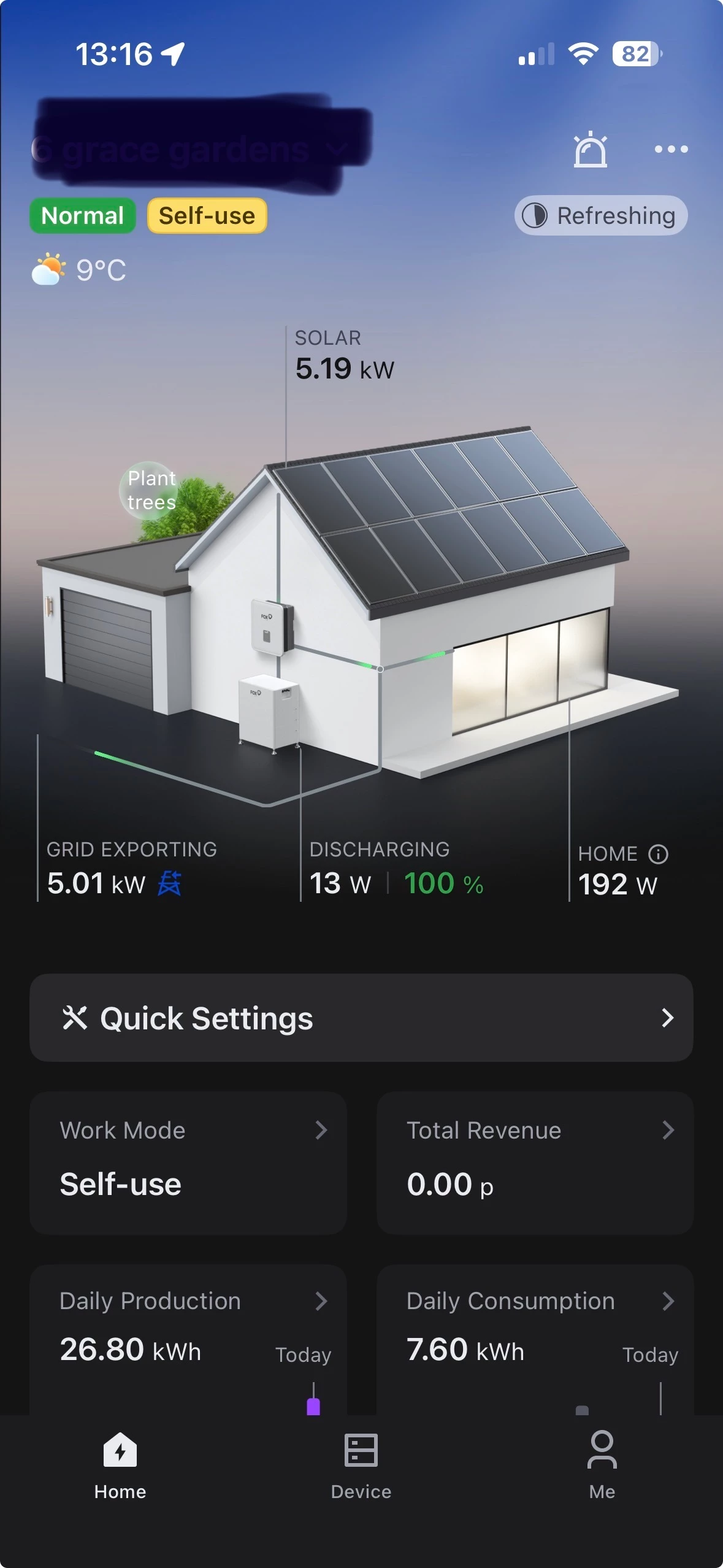


Best answer by Andy Miller

Updated on 02/04/26 by Ben_OVO

Spent all day trying everything yesterday and eventually gave up !


then this morning hey presto !!!


don’t know what I did but it’s working now !


thanks for all your help !


just need to work out how to insert my tarrif now !

BPLightlog said:


NB - I found the following on the Fox community pages ..

Troubleshooting Fox Cloud Solar System Battery Usage

If your Fox Cloud solar system is not utilizing the battery for power, follow these steps to diagnose and resolve the issue.

Check System Settings

  • Self Use Mode: Ensure your system is set to "Self Use" mode. This mode prioritizes using solar power for your home first, then charges the battery.
  • Battery Settings: Verify that the battery settings are configured correctly. The system should be set to charge the battery from solar only, without grid charging unless necessary.

Reboot the Inverter

If the settings are correct but the battery is still not discharging, a reboot of the inverter may be required. Follow these steps:

  1. Isolate the PV (solar panels).
  2. Isolate the AC (house power).
  3. Power off the battery and open the battery isolator.
  4. Wait for the inverter screen to go blank.
  5. Reverse the process: close the battery isolator, power on the batteries, close the AC isolator, and close the PV isolator.

After rebooting, allow a few minutes for the system to check and start up. The cloud data should begin updating shortly.

Additional Considerations

  • Battery State of Charge (SoC): Ensure that the battery's SoC is above the minimum threshold. If the battery is too low, the system may not discharge it to power the home.
  • Grid Charging: If the system is set to charge from the grid, it may prioritize that over discharging the battery. Adjust settings to prevent grid charging if you want to rely solely on solar and battery power.

17 replies

Andy MillerAuthorSolved
Rank 2
March 28, 2026

Updated on 02/04/26 by Ben_OVO

Spent all day trying everything yesterday and eventually gave up !


then this morning hey presto !!!


don’t know what I did but it’s working now !


thanks for all your help !


just need to work out how to insert my tarrif now !

BPLightlog said:


NB - I found the following on the Fox community pages ..

Troubleshooting Fox Cloud Solar System Battery Usage

If your Fox Cloud solar system is not utilizing the battery for power, follow these steps to diagnose and resolve the issue.

Check System Settings

  • Self Use Mode: Ensure your system is set to "Self Use" mode. This mode prioritizes using solar power for your home first, then charges the battery.
  • Battery Settings: Verify that the battery settings are configured correctly. The system should be set to charge the battery from solar only, without grid charging unless necessary.

Reboot the Inverter

If the settings are correct but the battery is still not discharging, a reboot of the inverter may be required. Follow these steps:

  1. Isolate the PV (solar panels).
  2. Isolate the AC (house power).
  3. Power off the battery and open the battery isolator.
  4. Wait for the inverter screen to go blank.
  5. Reverse the process: close the battery isolator, power on the batteries, close the AC isolator, and close the PV isolator.

After rebooting, allow a few minutes for the system to check and start up. The cloud data should begin updating shortly.

Additional Considerations

  • Battery State of Charge (SoC): Ensure that the battery's SoC is above the minimum threshold. If the battery is too low, the system may not discharge it to power the home.
  • Grid Charging: If the system is set to charge from the grid, it may prioritize that over discharging the battery. Adjust settings to prevent grid charging if you want to rely solely on solar and battery power.
Ben_OVO
Community Manager
Community Manager
March 30, 2026

@Andy Miller brilliant news! Glad it’s sorted for you. Just to let you know, I’ve added another badge to your profile to show your battery ownership.


Thanks so much for your help on this one ​@BPLightlog.

Powered by the Sun
Rank 2
March 30, 2026

Thanks for that ...one more thing sorry.


How do I make sure I am on the correct feed in tariff ?


It only started showing revenue since the app started working again. !


Regards 

Andy

BPLightlog
Super User
Super User
March 30, 2026

Thanks for that ...one more thing sorry.


How do I make sure I am on the correct feed in tariff ?


It only started showing revenue since the app started working again. !


Regards 

Andy

It’s not always possible in these type of apps - if a tariff selection is there, it’ll be in another of those settings. There is a section for ‘Plant set up or edit’ in that user guide I put a link to earlier

One quick check … do you mean Feed in Tariff (FIT) or maybe SEG (replaced FIT as an export tariff). Although suppliers also have their own versions - yours should show on your supplier plan page

Bring me Sunshine ~ E&E {Solar PV, Battery Storage, Hybrid EV, ASHP and Home Assistant automation}
Rank 2
April 23, 2026

I’m getting fed up of this always going wrong .

Things were going great and since the sun started shining been rattling out solar….until a few days ago and this has happened.

Saying daily production less than 1.5KWH (Was over 50) any ideas ?


BPLightlog
Super User
Super User
April 23, 2026

I think from all the problems you had before, there must be an issue with your system.

There are so many possibilities here, it’s difficult to pinpoint which might help.

If it were me, I’d be calling the installer to check and verify .. show them your screenshots . 
There should be a warranty on the system and its install.

Bring me Sunshine ~ E&E {Solar PV, Battery Storage, Hybrid EV, ASHP and Home Assistant automation}
Ben_OVO
Community Manager
Community Manager
April 24, 2026

Thanks for your help ​@BPLightlog - I completely agree.


Sorry ​@Andy Miller - this is a really frustrating one. Have a chat with the installer and, if you wouldn’t mind, please do keep us updated as to your progress.

Powered by the Sun

