Exciting news, everyone! Starting today, you can now use threaded replies in the OVO Community. This makes it easier to chat, ask for help, and follow conversations.
What’s changing & why you’ll love it
Ever wanted to respond to a specific point someone made earlier in a long topic without confusing the rest of the thread? Now you can.
Instead of all responses dropping into one long linear list, replies will now nest directly under the specific comment you’re responding to.
Better Context: Follow sub-conversations without losing the plot.
Closer Community: Chat directly with a specific member about their exact tip or question.
Cleaner Threads: Less clutter, making it faster to find the answers you need.
How it works: A quick guide
Replying to a thread is super straightforward:
1. Find the specific comment you want to respond to.
View of general user comment within a thread
2. Click the 'Reply' button located directly underneath that comment (rather than hitting the reply button now found directly under the original post/article).
Comment ‘Like’ and ‘Reply’ options
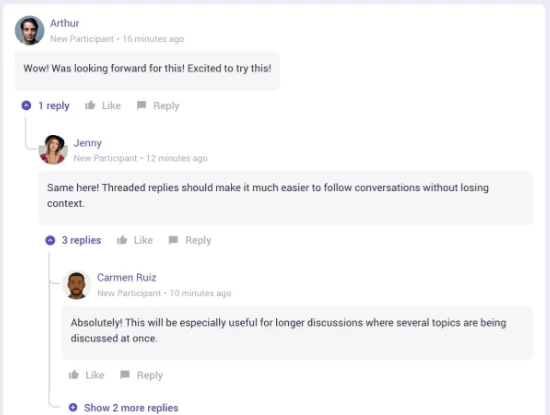
3. Type and post! Your message will appear neatly indented right below the original comment.
Example of how threaded replies will appear on the community
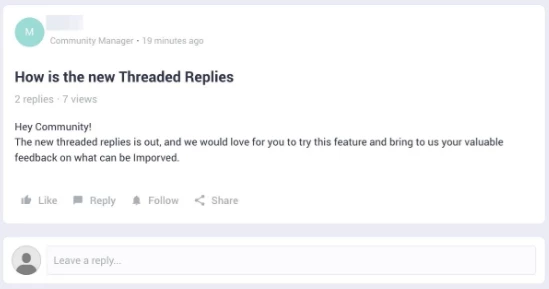
💡 Quick Tip: Want to address the main thread overall or start a brand-new point? Just use the main Reply box now found directly under the original post/article!
The general reply box will now remain under the original post instead at the bottom of the comment thread
We hope you’ll enjoy the new, modern and interactive feature - If you have any question, issues or suggestions, let us know in the comments below 👇
Something appears to have been broken in the change.
Clicking on this now takes me to the original post from 9-years ago:
And once I get there the page number and arrows to get to the latest page no longer appear, just a ‘show more’ button that you may need to click multiple times depending on the length of the thread (It took about 10-clicks on that thread to get to the post made an hour ago):
I find that if I click on the general article link it’ll take me to the OP and then I can scroll through historical comments.
However, if I click directly on the part you highlighted (message icon with 227 replies) it takes me to the latest reply in the thread.
Is this happening when via your hand held device or mobile as I know the experience changes between device used - however doing this myself I have the same outcome as I’ve mentioned above.
@Nukecad It might take some navigating for some older threads - but if you follow my instructions above and click the right places it should avoid you needing to navigate through all existing comments and take you straight to the lastest one.
I noticed a definite change in the behaviour of those links. I’m used to clicking on the n new link to get to the last (unread) post in the thread. The link to the right - the posting time/date - takes me to the last post in the thread, which may be below (or above!) other unread ones. It never crossed my mind that the black ‘no. of replies’ text to the left of the green link might be a link different from the green one. This will take some getting used to!
Noel | I have no official status; I'm just a volunteer who comes here to help other customers. My gear: Aclara SGM 1416-B Electricity-only E7 meter; Chameleon IHD3-PPMID-AAA | It may look as if I know what I’m talking about, but don’t let that fool you. |
Reducing my yearly fossil fuel usage with an EV (-900 litres petrol saving about £950/year), A2AHP (-8,700 kWh gas, cost neutral) and Timed Immersion heater (-1,500 kWh gas, £20/year more expensive but reducing as the gas price goes up)
This is a really useful improvement for keeping community conversations organized. Threaded replies make it much easier to follow specific discussions without losing track of important information or updates. I especially like the cleaner structure, since being able to follow individual replies and keep related details together can make it much easier to find useful information later. Features like this are great for keeping conversations, records, and updates easier to follow.
Is it just my old iPhone that prevents clicking on the Green number from jumping to the first unread comment ? It sometimes works ok but mostly just takes me to the initial comment.
Is it just my old iPhone that prevents clicking on the Green number from jumping to the first unread comment ? It sometimes works ok but mostly just takes me to the initial comment.
No it isn't just you, I already brought it up above. (And it's the same on Android phones and on computers.
Apparently the Gainsight software cannot fully support the threading that they have introduced. It's discussed in the posts above.
Sorry to drag this old complaint back but this Thread stuff just doesn’t work for me. I do look at the latest posts most days but I’m sure I’m missing a lot of the ‘previous’ posts unread by me, (ie indicated by the green number) as I can usually only locate the ‘last’ one. Today I can’t get to any previous post at all on the thread that has a ‘best answer’. Clicking on See in thread at the bottom of the best answer just gets me in a spiral. No other posts are showing.
Sorry to hear you’re not finding the ‘Threaded Replies’ easy to configure - it has been quite a large change (I imagine even more jarring for a tenured community that has gone most of it’s life without this change).
One manual way around this to make sure you’re only seeing the latest comments made on a post would be to head to the top of every thread and click on where it says ‘Oldest first’ and changing it to ‘Newest first’:
Here’s where you can find this filter
This way, the thread is positioned in the opposite direction where you can work backwards on any new engagement within each thread.
We’ll continue to monitor Gainsights updates and changes to ‘Threaded Replies’ as time goes on as I imagine they’re getting lots of similar concerns or questions.
there’s definitely something funny going on with the threads with Best answers, like the one I’ve linked above. The same weird behaviour is happening with:
I have been getting multiple notifications for every comment on it, though I don’t think I’ve taken part in the ‘conversation’ so I don’t know why. However if I click on the link in the notification that sends me to the best answer and again I can’t get out of the loop !!!
I agree with you @juliamc, @Nukecad. On my other forum I've switched off threaded (more accurately described as nested) replies because I'm missing out on what members have said. Sometimes I can't even find my own replies because I've had the thought I might have got it wrong/incomplete with hindsight and had to go into my own profile and track it down there.
I don't have anything against threaded/nested format itself. I would just like the ability to switch it off for me.
Reducing my yearly fossil fuel usage with an EV (-900 litres petrol saving about £950/year), A2AHP (-8,700 kWh gas, cost neutral) and Timed Immersion heater (-1,500 kWh gas, £20/year more expensive but reducing as the gas price goes up)
Need advice from other members?
Ask your question to our members - they have the experience you're looking for: