

Solved
How to stop Forum notification emails?
I keep getting emails from OVO for questions being asked on this site but there are no questions to answer - they are observations or rhetorical.

I keep getting emails from OVO for questions being asked on this site but there are no questions to answer - they are observations or rhetorical.
You can stop the emails if you want to.
Click on your user icon (the blue T) at the top-right of the page, and from the menu select Settings then in the page that opens select Notifications.
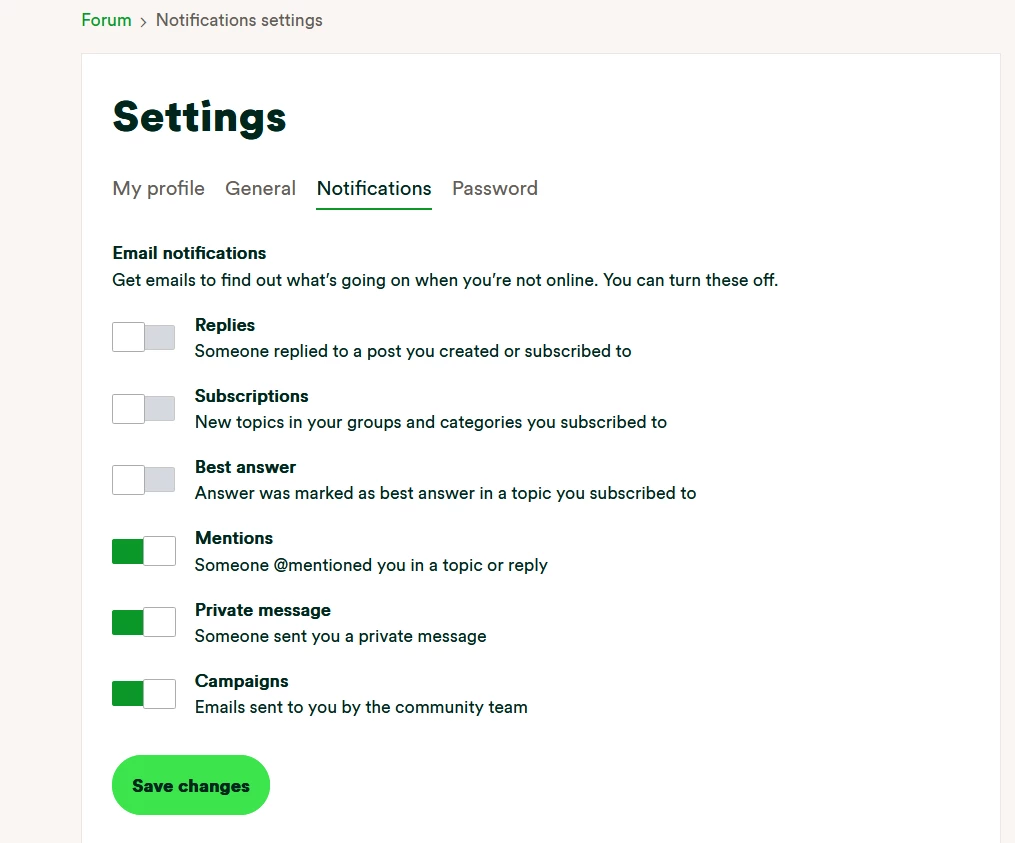
You will then see the following page where you can turn on and off what you get emails for.
I suspect from what you say that you have “Subscriptions” turned on which will email you everytime that someone replies to one of your subscribed ‘groups’, so you may want to turn that off.
No account yet? Create an account
Enter your E-mail address. We'll send you an e-mail with instructions to reset your password.
OVO Energy Ltd, Floor 5, Crescent, Temple Back, Redcliffe, BS1 6EZ, (Company no. 06890795) registered in England and Wales.
OVO (S) Gas Limited is registered in England and Wales (Company No. 02716495) at Floor 5, Crescent, Temple Back, Redcliffe, BS1 6EZ.
OVO (S) Gas Limited is part of OVO Group Ltd

