Rank 1
October 21, 2018
Solved

Why can't I login into my online account, app or send reset password email?

  • October 21, 2018
  • 60 replies
  • 9030 views

Having major issues: I registered on the forums fine yet when I enter my customer ID and click on First Time Logging In or Reset Password, nothing is being sent to the email address I registered with..... I know that the Email is correct because OVO send me account updates to it...

Best answer by Mw2870

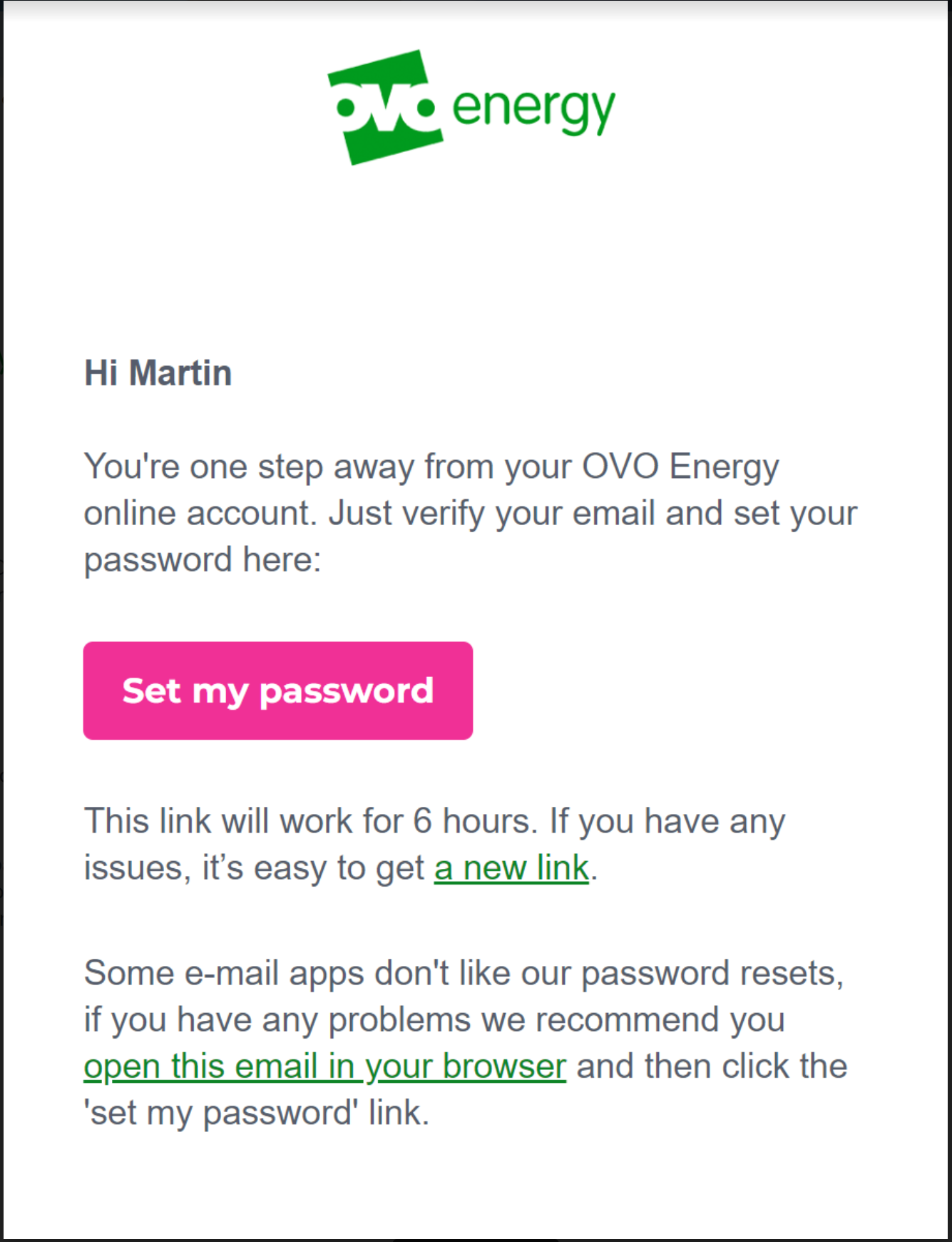
Updated 05/12/24 by Emmanuelle_OVO: Got issues registering or resetting a password for your OVO app or online account? We’ve made a recent change that might help:


OVO customers should ideally complete these steps in the web portal (online account) first. Once complete, these details will be copied over and available for use in the OVO App.


  • Select the option at the bottom of the reset email "open this email in your browser"


This should then allow you to follow the steps as prompted and login into your account.


Please note: This has been extensively tested and in the vast majority of cases will resolve the issue. However, there are still some issues with users of any Microsoft email domains such as Hotmail, Live, Outlook, Microsoft. We are working on the resolution for these customers and will update once a fix is made available.


There may still be issues for other customers with different email domains but these could be related to something else. Let us know in the comments below if you still have an issue resetting your password. Alternatively our Support team may be able to advise with this. 


60 replies

Mw2870
Newcomer
Mw2870Solved
Newcomer
October 22, 2018

Updated 05/12/24 by Emmanuelle_OVO: Got issues registering or resetting a password for your OVO app or online account? We’ve made a recent change that might help:


OVO customers should ideally complete these steps in the web portal (online account) first. Once complete, these details will be copied over and available for use in the OVO App.


  • Select the option at the bottom of the reset email "open this email in your browser"


This should then allow you to follow the steps as prompted and login into your account.


Please note: This has been extensively tested and in the vast majority of cases will resolve the issue. However, there are still some issues with users of any Microsoft email domains such as Hotmail, Live, Outlook, Microsoft. We are working on the resolution for these customers and will update once a fix is made available.


There may still be issues for other customers with different email domains but these could be related to something else. Let us know in the comments below if you still have an issue resetting your password. Alternatively our Support team may be able to advise with this. 


April 9, 2020

@thecat7457 I'm sure that the email address will have to be linked to her OVO account before you can access her pine account. Might be worth contacting customer service (who are still open) either via phone or email. It might have to be your mother who calls though due to data protection. They should be also be able to add you to the account also

NinjaGeek
Rank 12
Rank 12
April 9, 2020

Hello,

You should have needed to enter an email address when signing up to OVO. This will be the email addresses associated with your OVO ID. When signing into your account for the first time, you will need to click on forgotten password, enter the email address you used when signing up. You should receive an email requesting you to reset your password. Once you have done this, you should be able to sign into your account.

Please make sure to check your junk folder too as every email service spam filtering differ from one another. 

Any issues, please do respond back. We can try and help as much as we can before it requires a message on webchat via the Help Centre or a phone call on 0330 303 5063.

Thanks

Matt

Renewable energy + EV enthusiast
Rank 1
April 9, 2020

Hi Matt,

When my mother opened the account she didn’t have an email address. I have only just set it up for her.


Tim_OVO
OVO Staff
OVO Forum Legend
April 10, 2020

Hi @thecat7457 


Some good advise here from @ITGeek123 and @SR3 


Your mum will need to have an email address linked to her OVO account, and use this email address to login to My OVO and reset her passwords etc. 


If this needs sorting, drop us a Facebook message here


If it’s something else, check out the ‘best answer’ at the top of this topic for a full troubleshoot. 


Let us know what works!


Thanks,
Tim

Carbon neutral - we need a community to get there! My green tech: Aclara SGM 1411-B smart meter, Chameleon IHD6
NinjaGeek
Rank 12
Rank 12
April 10, 2020

Hey @thecat7457 

Are you able to register an email address to setup an OVO account?

Renewable energy + EV enthusiast
Nancy_OVO
Retired Moderator
Retired Moderator
April 20, 2020

Any updates on this, @thecat7457 ? Have you managed to get it sorted?

Your guiding light(bulb)
Transparent
Rank 20
Rank 20
April 20, 2020

I don’t know the answer to this for every combination of Operating System and Browser, @AlanB , but I’ve always been able to remove cookies for individual sites.

Although I don’t use Windows (of any variety), I would still expect this to be the case on whatever PC you’re using.

Error “400” is Page Not Found… which is a very common catch-all message.


Save energy... recycle electrons!
NinjaGeek
Rank 12
Rank 12
April 20, 2020

I don’t know the answer to this for every combination of Operating System and Browser, @AlanB , but I’ve always been able to remove cookies for individual sites.

Although I don’t use Windows (of any variety), I would still expect this to be the case on whatever PC you’re using.

Error “400” is Page Not Found… which is a very common catch-all message.


Best thing to try to see if it is a web browser issue is to try Incognito mode. Make sure the web browser is up to date too!

Renewable energy + EV enthusiast
Transparent
Rank 20
Rank 20
April 20, 2020

And are you going to explain the term “Incognito mode@ITGeek123 ?

We’ll have lots of readers trying to find that option on a menu otherwise! :face_palm_tone2:

Save energy... recycle electrons!