Best answer by BPLightlog

Updated on 14/03/25 by Ben_OVO


Manual here

https://www.smartme.co.uk/documents/5236UserManualVersion1_8.pdf

in particular it says 


11 replies

BPLightlog
Super User
Super User
May 4, 2023

Updated on 14/03/25 by Ben_OVO


Manual here

https://www.smartme.co.uk/documents/5236UserManualVersion1_8.pdf

in particular it says 


Bring me Sunshine ~ E&E {Solar PV, Battery Storage, Hybrid EV, ASHP and Home Assistant automation}
ColinGAuthor
Rank 3
May 4, 2023

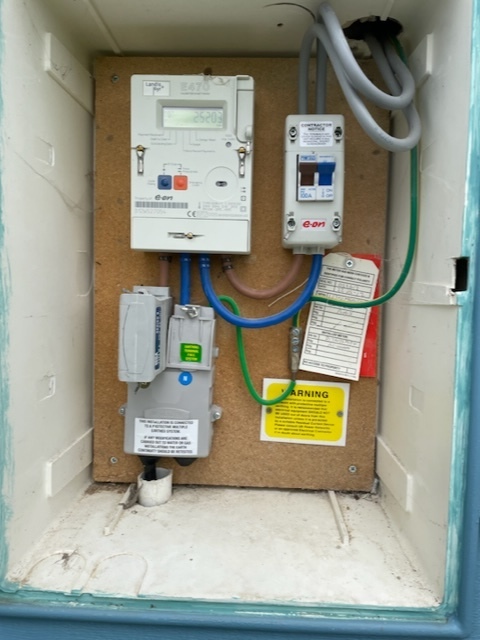
Thanks for that. Looks like it is a smets 1, given that it was installed in 2012. It also has an inbuilt GSM modem. The unit is not connected to a network and not sure how one gets that done. It is also strange that other models of the E470 (smets 1 and 2) are shown with separate and clearly evident comms hubs. It is all a bit of a mystery that I wish I could unravel.

BPLightlog
Super User
Super User
May 4, 2023

Not sure what this was for but I see continued research into GSM modem and smart meters designed to allow direct connection via mobile apps. 
The UK’s move to use a more secure network might have precluded its wider use

Bring me Sunshine ~ E&E {Solar PV, Battery Storage, Hybrid EV, ASHP and Home Assistant automation}
ColinGAuthor
Rank 3
May 4, 2023

You may well be on to something, Think I’ll give up and find a supplier who will swap it out for a smets2

Blastoise186
Super User
Super User
May 7, 2023

While you’re here @ColinG …

Can I use your image for my L+G guide? This is the first time we’ve seen that particular E470 variant and I’d like to document it so that we can cover this edge case. I like to ask permission first where possible!

My current guide is at this thread if you’d like to take a look.

But yeah, I can confirm it’s neither SMETS1 or SMETS2 . It looks like one of those legacy pre-SMETS era units for definite, back when it really was a wild west! And you can probably see once again why we hate the naming conventions of Landis+Gyr...

Securing energy by zapping security bugs... For that is The Blastoise Way! Remember, I'm just like you - AI Powered Evil Geniuses aren't Staff!
ColinGAuthor
Rank 3
May 7, 2023

Please do. The image degrades a bit when posted so I could send you a better copy if you wish. If you find out how to access the exported electricity register please let me know. Its currently got me beat :-)

The unit was installed in 2012 in what was then a newbuild. It certainly connects to  a network (the signal strength indicator is there).

Blastoise186
Super User
Super User
May 8, 2023

Thanks! If you send it over to forum@ovoenergy.com the forum moderators can get it over to me. They can also edit my post, so they can upload directly too. :)

In return, sure thing. I’ll try to do some research into that for you.

Securing energy by zapping security bugs... For that is The Blastoise Way! Remember, I'm just like you - AI Powered Evil Geniuses aren't Staff!
Blastoise186
Super User
Super User
May 9, 2023

Ok I’m back. Unfortunately, I can hardly find anything on this meter or any like it. Seems no-one really documented that pre-SMETS version. But there’s one more thing I can try…

Bear with me, I might be able to ask for help on this one.

Securing energy by zapping security bugs... For that is The Blastoise Way! Remember, I'm just like you - AI Powered Evil Geniuses aren't Staff!
ColinGAuthor
Rank 3
May 18, 2023

Thanks! I did try going direct to L+G but they “helpfully” told me they only talk to installers and not the end user -I should take the question to my supplier therefore!.

Blastoise186
Super User
Super User
May 18, 2023

Yeah, I’ve tried that before. I even tried the “I’m a forum volunteer who helps other people out” trick which usually works, but they still turned me away.

Securing energy by zapping security bugs... For that is The Blastoise Way! Remember, I'm just like you - AI Powered Evil Geniuses aren't Staff!