Rank 1
December 3, 2024
Solved

Hypervolt Home 3 Pro and Taycan not charging

  • December 3, 2024
  • 12 replies
  • 403 views

Ovo, Hypervolt Home 3 Pro and Taycan not charging


I have a 2022 Taycan, Ovo Charge Anytime and Hypervolt Home Pro 3.

Until recently, I used the Ovo App to control the schedule and set charging limit, such as 75% max.  This mainly worked fine until the car / Porsche / Ovo had a connectivity issue and it wouldn’t charge (which happened 3 times).

I have an MG4 arriving this weekend and need the Charge Anytime tariff to work with both cars.  However, Ovo hasn’t built an MG integration.

Several days ago Ovo advised that I delete the Ovo app, install it again and then go through the Hypervolt integration route (which didn’t exist earlier this year when I first configured the app).  Which I have done.  In theory, this should be a more stable process because the Hypervolt and Ovo communicate using my home wifi so don’t rely on the Taycan’s 4G (which isn’t great).

On my first charge attempt last night, it didn’t charge.

However, this morning I could force an “urgent” charge using the Ovo app and that did work.


This is my configuration / settings:

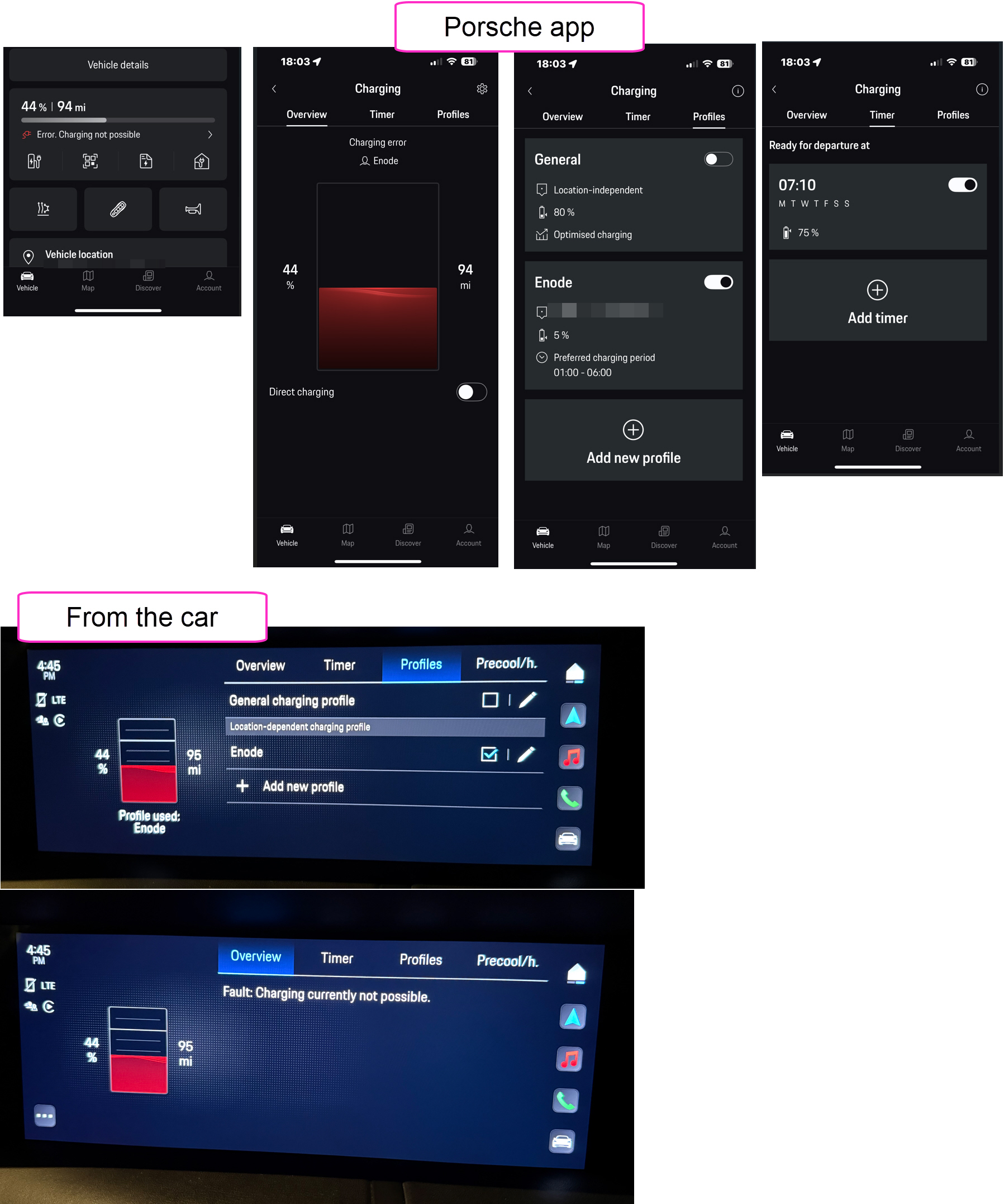
  1. Taycan app
    1. Charging timer is set for a max charge of 75%.
      1. (Since integrating Ovo and Hypervolt apps, the Ovo app can no longer set a max charge % and this can’t be done through the Hypervolt either.)
    2. “Ready by” 07:10.
    3. Taycan app shows the profile is “Enode”.
    4. The Taycan app also shows an error, “Error. Charging not possible”!
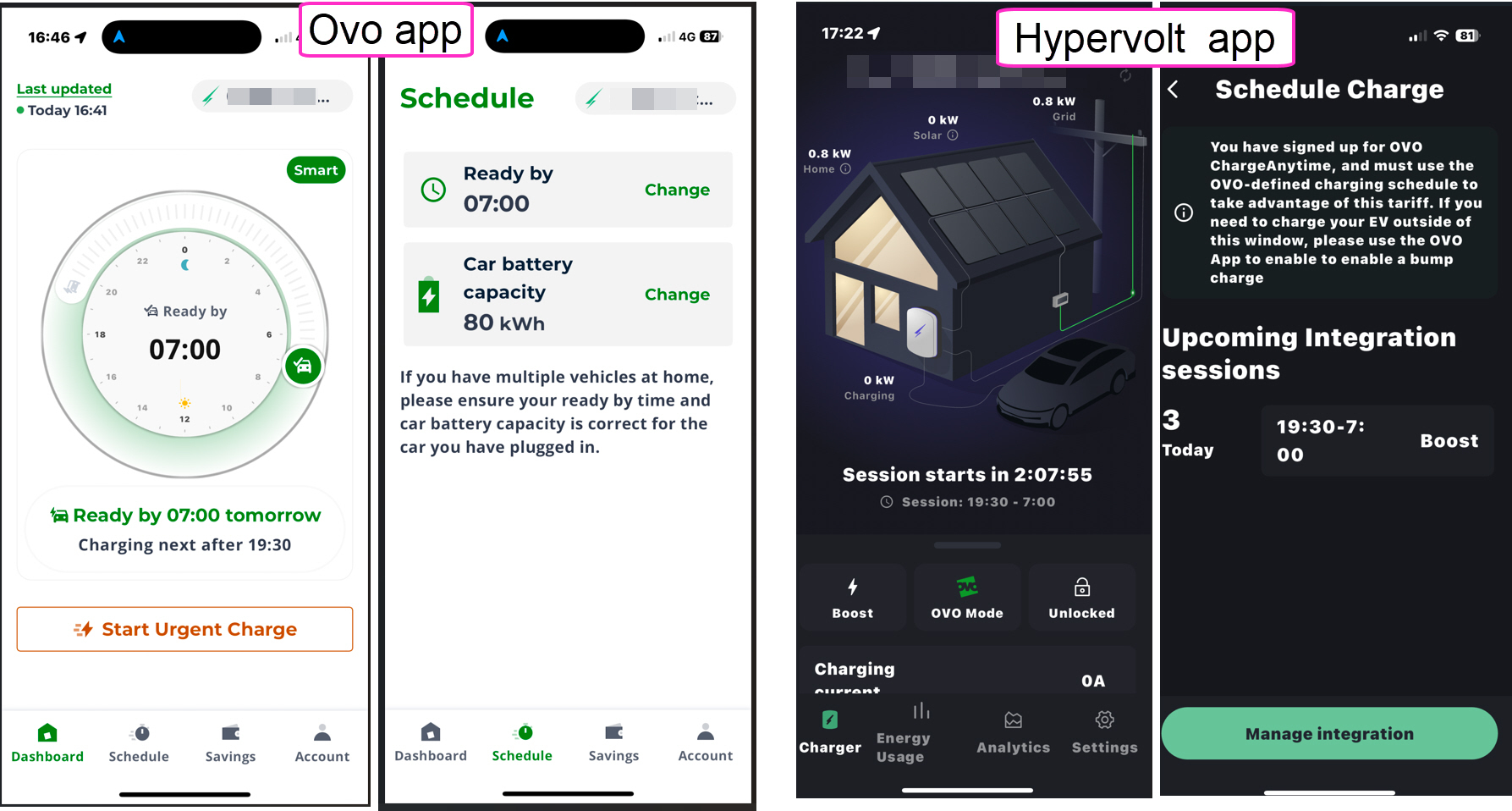
  2. The Hypervolt app shows “session starts at 19:30”
    1. (It’s now 17:50, so I’ll see what happens.  I don’t have high hopes.)
  3. Hypervolt app is in “Ovo mode”
    1. Which states that charger is being controlled through the Ovo app.  Great - this is which is what I expect to see.
  4. The Ovo app
    1. Shows it’s integrated with the Hypervolt.
    2. Shows the “ready by” schedule set at 07:10.
    3. States “next charging after 20:00”
      1. Odd that it’s not 19:30 as shown in the Hypervolt app!
    4. Schedule battery capacity is set to 80 kWh


Any suggestions on what I’m doing wrong?


Best answer by Abby_OVO

U​​pdated on 30/07/25 by Abby_OVO


Hey ​@EV is not easy 


Sorry to hear about the issues you’ve been having with Charge Anytime.


I’m really glad to see one of our volunteers, Blastoise186, has already stopped by with some really helpful advice as the team should be able to help with this.


How to get in contact with the Charge Anytime team

  • Call 0330 175 9678 (Option 1 new customers/option 2 existing customers) 

  • Email via chargeanytime@ovo.com

  • Webchat, click the link then the green chat icon at the bottom right of the page


Keep us updated with how you get on with this.

12 replies

Blastoise186
Super User
Super User
December 3, 2024

Howdy ​@EV is not easy !

First thing I’d say is get rid of that Enode profile that the Taycan is showing - I suspect that’s half the problem. If you delete it completely - or failing that, just disable it - you’ll have an easier time. Also, nuke the charge schedule from the Taycan too - that will also interfere if you leave it active. You want to set this up ONLY via the Charge Anytime app. You can and should still set the charge limit via the Taycan though.

Let me know if that helps!

Securing energy by zapping security bugs... For that is The Blastoise Way! Remember, I'm just like you - AI Powered Evil Geniuses aren't Staff!
Rank 1
December 3, 2024

Hi.
Thanks for your sugggestions.
The “Enode” profile is set by the Ovo app and I have no control over this.

The Taycan profile is required to set the max charge rate.  (1) This is how Ovo support told me to configure it because there is no way to control the max charge in the Ovo app once the Ovo and Hypervolt apps have been “connected”.  And (2) I don’t want the battery going to 100% each time I charge it because this will significantly shorten / degrades the battery life.

Blastoise186
Super User
Super User
December 3, 2024

Gotcha. I’d say have a word with the team in the morning on 0330 175 9678 Option 2 - they should be able to fix all of this.

Securing energy by zapping security bugs... For that is The Blastoise Way! Remember, I'm just like you - AI Powered Evil Geniuses aren't Staff!
Rank 1
December 3, 2024

I think I have misunderstood - how do I set a charge limit in the Taycan if you suggest I delete the Taycan’s schedule?
This could the the solution🤞

Blastoise186
Super User
Super User
December 3, 2024

Yup. The % limit can be set in the Taycan no problem - it’s just the times that need to be turned off.

Sounds like the Taycan still needs to be disconnected from Enode - the Charge Anytime team should be able to help with that.

Securing energy by zapping security bugs... For that is The Blastoise Way! Remember, I'm just like you - AI Powered Evil Geniuses aren't Staff!
Abby_OVO
Community Manager
Abby_OVOSolved
Community Manager
December 4, 2024

U​​pdated on 30/07/25 by Abby_OVO


Hey ​@EV is not easy 


Sorry to hear about the issues you’ve been having with Charge Anytime.


I’m really glad to see one of our volunteers, Blastoise186, has already stopped by with some really helpful advice as the team should be able to help with this.


How to get in contact with the Charge Anytime team

  • Call 0330 175 9678 (Option 1 new customers/option 2 existing customers) 

  • Email via chargeanytime@ovo.com

  • Webchat, click the link then the green chat icon at the bottom right of the page


Keep us updated with how you get on with this.

Currently Playing: She's Electric
Rank 1
December 11, 2024

Hi,
I cancelled with Ovo mid last week and was on Octopus by Sat.
So far, going well.


The whole EV industry is being let down by poor quality software.  Which is somewhat understandable given the speed of change in what is a new industry.  Bit more investment is needed if you want more EV customers who are not early adopters.


Rank 2
August 21, 2025

Hi all, 


I plugged my car in yesterday afternoon around 4pm and scheduled a charge via the Charge Anytime app, to be ready by 8am this morning. I ensured the charger wasn’t locked in the Hypervolt app and it all seemed fine. However I woke up to find it hadn’t begun charging. 


If I set the car to be ready in 5 or 6 hours from now then it starts charging almost immediately whereas when I scheduled for the following morning it went into a “Planning your next charge’ status on the Charge Anytime app.  


I have a Tesla Model Y and a Hypervolt Home Pro 3. I also have solar panels on my property too. 


Could anyone help me understand the correct procedure to successfully schedule an overnight charge please? I’ve contacted Ovo support and they’ve checked and told me no errors were reported at their end and to keep an eye on it, in case it happens again.


Thanks in advance. 

Chris_OVO
Community Manager
Community Manager
August 22, 2025

Hey ​@sb123


I’m really sorry to hear that you’ve been having trouble scheduling a charge! I’ve heard from others that Hypervolts have faced a few hiccups, especially with urgent charges, but not so much with planned ones. Is this the first time you've run into an issue with scheduling a charge, or has it happened before?


I’ve included a helpful article below that has more information about scheduled charges. If that doesn’t help, don’t worry! You can reach out to our friendly Charge Anytime team, who will be happy to walk you through it step by step.


I hope this helps!

Renewable energy jokes never get old.
Rank 2
August 22, 2025

Thanks Chris, appreciate the reply. 


Yes it’s the first time I’ve had an issue with a planned charge but to be fair I don’t tend to plan them very often. I normally charge during the day when the sun is out to take advantage of having my solar panels and diverting excess solar into the car, so I’m normally awake and can keep an eye on it to make sure it begins charging. 

I’ll have a read of the articles and make sure I’m not missing a step. Thanks again

EDIT:
Could you confirm whether the steps I’m following are correct please? 

  1. Plug the car in
  2. In the CA app, I set the desired ready by time
  3. In the Hypervolt app, I check the charger isn’t locked and make a mental note of the “Mode” being shown i.e. boost, eco or solar. 
  4. If I’m intending to use excess solar from my panels, I check to see the car begins charging (it usually does as I set a relatively short ready by time i.e 5 or 6 hours from now)
  5. If it’s an overnight charge, I just leave the apps open in the background on my phone and that’s that.