Best answer by Jeffus

Updated on 06/01/25 by Abby_OVO

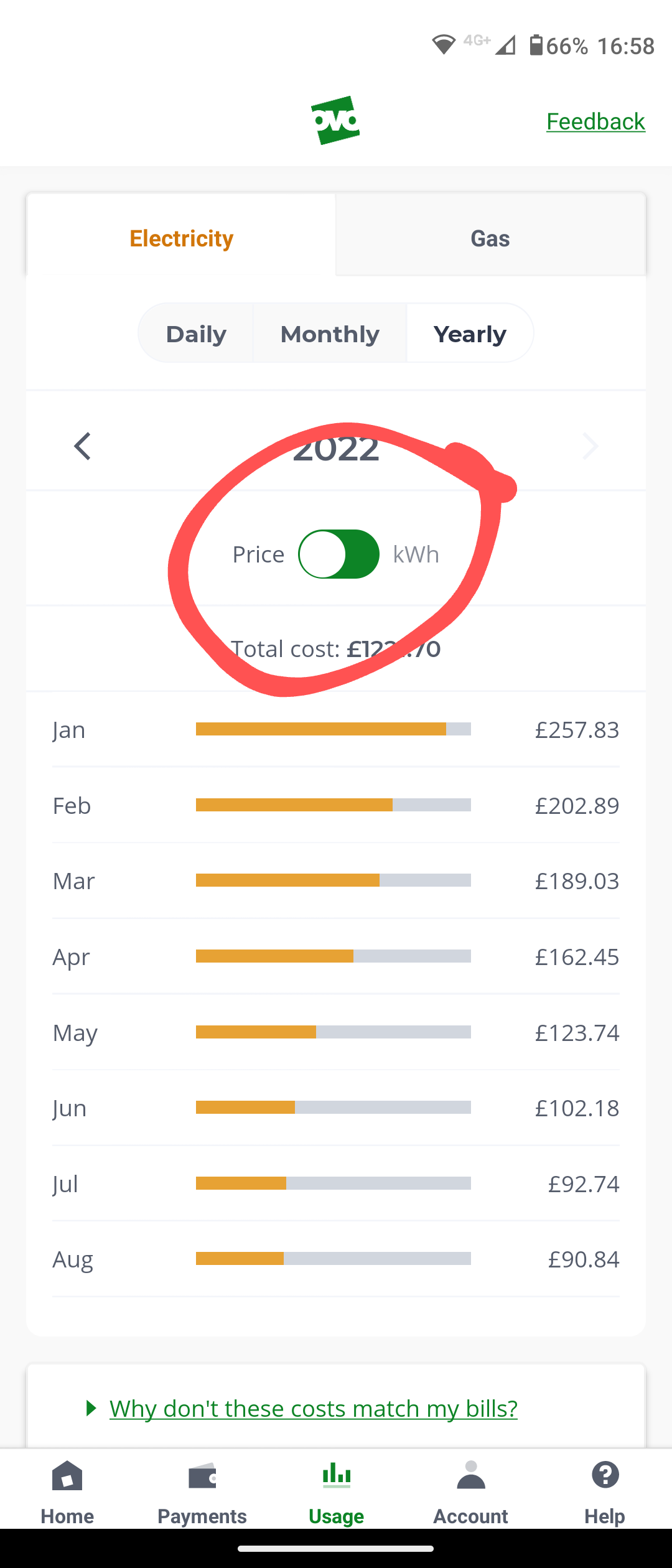
There's a slider on the middle of the usage page that takes you from kWh to £. I've circled it on this picture.


@Coolguy

Costs are only available on the Monthly and Yearly pages. 

If you'd like to see costs on the Daily page then vote for this feature

14 replies

M.isterW
Rank 6
Rank 6
August 27, 2022

There's a slider on the middle of the usage page that takes you from kWh to £. I've circled it on this picture.


1992 4 bed detached house. Solar PV + battery, Zappi EV charger, Mitsubishi Ecodan ASHP and i-life2 fan assisted radiators.... No gas 😊
Blastoise186
Super User
Super User
August 27, 2022

Hey @Coolguy ,

You can indeed do this, but you’ll need to use the Monthly and Yearly tabs rather than the Daily tab. Daily shows half-hourly data, Monthly shows daily data and Yearly shows monthly data. Please make sure your smart meters are in either Daily or Half-Hourly mode to get the best results. If you have one in Monthly mode or don’t have one at all, then you won’t be able to take advantage of your usage data.

Securing energy by zapping security bugs... For that is The Blastoise Way! Remember, I'm just like you - AI Powered Evil Geniuses aren't Staff!
Jeffus
Rank 20
JeffusSolved
Rank 20
August 27, 2022

Updated on 06/01/25 by Abby_OVO

There's a slider on the middle of the usage page that takes you from kWh to £. I've circled it on this picture.


@Coolguy

Costs are only available on the Monthly and Yearly pages. 

If you'd like to see costs on the Daily page then vote for this feature

CoolguyAuthor
Rank 1
August 31, 2022

Thanks for all your replies. I used the slider before and it worked to show the cost but it doesn't work now, it just says 'we can't show you this information at the moment ' I don't know why

Blastoise186
Super User
Super User
August 31, 2022

Ohh ok. It could be a temporary outage. Keep an eye on things for now and let us know if it doesn’t recover within a few days.

Securing energy by zapping security bugs... For that is The Blastoise Way! Remember, I'm just like you - AI Powered Evil Geniuses aren't Staff!
Newcomer
September 5, 2022

This option has now been removed from the app??


What for as I don't understand KWH and like to track my bill by how much we spend??

Blastoise186
Super User
Super User
September 5, 2022

This option has now been removed from the app??


What for as I don't understand KWH and like to track my bill by how much we spend??

Hi @Aarondent ,

You can still find the data you’re after in the app, as long as you’re on the Monthly or Yearly tab and flip the toggle to Cost.

Hope this helps answer your worry!

Securing energy by zapping security bugs... For that is The Blastoise Way! Remember, I'm just like you - AI Powered Evil Geniuses aren't Staff!
Newcomer
September 9, 2022

HI,

I'm sorry but at the moment you would be incorrect as the option has been removed from the app so you can now only see your bill in KWH.


Blastoise186
Super User
Super User
September 9, 2022

You need to check Payments > See Bills and Charges to find the full costs. I’m currently checking my app to see if I can reproduce this. Please bear with me.

Securing energy by zapping security bugs... For that is The Blastoise Way! Remember, I'm just like you - AI Powered Evil Geniuses aren't Staff!
Blastoise186
Super User
Super User
September 9, 2022

I’ve just tested this and it’s working fine for me. Please could you go to Account > App Info for me and tell me what you see there?

Securing energy by zapping security bugs... For that is The Blastoise Way! Remember, I'm just like you - AI Powered Evil Geniuses aren't Staff!