Rank 1
March 13, 2024
Solved

Generation meter reading needed- Secure meter

  • March 13, 2024
  • 9 replies
  • 648 views

I have a secure 100 liberty meter and I have submitted the export reading on the solar panels but not the generation reading does anyone know where I get that figure from the liberty meter?

Best answer by EverythingNeedsAUserName

Updated on 25/03/25 by Abby_OVO


@ClaireDL on the liberty 100, press 9. The display lights up and you are shown

IMP KWH

123456

EXP KWH

123456

It is this second number that you need. I find it helpful to take a picture with my phone as the display doesn't last long.


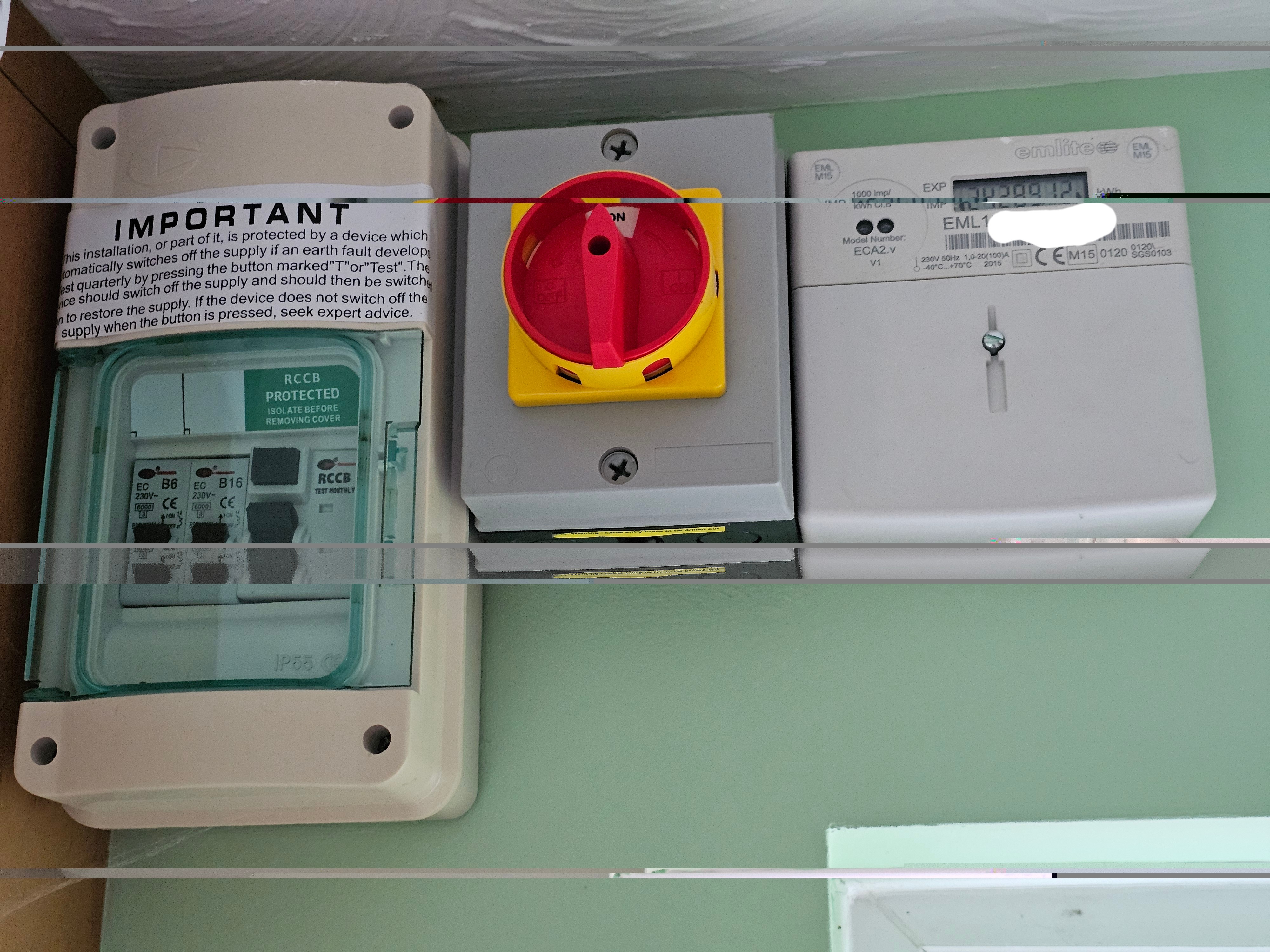
You also need the generation meter for FiT. Mine looks like this, it is near the fuse box /consumer unit. 


9 replies

BPLightlog
Super User
Super User
March 14, 2024

Hi @ClaireDL , your smart meter does not record solar generation. There should be a separate meter for that. 

Bring me Sunshine ~ E&E {Solar PV, Battery Storage, Hybrid EV, ASHP and Home Assistant automation}
ClaireDLAuthor
Rank 1
March 14, 2024

Thanks but I've only got the one meter

BPLightlog
Super User
Super User
March 14, 2024

Thanks but I've only got the one meter

Then unless there’s something on the solar system itself, you can’t get a generation reading. Smart Meters like the Liberty don’t record solar generation. 
It’s unusual for there not to be a generation meter .. can you see the solar inverter? 
This guide shows how a typical set up works. Note the generation meter and separate utility meter

Bring me Sunshine ~ E&E {Solar PV, Battery Storage, Hybrid EV, ASHP and Home Assistant automation}
Tim_OVO
OVO Staff
OVO Forum Legend
March 15, 2024

@ClaireDL if you have a smart meter, you’re able to report the exact amount of energy you export. That means you don’t need to know the amount you generated. 


A generation meter reading is used for FIT customers who don’t have a smart meter and need to know how much they generate so that half of it gets assumed (often to your advantage) as an amount exported. 


@BPLightlog or @EverythingNeedsAUserName will correct me if I'm wrong but I’m pretty sure you’re good with just that export reading. More info on FIT here

Carbon neutral - we need a community to get there! My green tech: Aclara SGM 1411-B smart meter, Chameleon IHD6
Blastoise186
Super User
Super User
March 15, 2024

Actually, if memory serves FiT requires both Generation and Export readings. You won’t find the Generation reading on most Smart Meters - you need to look for another meter elsewhere in the property for that.

For SEG, it’s Export readings only. :)

Securing energy by zapping security bugs... For that is The Blastoise Way! Remember, I'm just like you - AI Powered Evil Geniuses aren't Staff!
Rank 7
March 15, 2024

I've got a first generation smart Meter, which means that I need to report not only the generation shown by my solar panel meter but also the export kilowatt hours from a manual Reading from my smart Meter!

3.99kW solar 2015, 12kWh batteries 2022, Tado.
Rank 7
March 15, 2024

Updated on 25/03/25 by Abby_OVO


@ClaireDL on the liberty 100, press 9. The display lights up and you are shown

IMP KWH

123456

EXP KWH

123456

It is this second number that you need. I find it helpful to take a picture with my phone as the display doesn't last long.


You also need the generation meter for FiT. Mine looks like this, it is near the fuse box /consumer unit. 


3.99kW solar 2015, 12kWh batteries 2022, Tado.
BPLightlog
Super User
Super User
March 15, 2024

@ClaireDL , if this is for SEG as Tim mentions you only need an export figure which you know how to get. 
If this is for FIT, there should be a generation meter on the system unless it has been installed wrongly. FIT system get payment for generation as well as export - export can be either deemed or recorded, depending on your metering. With an export register, you would use the measured value

Bring me Sunshine ~ E&E {Solar PV, Battery Storage, Hybrid EV, ASHP and Home Assistant automation}
Rank 2
March 15, 2024

@ClaireDL on the liberty 100, press 9. The display lights up and you are shown

IMP KWH

123456

EXP KWH

123456

It is this second number that you need. I find it helpful to take a picture with my phone as the display doesn't last long.


You also need the generation meter for FiT. Mine looks like this, it is near the fuse box /consumer unit. 


Our generation meter is nowhere near our fuse box or consumer unit. It is next to the Solar PV inverter … which is in the loft. Fortunately we have a SEG account, so it is not needed!