


Solved
New smart meter display shows a new message, how do I open it?
I got a smart meter fitted today but it will not let me navigate with any of the buttons, displaying say there’s a new message but can’t read it.

I got a smart meter fitted today but it will not let me navigate with any of the buttons, displaying say there’s a new message but can’t read it.
Updated on 19/12/25 by Abby_OVO
If it’s the IHD that I think it is, ie a GEO Trio touch button that looks similar to this:
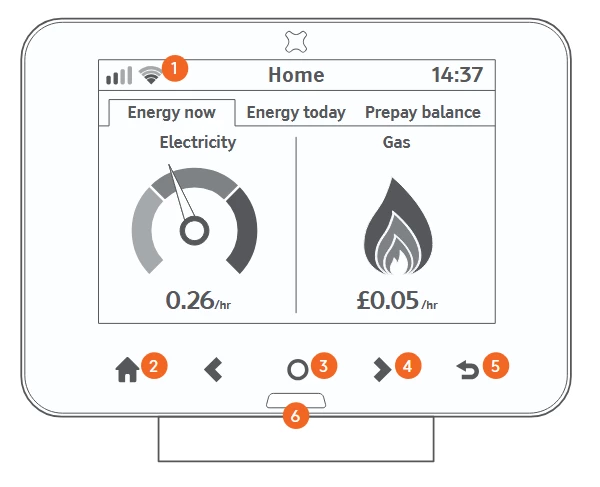
The picture above is from the user manual which you can download here:
If yours isn’t that type then could you post a photo of it so we can see just which make and model it is?
Hey
Nice to hear about your newly fitted smart meter!
Nukecad has left some really helpful advice here already, have you been able to take a look at those steps? Without seeing a photo of the device we can only make best guesses as to what display you’re using. I’ve linked below to a few other topics which might also be helpful here:
Do let us know how you’re getting on.
No account yet? Create an account
Enter your E-mail address. We'll send you an e-mail with instructions to reset your password.
OVO Energy Ltd, Floor 5, Crescent, Temple Back, Redcliffe, BS1 6EZ, (Company no. 06890795) registered in England and Wales.
OVO (S) Gas Limited is registered in England and Wales (Company No. 02716495) at Floor 5, Crescent, Temple Back, Redcliffe, BS1 6EZ.
OVO (S) Gas Limited is part of OVO Group Ltd

