Question

IHD. not working after new meter installed

  • July 19, 2026
  • 12 replies
  • 114 views

Good morning… last week my electricity meter was updated. When completed the engineer set up an IHD 

which was working. I asked he could instead set up my own chameleon IHD7. He suggested I should ring in with the GUID number and have it initialised.

This was done and their supplied IHD3 was turned off.

Needless to say they could not initialise my device which has worked faultlessly for several years.I am now looking at two devices which are dead ducks. I have reported this and their answer was to be patient and if it is still not working in 28 days time report it again. I do not wish to raise a complaint yet but I am becoming very frustrated.

briiow.

12 replies

Blastoise186
Super User
Forum|alt.badge.img+9

Hi ​@briiow ,

I have to be honest… This has always been a sticky one…

It sounds to me as if the Comms Hub was swapped out without doing Trust Centre Swap-Out and/or without unpairing the IHD7 first, meaning the keys the IHD7 are paired with went away with the engineer. It is, however, important to note that if you got that IHD7 off of eBay, it’s not supported. I’m not sure if you did or not, but it’s something I like to make sure folks are aware of just in case. If you got it directly from OVO or another supplier, you can get it re-paired with the new meter.

However, it can be a slow process as it sometimes requires back office work which is I suspect what’s happening here. Keep an eye out for now - but don’t be afraid to complain if you need to.


Ben_OVO
Community Manager
Forum|alt.badge.img+4
  • Community Manager
  • July 20, 2026

Morning ​@briiow and a warm welcome to the OVO Forum community, I hope you’re well and had a good weekend.


I’m sorry to hear about the IHD issues you’re experiencing. It’s a somewhat technical process on our side to switch from one IHD to another, and hopefully it’ll start working soon. Please try turning it off and then on again, and putting it as close to the electricity meter as possible.


It might be that you’ll need to get back in touch with our Support Team to ask them to try again. We don’t have access to customer accounts on the Forum, so I can’t check to see whether the process has been carried out correctly or not. Please let us know how you get on with this, and you can find our complaints process here if necessary.


Whilst you’re waiting for the IHD to be paired, we’d recommend checking your online account / app usage pages:


Please keep us updated as to how you get on - I hope this can be fixed ASAP for you.


  • Author
  • July 24, 2026

Good evening,

Good evening,

As of this evening Friday 24th of July I still have two non-working monitors. I did receive a reply back from Evo saying that because one of them did not belong to OVO they could not look at it.

The tone  suggested that my IHD7 is not their  property and therefore they cannot assist in getting it working.

I have been in touch with IVIE and they very kindly Looked at my monitor remotely and  assured me there was nothing wrong with it but in order to be certain they’ve done a factory reset on it and are convinced that OVO should and could reinstate it.

Much to the credit of the people at IVIE they have also said that if the matter cannot be resolved, they will send me a replacement which I can then try again to get integrated into the system

As I said in my earlier post, I’ve had it for around five years and it has worked for me in that time with the old meter. I cannot seem to get through to them that if they cannot get my IHD working, why can they not get the one that the engineer left working because that is also as dead as a dodo. The whole matter is getting very frustrating.

Finally, can I ask is it possible that they could have completely “killed” The two monitors in my homeShould I expect to be able to get my own or even the one they’ve given me working without replacement replacements?

Thank you for your time. Look forward to your answer.


  • Author
  • July 24, 2026

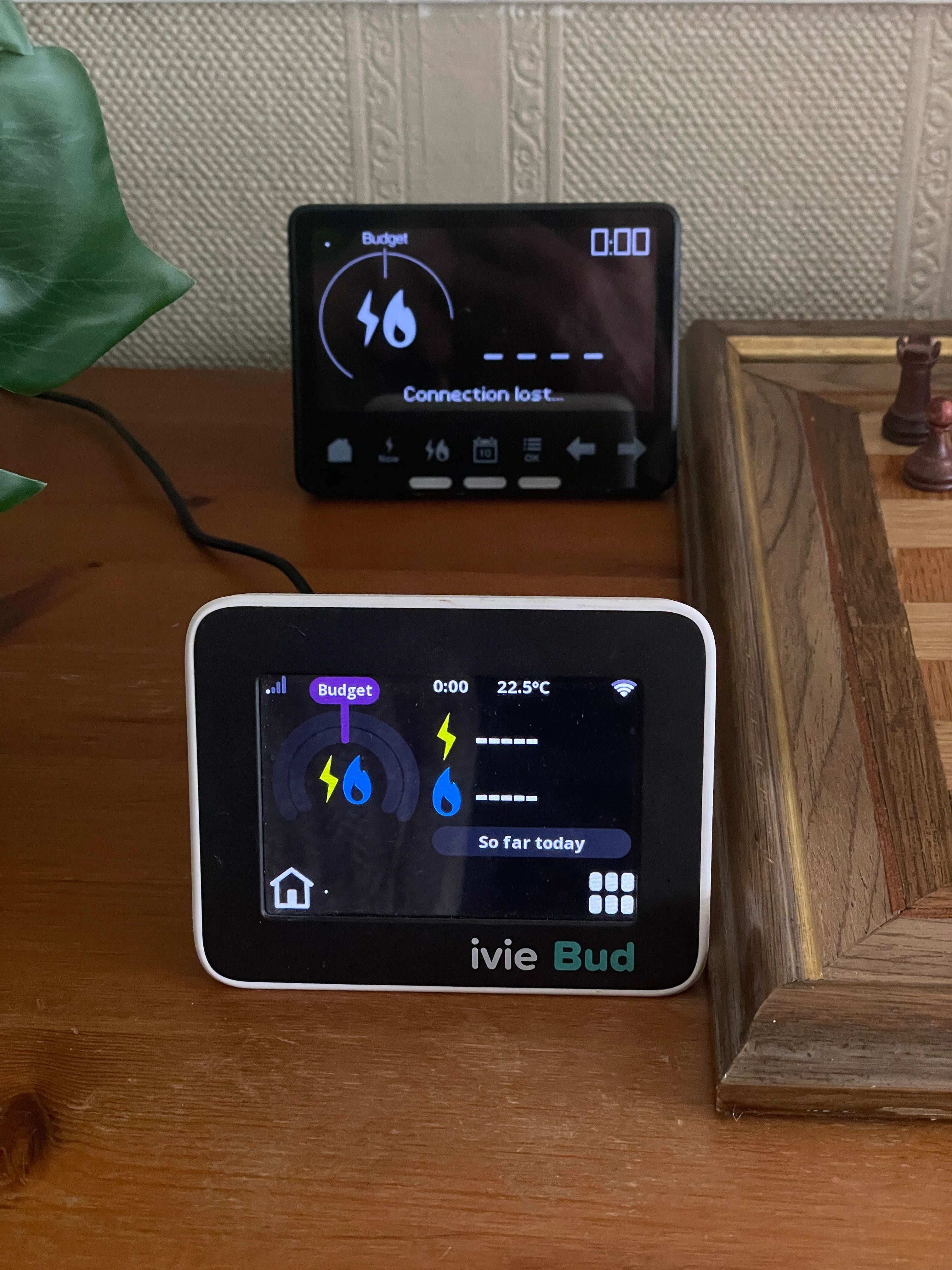
Occasionally they switch off and back on of their own accord, but this is how they end up after a couple of seconds.

It is a rollercoaster ride as I think this time it’s all gonna connect and then they plunge back down and I get so disappointed when nothing happens!!


Firedog
Super User
Forum|alt.badge.img+8
  • Super User
  • July 24, 2026

Strange that the Ivie Bud has a strong signal while the IHD3 next to it apparently has none. It looks rather as if the IHD3 needs re-pairing, which Support should be able to do.


Blastoise186
Super User
Forum|alt.badge.img+9
  • Super User
  • July 24, 2026

Ahh ha… That makes FAR more sense!

You have an ivie Bud, for which OVO isn’t responsible for supporting and can’t pair to your meters - that has to be done by Chameleon Technologies. the IHD3 however, can be resolved by OVO.

Please contact Chameleon via https://ivie.co.uk/contact-us/ as they’ll need to dig into this one.


Blastoise186
Super User
Forum|alt.badge.img+9
  • Super User
  • July 24, 2026

Strange that the Ivie Bud has a strong signal while the IHD3 next to it apparently has none. It looks rather as if the IHD3 needs re-pairing, which Support should be able to do.

That’ll be the Wi-Fi :P

HAN is on the left, same as the IHD6/7


  • Author
  • July 25, 2026

Good morning Blastoise.

I’ve just read your last comments with great interest. I have indeed been in touch with Chameleon Technologies (this is whom I purchased the moniter from brand-new). They have had a look remotely at my IHD7. After investigating they could not find any problems with it. Just to ensure everything would work they did a factory reset..

Also they have offered to send me a replacement, even though my original one must be at least five years old.

So now armed with this information should I push further to try to get this monitor reinstated as I am now confident it is not the monitor that is the problem .

I appreciate that OVO want to solve the problem but I need to be asking the right questions to the right people. Thank you.


Firedog
Super User
Forum|alt.badge.img+8
  • Super User
  • July 25, 2026

Strange that the Ivie Bud has a strong signal while the IHD3 next to it apparently has none. 

That’ll be the Wi-Fi :P

HAN is on the left, same as the IHD6/7
  

You’re right, of course - silly me! 

The ‘Connection lost ...’ message does rather suggest, though, that the device just isn’t picking up the HAN signal, so of course it couldn’t be paired even if that were the problem.

@briiow Sorry if this sounds patronising, but just to be sure: you have tried moving the devices around to find a spot where the HAN signal is better? As ​@Blastoise186  points out, the wireless symbol for the HAN is in the top left-hand corner of the IHD3 - in your image, it shows the minimum signal strength: just a dot, which might even mean ‘no signal at all’. 


  • Author
  • July 25, 2026

hi,

hi,

I don’t find it patronising at all. I really do appreciate any help and guidance on this matter.
I have tried the monitor exactly where it has always sat in our house and also as a test I actually put it into the cabinet with the electricity meter where it stayed for 10 hours and it was still not working. Like yourself I am convinced that the problem lies with the HAN as neither monitors are working.

The IHD supplied by OVO is also plugged in and this also is not showing the HAN which I feel strengthens my argument.

I am totally unsure of how it will happen but I really feel that the HAN needs to be looked at and possibly reinstated so that we can recognise either of the Monitors that arein the house.

Would it be in order when I next speak to the OVO team to insist that they look at this and see if this is where the problem lies.

I will most certainly appreciate your extensive knowledge on these matters. Once again, thank you


Firedog
Super User
Forum|alt.badge.img+8
  • Super User
  • July 25, 2026

… as a test I actually put it into the cabinet with the electricity meter where it stayed for 10 hours and it was still not working.
 

‘Still not working’ doesn’t tell us much. If the device is still showing the ‘Connection lost ...’ message, then it sounds as if there is no HAN to pick up. Support should be pestered to fix it, perhaps suggesting that you would have to enter a stern complaint if they don’t spark. They may have to ask a real in-house expert for help with the fix - be firm!
  
When describing a fault, please always say exactly what you’re seeing. Error messages are supposed to be diagnostic tools, not irritating disturbances as they may sometimes appear to be.


… your extensive knowledge on these matters.
 

Read my signature! ​@Blastoise186 is our resident IHD expert; I tend to work from personal experience (and occasionally pinch tips from the real experts!)


Blastoise186
Super User
Forum|alt.badge.img+9
  • Super User
  • July 25, 2026

Just gotta make a sliiiight correction as well actually. The Chameleon IHD7 and ivie Bud are technically identical from a hardware perspective - they basically share 100% hardware components with each other, except for the rear cover and lack of a battery in the ivie Bud.

From a firmware perspective however, is where they differ. The Chameleon IHD7-CAD-PPMID is equipped with firmware designed to run the full stack of smart meter functions - including full PPMID (Prepayment Meter Interface Device) functionality to PAYG Customers can punch in top-up codes via the IHD rather than messing with the meter menus (which can be complicated!). It is also set up to be managed via the supplier using their systems via the DCC Supplier role.

The ivie Bud however, lacks PPMID functionality and can only do read-only for PAYG data. It’s also got firmware that hooks it up to the Chameleon/ivie backend systems that run independently of the supplier via the DCC Other User role. It’s for this reason that OVO can’t pair it to the HAN for you - it specifically has to be done via ivie to comply with DCC rules and because OVO has no way to access or communicate with it.

If you have a word with OVO for that IHD3 and Chameleon for that ivie Bud, they should be able to get you back up and running.