Rank 1
July 8, 2023
Solved

How to reschedule smart meter appointment on a weekend?

  • July 8, 2023
  • 15 replies
  • 1393 views

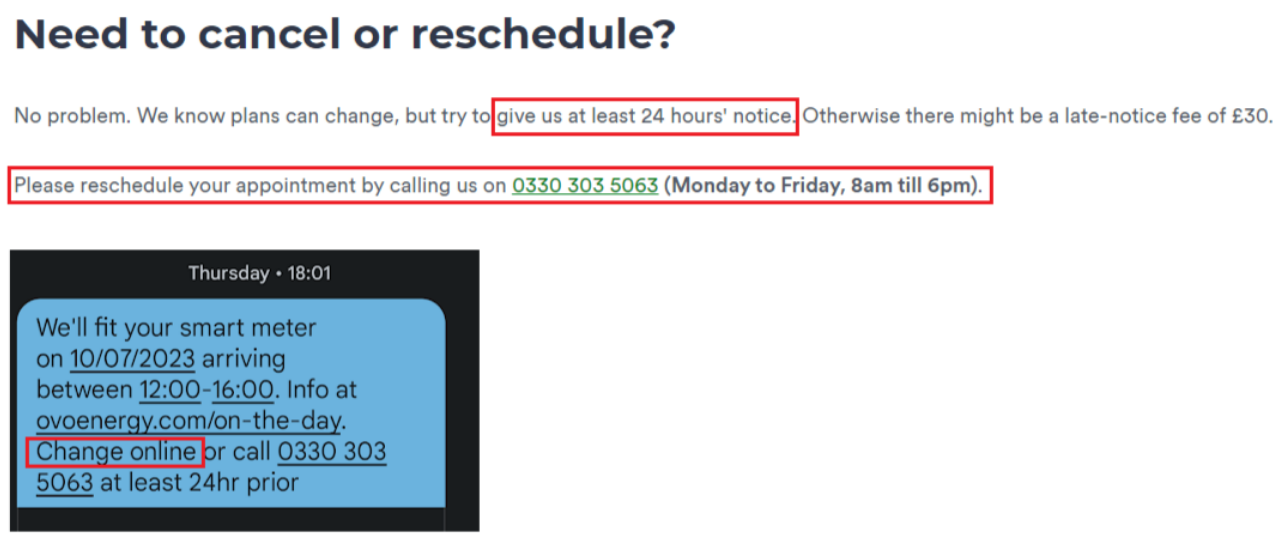
Why is there no option to change my smart meter installation date online? Despite their text massage saying I would be able to change it online. It’s Saturday and I want to change my appointment from Monday to Tuesday, but if the only option is to phone them then I can’t do that until Monday morning since the phone lines are closed at weekends, which is less than 24 hours notice, and hence a  £30 fine.


Best answer by Firedog

Updated on 12/12/25 by Chris_OVO


The ONLY option is to reschedule by phone, ...

Since the phone number is the ordinary support one, you should be able to get in touch with the same team via Twitter or Facebook, and they should be there today:

https://twitter.com/OVOEnergy

https://www.facebook.com/ovoenergy

Send a DM with your account no., name, address, postcode and date of birth so they know who they’re dealing with, and then post in their feed to say you’ve sent a DM.


Smart appointments can be easily cancelled or rescheduled via your online account or app. There are instructions for this in this tutorial:


If you don’t have the option online our Support Team can cancel or reschedule it for you.

15 replies

Abby_OVO
Community Manager
Community Manager
July 10, 2023

Hey @andyjmr 


Sorry to hear about the issues you’ve had trying to get the appointment date changed, did you manage to get it done?


Have just installed the OVO app, and found this .. if you’re ill you can cancel within 24 hours without penalty… provided you know how to call [object Object] lol.


Thanks for flagging this, I’ve raised it to the team in charge of this, they’ll get this updated.

Currently Playing: She's Electric
Newcomer
April 5, 2026

I have an engineer coming sometime to install my electric and gas smart meters but i cant find my notes of the date they are coming, can someone please help as i would like to know the appointment date , thanks

Nukecad
Super User
Super User
April 5, 2026

You will be best contacting customer support and asking them when the appointment to change the meter(s) has been set for, see the contact link below.

I'd suggest that you wait until Tuesday, or probably better Wednesday because after the long Bank Holiday weekend there will be a lot of callers on Tuesday.


I said, Hey - Watts going on.
Blastoise186
Super User
Super User
April 5, 2026

Try checking your emails again just in case too! Usually OVO sends you an email as a reminder so it might be in there.

Securing energy by zapping security bugs... For that is The Blastoise Way! Remember, I'm just like you - AI Powered Evil Geniuses aren't Staff!
Newcomer
April 5, 2026

Thanks for the tip to check the email, my head didnt even think of that…

Its 13th so a week tomorrow..

Thanks to both of you for the replies and for the help.