



Rank 2
April 12, 2022
Solved

How can I take my export reading on a Landis and Gyr smart meter?

  • April 12, 2022
  • 19 replies
  • 29950 views

Hi, I’ve recently had some Solar panels fitted and I need to take an export reading for my SEG application. I have a Landis+Gyr E470 SMETS1 with a Trilliant comms hub identicle to this one:
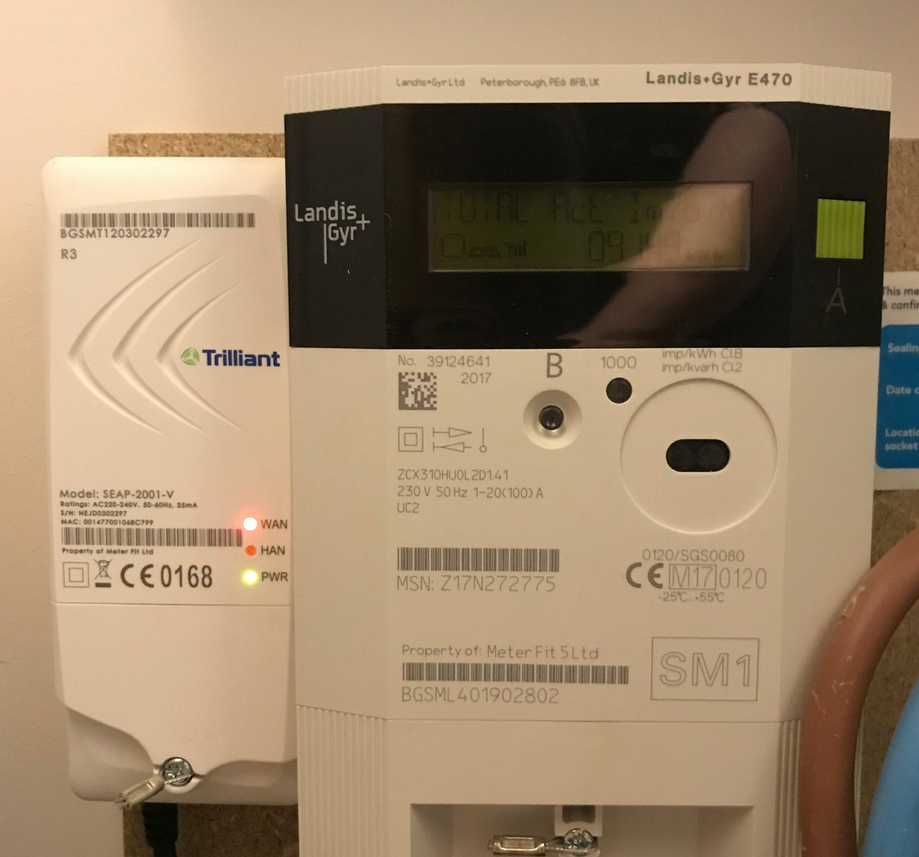
I’ve read a couple of guides online and tried to find the Export on this thing with no luck. Going through the menu I get;

Time

Date

Credit Mode

Standing Charge

Total Act Import

Rate 01 Act Import

Meter Balance


Anyone know what I have to do or is it not possible with this thing?

Best answer by Freebo

Updated on 17/04/26 by Abby_OVO


One of our helpful members has provided the video below demonstrating how to take an export reading on a Landis and Gyr smart meter:

@Jess_OVO@Blastoise186 


We’ve also added the steps from the video below:


  1. ​​​​​From a sleep state (where the backlight is off) press and hold the ‘A’ button until you see the word 'Time' appear.

  2. Tap button ‘A’ repeatedly (skipping past Date and Import) until you see "Total Act Export".
  3. The number displayed in kWh is your total export reading.


Note: If you miss it, don't worry. Just keep tapping ‘A’ and it will eventually loop back around to the start, or wait 30 seconds for the screen to turn off and try again.

19 replies

FreeboAuthorSolved
Rank 2
April 27, 2022

Updated on 17/04/26 by Abby_OVO


One of our helpful members has provided the video below demonstrating how to take an export reading on a Landis and Gyr smart meter:

@Jess_OVO@Blastoise186 


We’ve also added the steps from the video below:


  1. ​​​​​From a sleep state (where the backlight is off) press and hold the ‘A’ button until you see the word 'Time' appear.

  2. Tap button ‘A’ repeatedly (skipping past Date and Import) until you see "Total Act Export".
  3. The number displayed in kWh is your total export reading.


Note: If you miss it, don't worry. Just keep tapping ‘A’ and it will eventually loop back around to the start, or wait 30 seconds for the screen to turn off and try again.

Jess_OVO
OVO Staff
OVO Staff
April 28, 2022

What a fantastic explainer video there, @Freebo - earning yourself some lovely best answer points too!


How are you finding the solar panel exporting so far?


Any thoughts to share over here? 🌞

Powered by Re-knowable Energy!
Newcomer
June 22, 2025

I have a Landis &Gyr Smart Meter E470 and have been told by OVO to submit the Smart meter’s  readings for FEED-in to the grid from my solar panels. How do you do it? I have tried to find such readings but without success. It seems the Smart meter only registers useage and not feed-in to the grid. Can anyone help me please?

BPLightlog
Super User
Super User
June 23, 2025

Hi ​@John W S , if you are looking for a Generation meter reading for the FIT tariff (note this is different to SEG), then there should be a separate meter recording this - it does not appear on your smart meter.

If you are looking for an Export reading then this should be available via the smart meter. Depending on the exact type (there are several), you should be able to use the guide below which includes YouTube video.


Bring me Sunshine ~ E&E {Solar PV, Battery Storage, Hybrid EV, ASHP and Home Assistant automation}
Chris_OVO
Community Manager
Community Manager
June 23, 2025

Hey ​@John W S


Welcome to the community! I’ve added a badge to your profile to show you’re part or our solar community ☀️


Are you able to show us some photos of your meter/setup as that might help everyone give more specific advice. ​@BPLightlog has already given a handy article with helpful advice. 


I did find a L&G E470 manual on another thread which i’ll link below:


Please let us know if that worked for you or if you need anymore help.


Renewable energy jokes never get old.
Newcomer
June 23, 2025

Thanks for all the advice. I have managed to switch from usage info to feed - in info but can only get "credit balance £33.57" but not the kWh figure.What am I doing wrong?


BPLightlog
Super User
Super User
June 24, 2025

Have you looked through the links above ? There are a number of comments/instructions about button presses and also a video. It is not an easy meter to read.


Bring me Sunshine ~ E&E {Solar PV, Battery Storage, Hybrid EV, ASHP and Home Assistant automation}
Chris_OVO
Community Manager
Community Manager
June 27, 2025

Hey ​@John W S,


Did you make any more progress using the information above? 

Renewable energy jokes never get old.
Newcomer
June 27, 2025

Yes! Success at last. I found the relevant you-tube videos very useful. Noted what they said and then with determination, gave it a go. Eureka. It worked out well.

Thanks to all for very useful advice. So glad to have succeeded.

John
