Question

Tesco Clubcard Millionaire

  • April 1, 2026
  • 11 replies
  • 86 views

Forum|alt.badge.img+1

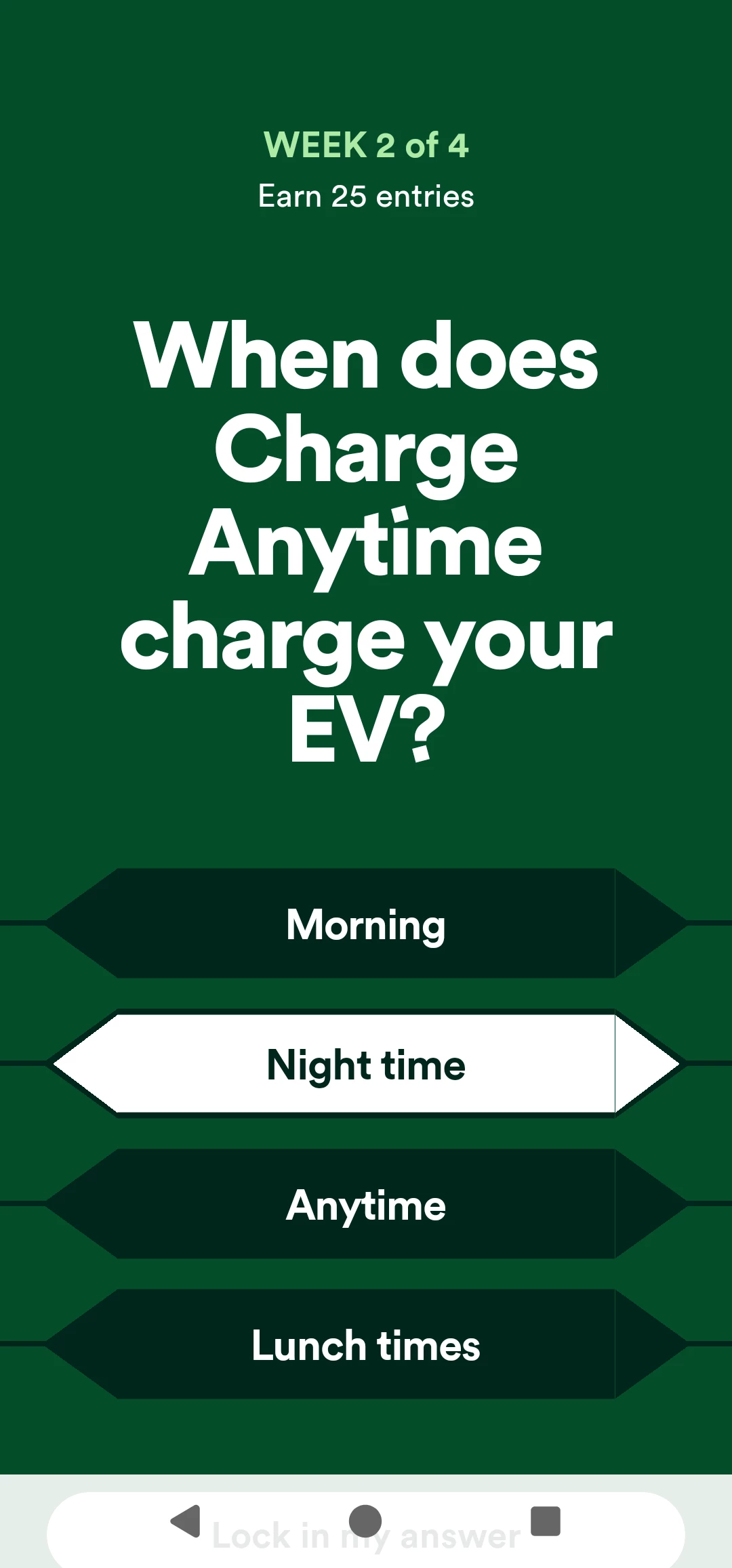
Hi there Had invite to enter the clubcard competition. Opened the app, selected next question and it opened. I selected the answer but the lock in your answer is under the home and back button banner. I have tried to shrink teh screen or rotate it and neither work. Anyone else having the same problem

David

11 replies

Forum|alt.badge.img+1
  • Rank 9
  • April 1, 2026

No problem like that on iPad.


Forum|alt.badge.img+2
  • Rank 10
  • April 2, 2026

Hi there Had invite to enter the clubcard competition. Opened the app, selected next question and it opened. I selected the answer but the lock in your answer is under the home and back button banner. I have tried to shrink teh screen or rotate it and neither work. Anyone else having the same problem

David

Yes, I had the same problem. 


Ben_OVO
Community Manager
Forum|alt.badge.img+4
  • Community Manager
  • April 2, 2026

@DJB67 / ​@Bendog thanks so much for flagging this. Have you tried deleting and reinstalling the app? We’ll need to confirm that you’ve done this when raising this to our Product team.


Forum|alt.badge.img+1
  • Rank 2
  • April 2, 2026

I have the same on Android phone. See screenshot attached. It's a common issue in many apps when this “home panel” overlaps the buttons in the app. It's probably because the panel itself is customable – it is not present by default, but you can add it in your settings (which many, including myself, do). Please, ignore my answer – 1) I have no idea, 2) I wasn't able to submit it.


Forum|alt.badge.img+1
  • Rank 2
  • April 2, 2026

​Have you tried deleting and reinstalling the app? We’ll need to confirm that you’ve done this when raising this to our Product team.

I just did. No any change. I had to disable the “home panel” (I think its more accurate to call it “navigation buttons”) in my setting to be able to answer the question. 


Forum|alt.badge.img+1
  • Rank 2
  • April 2, 2026

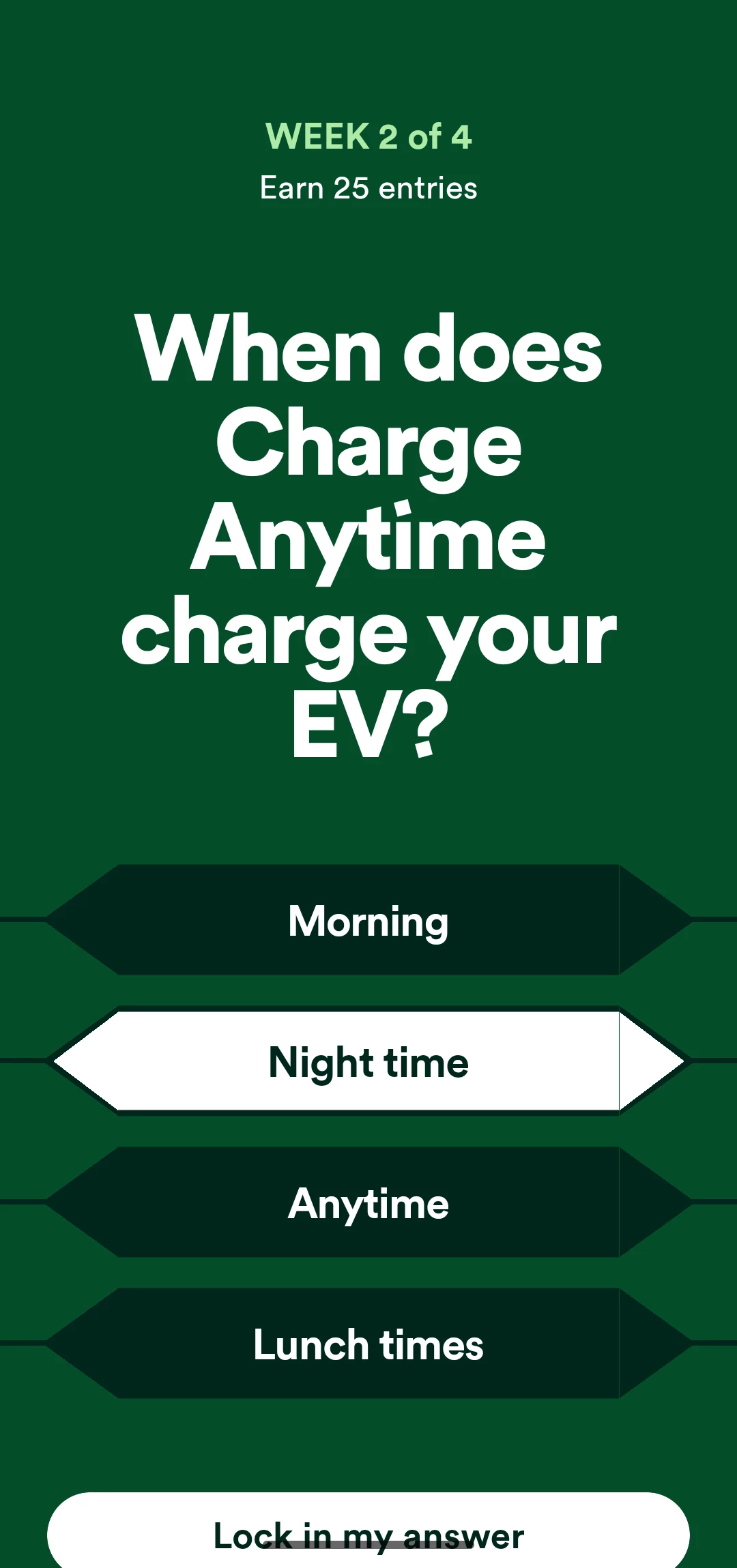
And that's how it looked without it. It's still out of screen. Some Android phones for some reasons use unusual screen proportions. If I remember correctly, my phone’s screen is 20:9 instead of isual 16:9. Not all apps can adapt it. I think the issue lies there (when the navigation buttons are off). 


P.s. Continue ignoring the selected answer – it's for the display purposes. 


Forum|alt.badge.img+2
  • Rank 10
  • April 2, 2026

I managed to solve this by using Phone Link on my PC. There is just enough room to use the mouse to lock in the answer. I did not have this problem the first week.


Firedog
Super User
Forum|alt.badge.img+7
  • Super User
  • April 3, 2026


I had to disable the “home panel” (I think its more accurate to call it “navigation buttons”) in my setting to be able to …
   

It’s taken a long time, but I think I’ve at last realized what the problem being discussed here is. I was initially thrown by the OP’s reference to a banner (“…  the home and back button banner”). A banner for me is something which waves overhead, so I didn’t cotton on to what he was describing. It wasn’t until costeek showed us ‘before and after’ pictures that the penny dropped. 

A big problem in this sort of discussion is unqualified references to ‘the app’. I thought the discussion was about the Ovo Energy app, until costeek presented screenshots about Charge Anytime - a different app altogether, I thought. Perhaps not.

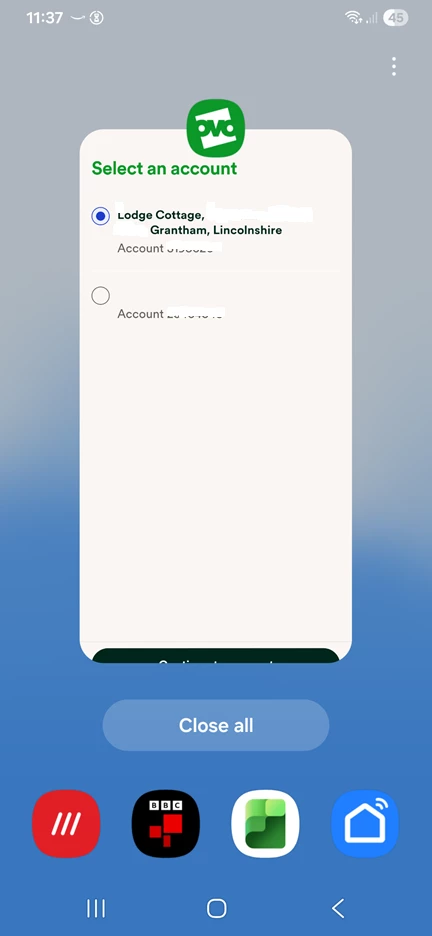
Anyhow, this irritating flaw which hides vital app controls behind OS ones has plagued me for a long time. When I launch the app, I have to select which OVO account to use. Having done so, there is then a button the whole width of the bottom of the screen to ‘Continue to account’. If I use my usual fat finger on this button, anything can happen.

[Incidentally, what does ‘Lock in my answer’ mean?]


Chris_OVO
Community Manager
Forum|alt.badge.img+4
  • Community Manager
  • April 3, 2026

Hey ​@costeek,


That’s a really good point! It’s true that less common aspect ratios like 20:9 can cause some issues since most apps are designed with a 16:9 ratio. If you take a look at your device’s display settings, you might find an option to lock the aspect ratio to full screen, which could help solve the problem. I also found a great article that explains this in more detail, so you might want to check it out!


I’ve shared your feedback with the Beyond team and let them know about the issues you’ve been having. They’ll definitely be more aware of this moving forward. Thanks for bringing it to our attention!


@Firedog I’d guess it’s a nod to Who Wants to Be a Millionaire, based on the look of the answer boxes and the words being used. 😂 


Forum|alt.badge.img+1
  • Rank 2
  • April 3, 2026

@Firedog I think it is a matter of how fast the internet devices are developing and our vocabulary within it. But it might also be the fact that English isn’t my first language, so I might process the information a bit differently, which, in this case, helped me better understand the OP concerns. 


By the way, it is about the OVO Energy app, not the Charge Any Time one. This is the Beyond section of it. 


It’s a bit confusing about choosing which account to use each time I open the app, to be honest. As it asks between the account at my previous living place, which isn’t active, and my current one. It’s good, though I don’t have to choose the right one, as it is always selected, so I have to submit the selection only. It’s not the case when I access my account online (via computer) – there I always need to select the correct one. 


Forum|alt.badge.img+1
  • Rank 2
  • April 3, 2026

That’s a really good point! It’s true that less common aspect ratios like 20:9 can cause some issues since most apps are designed with a 16:9 ratio. If you take a look at your device’s display settings, you might find an option to lock the aspect ratio to full screen, which could help solve the problem. I also found a great article that explains this in more detail, so you might want to check it out!

It seems my Android doesn’t have that option. I tried to Google it and I felt gaslighted, because the search says “yes, you can do it! Just follow these steps...” which don’t exist in my settings. I will continue searching, but it is possible that not expensive Android phones do not have that.