Solved

How do I see top up receipts/history on the new PAYG app?

  • June 8, 2026
  • 9 replies
  • 136 views

Hi, I’ve used the new app today but it hasn’t sent me a payment receipt via email or text like the old one did and I cannot see top-up history anywhere in the new app. 
I have notifications enabled etc same as on the old app so I’m not sure how I’m meant to get a copy of my receipt.

Best answer by Chris_OVO

Updated on 23/06/26 by Abby_OVO


Hey ​@lornacw,


I spoke with the team, and they informed me that if you top up through the app, you will not receive a payment receipt unless you are a guest topping up on behalf of someone else. 


If you click onto the fuel type, i.e. into the ‘Electricity’ section or ‘Gas’ section depending on which history you want to check, you should be able to view the top-up history in there.
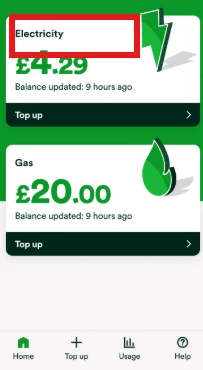


You can view your top-up history by selecting the option at the bottom of the screen. This page will show all top-ups made using the new app, but it will not display any top-ups made on the older app, as they're two different apps.


I hope this helps 😊

9 replies

Chris_OVO
Community Manager
Forum|alt.badge.img+4
  • Community Manager
  • Solved
  • June 9, 2026

Updated on 23/06/26 by Abby_OVO


Hey ​@lornacw,


I spoke with the team, and they informed me that if you top up through the app, you will not receive a payment receipt unless you are a guest topping up on behalf of someone else. 


If you click onto the fuel type, i.e. into the ‘Electricity’ section or ‘Gas’ section depending on which history you want to check, you should be able to view the top-up history in there.


You can view your top-up history by selecting the option at the bottom of the screen. This page will show all top-ups made using the new app, but it will not display any top-ups made on the older app, as they're two different apps.


I hope this helps 😊


  • Author
  • Rank 1
  • June 9, 2026

That’s great thank you for confirming that.

i was worried about not having the payment receipt code if the top up didn’t go through but now you’ve pointed out where I can find the top up history I’ve found the top up code is connected to that so that has eased my mind.


Chris_OVO
Community Manager
Forum|alt.badge.img+4
  • Community Manager
  • June 9, 2026

Hey ​@lornacw,


You’re welcome and i’m happy to hear that it’s put your mind at ease. If you’ve got any more questions don’t hesitate to reach out we’re here to help 😊


Forum|alt.badge.img
  • Rank 5
  • June 19, 2026

Hello,

I have been wondering about this very same thing.  I have looked all over the app but can't find any Top Up history.  Can you tell me where to find it please?


Abby_OVO
Community Manager
Forum|alt.badge.img+4
  • Community Manager
  • June 22, 2026

Hey ​@hallj12345 


If you click onto the fuel type, i.e. into the ‘Electricity’ section or ‘Gas’ section depending on which history you want to check, you should be able to view the top-up history in there.


If this isn’t appearing in there, could you please take a screenshot of what you can see when you click into one of them.


Forum|alt.badge.img
  • Rank 5
  • June 22, 2026

Hello,

Thank you for your reply.  Yes I can see the top up history and the top up code if needed.  Thank You for explaining this to me.


Abby_OVO
Community Manager
Forum|alt.badge.img+4
  • Community Manager
  • June 23, 2026

Hey ​@hallj12345 


No problem at all glad we could help, I’m glad it’s all in there as it should be.😊


Forum|alt.badge.img
  • Rank 5
  • June 23, 2026

Hello,

When I looked yesterday I noticed a top up done on the app for £6 on 19th June wasn't showing.  It   seems to be only showing top ups done on line though.


  • Rank 2
  • June 23, 2026

Hello,

I have been wondering about this very same thing.  I have looked all over the app but can't find any Top Up history.  Can you tell me where to find it please?

They have got horrible UX/UI. Top-up history should be an easy thing to locate. It should be clearly labelled either in the 'home' section or in the 'topup' section of the app.