



Answer

How do I check the balance on an Aclara SGM 1416-B?

  • October 28, 2023
  • 6 replies
  • 1500 views

Hello my parents who are in there 80’s has just had to have a pay as you go smart meter fitted to replace a key meter as the screen stopped working anyway the meter is a Aclara SGM 1416-B … the issue is that it’s so complicated to use as all we really want to see on the screen is how much money is in there yet I’ve been pushing buttons A and B and I can’t find it anywhere? I have downloaded the ovo top up app so I can top it up for them and I can see the balance on my phone usually 24 hours behind… but does anyone know how I get the balance on the screen so my parents can see for themselves … I’ve looked high and low but can’t find anything? 

many thanks 
Best answer by BPLightlog

Updated on 08/08/25 by Abby_OVO


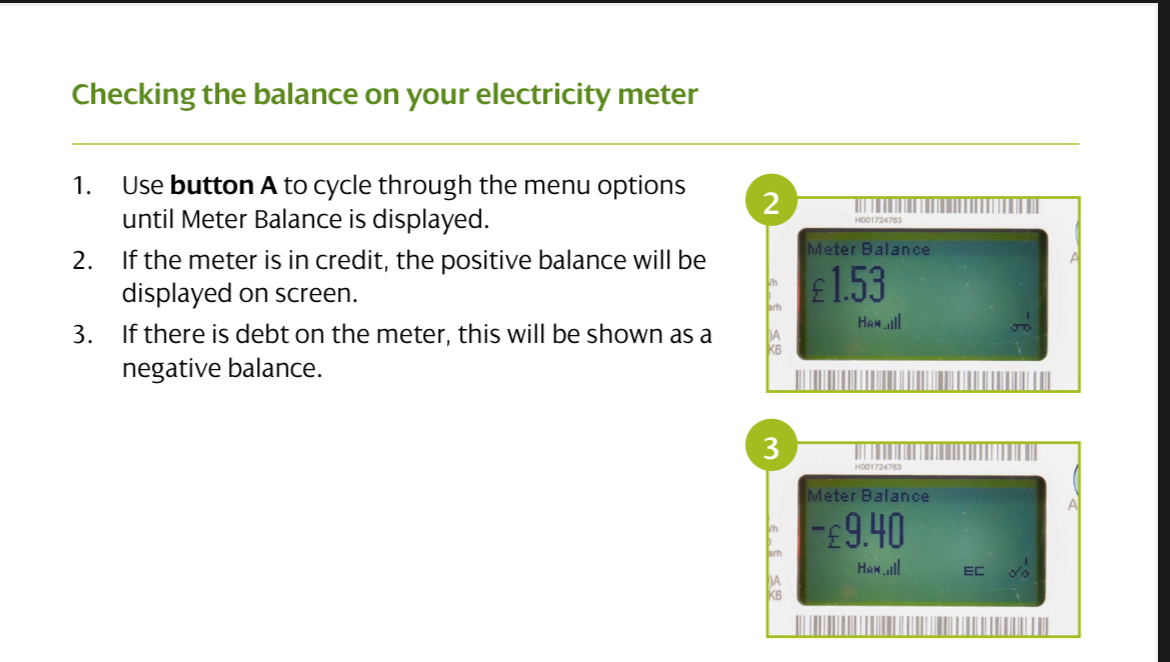
Hi @Valandroy6 , this is the manual for the 1400 range but it’s not straightforward. 
I’m sure there’s a better guide somewhere..

Edit:

this is from a SP user guide which might help 


6 replies

BPLightlog
Plan Zero Hero
Forum|alt.badge.img+5
  • Plan Zero Hero
  • Answer
  • October 28, 2023

Updated on 08/08/25 by Abby_OVO


Hi @Valandroy6 , this is the manual for the 1400 range but it’s not straightforward. 
I’m sure there’s a better guide somewhere..

Edit:

this is from a SP user guide which might help 


Firedog
Plan Zero Hero
Forum|alt.badge.img
  • Plan Zero Hero
  • October 29, 2023


I’m sure there’s a better guide somewhere..


That’s a good find, BP. 

@Valandroy6  I’d just point out that prepayment isn’t a good option for many elderly customers, especially if they struggle with complicated kit like that smart meter. We’ve seen too many examples here in the forum where something’s gone wrong with the top-up process and little old ladies have been left with no heat or light over a weekend. This won’t happen with, say, a Direct Debit account (although other things can go wrong, of course). It costs about the same these days.

If you usually help them out with stuff like this, then you might want to make sure you’re named as a responsible adult as far as their account is concerned, so you don’t have problems contacting support on their behalf if something needs doing. They should also be on the Priority Services Register, which can be helpful in lots of ways. Read all about it here (also about being nominated to act for them): Priority Services Register: How We Can Give You the Help You Need (ovoenergy.com).


Emmanuelle_OVO
Community Manager
  • Community Manager
  • October 30, 2023

Hey @Valandroy6,


Brilliant advice given here by our community members. 


Just wanted to add, you might find our Pay As You Go Topic Hub helpful:


  • Author
  • Carbon Cutter*
  • October 30, 2023

Hello and thanks for responding I went over to see the parents today and scrolled through the meter using buttons A and B but there was no part of the menu which read meter balance ??? 


Blastoise186
Plan Zero Hero
Forum|alt.badge.img+1
  • Plan Zero Hero
  • October 30, 2023

Use Button A only - pressing B gets into a completely different menu.

Also, the Aclara meters auto-scroll if you don’t press any buttons. Eventually it’ll show the current balance in that list.


Emmanuelle_OVO
Community Manager
  • Community Manager
  • October 31, 2023

Keep us posted with how you get on @Valandroy6 


SMETS2 Aclara Guide

