



stateofit
Rank 1
Rank 1
March 5, 2017
Solved

So your OVO economy 7 smart meter gives you off-peak cheap electricity, but when is it cheapest?
  • March 5, 2017
  • 17 replies
  • 36596 views

So, some people are lucky enough, or unlucky enough depending on your lifestyle choices, to live in a house with a Dual-Rate meter. You probably didn't know you had one when you moved in. You checked the area, the schools, the bus-routes etc, but it didn't cross your mind to count the registers on your electricity meter. Of course not... No-one does that...

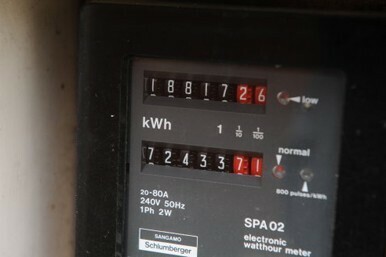
Dual-Rate meters have TWO registers, Peak and Off-Peak, sometimes labelled Normal and Low, or even a cheerful little Sun and Moon. Off-Peak electricity is charged at close to HALF the unit rate.

Lemme say that again. HALF. Half price electricity...

Usually there are 7 hours of off-peak timing, which is why it's sometimes called Economy 7. Some people think it means Economy After 7pm. It doesn't...

But are you Sure you know exactly WHEN your seven hours are? Many of them are Midnight til 7am, or 00:30 to 07:30... But there Are some weird and wonderful set-ups out there...

There's even Economy 10, for example. Off peak electricity with timing like :
0000 - 0500
1300 - 1600
2000 - 2200

That means that even if your washine machine can't go on after midnight because of kids, or because it doesn't Do that, you can pop it on for a bit in the early afternoon, or just after dinner, and still get half price leccy. So it makes sense to Know When...

Now, some new meters kindly have the timings printed on the meter, but older ones Don't. So, how are you supposed to find out When your cheap electricity is?

Well, one way is to ask your energy provider, but i'm not encouraging everyone to pick up the phone, the good guys at OVO already work hard enough...

But I wonder if the Mods here can help...
Best answer by Tim_OVO

Updated on 14/08/25 by Abby_OVO


If you have meters that were not installed by OVO the off-peak hours may vary. The best way to find out in this case would be reaching out to your supplier (or our Support Team if you’re an OVO member).


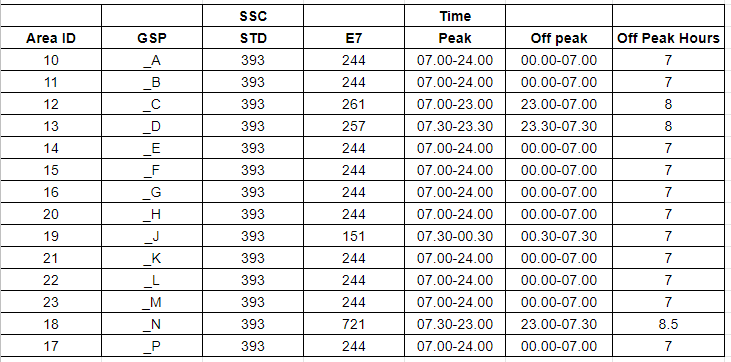
If you have a Smart meter installed by OVO the off-peak times can be worked out using your Meter Point Administration Number (MPAN). You can find your MPAN on your monthly statement found via your online account or OVO app (download for Android or iOS):


Then use this table below; the first two digits of your MPAN is the ‘Area ID’; the ‘Off peak’ times are on the column second from the right:


Please be advised that Secure, Aclara and Honeywell smart meters don't adjust for BST. The result of this is that during summer your off peak times will be an hour later than advised above. 


OVO member but not got a smart meter yet? - Book today!


Interested but not yet an OVO member? - Check out our plans!

17 replies

Blastoise186
Super User
Super User
March 18, 2023

OVO tends to install SMETS2 Aclara SGM1400 Series meters and either Geo Trio II or Chameleon IHD6/IHD7 IHDs. I’m afraid I don’t have the right photos to show you as hardly anyone ever posts them here.

However… I can probably call in a favour from the forum moderators who might be able to figure out a few tricks next week, if that helps?

Securing energy by zapping security bugs... For that is The Blastoise Way! Remember, I'm just like you - AI Powered Evil Geniuses aren't Staff!
Newcomer
March 19, 2023

Thanks, I would greatly appreciate it. I just need to see an example of how you can look at the smart meter and/or the IHD and tell which rate (peak vs off-peak) is currently active.

I’ve tried looking online for examples of economy 7 on an Aclara smart meter and the best thing I could find is this thread which contains photos:

https://forum.ovoenergy.com/smart-meters-136/why-do-my-economy-7-tariff-times-shown-on-my-5-port-s2-smart-meter-not-match-my-meter-switch-times-since-switching-to-ovo-9291

Is the active tariff price (provided the user remembers the peak vs off-peak price) the only way to know which rate is active?

BPLightlog
Super User
Super User
March 19, 2023

@Blastoise186 is this of any use?


Bring me Sunshine ~ E&E {Solar PV, Battery Storage, Hybrid EV, ASHP and Home Assistant automation}
Blastoise186
Super User
Super User
March 19, 2023

Not while Exporting it doesn't!

Securing energy by zapping security bugs... For that is The Blastoise Way! Remember, I'm just like you - AI Powered Evil Geniuses aren't Staff!
BPLightlog
Super User
Super User
March 20, 2023

Looking through my smart meter documents, it looks like the newer versions are programmed to automatically display the active rate register. 
I can scroll through the various options including both registers but the auto set up looks useful

Bring me Sunshine ~ E&E {Solar PV, Battery Storage, Hybrid EV, ASHP and Home Assistant automation}
Tim_OVO
OVO Staff
OVO Forum Legend
March 20, 2023

I’m surprised this question doesn’t have a confident confirmation one way or another. Thanks for sharing BPLightlog, I wonder if that means older S2 Aclara don’t have this ‘auto set up’ config, or if this is a firmware upgrade. 


@Datsun42 these smart meters will always change at the same time, moving forward one hour when BST kicks in. With that in mind once you find out when your smart meter’s off peak is, it’s easy to know when to use those hungry electrical appliances.

Carbon neutral - we need a community to get there! My green tech: Aclara SGM 1411-B smart meter, Chameleon IHD6
Newcomer
November 1, 2023

I believe you pay more per unit for your peak usage - so you need to be sure you use enough off peak to make it worth while having economy 7

