



Unlocking your OVO Charge Account
Updated on 03/07/26 by Chris_OVO
How to log in to the new OVO Charge app:
We’re excited to announce that our new OVO Charge app has officially been released to users following a successful trial hosted here on the Forum.
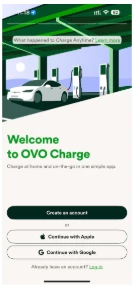
If you're downloading the app for the first time, you must create a new account when you sign in. Please note that you can't use your previous credentials. Download the OVO Charge app from the App Store or Google Play.
The first time you open the app, you’ll be prompted to register. You can manually enter your information or use the quicker "Continue with Apple" or "Continue with Google" options to autofill your details.
Once registered, you’ll have access to the OVO Charge app and the OVO public charging network.
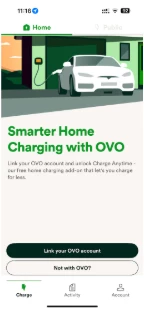
Once you’ve completed this step, you can use the toggle at the top of the screen to select "Home." This’ll let you link your OVO account.
After signing in, press the "Home" toggle button at the top of the screen, as shown below. This’ll let you link your OVO account and Charge Anytime.
Using the OVO Charge app
Q: What should I do if there’s a problem with the OVO Charge app when using Charge Anytime?
A: Please check that you can log in to your EV or Charger app. If you can’t, or if your EV’s app isn’t working, then the OVO Charge app won’t work. Common reasons why your EV’s app won’t work include:
Your EV’s app has a technical issue – this will usually sort itself out in an hour or two.
You’ve changed your username and password, so need to log in again. Please check that your EV is able to connect to the internet when plugged in and charging at home. If your EV can’t connect – either via wifi or an onboard cellular connection – then the OVO Charge app won’t work as expected.
Q: How does the OVO Charge app connect to my EV?
A: The OVO Charge app connects to your EV in exactly the same way as your EV’s app. The only difference is that the OVO Charge app will instruct your EV to start or stop charging when plugged in at home – this is to maximise use of the greenest and cheapest energy on the grid.
IMPORTANT NOTE: The OVO Charge app does not interact with any other part of your EV. Charge Anytime can only schedule your EV to start and stop charging when you’re plugged in at home.
Q: Can I add multiple EVs to Charge Anytime?
A: Yes, you can add more than one EV to Charge Anytime – the app can control charging for several EVs.
You’ll be able to see the savings for each individual EV in the savings screen of your OVO Charge app.
If you’re charging multiple EVs on one charger – please remember to update your ready-by-time and battery capacity on the schedule page for the EV you’re currently smart charging.
To add another EV, go to the OVO Charge “Devices” page and select the “Connect another vehicle” button.
IMPORTANT NOTE: Charge Anytime only supports multiple EVs, not multiple chargers or a combination of EV and charger. Here’s our list of current compatible EVs and chargers.
If you've linked your charger to Charge Anytime (not your EV), and use it to charge more than one EV, you won't be able to see the savings for each individual EV.
Q: Can I swap my EV connection to a charger connection, and vice versa?
A: Yes. Go to the “Devices” page in the account tab and remove your EV or charger. Then connect your other device instead.
IMPORTANT NOTE: Before swapping your connection, make sure the EV or charger you want to swap to is compatible with Charge Anytime.
Q: Why do I have to enter the battery capacity of my EV?
A: When connecting to Charge Anytime via your charger, your charger doesn’t know the battery capacity of your EV. The OVO Charge app needs to know the battery capacity, so it can work out your smart charging schedule.
IMPORTANT NOTE: If possible, we need to know the usable battery capacity. This is the amount of energy your battery can actually use now, taking into consideration safety measures and any degradation. You should be able to find this in your EV's app, or in-car display or touchscreen. If you can’t find its actual usable capacity, you can enter its original battery capacity from the manufacturer.
Q: Why can’t I set maximum and minimum charge limits when connected to my charger?
A: When connecting to Charge Anytime via your charger, your charger doesn’t talk directly with your EV. This means your charger doesn’t know how much battery power your EV has, or how full it is. The OVO Charge app estimates your charge and charges your EV to full.
If you want to limit the maximum charge of your EV, we recommend setting this in your EV’s app. The charger can’t override any maximum charge you set. Once your EV stops accepting charge, the app assumes the battery is full and stops charging.
Q: Why can’t I add another charger?
A: You can add more than one EV to Charge Anytime, and the app can control charging for multiple EVs at once. Charge Anytime only supports multiple EVs, not multiple chargers or a combination of EV and charger.
Q: Why do my charging insights look different in the Charge Anytime app compared to OVO Charge?
A: The insights and savings may be slightly different in OVO Charge compared to the Charge Anytime app. The Charge Anytime app only uses an estimation of savings whereas OVO Charge takes the data that is used to generate your bill to calculate savings, for example, your live home tariff rate. The OVO Charge insights are accurate and will reflect exactly what you’ll receive in bill credits.
If you’re having a technical issue with adding another EV, or need help connecting your EV, you can email ovocharge@ovo.com or call us on 0330 175 9678. We’re here Monday to Friday (excluding bank holidays), 9am to 5pm.
Charging your EV
Q: What if I don't use the smart charge schedule?
A: If your plans change and you need your EV to start charging as soon as you plug it in, you can use the Urgent Charge function. This lets you temporarily override your smart charging schedule and fully charge your EV as quickly as possible.
You can Urgent Charge by pressing the button in the app. This will override the current smart schedule and force the EV to start charging immediately. Just remember, you won’t receive the discounted Charge Anytime rate when using the Urgent Charge function. You'll pay your standard home electricity unit rate.
Q: How much will it cost to override the smart charging schedule?
A: Using the Urgent Charge function to override the smart charging schedule is charged at your standard home electricity rate.
Q: What happens when I charge away from home?
A: Charge Anytime only works when you’re plugged in and smart charging at home. When you’re away from home, you won't be able to get the cheaper rate but you’ll be able to use the public charging section in the OVO Charge app giving you access to public charging at 50,000+ UK public charge points across some of the UK's biggest charging networks – like Osprey, MFG, InstaVolt, TotalEnergies, Allego, FastNed, and Ionity.
If you want to find out more about charging away from home, check out the public charging section of the OVO Charge app.
Q: Why doesn’t my EV start charging as soon as I plug it in?
A: So you can get the discounted rate, we only let your EV charge during the cheapest and greenest times. This often means that your charging will start sometime after you plug in. If your plans change, and you need your EV to start charging immediately, you can press the Urgent Charge button in the app – you'll be charged your standard home electricity rate for this function.
Q: Should I remove any previous schedules programmed into my wall charger?
A: Yes. It’s essential that you remove any previously programmed schedules from your wall charger as these will interfere with the OVO Charge app.
Q: What is your fair usage policy?
A: We’ve introduced a fair usage policy meaning the maximum Charge Anytime credit you can receive on your bill is £100 per month. This works out as about 571 kWh of smart charging per month 2 and will vary slightly depending on home tariff rate and the current Charge Anytime rate.
For most customers it’s very unlikely you’ll smart charge above this amount of energy per month. 571 kWh is roughly the equivalent of driving 2,284 miles a month.3 There are no restrictions on the total charging consumption however if you exceed the maximum Charge Anytime Credit of £100 any consumption above the cap will be billed at your home tariff rate.
Receiving credit
Q: What will the credit look like on my bill?
A: We’ll aim to apply your Charge Anytime credit to your account in the first week of every month although on some occasions this may be delayed, for example, technical issues delaying crediting. It’ll appear on your monthly OVO energy bill as Charge Anytime Credit. The credit shown on your bill will be for the electricity you used for smart charging the previous month. So in the first week of September, you’ll see your credit for August.
Q: Will my Direct Debit be affected?
A: Your Charge Anytime Credit won’t affect your Direct Debit. In fact, you can even ask for these credits to be refunded to you once you’ve got enough of them. Any refunds will be applied in line with our refund policy where you can find more information on refund eligibility.
Q: What should I do if the credit amount looks wrong?
A: Please email your query and the screenshots of your charging history to ovocharge@ovo.com, or call us on 0330 175 9678. Lines are open Monday to Friday 9am to 5pm, excluding bank holidays.
OVO can’t take responsibility for the quality of the data supplied by your home EV charging setup. Any inaccuracies will need to be taken up with your manufacturer.

