Solved

Smart meter reporting and electric meter do not match

  • November 20, 2025
  • 39 replies
  • 558 views

Hi,

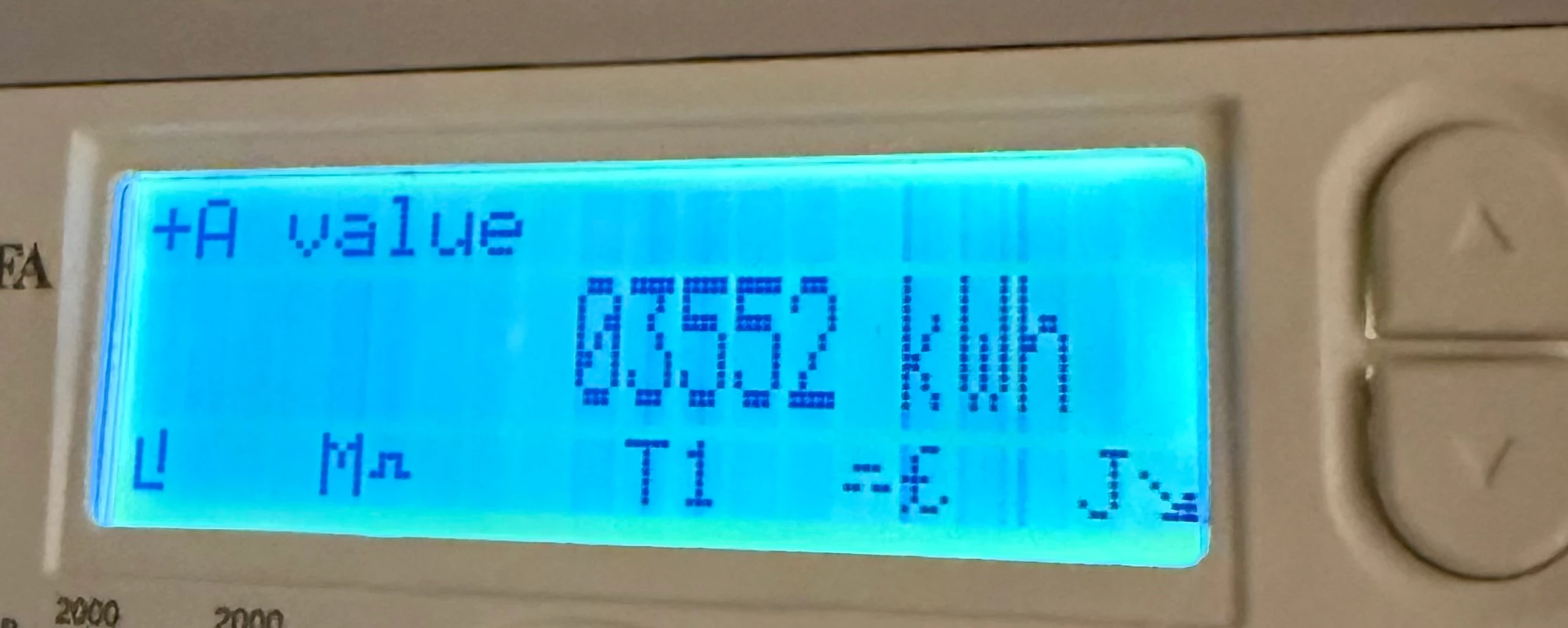
I have just moved into a newbuild apartment where the utilities have been handed over from the developer. The current meter reading is 03552 (shown by the photo), slightly above the confirmed reading I received off the developer on completion.

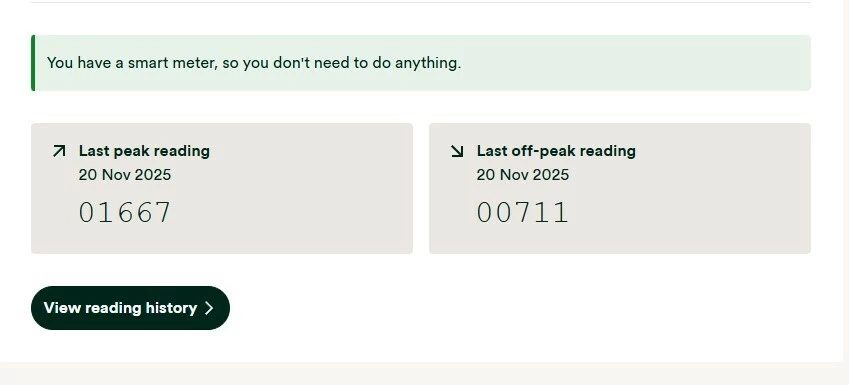
I registered with OVO Energy this week and found out from them that my meter is apparently a smart meter. However, upon checking the readings it has sent to OVO (photo also attached)  they appear to be completely different and far lower than the reading I see on the meter.

Is it possible this is fine and it sends different readings from the display I see when reporting as a smart meter, or is there something potentially wrong with my electric meter/out of sync and I need to call ASAP.


Best answer by Firedog

Updated on 04/12/25 by Ben_OVO

The first thing to check is that the Meter Serial Number shown just above You have a smart meter, so you don't need to do anything is the one actually printed on the front of the meter itself. It’s not at all uncommon for meters in new build estates to be assigned to the wrong property.

If that isn’t the problem, then check what other kWh readings your meter can display. I assume it’s an MA 120 or MA 120B. These are the instructions I found; sadly, there’s no guarantee that they will apply to your meter:

Follow these steps to read the two rates on your electricity meter:

  1. Press the top white button to open the menu
  2. Check the arrow on the screen is pointing to 'General Display' (if not, use the top and bottom white buttons to move the arrow up and down)
  3. Press and hold the top white button to select 'General Display'
  4. Press the bottom white button to move the arrow down to 'Tariff Matrix'
  5. Press and hold the top white button to select 'Tariff Matrix'
  6. Check the arrow is pointing to 'TOU Register' (if not, use the top and bottom white buttons to move the arrow up and down)
  7. Press and hold the top white button to select 'TOU Register'
  8. Write down the numbers under 'T01' (they'll be followed by 'kWh') – this is your Rate 1 reading
  9. Then write down the numbers under T02 – this is your Rate 2 reading.

Please come back and tell us whether you were able to follow these steps.

If the meter readings shown on your meter are different to those displayed on your online account / app / statements, you’ll need to get in contact with our Support Team. In this scenario, you may also find these guides helpful for trying to diagnose the issue:




39 replies

Firedog
Super User
Forum|alt.badge.img+7
  • Super User
  • Solved
  • November 20, 2025

Updated on 04/12/25 by Ben_OVO

The first thing to check is that the Meter Serial Number shown just above You have a smart meter, so you don't need to do anything is the one actually printed on the front of the meter itself. It’s not at all uncommon for meters in new build estates to be assigned to the wrong property.

If that isn’t the problem, then check what other kWh readings your meter can display. I assume it’s an MA 120 or MA 120B. These are the instructions I found; sadly, there’s no guarantee that they will apply to your meter:

Follow these steps to read the two rates on your electricity meter:

  1. Press the top white button to open the menu
  2. Check the arrow on the screen is pointing to 'General Display' (if not, use the top and bottom white buttons to move the arrow up and down)
  3. Press and hold the top white button to select 'General Display'
  4. Press the bottom white button to move the arrow down to 'Tariff Matrix'
  5. Press and hold the top white button to select 'Tariff Matrix'
  6. Check the arrow is pointing to 'TOU Register' (if not, use the top and bottom white buttons to move the arrow up and down)
  7. Press and hold the top white button to select 'TOU Register'
  8. Write down the numbers under 'T01' (they'll be followed by 'kWh') – this is your Rate 1 reading
  9. Then write down the numbers under T02 – this is your Rate 2 reading.

Please come back and tell us whether you were able to follow these steps.

If the meter readings shown on your meter are different to those displayed on your online account / app / statements, you’ll need to get in contact with our Support Team. In this scenario, you may also find these guides helpful for trying to diagnose the issue:



Abby_OVO
Community Manager
Forum|alt.badge.img+4
  • Community Manager
  • November 21, 2025

Hey ​@oaashy1411 


Sorry to hear about this though I’m glad to see Firedog has already stopped by with some really helpful advice here.


The first suggestion about checking the Meter Serial Number is definitely the first thing to do.


If that isn’t the problem, then check what other kWh readings your meter can display. I assume it’s an MA 120 or MA 120B. These are the instructions I found; sadly, there’s no guarantee that they will apply to your meter:

Follow these steps to read the two rates on your electricity meter:

  1. Press the top white button to open the menu
  2. Check the arrow on the screen is pointing to 'General Display' (if not, use the top and bottom white buttons to move the arrow up and down)
  3. Press and hold the top white button to select 'General Display'
  4. Press the bottom white button to move the arrow down to 'Tariff Matrix'
  5. Press and hold the top white button to select 'Tariff Matrix'
  6. Check the arrow is pointing to 'TOU Register' (if not, use the top and bottom white buttons to move the arrow up and down)
  7. Press and hold the top white button to select 'TOU Register'
  8. Write down the numbers under 'T01' (they'll be followed by 'kWh') – this is your Rate 1 reading
  9. Then write down the numbers under T02 – this is your Rate 2 reading.

Please come back and tell us whether you were able to follow these steps.


If you could follow Firedog’s steps above and let us know how you get on. 


I’ve linked below to a couple of other topics which might also be helpful here:


  • Author
  • Rank 2
  • November 25, 2025

Many thanks for your responses. I have had a reply from OVO today who say that the smart meter has been reporting automatically and the serial is correct, but they agree it does not match the larger readings that I see on the screen.

Smart meter readings to OVO as of 25/11:

Peak - 1706

Off peak - 726

Readings I see on the meter screen:

Peak - 2638

Off peak - 1047

This has been escalated to their metering department. I am hoping they address the cause of the difference and do not just insert the manual readings I have seen on the screen, as this would lead to a significant jump from the smart meter recorded kWh and would therefore lead to a large bill for significant electricity use - which is not possible as I only moved in a week ago.


  • Author
  • Rank 2
  • November 25, 2025

The developer recently switched provider over to OVO from Pozitive Energy before handing responsibility for billing over to residents (and this company still displays on the meter when scrolling through the display). So I’m wondering if it’s still displaying Pozitives tariff rates or something along those lines.


Blastoise186
Super User
Forum|alt.badge.img+8
  • Super User
  • November 25, 2025

That’s plausible - for which the SMETS Command Update Tariff Configuration and Update Supplier Name likely fixes it.


Firedog
Super User
Forum|alt.badge.img+7
  • Super User
  • November 25, 2025

... OVO today … say that the smart meter has been reporting automatically and the serial is correct,


The photo you shared earlier doesn’t show the Meter Serial Number. Perhaps the ones you sent to OVO did, but if they didn’t, I can’t see how Agent Noni could be certain that the one communicating with them is in fact the one on your wall. I take it you have compared the number with the one showing in your account. This is the one:


This is a generic photo provided by the manufacturer of a meter made in 2022. The MSN might be in another position on yours, but it should start with the last two digits of the year of certification and (I think) a J for Kaifa. 

As I wrote earlier, this should be the same as the one on your Meter readings page:
  

https://account.ovoenergy.com/meter-readings


  • Author
  • Rank 2
  • November 25, 2025

... OVO today … say that the smart meter has been reporting automatically and the serial is correct,


The photo you shared earlier doesn’t show the Meter Serial Number. Perhaps the ones you sent to OVO did, but if they didn’t, I can’t see how Agent Noni could be certain that the one communicating with them is in fact the one on your wall. I take it you have compared the number with the one showing in your account. This is the one:


This is a generic photo provided by the manufacturer of a meter made in 2022. The MSN might be in another position on yours, but it should start with the last two digits of the year of certification and (I think) a J for Kaifa. 

As I wrote earlier, this should be the same as the one on your Meter readings page:
  

https://account.ovoenergy.com/meter-readings


Hi, the meter serial is definitely correct and a more full photo was shown. It matches the serial on my account.


Firedog
Super User
Forum|alt.badge.img+7
  • Super User
  • November 25, 2025

…  I’m wondering if it’s still displaying Pozitives tariff rates or something along those lines.
  

That’s quite possible, but it doesn’t affect the stored register readings. They are only stored for a month, so it’s quite important that OVO find out what’s going wrong quickly.

Support agents like Noni can request an instantaneous reading from your meter. Did he/she do this? That would establish once and for all whether the figures OVO is retrieving are actually from your meter or not. 

There’s another possible problem. On 20 November, the total of both registers on your meter was 3552. Today, it was apparently (2638 + 1047 = ) 3685. That’s 133 kWh consumed in five days, which sounds really high. The typical all-electric household consumes 4200 kWh/year, while you’re on track to use 12000 kWh. That may not be alarming if you’re charging an EV at home every day, say, but otherwise I’d be worried about that level of usage.


  • Author
  • Rank 2
  • November 25, 2025

…  I’m wondering if it’s still displaying Pozitives tariff rates or something along those lines.
  

That’s quite possible, but it doesn’t affect the stored register readings. They are only stored for a month, so it’s quite important that OVO find out what’s going wrong quickly.

Support agents like Noni can request an instantaneous reading from your meter. Did he/she do this? That would establish once and for all whether the figures OVO is retrieving are actually from your meter or not. 

There’s another possible problem. On 20 November, the total of both registers on your meter was 3552. Today, it was apparently (2638 + 1047 = ) 3685. That’s 133 kWh consumed in five days, which sounds really high. The typical all-electric household consumes 4200 kWh/year, while you’re on track to use 12000 kWh. That may not be alarming if you’re charging an EV at home every day, say, but otherwise I’d be worried about that level of usage.


The agent did not say, though the above screenshot is the first response I’ve had from OVO since emailing them about the problem on Thursday. I am hoping a response will be provided from the metering team this has been escalated to quite quickly. The meter serial I see definitely matches the meter serial associated with my account though.
 

In terms of the high usage, I have also noticed this - however I have just moved in to this apartment and it is taking me a while to get used to the water heater/electric radiators (some of which I’ve had on recently) so I was expecting high usage for a few weeks.


Ben_OVO
Community Manager
Forum|alt.badge.img+4
  • Community Manager
  • November 26, 2025

Morning ​@oaashy1411,


I’d recommend replying back to the advisor and requesting that a complaint be logged, if one hasn’t been already. You’ll then be provided with a complaints reference number, and this should speed up the process of this being sorted.


The fact that the reads on the meter don’t line up with the bill is definitely grounds for a complaint - the advisor should have logged one when they picked this up.


Please keep us updated as to how you get on.


Firedog
Super User
Forum|alt.badge.img+7
  • Super User
  • November 26, 2025

The agent did not say, …
 

OK. Any support agent should be able to call up a meter reading, so you don’t have to wait for someone to respond to your written enquiry - a phone call or webchat should get it done in minutes. Then at least you’d know where the fault is coming from. 


In terms of the high usage, I have also noticed this -
… it is taking me a while to get used to the water heater/electric radiators 
 

OK. You have a dual-rate meter, recording peak and offpeak usage on registers labelled T01 and T02. If you’re also on a dual-rate tariff, i.e. with different rates for peak and offpeak use, something’s still not right! T01 (the first register tier) should be for peak usage, T02 for offpeak. Dual-rate tariffs only really make sense for customers with more than about 1/3 of their consumption during offpeak hours; you’re around the 28% mark.

If the tariff is only single-rate (peak and offpeak at the same price), this is irrelevant. If this is the case, though, I’m afraid you may have picked the most expensive form of heating there is. 

Have a really good look at your online account - there’s all sorts of information there to help you work out how everything works. One thing to check is that the account is set to record half-hourly usage; this helps you to work out just where and when all that energy is being consumed. 


juliamc
Rank 20
Forum|alt.badge.img+8
  • Rank 20
  • November 26, 2025

What water heater and electric heaters do you have ? Can you post photos of them ?


  • Author
  • Rank 2
  • November 27, 2025

Despite the meter serial number matching my account, something definitely seems to be wrong with my smart meter. I did not use heating yesterday at all but did on Tuesday. Yet it reported my usage yesterday as being higher. It also reports surges of electricity in the early hours of the night when everything is turned off - my water heater only comes on at 7.30am.
 

I now believe the smart meter is either faulty or linking to another address, this would also make sense why the readings do not match my physical meter display - odd though as all the serials are correct.


Firedog
Super User
Forum|alt.badge.img+7
  • Super User
  • November 27, 2025

… my water heater only comes on at 7.30am.
  

An immersion heater is often rated at 3 kW. If it was firing up at 07:30, you would certainly see a spike in the 07:30-08:00 slot, but you don’t.


I now believe the smart meter is either faulty or linking to another address, 
  

The meter that is returning those half-hourly data seems to be working as expected. It’s thus becoming increasingly apparent that it’s not the meter on your wall, but a different one. That’s why it would be a good idea to ask OVO to take a meter reading while you’re talking to them. You could even be on your mobile phone at your meter looking at the readings at the same time, so you’d both see the discrepancy.

You haven’t, I think, told us where you live. The Distribution Network Operator (DNO) is the one responsible for the supply to your apartment and all the others in the same development. The supply has a unique ID, commonly called its MPAN, which you should be able to find on the account page I referred you to earlier: Edit meter reads frequency - OVO Energy. The first two digits are the code for your DNO, which should correspond with the info in this graphic:
  

(There are a few other, independent DNOs, who muddy the picture a bit, especially in new estates. You’ll see if that’s your situation.) 

   
If you call your DNO, they should be able to tell you what meter number is associated with your MPAN or perhaps vice-versa, if there’s a mix-up somewhere. The MPAN is set in stone for the most part, while meters come and go. 


Ben_OVO
Community Manager
Forum|alt.badge.img+4
  • Community Manager
  • November 28, 2025

@oaashy1411 have you followed my advice?:


I’d recommend replying back to the advisor and requesting that a complaint be logged, if one hasn’t been already. You’ll then be provided with a complaints reference number, and this should speed up the process of this being sorted.


The fact that the reads on the meter don’t line up with the bill is definitely grounds for a complaint - the advisor should have logged one when they picked this up.


Please keep us updated as to how you get on.


Please let me know how you get on. This needs to be logged as a complaint so that it sits in the right area and is looked at by someone with experience.


This is one of those instances where we can only speculate on the Forum as to what could be the problem. I can think of a few things, but this needs to be looked at directly.


  • Author
  • Rank 2
  • December 5, 2025

Update on this case:

I raised it as a complaint last week. On a phone call from OVO, they stated they would send an engineer to look at the issue on Friday 12 December. I have just had a visit, the person they actually sent was a meter reader rather than an engineer.

He unfortunately did not know how to take dual rate readings and instead took the single rate reading on the electric meter. I tried to show him that the smart meter was reporting significantly lower figures than what the actual meter showed by showing him my app, but he did not know any sort of fix other than to say “We have lots of problems with the MA120” and “they don’t care in these new builds as long as you sign the dotted line”.

I am now very concerned due to the manual reading that was taken that my reading history will jump significantly - due to the manual reading being significantly higher than what the smart meter is reporting.

Latest reading update as follows:

Manual reading taken today:  3837

Smart meter readings sent automatically: 1778 (peak) 759 (off peak) - or 2537 total.

I have sent an updated complaint email to OVO, however I am losing confidence in their customer service compared to providers who have been great in the past like Octopus.

I am really hoping their team understand the issue but it feels like something that could go to the Ombudsman eventually.


Firedog
Super User
Forum|alt.badge.img+7
  • Super User
  • December 5, 2025

Update on this case:

I raised it as a complaint last week. …  it feels like something that could go to the Ombudsman eventually.
  

Sometimes, OVO’s complaints system works very well and seemingly intractable problems are solved to everyone’s satisfaction. Sometimes, though, it doesn’t. If it looks as if the Ombudsman might get involved (if the complaint remains unresolved eight weeks after submission), it’s vital to retain all the evidence of your dealings with OVO’s customer service. That means photos of meter readings, say, and transcripts of conversations with the various agents. The Ombudsman doesn’t investigate - he just listens to the evidence the two parties present and then decides which to favour. 

I’m not sure what a visiting engineer is supposed to do that you can’t do yourself - stand at the meter with your phone, call OVO (perhaps your complaint handler) and ask for meter readings to be taken. Take photos of the readings you see - being sure to include the MSN in the photos - and you should have incontrovertible evidence of what looks like an unusual crossed-meter situation (it’s unusual because the MSNs you’re seeing and OVO are seeing are the same, but the readings are different). 

Did you ask your DNO to check the MSN associated with your MPAN? They might say initially ‘ask your supplier’, but if you explain the situation, they should take pity on you and tell you what their own records say. 
 

[I’m still scratching my head at the idea of a professional meter reader who doesn’t know how to take meter readings ...] 


  • Author
  • Rank 2
  • December 5, 2025

I assumed my DNO would be Electricity North West as the property is in Salford… However they do not recognise my post code. When I check via the Energy Networks Association, it lists my post code DNO as Last Mile Asset Management… I’m assuming this is because it’s a new build. I’ll email them and see if they get in touch.


Firedog
Super User
Forum|alt.badge.img+7
  • Super User
  • December 5, 2025

You’re getting somewhere! It looks as if the claim that “utilities have been handed over from the developer” might have been a bit premature. In your shoes, I’d contact LMAM and ask them to check which assets they’re managing (or failing to manage) for your property. There might be a water meter somewhere, too. There will have been a developer’s plot number or similar for the property before you took over - do you know what it was?

I don’t know whether this will help you make contact with them:


  • Author
  • Rank 2
  • December 5, 2025

That’s very interesting as my water provider is Icosa Water (which is owned/operated by Last Mile). When I registered with Icosa they had my address details correct but instead of Apartment 307, they had Plot 307 instead as well as a slightly different post code associated with the plot number rather than the newly assigned post code… They had also registered my water meter number slightly wrong (a mismatch of two letters) by accident.

So I suspect something similar has happened (though OVO have my address correct).

I’ve emailed Last Mile to check the meter serial and MPAN I have listed with OVO matches their records.


  • Author
  • Rank 2
  • December 5, 2025
(image edited by Moderator)

Last Mile have just got back to me… Everything is correct (apart from the last letter of the post code which should be M5 4TU)

So I am guessing it’s just a faulty smart meter.


Firedog
Super User
Forum|alt.badge.img+7
  • Super User
  • December 5, 2025

   … back soon ...


Firedog
Super User
Forum|alt.badge.img+7
  • Super User
  • December 5, 2025

Kudos to LMAM for getting back to you so quickly. That looks pretty conclusive, so the mystery is just as deep as before. There is one last check to be made, though, since it seems that OVO is connected to a meter which isn’t the one you know to be yours.  

Communications between meters and suppliers go through the DCC, who carry out the authentication checks. DCC maintains a database of the equipment communicating through their portals, and each piece of equipment is identified by its MAC address. The last check, then, is that the meter on your wall has the same MAC address as the one DCC and OVO think you’ve got. 

You can see the MAC address LMAM have recorded for your meter at the very bottom of their impressive site information table: 00-1C-55-00-00-03-65-4C. You can check what DCC - and thus, I think, OVO - have recorded for your meter by running this harmless little utility: n3rgy data Smart Meter check. Homebrew calls the MAC address the GUID, which of course it is, too. Is it the same as LMAM’s?

[There’s a lot of personal information in the table, so I’ve asked the forum mods to remove it just in case.]


  • Author
  • Rank 2
  • December 5, 2025

The MAC address on homebrew is 00-1C-55-00-00-03-64-69, so very slightly different


Firedog
Super User
Forum|alt.badge.img+7
  • Super User
  • December 5, 2025

The MAC address on homebrew is 00-1C-55-00-00-03-64-69, so very slightly different
  

Right. I admit to flying by the seat of my pants here, but I’d guess that in a situation like this, a miss is as good as a mile. I can’t imagine how this could happen, but it looks like it has happened. You have a photo of the front of your meter; the MAC address on it should be the same as what Homebrew is reporting. I suspect it isn’t. I can’t imagine how this can have happened, because the numbers and barcodes on the meter are I understand laser-printed on it in the factory. It shouldn’t be possible for a mismatch ever to arise.

Now, what to do about it? Again, I’m guessing, but it’s possible that one of your neighbours is in a similar situation. LMAM should be able to find the MAC address on the front of your meter in their database of assets in this development. At the moment, it looks as if the fault may be in LMAM’s records, so I’d get back to them to ask if this mismatch - if that’s what it is - can possibly have happened on their watch. 


Feedback 💬