Solved

Smart Meter not sending readings to OVO?

  • June 2, 2025
  • 13 replies
  • 328 views

Why has my smart meter stopped sending information to Ovo, it has now been a week ?

what should I do?

Best answer by Emmanuelle_OVO

Keep us posted with how you get on ​@Johnchisholm

This webpage may help: https://www.ovoenergy.com/help/article/smart-meter-troubleshooting

It’s worth noting that you may need to send in a manual meter reading if the meter doesn’t start communicating by your next billing period to ensure you don’t get an estimated bill. 
 

Please provide your current reading


How to take a manual smart meter reading?


To find out your current reading press the menu button or A on your electricity smart meter and the reading will appear after the words IMP KWH. 


Aclara (Flonidan for gas)

  • Electricity: There’s 2 buttons on an electricity meter. Pressing B will cycle through all the menus on the meter screen and pressing A will cycle through all the sub menus. To take an electricity reading, you will need to press A - TOU rate 1 will be the electricity reading. For Economy 7 members, TOU rate 2 will show the rate 2 reading.

  • Gas: Gas meters have A, B and C. Pressing C will give you the menu and A & B will allow you to scroll through the options. The balance section is where you can check the reading (when you wake up the meter it should automatically default to the reading screen). Screen 1 - readings, active tariff price, standing charge, export reads, meter mode.


Honeywell

  • Electricity: Press the top button once or twice to access the reading. 

  • Gas: Press the middle button once or twice to access the reading. 

If you have a Landis+Gyr smart meter, see this topic guide here to confirm how to read it:


13 replies

Blastoise186
Plan Zero Hero
Forum|alt.badge.img+1
  • Plan Zero Hero
  • June 2, 2025

Howdy ​@Johnchisholm !

In the first instance, could you give https://smart-meter-help.ovoenergy.com a spin? It usually helps with most of these cases.

Thanks!


  • Author
  • Carbon Cutter*****
  • June 2, 2025

Thankyou will give that a try.


Emmanuelle_OVO
Community Manager
  • Community Manager
  • Solved
  • June 3, 2025

Keep us posted with how you get on ​@Johnchisholm

This webpage may help: https://www.ovoenergy.com/help/article/smart-meter-troubleshooting

It’s worth noting that you may need to send in a manual meter reading if the meter doesn’t start communicating by your next billing period to ensure you don’t get an estimated bill. 
 

Please provide your current reading


How to take a manual smart meter reading?


To find out your current reading press the menu button or A on your electricity smart meter and the reading will appear after the words IMP KWH. 


Aclara (Flonidan for gas)

  • Electricity: There’s 2 buttons on an electricity meter. Pressing B will cycle through all the menus on the meter screen and pressing A will cycle through all the sub menus. To take an electricity reading, you will need to press A - TOU rate 1 will be the electricity reading. For Economy 7 members, TOU rate 2 will show the rate 2 reading.

  • Gas: Gas meters have A, B and C. Pressing C will give you the menu and A & B will allow you to scroll through the options. The balance section is where you can check the reading (when you wake up the meter it should automatically default to the reading screen). Screen 1 - readings, active tariff price, standing charge, export reads, meter mode.


Honeywell

  • Electricity: Press the top button once or twice to access the reading. 

  • Gas: Press the middle button once or twice to access the reading. 

If you have a Landis+Gyr smart meter, see this topic guide here to confirm how to read it:


  • Author
  • Carbon Cutter*****
  • June 4, 2025

Apparently an Engineer Appointment can only be given once your meter has not sent readings for 31 days! There is no guarantee you will get an appointment after the 31 days has past.

Questioned the high estimated use compared with the previous 3 weeks prior to readings not being sent, lot of talk but no actual explanation given.

It was agreed with Ovo,I hope, that no review of direct debit will be undertaken until at least September.

I can’t say I was either happy on confident with the outcome, but we shall see.

I will communicate any developements

thankyou 


Blastoise186
Plan Zero Hero
Forum|alt.badge.img+1
  • Plan Zero Hero
  • June 4, 2025

That’s to be expected - sometimes it comes back faster than that meaning no engineer visit is needed. It’s a way to be certain it really is dead first.


  • Author
  • Carbon Cutter*****
  • June 16, 2025

On the homepage it says OVO not receiving readings! Well OVO knew that because I already told them it was not working. Asked to send manual readings, however go onto that page, I am told readings being received normally, but they are not, the other page won’t let me send manual readings because they are being sent automatically which they are not!

So on the app different pages giving contradictory information!

As expressed earlier in this thread I had little confidence of a satisfactory conclusion, looks like I was right! Can somebody explain what is going on.

Thankyou


Blastoise186
Plan Zero Hero
Forum|alt.badge.img+1
  • Plan Zero Hero
  • June 16, 2025

We have no access to your account from here. We can only make a rough guess.

If we can think of anything, we’ll post it here, otherwise you’ll need to let the 31 days tick down so that an engineer can be arranged.


Firedog
Plan Zero Hero
Forum|alt.badge.img
  • Plan Zero Hero
  • June 16, 2025

So on the app different pages giving contradictory information!


It’s usually possible to submit readings in the app even though the website doesn’t allow it. Have you tried?


  • Author
  • Carbon Cutter*****
  • June 16, 2025

Just tried again. Clicked on “send a reading” takes me to new page which tells me my readings are been send automatically. Won’t allow me to input manual readings. 


Blastoise186
Plan Zero Hero
Forum|alt.badge.img+1
  • Plan Zero Hero
  • June 16, 2025

You should be able to do them via OVO Support regardless - they can bypass those restrictions


Abby_OVO
Community Manager
  • Community Manager
  • June 17, 2025

Hey ​@Johnchisholm 


If the system think the meters are communicating but haven’t sent a reading in over a week, it might be worth checking the meter reading schedule is set to send readings more than once a month. If it’s set to once a month, it will think it’s communicating fine if it sent a reading recently. 


Have you contacted the Support Team like the community members suggested? As they mentioned, no one here at the Forum has access to customer accounts so they’d need to check that and take & submit the meter readings for you.


Keep us updated with how you get on.


Firedog
Plan Zero Hero
Forum|alt.badge.img
  • Plan Zero Hero
  • June 17, 2025


Clicked on “send a reading” takes me to new page which tells me my readings are been send automatically.
 

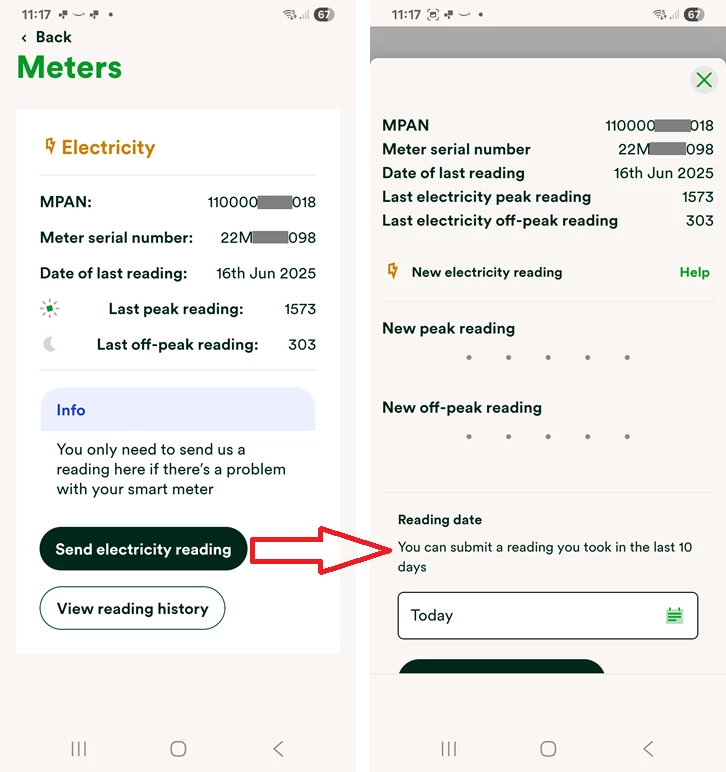
‘Clicked’? In the app, this is what I see (I don’t have gas):


Are you seeing something different? This is the OVO Energy app I’m using - It's free to download from the App Store and Google Play.


Ben_OVO
Community Manager
  • Community Manager
  • June 18, 2025

Morning ​@Johnchisholm, I hope you’re well.


If the system think the meters are communicating but haven’t sent a reading in over a week, it might be worth checking the meter reading schedule is set to send readings more than once a month. If it’s set to once a month, it will think it’s communicating fine if it sent a reading recently. 


Have you tried checking the reading schedule on the app? To let you know, if it is currently set to ‘monthly’, this can actually trick our systems into telling you the meters aren’t in communication, as our billing platform and online / app services are designed to work with daily or half-hourly readings.


If you follow the guide Abby sent over and your app tells you that your readings are set to ‘monthly’, change it them to ‘half-hourly’. Then give it 48 hours, and look back at your app to see if the reads have started coming through automatically.


Let us know how this goes.