



RTS Meter replaced successfully with new smart meter!

  • May 20, 2025
  • 59 replies
  • 1428 views

Had an appointment today to have my new meter fitted. I chose a single rate meter and th standard variable rate due to my set up.

My old meter set up was this
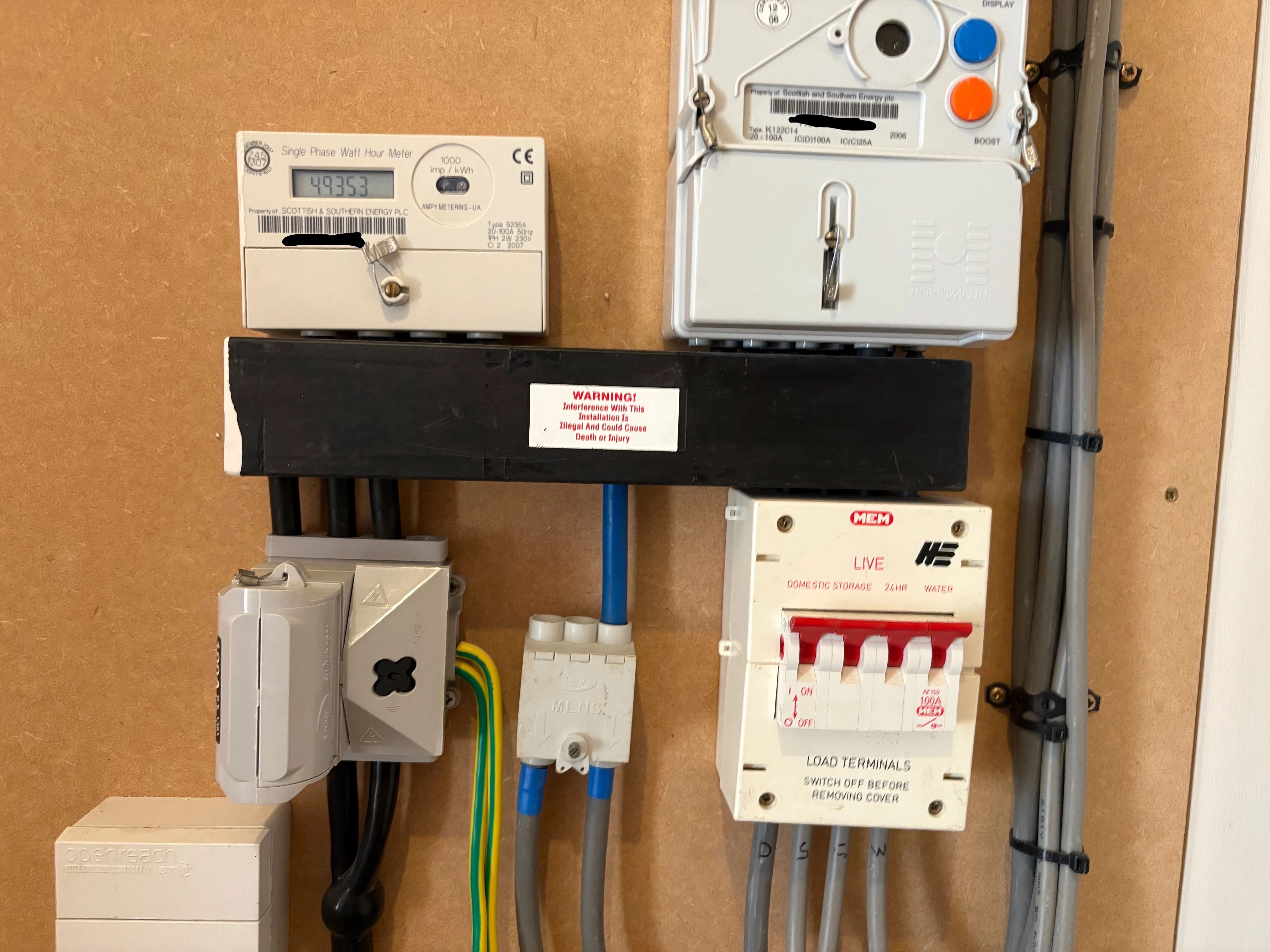
 

When the engineer arrived I asked hime what he was installing and he started talking about two rate and time switching. I said that that was not what I asked for so he got in touch with OVO and they said that off peak had to go to off peak on the new meter and peak to peak. Again I said that I dod not want that so he got in touch with a colleague from SMS who I talked to on the phone and we agreed that I could have what I wanted and the new meter was installed see below.
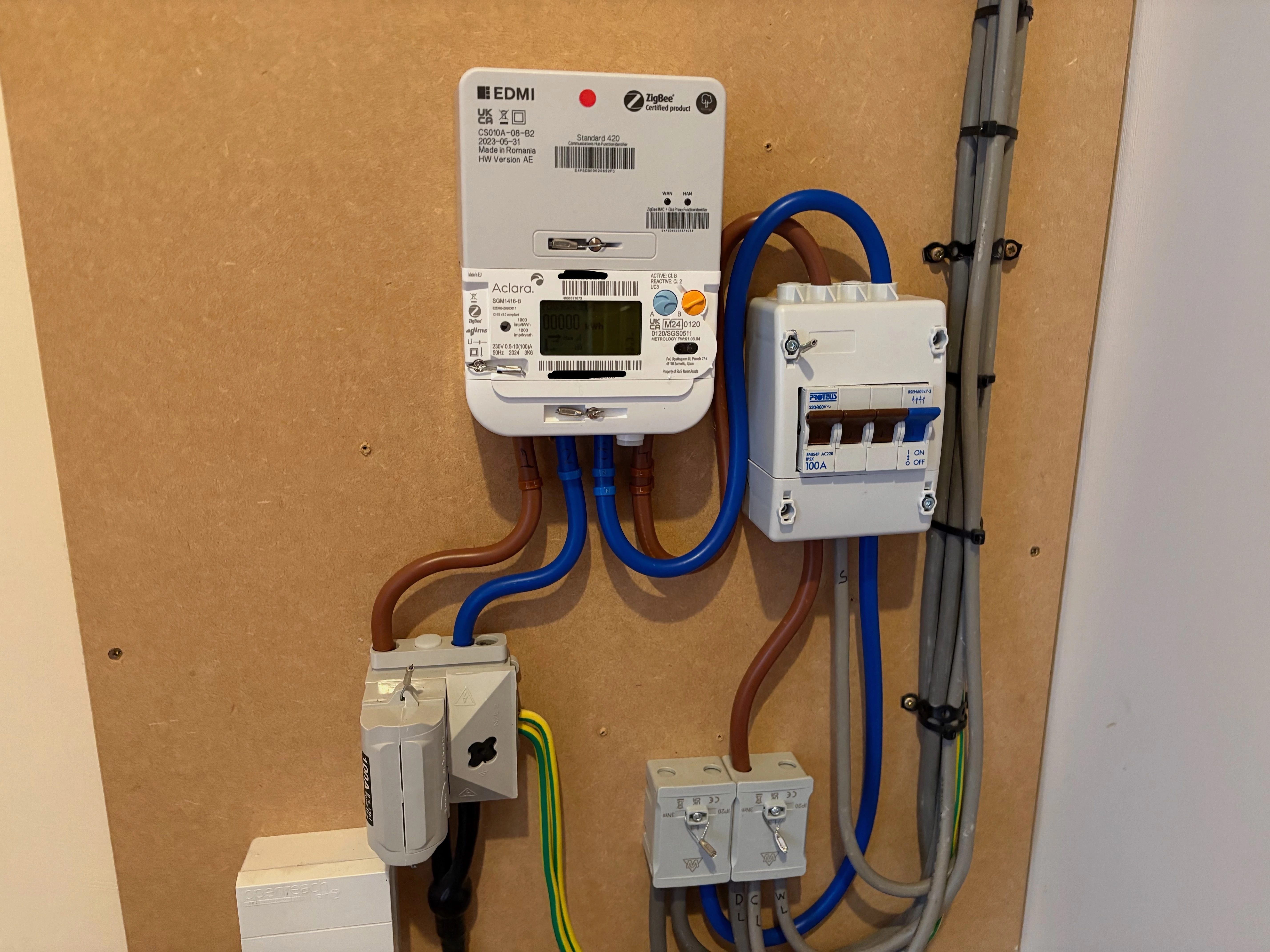


I’m not sure what tariff I am on yet or how to read the meter. I do have an issue with my water but I think that is the time switch the electric put in not anything to do with the meter.


So I think it was successful. Thanks to Malek from SMS who managed to get it done.

 

59 replies

Firedog
Super User
Forum|alt.badge.img+7
  • Super User
  • May 20, 2025

You seem to have got what you asked for. The meter is a multi-rate capable one, but there is no connection to a switched circuit for offpeak heating equipment. That could be added later if you were to change your mind, but the change would not necessarily be free of charge. 

The two little LED lights on the communications hub (the grey EDMI box on top of the white Aclara meter) tell you how the connections to the smart meter network (the WAN) and the In-House Display (the HAN) are behaving. If they’re not flashing at regular 5-second intervals, it’s possible that something’s not right.

Reading the meter is quite simple. If you can’t read the display, touch a button to turn the lights on. Then watch; the display scrolls through several of its internal registers, but some of them will just be zero. The ones you’re interested in are Total Active Import and (possibly) TOU Rate 1 and TOU Rate 2. If you tell us what you see, we’ll be better able to explain.

The tariff rates should arrive at the meter (assuming that communications are working properly) within the first couple of days after installation, although it might take longer or indeed happen earlier. Once the meter has them, they should also get through to the IHD. If you asked for the standard variable tariff, the current prices (paid by Direct Debit) appear to be 26.99 p/kWh and 60.87 p/day. Check here: Our prices | OVO Energy

It might take six weeks or more for everything to fall into place after a major metering change like this, so please don’t panic until six weeks have passed.   


Abby_OVO
Community Manager
Forum|alt.badge.img+4
  • Community Manager
  • May 21, 2025

Hey ​@awills61 


Glad to see that’s been installed successfully and you were able to get what you wanted sorted out! 


Firedog has left some really good advice already about your tariff and reading your new meter, if you’re still unsure about either of those don’t hesitate to ask us more questions. The following topics may also be helpful:


As Firedog did also mention, it can take up to 6 weeks for things to fully settle down after a smart meter is installed. If you still have any issues after that time, do let us know.


  • Author
  • Rank 7
  • May 21, 2025

@Firedog The LEDs are both flashing at approx. 5 second intervals.

When I press button ‘A’ I get the following 4 screens


The IHD does have tariff rates


and these match the values you gave give or take a decimal rounding but I don’t see them on the meter.


Firedog
Super User
Forum|alt.badge.img+7
  • Super User
  • May 21, 2025

That’s perfect. All your usage is being recorded on the first TOU register, so TOU Rate 1 and Total Active Import are the same. This means that you can see the instantaneous meter reading to the nearest Wh on the IHD as well.

Have you managed to sort out the water heating?


  • Author
  • Rank 7
  • May 21, 2025

@Firedog hopefully electrician will be coming today. I can cope at the moment as we have solar heating and I can still use the boost. 
 

Where will the tariff details appear in the meter?


Firedog
Super User
Forum|alt.badge.img+7
  • Super User
  • May 21, 2025

​Where will the tariff details appear in the meter?
 

That’s not easy to say, because the menus on the meter display are configurable. I can only tell you where they are on my own meter, which is of exactly the same type: repeated presses of the orange button B cycles through several items, most of which it’s safest to ignore. One of them is Active Tariff Price and another Standing Charge. Both amounts (in pence) include VAT. The active price will always be the same for you; for those with peak/offpeak rates, the appropriate price would be shown at the appropriate times.


  • Author
  • Rank 7
  • May 21, 2025

@Firedog Pressing button ‘B’ I get the following

Mode of Operation currently showing Credit Mode

R1BL1 kWh currently showing 00000 kWh

Engineering Menu which says Press & Hold A to Enter

Event Log which says Press & Hold A to Enter

Meter Signal Strength currently showing -6 dBm

Active TOU Number currently showing 1

Privacy PIN Menu which says Press A to Enter

and it then goes back to TOU Rate 1.


Firedog
Super User
Forum|alt.badge.img+7
  • Super User
  • May 21, 2025

I did say that the menus were configurable, so we can’t expect yours will be the same as mine. That said, the idea is that button B shifts from one menu to the next, so try with each one - B, then A repeatedly to cycle through all the items there, then B again and A again and so on. I’m fairly sure the two figures you’re looking for will be there somewhere. I should steer clear of the Engineering, Privacy PIN and Event Log menus, though. 


  • Author
  • Rank 7
  • May 21, 2025

@Firedog They are under ‘Mode of Operation’. Electrician been and fixed the water heating.


  • Author
  • Rank 7
  • May 22, 2025

Readings from smart meter now arriving in OVO account. 


  • Author
  • Rank 7
  • May 23, 2025

Billing seems to have been sorted as well


Abby_OVO
Community Manager
Forum|alt.badge.img+4
  • Community Manager
  • May 23, 2025

Hey ​@awills61 


That’s great! Thanks for popping those updates on the thread, I’m really glad to see the meter is continuing to settle in.


It’s nice to see the positive updates continuing.😊


  • Author
  • Rank 7
  • May 24, 2025

Billing seems to have been sorted as well

False alarm. Whilst readings are coming through the billing details relating to the old tariff are changing on a daily basis. I assume this will all settle down eventually.


Blastoise186
Super User
Forum|alt.badge.img+8
  • Super User
  • May 24, 2025

It’s more likely just the usual six week stuff going on - especially because migrations of this type likely require more manual effort to update records than a simple “regular” meter swap.


  • Author
  • Rank 7
  • June 4, 2025

Update after two weeks with new meter.


Everything seems to be working OK. Meter readings are being sent automatically, I now have access to the app and I can see half hourly data in the Bright app.

The only thing I currently have an issue with is usage both on the web and in the app - I’m seeing no data.

The web portal shows

and the app shows 


Blastoise186
Super User
Forum|alt.badge.img+8
  • Super User
  • June 4, 2025

Nice one! It’s probably a case that OVO hasn’t yet got that part of it fully figured out, but I suspect they will eventually.

The main thing is that the meter readings are coming through though so that’s a good sign!


Firedog
Super User
Forum|alt.badge.img+7
  • Super User
  • June 4, 2025

 I can see half hourly data in the Bright app ...
The only thing I currently have an issue with is usage both on the web and in the app - I’m seeing no data.
 

Your meter records half-hourly data (and stores the figures for 400 days!) regardless of what the supplier (OVO) wants or orders. That’s why Bright is able to get the data even though OVO has nothing yet. 

In your online account’s Profile page, you should see an option to Set how often meter readings send. You’ll want to select the first ‘Every half hour’ button to get the same data that Bright are retrieving (probably a few hours later, though). The second half-hourly option is a different matter altogether; I’d suggest selecting it, but read here first: There’s an industry wide change coming to meter reading consent | The OVO Forum. It may help to repost this:
 

There are three choices for a ‘reading’ schedule: half-hourly, daily or monthly. This is what I think they involve:
 

Selected
schedule  
What it prescribes
for usage data
What it prescribes
for meter readings
Half-hourly 48 quantities each day 1 reading each day
Daily None 1 reading each day
Monthly None 1 reading each month


The first is the most useful for everyone concerned. The second makes live billing really helpful, with a new accurate balance each day so there’s no doubt how the account is doing. You only have to subtract yesterday’s reading from today’s to get the daily usage, which will be very close to the sum of the 48 Hh figures. The third is the minimum required for a monthly billing schedule, which is the only one available to OVO customers.

Ofgem have laid down the law about this, so that Hh data is the default for new customers/meters. 


  • Author
  • Rank 7
  • June 4, 2025

@Firedog Both Billing and Settlement are set to every half hour.


My meter readings only show one a day though.


Firedog
Super User
Forum|alt.badge.img+7
  • Super User
  • June 4, 2025

That’s just as it should be. The reading is a snapshot taken of the meter register on the stroke of midnight each day.

Usage data - the half-hourly figures you can see on Bright - are retrieved quite separately from the readings. They will start coming through eventually; it’s still early days in the life of a new smart meter. Because your readings are being retrieved in a timely manner, your billing should soon fall into line as well. Only if everything isn’t as it should be when the six weeks from installation are up should you think about contacting Support to find out what’s wrong. 


Abby_OVO
Community Manager
Forum|alt.badge.img+4
  • Community Manager
  • June 5, 2025

Hey ​@awills61 


Glad to see things are still going well!


As some of the volunteers have mentioned, it may still take a little time to see some of that data fill out entirely.


That’s just as it should be. The reading is a snapshot taken of the meter register on the stroke of midnight each day.

Usage data - the half-hourly figures you can see on Bright - are retrieved quite separately from the readings. They will start coming through eventually; it’s still early days in the life of a new smart meter. Because your readings are being retrieved in a timely manner, your billing should soon fall into line as well. Only if everything isn’t as it should be when the six weeks from installation are up should you think about contacting Support to find out what’s wrong. 


As Firedog mentions, if you’re having issues seeing data after 6 weeks after the installation, definitely reach out to the Support Team who’ll be able to look into any issues, but the data should start to settle in soon. I’ve linked below to a similar topic which may be helpful:


Thanks for keeping us updated!😊 


  • Author
  • Rank 7
  • July 2, 2025

6 Weeks are up. Still no usage data. I’ve been on to support and got this response ‘it looks like we're still waiting for the Industry database to recognize your meter setup as changed. So right now your MPAN, the number that is used to address your meter, is still thought to be the old meter type by the National database. So the app is defaulting to that message. It really should sort itself this week as it's their time frame, I'd give it until Friday or Monday and if not sorted by then, then we have authority to have it chased up.’ 


Emmanuelle_OVO
Community Manager
Forum|alt.badge.img+4

That’s very frustrating, I’m sorry to hear that ​@awills61

Sometimes, because we rely on third parties like the national database, there can be delays. 

Please keep us posted with how you get on. 


  • Rank 2
  • July 4, 2025

I hope you dont mind me piggybacking on your thread.

I had a THTC meter replaced with a smart meter last December (and there's a thread somewhere with my questions while that was going on, thanks to everyone who helped then). I stayed on a 2-rate tariff, and since then we've had a heat pump put in. I'm giving the E10 tariff a year to see how it works out for a heat pump before deciding what to do next.

It would be really handy for this if I could use the usage data in the OVO app to see consumption through the day (the meter is giving half hourly readings) but I too still see that error message on the app and website, almost 7 months later. The smart meter API still shows the old meter, but it has an "end" field set to 9 December 2024.

I've emailed twice over the past month (it's hard to call during opening hours when we both work office hours). I would say the advisors call back pretty quickly and then follow up with an email, so that's good!

The first time, I was told it was because the old heating meter was still around in the background so they'd get rid of it within 2 weeks. When the error message was still there 2 weeks later, I emailed again. This time I was told the old heating meter couldn't be removed from the database entirely in case needed for back billing, disputes etc and anyway it would be very difficult to do. So I was told he'd pass the issue to the app/website team to fix it. 

A week later and there's still no change, the error on the Usage page is still there.

Does anyone know if the old heating meter's presence, even if past its end date, is the cause of the lack of usage data, and if so how this can be resolved?

In the meantime I'm using the Bright app but there's often delays getting the data to the app which presumably wouldn't be the case for my own supplier.


  • Author
  • Rank 7
  • July 7, 2025

Still no usage data, so another web chat. It has been updated on the national database but the issue now appears to be some missing readings. I’ve been advised that they should be fixed today and usage data should appear tomorrow.


Chris_OVO
Community Manager
Forum|alt.badge.img+4
  • Community Manager
  • July 7, 2025

Hey ​@awills61


Good news! It sounds like progress has been made, and you should hopefully start seeing your usage data come through by tomorrow. Please keep us updated


Hey ​@ClaireL


Have you contacted the Support Team for an update on your ticket and to check on the progress of your access request? Contact options are available in the article below


Feedback
