



Answer

LED status light on blue following power cut, why?

  • October 18, 2025
  • 6 replies
  • 115 views

Forum|alt.badge.img

We had a smart meter installed a few months ago. We haven’t yet been given an in-home monitor, so have to refer to the meter itself. 
 

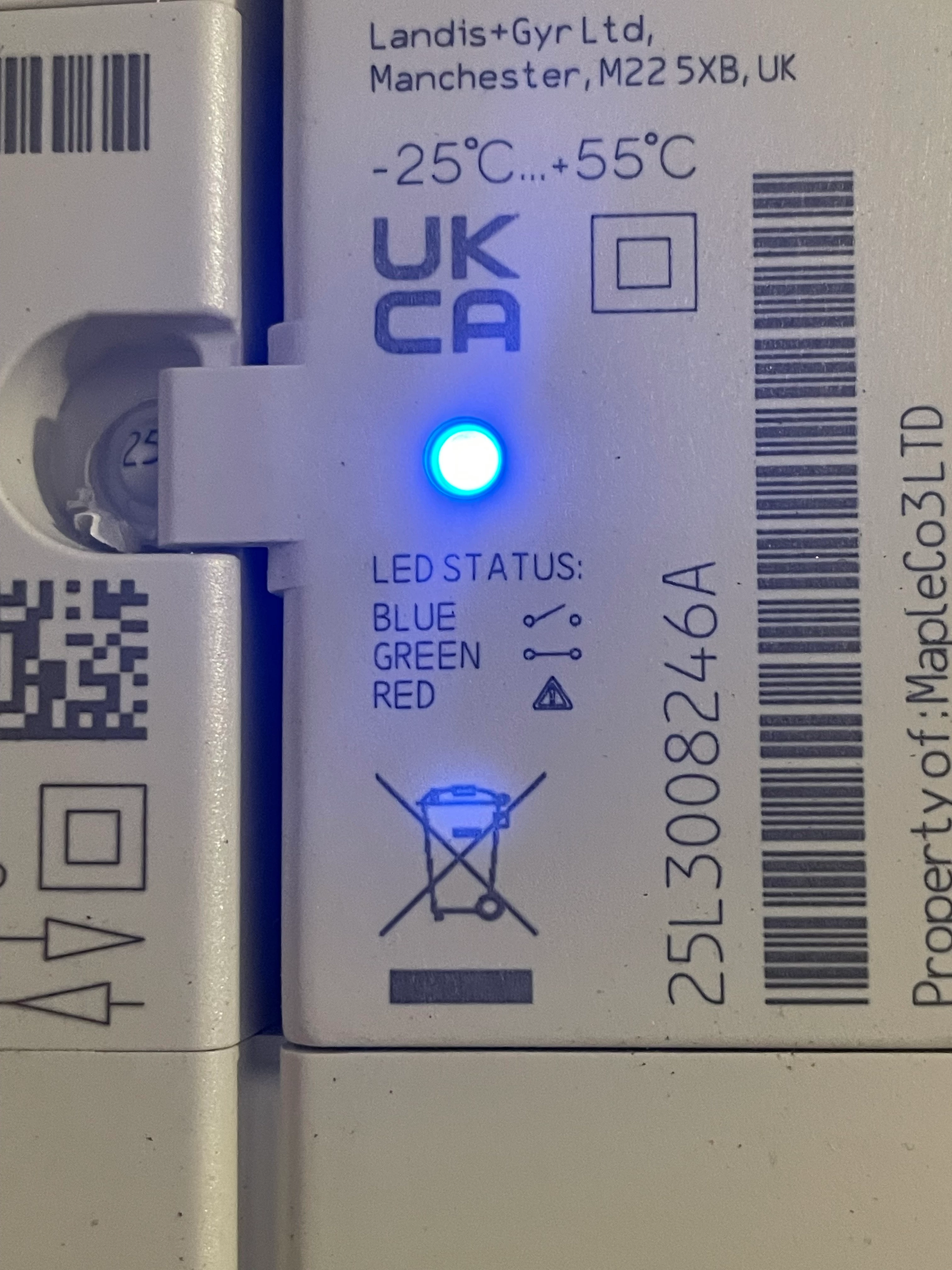
On checking our usage today, I noticed the meter had stopped sending daily readings since 6th of this month, which coincides with a bad storm and power outage. On checking the meter in order to send manual readings, I noticed that there were three LED status lights and, at first, the green light was showing. There were also two buttons to the left of the screen, one green and the other grey. We took a note of the reading being displayed, but since we have both peak and off-peak rates, we waited to see if it would show the other reading but it didn’t, so we pressed the green button and the display went blank. After randomly pressing both buttons, we eventually got back to the original screen, but the LED light which had been green had now changed to blue, and we’ve no idea what this means.

I’ve included a photo of these lights ( please note that it is actually blue, and not green as it looks in the photo). Can anyone explain what’s going on?


Best answer by Ben_OVO

@almaca welcome to the OVO Forum! I hope you’re well.


Thanks for your post and sorry to hear of the issues with your smart meter since the outage. This is quite a common occurrence after a power outage. There’s a chance that the smart meter will regain communication with us, however it may require an engineer to come out to fix or replace the meter. If so, this appointment would be free of charge.


We’ve got a guide on the Forum that helps with diagnosing smart meter issues using your online account / app:


If the reads aren’t coming through I’d definitely recommend getting in touch with our Support Team about this, so that they can arrange an appointment for you if necessary. Let us know how you get on when you do.


Lastly, regarding the power outage, I don’t know whether there are any vulnerabilities within your household but, if so, I’d recommend signing up to the Priority Services register. This is a free service with numerous benefits, the main one being that the Grid will contact you to warn you of any incoming outages where possible. If you do go off supply, they’ll also look to get your property back on with priority. You can find out more info and sign up here: https://www.ovoenergy.com/register-for-priority-services.

6 replies

Firedog
Plan Zero Hero
Forum|alt.badge.img
  • Plan Zero Hero
  • October 18, 2025

The LED in your picture is on the bolted-on Auxiliary Load Control Switch (ALCS) which switches power to storage heaters and water heaters during offpeak hours. If it changed colour while you were watching, you caught the switch from offpeak to peak as the heating circuit was switched off.

This is nothing to do with recording usage or connecting to OVO. We’d have to see the whole meter, with its display lit up, and the whole meter cupboard or backboard so we can see the cables to and from the meter if we’re to be able to suggest what’s going on. 


Blastoise186
Plan Zero Hero
Forum|alt.badge.img+1
  • Plan Zero Hero
  • October 18, 2025

With that in mind…

Try https://smart-meter-help.ovoenergy.com as I suspect it’ll be the fastest diagnostic route for the comms issue and should send an alert to OVO at the end.

We’ll help you diagnose the rest as well - but that tool is definitely worth a spin!


Forum|alt.badge.img
  • Author
  • Carbon Cutter***
  • October 18, 2025

Thank you both for your replies. It’s a relief to learn that the change in LED lights was simply it moving to Off-peak, which does coincide with the time when we were looking at it.

It’s going to be Monday before I can follow through with your suggestions, and I’ll post a further reply once I’ve obtained the info you asked for. I will also have a proper look at the link to OVO diagnostics.


Ben_OVO
Community Manager
  • Community Manager
  • Answer
  • October 20, 2025

@almaca welcome to the OVO Forum! I hope you’re well.


Thanks for your post and sorry to hear of the issues with your smart meter since the outage. This is quite a common occurrence after a power outage. There’s a chance that the smart meter will regain communication with us, however it may require an engineer to come out to fix or replace the meter. If so, this appointment would be free of charge.


We’ve got a guide on the Forum that helps with diagnosing smart meter issues using your online account / app:


If the reads aren’t coming through I’d definitely recommend getting in touch with our Support Team about this, so that they can arrange an appointment for you if necessary. Let us know how you get on when you do.


Lastly, regarding the power outage, I don’t know whether there are any vulnerabilities within your household but, if so, I’d recommend signing up to the Priority Services register. This is a free service with numerous benefits, the main one being that the Grid will contact you to warn you of any incoming outages where possible. If you do go off supply, they’ll also look to get your property back on with priority. You can find out more info and sign up here: https://www.ovoenergy.com/register-for-priority-services.


Forum|alt.badge.img
  • Author
  • Carbon Cutter***
  • October 23, 2025

Thanks everyone for your suggestions. Today I went to tackle the issue and I see it seems to have resolved itself! There are now daily readings, which correspond to the manual reading I took the other day.

I still have a separate issue regarding what I was being charged up until the Smart Meter was recently installed, but I’ll put that in a separate post.


Chris_OVO
Community Manager
Forum|alt.badge.img
  • Community Manager
  • October 24, 2025

Hey ​@almaca


I’m glad the issue has been resolved and the advice worked! We’ll keep an eye out for your next post to help as well.

