Solved

How is data recorded on the online graphs and tables?

  • October 29, 2025
  • 51 replies
  • 630 views

Show first post

51 replies

Forum|alt.badge.img+1
  • Author
  • Rank 8
  • November 20, 2025


@Bendog did you do any testing yet to pin down just how many minutes your gas meter offset is?

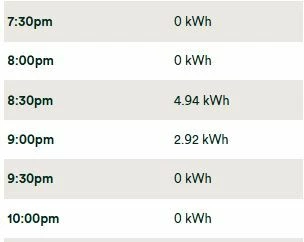
It is about 15 minutes, we think. However, now we have a change in the weather, we may have to wait until we are only using the boiler for water to narrow it down further. It is just really frustrating that OVO have decided to expect us to be able to work out something that will be individual to individual meters, it seems unfair that the offer is available, with a guaranteed reward, for electricity only customers who just need to pick a slot. In the first slot I booked, we managed 5.95kWh for the first hour but only 2,6 kWh for the second because of the time offset. In the second one we managed to use over 5 kWh in each because we did a 15 minute adjustment to the slot start time. The first slot should credit us with the cost of 7.6 kWh while the second should credit us for the full 10 kWh. However, we do know that we should not chance picking any 9-11pm slots given that 10.30 and 11pm are the slots that are so often not recorded at all.


Nukecad
Super User
Forum|alt.badge.img+4
  • Super User
  • November 20, 2025

@Bendog we are discussing, and actively testing, this issue ‘backstage’ I for one am coming round to thinking that there is a solution to this apparent time offset with gas meters - it’s just not a solution that is automatically used.

It appears that when a gas meter is more than 10 seconds out of sync with ‘clock time’ it will not try to correct itself but will send “alerts” that attention is needed.
However as the ‘glitch’ makes no difference at all to your gas billing then it it is not a priority to look at.
(Or in other words it gets ignored as being unimportant - which is fair enough because it makes no, well very little, difference to billing).

However there is apparently a command “Set Clock” that can be sent by support to gas meters, to re-sync the meter with clock time.
You might want to ask support to try it for you - (I want do do some more testing recording before I ask them).


Forum|alt.badge.img+1
  • Author
  • Rank 8
  • November 20, 2025

@Bendog we are discussing, and actively testing, this issue ‘backstage’ I for one am coming round to thinking that there is a solution to this apparent time offset with gas meters - it’s just not a solution that is automatically used.

It appears that when a gas meter is more than 10 seconds out of sync with ‘clock time’ it will not try to correct itself but will send “alerts” that attention is needed.
However as the ‘glitch’ makes no difference at all to your gas billing then it it is not a priority to look at.
(Or in other words it gets ignored as being unimportant - which is fair enough because it makes no, well very little, difference to billing).

However there is apparently a command “Set Clock” that can be sent by support to gas meters, to re-sync the meter with clock time.
You might want to ask support to try it for you - (I want do do some more testing recording before I ask them).

I have already been in contact with them regarding both the offset and the irregular missing data slots. As you have said, since the overall usage is correct via the daily meter readings that are used to calculate this, they do not view it as a problem. In the great scheme of things and, under normal usage, of course, it is not. I have been aware since our gas meter was installed that the start time actually recorded and the start time of the actual boiler has always been “one slot out” - i.e. it records usage in the 6am slot when the boiler actually comes on at 6.30am. It is only now, with their attempt to use the exact same method as the free electricity initiative and apply it to our gas usage that it does become a problem.  To be honest the simplest solution for something that they do not really want to support to make correct would be to allow us to choose just a day and the 10 kWh rebate be applied to that day. This is, in reality what they have done for electricity-only customers. We are paying a daily standing charge for our meters and we should be able to expect that they are totally accurate both for time and usage. I have, incidentally, contacted them regularly, in the past regarding their apparent inability to deal with the switches between GMT and BST - after all, these have been standardised for years - they do not come as a surprise!!


Nukecad
Super User
Forum|alt.badge.img+4
  • Super User
  • November 21, 2025

i can only agree with your comments there.

TBH though gas is a fossil fuel and so doesn’t fit in with the OVO ‘Plan Zero’ ethos.

You can sort of see why they obviously regard gas as second class; and would probably not have anything to do with it if they could get away with dropping it and selling electricity only.
But of course that would risk losing customers who prefer to have one supplier for both fuels.

PS, Here’s an off the wall thought about fossil fuels.
Gas, Coal, and Oil, are in fact renewable fuels. It just takes a very, very, long time for them to renew. (much longer than it takes to burn them).


Firedog
Super User
Forum|alt.badge.img+7
  • Super User
  • November 21, 2025

I feel a bit of an intruder in this thread because, gas not having been invented in this part of the world yet, I’ve no personal experience of gas meters to go by. However, here are a couple of general remarks:

  • I honestly can’t tell from the red figures in ​@Bendog‘s table whether he’s missing all the data for some days or just between noon and midnight. I just don’t seem able to say at a glance whether 12:00 AM/PM refers to noon or midnight - to this old dog, 12:00 will always be noon - the Meridian to which the ‘M’ in AM and PM refers.
  • We don’t have to depend solely on our supplier to retrieve usage data from our meters. Anyone with the appropriate permissions can retrieve them given the data owner’s authority. Bendog might see how he gets on with a utility like Bright, which should be able to request both electricity and gas usage data from a SMETS2 meter.
    [NB Bright et sim. can only retrieve usage and tariff data. They’re not allowed to retrieve meter register readings.]   
  • The question of which half-hour a particular usage data item belongs to is a bit vexed, as I think I pointed out earlier. This graphic shows how different datasets are presented:
      
    The columns are aligned by bucket, so all the 0.068 entries are in the same row. Only n3rgy is true to the source’s timestamp.
    [This was during BST, so there’s an hour’s difference here and there.]
  • I’m sceptical about ​@Nukecad‘s theory about the gas meter clock being stuck at ‘time of installation’. It must be part of the commissioning process to synchronize the meter’s internal clock with that in the CH; what happens subsequently is anybody’s guess. 
  • I’m not quite sure what Bendog is referring to here: “I have, incidentally, contacted them regularly, in the past regarding their apparent inability to deal with the switches between GMT and BST.“ OVO’s account pages have for some years struggled to present usage data in an orderly and accurate fashion during summertime, but they got it right in the summer just past. Where are you now seeing BST not being treated properly?

Nukecad
Super User
Forum|alt.badge.img+4
  • Super User
  • November 21, 2025
  • I’m sceptical about ​@Nukecad‘s theory about the gas meter clock being stuck at ‘time of installation’. It must be part of the commissioning process to synchronize the meter’s internal clock with that in the CH; what happens subsequently is anybody’s guess. 

I freely admit that it’s an unsubstantiated theory - but can’t think of another that could account for the gas metering offsets that we are seeing?

There does seem to be a difficulty with understanding what the actual issue is, which will be why Ben_OVO got that wide-of-the-mark answer.

The issue here isn’t that the gas meter’s clock is out, it isn’t.
The issue is that the 30-minute usage data packages are not aligned to the clock half-hour.

As an example:

Imagine that my particular meter was commissioned at 6 minutes past a clock half hour. 

It records the next 30 minutes of usage data as being in the clock half hour where that 30 minutes data period started. Even though 6 of them were actually in the next clock half hour.

So a 30-minute data package that started at 06:36 would run untill 07:06 and so would record the fist six minutes of a CH boiler timed to come on at 07:00 as being used in the 06:30 to 07:00 clock time period.

I have checked the clock time set on my gas meter and it’s correct.*

However my readings still show the first six minutes usage in each clock half house as being used in the previous clock half hour. As in the example I give above.

The only reasonable way I can think to explain that is that the 30-minutes data collection period is not aligned with the clock half hour.

And the only reason that I can think of as to why such a misalignment might happen is the meter commissioning not being on the half hour.

To get the 30-minute usage logging to align with a clock half hour you would have to either-

  1. Start recording the first 30 minutes of data at the clock half hour before the meter was comissioned.
    or:
  2. Specify somehow that the first data period should be less than 30 minutes and should end on a clock half hour,
    or:
  3. Ignore anything used before the first encountered clock half hour, which isn't practical. It would mean the commissioning engineer hanging around until a clock half hour was reached so that they could check that the meter was measuring as it should do.

#2 would probably be the most practical way, but it doesn’t appear to work like that, and won’t do until someone (Ofgem?) sees the offset as being a problem that needs to be addressed.

*PS. Thinking about that, if support sends a "Set Clock" command that would just reset the clock, it wouldn't have any effect on the observed usage merering offset.

PPS. Until someone comes up with another, reasonable, theory to explain why the gas usage data periods are observably misaligned to the clock half hour then I'll stick with my theory.


Forum|alt.badge.img+1
  • Author
  • Rank 8
  • November 21, 2025

i can only agree with your comments there.

TBH though gas is a fossil fuel and so doesn’t fit in with the OVO ‘Plan Zero’ ethos.

You can sort of see why they obviously regard gas as second class; and would probably not have anything to do with it if they could get away with dropping it and selling electricity only.
But of course that would risk losing customers who prefer to have one supplier for both fuels.

PS, Here’s an off the wall thought about fossil fuels.
Gas, Coal, and Oil, are in fact renewable fuels. It just takes a very, very, long time for them to renew. (much longer than it takes to burn them).

I do understand that OVO are not really interested in those of us who use gas, so why did they not just institute another electricity saving period? Since most people, if they have gas with OVO also have electricity, it would have been simple and OVO would not have received copious amounts of data and images from me for something worth a maximum (on my tariff) of about 60p per week. This whole thread would have been unnecessary too!!

I love your final comment, however!


Nukecad
Super User
Forum|alt.badge.img+4
  • Super User
  • November 22, 2025

When I first read the Terms of the offer and realised it was for gas and not electricity I predicted that it would cause issues. (Although I didn't see this metering offset cropping up again).

I think that we are still waiting for the confusion posts from those who will be expecting 10 kWh of free electricity to be credited this month. You just know that people don't read things properly.


Forum|alt.badge.img+1
  • Author
  • Rank 8
  • November 23, 2025

I feel a bit of an intruder in this thread because, gas not having been invented in this part of the world yet, I’ve no personal experience of gas meters to go by. However, here are a couple of general remarks:

  • I honestly can’t tell from the red figures in ​@Bendog‘s table whether he’s missing all the data for some days or just between noon and midnight. I just don’t seem able to say at a glance whether 12:00 AM/PM refers to noon or midnight - to this old dog, 12:00 will always be noon - the Meridian to which the ‘M’ in AM and PM refers.


This is how OVO’s online Portal (not the app) displays the half hourly data. When we are on BST or GMT, this is how those missing time slots appear to me using the online Portal.

This leads me to assume that OVO do not, in fact, manage the changes that occur twice a year, every year, on an easily predicted date.


Firedog
Super User
Forum|alt.badge.img+7
  • Super User
  • November 23, 2025


This is how OVO’s online Portal (not the app) displays the half hourly data.
 

This leads me to assume that OVO do not, in fact, manage the changes that occur twice a year, every year, on an easily predicted date.
  

Right. I’d forgotten that the online usage data tables have that infuriating way of displaying times. I only ever see the ones I get from n3rgy, where I also see three decimal places for the kWh values. It helps, of course, to see 12:00am in context. It’s done nicely in the app, just the other way up for some reason.

It took me some time to work out what you were illustrating with the ‘missing data slots’ images. I think you’re pointing out that the data for the last hour of the day were transferred to the first hour - is that it? If so, that was - I thought - corrected last March. If you examine the underlying data, when the website calls for data for a particular date during BST, the code now returns data for the 24 hours starting at 23:00 the previous day:


The first two nodes here are displayed at the website with labels 12:00am and 12:30am; quite inexplicably, 0.069 becomes 0.07 kWh and 0.026 > 0.03 kWh:


Have you found out why gas data are missing for specific periods most days? Comparing with what Bright returns would confirm whether the fault was at your end or at OVO’s.


Forum|alt.badge.img+1
  • Author
  • Rank 8
  • November 24, 2025

Have you found out why gas data are missing for specific periods most days? Comparing with what Bright returns would confirm whether the fault was at your end or at OVO’s.
  

This image shows what is displayed on the online OVO Portal compared with what is displayed, for the same date and times, on the Bright app.

It is also something that does not happen every day but, it seems, on random dates. 


Firedog
Super User
Forum|alt.badge.img+7
  • Super User
  • November 24, 2025

OK, so OVO and Bright agree on the timestamps, but Bright apparently don’t differentiate between ‘null’ (no data) and ‘0’ (value is zero), so that doesn’t help much - sorry! I’m guessing that when this happens, you see a null value even though there has actually been consumption in the period. I’m not sure, but in this scenario I’d expect the unreported usage to be notified to the CH when normal service was resumed, in the spirit of ‘better late than never.’

I can’t find any instance in my own records of null values, so I can’t check how they might be reported by a different user, e.g. n3rgy. 


Forum|alt.badge.img+1
  • Author
  • Rank 8
  • December 24, 2025

Update (of sorts) Another person, today, has taken over “my case” (and then left for the “holidays” at 2.30 pm).

However, this is what I have now been told: “I understand you would want to know what you have used in that time, however, after speaking with a tech Specialist, I was advised the online usage chart and app, are add ons. This was explained to me as, they are not a requirement of service and do not impact or affect your supply and are provided as a tool to help understand usage. It was explained to me also that much like mobile phones and wifi, the signal can be interrupted sometimes and if the signal has been interrupted, there is nothing we can do to alter that.”

I understand that signals may be interrupted, sometimes, but WHY would it happen at the same time every time it does happen and why would it happen on random days? 

The final assessment was that this was going to be the likely resolution: “It may be I am simply going to reach out to advise you it is nothing more than a signal issue that is unresolvable. I just want to be realistic and upfront from the start and not give any false information.”


The image shows that recorded electricity usage never suffers the same issue. It shows the daily data I have collected from the online portal from December 1st - 22nd. 


Firedog
Super User
Forum|alt.badge.img+7
  • Super User
  • December 25, 2025

Fascinating stuff, for which I’ve no explanation. Just a couple of suggestions:

  1. I wonder if there’s a difference between zero and null (in your table, ‘0.00 kWh’ and ‘-’). It’s possible that the meter records zero for anything less than 0.01 kWh, but null for anything less than, say, 0.002 kWh. We see this sort of ‘negligible’ report in, for example, the electricity meter’s ‘anti-creep’ performance. If you turn off everything at the CU, the meter’s LED impulse counter will probably show solid red. This indicates not that there’s no electricity flowing through it, but that there’s a flow of less than, say, 40 mA (the figure for my own Aclara meter). If this is logged anywhere, it might show a difference between real zero and null (i.e. < 40 mA).
  2. Since the times of these null readings are pretty uniform when they happen, could there be interference with the gas meter’s Zigbee transmission that happens just at these times? Something emitting EMF radiation close by that turns on and off at these times? I can’t think of anything specific, but - outside security lights? Electric blanket before bedtime? Or perhaps another intermittently-operating Zigbee device? The gas meter’s signal is tiny (it has to be, to conserve battery power in the meter), so susceptible to tiny variations in the ubiquitous EMF radiation just slightly different from the rest of the day. The Zigbee transmitter will in general pick the best channel to use, but I’ve no idea how often it checks. Again, it can’t be too often because battery - perhaps daily, say. A Zigbee expert might come along to tell us. Meanwhile, you could waste several hours trying to make sense of discussions like this one: I tracked channel utilization with ZHA to find the best Zigbee channel - Configuration / Zigbee - Home Assistant Community

Forum|alt.badge.img+1
  • Author
  • Rank 8
  • December 26, 2025

Fascinating stuff, for which I’ve no explanation. Just a couple of suggestions:

  1. I wonder if there’s a difference between zero and null (in your table, ‘0.00 kWh’ and ‘-’). It’s possible that the meter records zero for anything less than 0.01 kWh, but null for anything less than, say, 0.002 kWh. We see this sort of ‘negligible’ report in, for example, the electricity meter’s ‘anti-creep’ performance. If you turn off everything at the CU, the meter’s LED impulse counter will probably show solid red. This indicates not that there’s no electricity flowing through it, but that there’s a flow of less than, say, 40 mA (the figure for my own Aclara meter). If this is logged anywhere, it might show a difference between real zero and null (i.e. < 40 mA).
  2. Since the times of these null readings are pretty uniform when they happen, could there be interference with the gas meter’s Zigbee transmission that happens just at these times? Something emitting EMF radiation close by that turns on and off at these times? I can’t think of anything specific, but - outside security lights? Electric blanket before bedtime? Or perhaps another intermittently-operating Zigbee device? The gas meter’s signal is tiny (it has to be, to conserve battery power in the meter), so susceptible to tiny variations in the ubiquitous EMF radiation just slightly different from the rest of the day. The Zigbee transmitter will in general pick the best channel to use, but I’ve no idea how often it checks. Again, it can’t be too often because battery - perhaps daily, say. A Zigbee expert might come along to tell us. Meanwhile, you could waste several hours trying to make sense of discussions like this one: I tracked channel utilization with ZHA to find the best Zigbee channel - Configuration / Zigbee - Home Assistant Community

We now have only solar powered outside security lights. We did this as we had one wired in that had no off switch facility in the house, not even via the fuse board!! It was wired into a permanently live feed in the garage for which we could find no other use, so we had it disconnected. However, this has made me think about what we do have that is set to go off every night at 11pm - our Hive heating controls. I think we will change that to midnight from tomorrow to see if that has an effect on when these “signal interruptions” happen. I do not have any data from before our smart meters were installed, of course and our boiler, radiators and all associated controls were installed only two weeks before the smart meters, anyway,

However, this would not explain the fact that this “null read” happens one hour later during BST as the Hive controls compensate for that. 


Firedog
Super User
Forum|alt.badge.img+7
  • Super User
  • December 26, 2025

… what we do have that is set to go off every night at 11pm - our Hive heating controls. I think we will change that to midnight from tomorrow to see if that has an effect on when these “signal interruptions” happen. 
  

I’d also try to rule Hive out, or identify it as a possible culprit. Google tells me that Hive operates on Zigbee channel 20, around Wi-Fi’s 2.4GHz channel 8-9. My own Wi-Fi always defaults to channel 9 (2.442-2.462 GHz). 

It’s not just Zigbee or Wi-Fi signals that interfere with each other. Any electrical equipment will emit EMF radiation, usually within prescribed anti-interference limits, but even lower-energy signals can interfere with others on the same frequency. It could be something entirely different, apparently innocuous, that just happens to be emitting low-power radiation at an awkward frequency. I don’t know of any foolproof technique for checking what’s going on in your EMF space.


  • Newcomer
  • January 11, 2026

That actually clears up why my gas usage always seems to show up 30 minutes 'early' on the charts. It's a bit unintuitive at first, but knowing it's just a timestamping quirk rather than a meter error is a relief. On a side note, I’ve been trying to keep a manual log of my monthly statements and project docs to track these discrepancies over time. I found a handy tool recently, https://wordimageextractor.com/, which is great if you ever need to quickly pull graphs or charts out of those long Word-based energy reports or project summaries without messily screengrabbing everything.

Anyway, I’ll keep an eye on my next '30-minute window' and see if the offset matches up with what you've described.


Forum|alt.badge.img+1
  • Author
  • Rank 8
  • Solved
  • January 13, 2026

Today I have agreed to close the case I raised regarding the issue of missing data and the “data shift” issues. This is an extract from the reply I received from Dawn at OVO. 

Thank you for highlighting the "data shift" where your heating usage, which you observe coming on at 6:30 am, is recorded in the 6:00 am half-hourly slot. This is a known aspect of how smart meters and the data network report usage. The meter records consumption in a given half-hour period (e.g., 6:00:00 to 6:29:59) and then transmits that total. Depending on the exact timing of the meter reading and data processing, usage that begins at 6:30 am often falls into the total for the preceding 6:00 am slot. This inherent delay can indeed make precise real-time management of usage for specific initiatives challenging, and we appreciate your feedback on this.”

As you can see, OVO acknowledge this is a “known issue”. Knowing this, I wonder how and why it was decided to offer a “time of use” initiative for gas users. Earlier in the email, I was told that any missing data is a DCC issue. I still wonder why almost all of my missing data occurs at the same time. 


Jeffus
Rank 20
Forum|alt.badge.img+5
  • Rank 20
  • January 13, 2026

Obviously I am late to this thread so don't have anything much to add.

I don't look at the detailed readings any more.

I do remember I regularly use to get drop outs of gas readings, but my gas and electricity meters are quite far apart with solid walls in between so it is understandable for me. 


Forum|alt.badge.img+1
  • Author
  • Rank 8
  • January 17, 2026

Obviously I am late to this thread so don't have anything much to add.

I don't look at the detailed readings any more.

I do remember I regularly use to get drop outs of gas readings, but my gas and electricity meters are quite far apart with solid walls in between so it is understandable for me. 

My main reason for starting this thread was to highlight two of the problems that I had with the recording of my gas data and how they would impact on my ability to take advantage of the “A little help with your heating initiative” (now finished). This was a “time of use” initiative and, as you can see from their final answer to me the known issue of the “data shift” with gas “can indeed make precise real-time management of usage for specific initiatives challenging,” Precise two hour slots were offered for this. One of the offered two hour slots each week out of three was not one I dared to choose as it fell in the period that I most regularly had no data recorded. On 6 out of 15 days, so far, this month I have had no data recorded for my usage in the 10.30pm and 11pm time periods. In almost every month, these two time periods are the only ones that have no recorded data. I would expect a DCC problem to be more random. The main focus of my case was on these two issues. Given that missing data and “data shift” problems appear not to be unusual, I still question why this initiative was not better thought out. This is especially true as Electricity ONLY customers were able to choose a slot and, without any other changes to their energy usage, were able to receive the equivalent of the cost of 10 kWh of gas for their area as a reward each week. Despite trying to second-guess the “data shift” in the slots I chose, I was not successful in being able to claim that 10 kWh (restricted to 5 kWh per hour) reward in any of the ten weeks!


BPLightlog
Super User
Forum|alt.badge.img+9
  • Super User
  • January 17, 2026

While catching up on various threads, I came across this and am rather confused .. although appreciating that ​@Bendog has accepted an explanation.

My confusion arises as each data chunk from the smart meter should have various details, including the timestamp relating to each half hour record. Yes, the transmission of the 30 min record might not reach the comms hub at the end of the 30 min point (mine is delayed by up to 15 min) but it should still contain the information required to be accurate. Drop outs are a different item and can indeed occur from time to time, particularly on gas - the meter is often a distance from the comms hub and subject to any transmission difficulties while sending its data.

The explanation from OVO therefore doesn’t make sense and although TOU considerations are rare for gas supply (in the UK), smart meters are built with this consideration. Of course, the time of the data arrival can/does differ from time of usage and so manual intervention is required (this is often the case for electricity data, when out of line with ‘meter’ time).

The full answer may well therefore relate to an earlier point made in that gas is seen as secondary to electricity by suppliers and therefore beyond general accuracy checks for daily/monthly usage, they are mostly uninterested … which begs your basic question that why would an incentive be offered if it could not be validated easily .


Firedog
Super User
Forum|alt.badge.img+7
  • Super User
  • January 18, 2026

@Bendog  I’m sorry I missed this. I try to look at every new post in the Recently active list, but sometimes - like now - I discover posts that I’m sure weren’t there when I looked earlier.
    

Today I have agreed to close the case I raised regarding the issue of missing data and the “data shift” issues.
  

It’s a bit sad that, given the complexity of the electronic innards of gas meter itself and of the GPF at the other end of the connection, it’s not possible to assign an accurate timestamp to a metered quantity. If you’d like to delve into that complexity, you could waste a few hours ploughing through the specifications! This is just the bit for the GPF (Gas Proxy Function) in the comms hub: https://smartenergycodecompany.co.uk/documents/sec-subsidiary-documents/sec-schedule-10-communications-hub-technical-specifications-v1-7/


I still wonder why almost all of my missing data occurs at the same time. 

    

Did your little experiment with changing the Hive heating control timing reveal anything?


Forum|alt.badge.img+1
  • Author
  • Rank 8
  • January 18, 2026


I still wonder why almost all of my missing data occurs at the same time. 

    

Did your little experiment with changing the Hive heating control timing reveal anything?

It changed nothing. From 1st - 16th January, no data was recorded for the 10.30pm and 11pm slots on seven days. I am just assuming that, if OVO decide to try something similar for gas users in the future, it might be better thought out. To use the same model for gas as they used for electricity, given that the data recording and data shift issues for gas users are not unique, was, in my view, a poor decision. However, I believe that it was, in fact, a failed experiment. one they are unlikely to repeat. 


Ben_OVO
Community Manager
Forum|alt.badge.img+4
  • Community Manager
  • January 19, 2026

Thanks so much your feedback on this ​@Bendog - very much appreciated.


Firedog
Super User
Forum|alt.badge.img+7
  • Super User
  • January 20, 2026


Did your little experiment with changing the Hive heating control timing reveal anything?

It changed nothing. From 1st - 16th January, no data was recorded for the 10.30pm and 11pm slots on seven days. 
   

OK - it’s always good to be able to rule things out when troubleshooting! 

I’m still inclined to believe that this strange error is nothing to do with OVO, and almost as confident that DCC isn’t at fault either. If I were determined to get to the bottom of it, I’d be asking Landis & Gyr’s tech support whether they could shed any light on it. 


Feedback 💬