Question

Access Usage Data

  • March 24, 2026
  • 14 replies
  • 107 views

Forum|alt.badge.img+1

I’m trying to register with a third party to access my usage data. They ask for the MPAN (which is fine) and the MAC Address of the IHD.

I’ve entered the MAC Address from the IHD I have here, but it’s getting declined. Just tried to explain this to OVO, which resulted in me being told my IHD no longer works (it does) and I can only access my usage data using the OVO App.

Pulling my hair out with these folks at the moment. Does anyone have any suggestions?

14 replies

Blastoise186
Super User
Forum|alt.badge.img+9
  • Super User
  • March 24, 2026

Hiya!

It’s not the MAC Address you want - it’s the GUID which is longer. :)


Firedog
Super User
Forum|alt.badge.img+7
  • Super User
  • March 24, 2026

I’m trying to register with a third party to access my usage data.
  

Which third party? There are people here who have tried most of them and can probably suggest what’s going wrong.

There is a utility which retrieves the OVO data from the account website, which may be good enough for you. The website is usually up to 24 hours behind, so this isn’t much use if you’re looking for close to real-time data. It’s here: https://github.com/MikeWilliams-UK/My-Ovo-Data/releases/tag/V1.0.9 

OVO have no interest in helping with accessing usage data via third-party utilities. 


Blastoise186
Super User
Forum|alt.badge.img+9
  • Super User
  • March 24, 2026

It’s also worth mentioning that it’s not so much OVO refusing to help with this one, and more of a case that they can’t help with it as OVO has no access to third-party systems such as whoever you were trying to connect to. DCC User Roles prevent OVO from touching that as third parties come under DCC Other User while OVO is DCC Supplier if memory serves.

Responsibility for support lies with the third party in this case.


Ben_OVO
Community Manager
Forum|alt.badge.img+4
  • Community Manager
  • March 25, 2026

@ObsidianWalker have you had any luck entering the GUID number as per ​@Blastoise186’s advice?


The GUID is a 16 digit alphanumeric code, split up by hyphens. It’ll generally be on a sticker on the back or underside of the IHD.


Let us know how you get on! You might find some helpful info in this long thread:


​The programme ​@Firedog has linked has been made by one of our Forum members, ​@MikeWilliams, who’s very knowledgeable on this subject.


MikeWilliams
Newcomer
Forum|alt.badge.img

Hi All,

@Ben_OVO I suspect that if the necessary id, if 16 characters that it is NOT a GUID

This is an example of a random GUID generated by https://guidgenerator.com/ which as you can see in the last example below is 32 characters

  • {356df19f-5744-4d75-89ae-312ee1247f55}
  • 356df19f-5744-4d75-89ae-312ee1247f55
  • 356df19f57444d7589ae312ee1247f55

The stickers on my IHD are it’s MAC addresses which is 16 characters long (when the colons are ignored) - The following are a random MAC Address in the formats I typically see, the last being as shown on my IHD’s info screens

  • C8:DE:BE:E7:B3:DB
  • C8-DE-BE-E7-B3-DB
  • C8DE-BEE7-B3DB

On my IHD there is also an installation id which is 20 characters formatted like that below, and a different format in the IHDs info screen with dashes.

  • 1234 5678 9012 3456 7890
  • 12345-67890-12345-67890

My IHD has an info screen which shows a Hub ID (like a mac address) which is different to the IHD’s MAC address.

Edit:
Just looked at my electric meter and that has it’s own MAC address.

Hopefully this should clarify things.

/MIke


MikeWilliams
Newcomer
Forum|alt.badge.img

I’m trying to register with a third party to access my usage data. They ask for the MPAN (which is fine) and the MAC Address of the IHD.

I’ve entered the MAC Address from the IHD I have here, but it’s getting declined. Just tried to explain this to OVO, which resulted in me being told my IHD no longer works (it does) and I can only access my usage data using the OVO App.

Pulling my hair out with these folks at the moment. Does anyone have any suggestions?

I tried to register with n3rgy in November 2025, but nothing I entered worked.
I raised a ticket and this is the response I got

“n3rgy discontinued API support for consumers from 1st October 2024. This is part of the n3rgy refocusing of its services for Consumers.”

https://support.n3rgy.com/support/solutions/articles/103000315764-n3rgy-api-support-for-consumers-from-1st-october-2024

/Mike


Firedog
Super User
Forum|alt.badge.img+7
  • Super User
  • March 25, 2026

I tried to register with n3rgy in November 2025, but nothing I entered worked.
[...]
“n3rgy discontinued API support for consumers from 1st October 2024.
  

To access your meter via n3rgy’s API, you have to be a client of one or other of their ‘business partners’, who are then responsible for the basic authentication. The system was a bit wobbly last autumn, but it all came right over Christmas and now works better than ever. I ended up signed up with both Equiwatt and Snugg; Equiwatt make it clear that you have to join in their load-balancing games to be allowed to stay on board, but Snugg (whose sign-up process is a lot more convoluted) haven’t made any such threats yet. I don’t know which one it is that makes access to n3rgy’s API possible, but it’s probably both.

This is my preferred mode; the data I get are usually less than an hour old, compared with 12-24 hours if I rely on OVO’s own website or the Bright app.


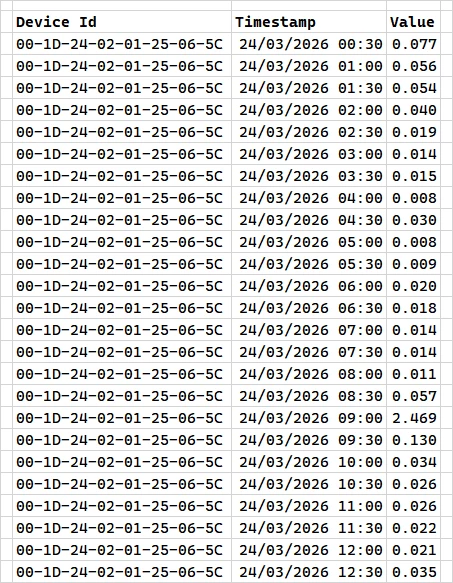
And this is the sort of thing I get each morning:

Beware the timestamp: it gives the end of the period
during which the quantity was recorded.  


The Device ID is the meter’s unique MAC address, shown on the face of the meter itself both en clair and as a barcode. This isn’t the same as the one for the IHD. You’re asked for that because it’s not published anywhere, so only the IHD’s guardian can quote it, providing prima facie evidence for identification and thus authentication.


Forum|alt.badge.img+1

I’m trying to register with a third party to access my usage data.
  

Which third party? There are people here who have tried most of them and can probably suggest what’s going wrong.

There is a utility which retrieves the OVO data from the account website, which may be good enough for you. The website is usually up to 24 hours behind, so this isn’t much use if you’re looking for close to real-time data. It’s here: https://github.com/MikeWilliams-UK/My-Ovo-Data/releases/tag/V1.0.9 

OVO have no interest in helping with accessing usage data via third-party utilities. 

It was N3rgy, but seems from other replies it’s a dead end anyway. Will give this link a try, thank you.


Forum|alt.badge.img+1

@ObsidianWalker have you had any luck entering the GUID number as per ​@Blastoise186’s advice?


The GUID is a 16 digit alphanumeric code, split up by hyphens. It’ll generally be on a sticker on the back or underside of the IHD.


Let us know how you get on! You might find some helpful info in this long thread:


​The programme ​@Firedog has linked has been made by one of our Forum members, ​@MikeWilliams, who’s very knowledgeable on this subject.


@Ben_OVO  hi, no I’ve had no luck. It was on the N3rgy site, but seems this might be a dead end anyway. Am going to try the link that ​@Firedog provided.

As an aside, my IHD has a Serial Number and a EUI printed on the base. I can also see these in the IHD settings as well.


BPLightlog
Super User
Forum|alt.badge.img+10
  • Super User
  • March 25, 2026

It is usually the GUID that is requested .. but you have to enter this very carefully and exactly as printed. 
Be careful not to mix 0 and O (zero and capital O)


Firedog
Super User
Forum|alt.badge.img+7
  • Super User
  • March 25, 2026

Which third party?
   

It was N3rgy, but seems from other replies it’s a dead end anyway.
  

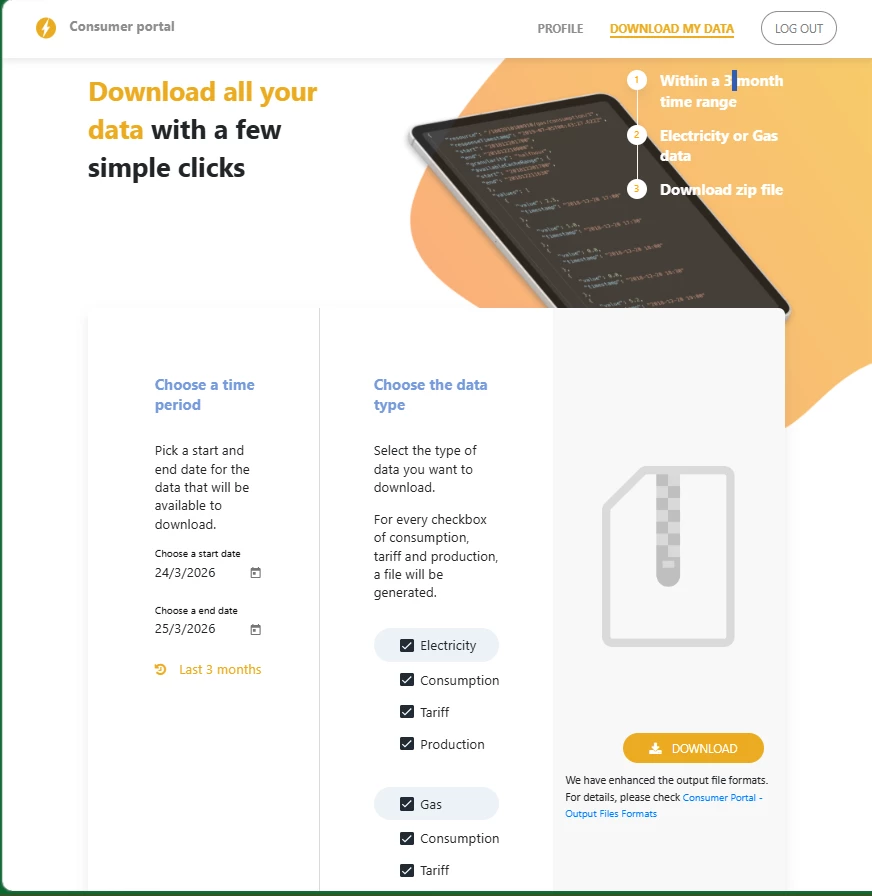
Not at all. My first task every day is to get my usage data from n3rgy. This from n3rgy data - accessing smart energy data:

If any organisations¹ access your energy data through the n3rgy data services, our Consumer Portal allows you to:

  • Review which organisations you have granted access to
  • Withdraw consent for any or all the organisations listed
  • Download a copy of your smart meter data held by n3rgy.
1.  You can find further information on organisations using our services to manage your consent and access your energy at Organisations using n3rgy services


Ben_OVO
Community Manager
Forum|alt.badge.img+4
  • Community Manager
  • March 26, 2026

@MikeWilliams thanks for your input here - it’s great we can call on you for these queries.


@Firedog does it cost anything to sign up to these business partners? ​@ObsidianWalker looks like a good workaround if you did want to use those services.


Firedog
Super User
Forum|alt.badge.img+7
  • Super User
  • March 26, 2026

@Firedog does it cost anything to sign up to these business partners? ​
  ​​​​​

The ones I mentioned are both free, which is why there may be a quid-pro-quo like having to take part in their demand-flexibility exercises (which are like OVO’s PM Flex). It can take a day or two for the permissions to be all sorted out, but I find it well worth it once the system is up and running. 


Ben_OVO
Community Manager
Forum|alt.badge.img+4
  • Community Manager
  • March 27, 2026

Thanks ​@Firedog that’s really helpful 👍.