Why has my online account lost my meter reading history for my non-smart gas meter?
I note that the font has changed on the entry page, so OVO must have made a change to this feature and now that they have made that change, my previous readings have all disappeared.
Morning @TonyS4, and welcome to the OVO Forum community.
I’m sorry to hear what’s happening here. Without having access to your account, I can only speculate as to what the issue is. The issue will either be fixable by a frontline advisor, or will need to be escalated to our IT team. For traditional meters like yours, a more common cause of missing gas reading history is what we call an ‘ambiguous MSN’ (meter serial number). this is when the gas meter serial number isn’t logged on the account correctly.
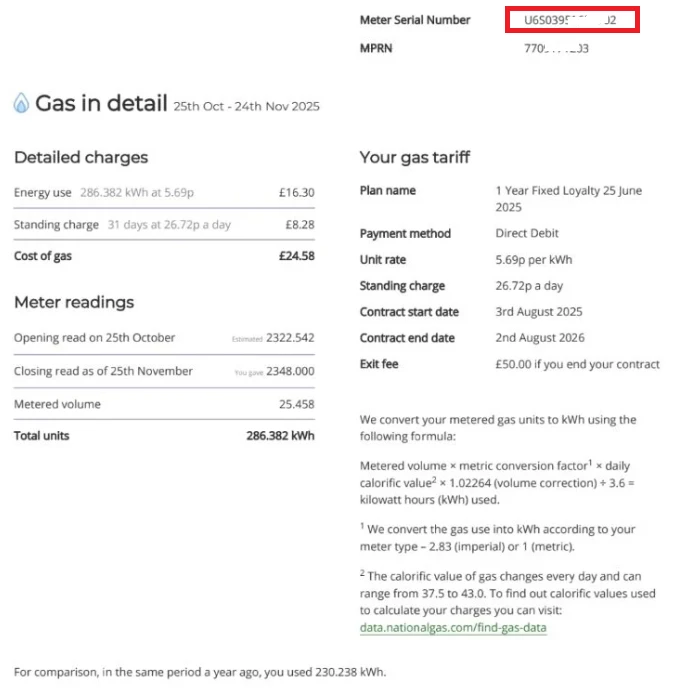
I’d recommend downloading a statement from your online account, and checking the gas meter serial number on the bill against the serial number on your meter. The gas meter serial numbers should match, and it’ll be a mixture of numbers and letters. If the meter serial number listed on your statement is just a couple or three numbers, then this will be the ‘ambiguous MSN’ issue, and the meter serial number on your OVO account will need to be updated to match the serial number on the meter. You’d need to send a photo of the gas meter, clearly showing the reading and serial number, to our Support Team.
The serial number can be found at the top of the statement page titled ‘Gas in detail’. I’ve added a screenshot below of this page on my bill, with the serial number highlighted in red.
I can’t guarantee that this is the cause of the issue, but it’s probably the most common cause, and is also something that some newer advisors may not know about. If you do see that the serial number on the meter doesn’t match up to the number on the bill, get in touch with our Support Team, and you can reference this Forum thread when you speak to them.
Have you tried updating your app to the latest version? You might be using an older version, which could be causing some bugs. If you can share a few screenshots of what you're seeing, it would help us better understand the issue and provide support. Please make sure to obscure any personal information in the screenshots. Thank you!
Have you had a chance to chat with our Support Team about the issue? We want to help, but we can only do so much with account-related questions here in the Forum. If you reach out to them using the contact options below, they’ll be happy to look into why your readings aren’t showing up.