Solved

How do I confirm Economy 10 hours and rates?

  • December 5, 2025
  • 16 replies
  • 150 views

Good afternoon,

According to my ovo bill, I’m on the following tariff:

Simpler Energy - Economy 10


My property is an all electric flat, originally supplied by SSE but subsequently transferred to OVO.

I have always been on economy 10. I have a smart meter, which was fitted by OVO.


To ensure that I’m not getting fleeced, I want to check: 

  1. the hours of the day that are deemed off-peak
  2. the price rates being applied to the off-peak and peak hours.

How can I check the above?


thanks in advance

Best answer by Firedog

Updated on 18/12/25 by Ben_OVO

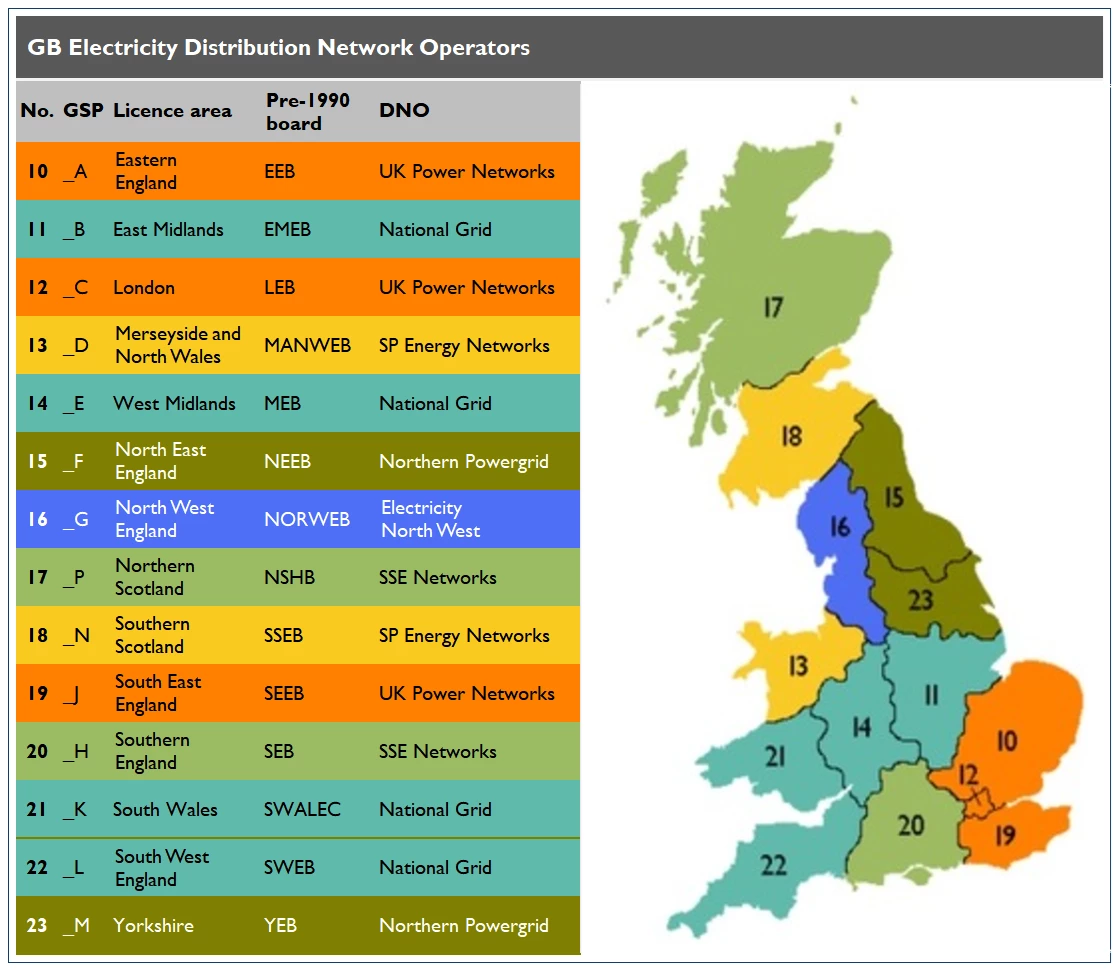
Prices and ToU timings vary from place to place. Note your area no. from this map:

The Economy 10 timings are given here: Economy 10. The MPAN referred to is the area no. you noted above.

Note that the smart meter will introduce a delay into all the timings. It will probably be around 10-15 minutes, and it will always be the same. 

Current prices are here: Our prices | OVO Energy. Use the filters to cut out tariffs you’re not interested in.


16 replies

Firedog
Plan Zero Hero
Forum|alt.badge.img
  • Plan Zero Hero
  • Solved
  • December 5, 2025

Updated on 18/12/25 by Ben_OVO

Prices and ToU timings vary from place to place. Note your area no. from this map:

The Economy 10 timings are given here: Economy 10. The MPAN referred to is the area no. you noted above.

Note that the smart meter will introduce a delay into all the timings. It will probably be around 10-15 minutes, and it will always be the same. 

Current prices are here: Our prices | OVO Energy. Use the filters to cut out tariffs you’re not interested in.


Nukecad
Plan Zero Hero
  • Plan Zero Hero
  • December 5, 2025

If you login to your account online and on the left select ‘Plan’ then ‘Plan details’ that should show you your current tariff with the information that you require.

The ‘Prices and unit rates’ should give you the hours and costs per kWh.

They are shown there as ex-VAT, so multiply the rates by the kWh used, (for both peak and off-peak), then add the daily standing charges, and then add VAT of 5% to the total.


If you are using the app then the information is found under ‘Bills > View plan details’


  • Author
  • Carbon Cutter***
  • December 5, 2025


The plan details only give standing charge, peak rate and off-peak rate.


I want to verify that i’m getting 10 off-peak hours per day.

I want to verify the times of day i’m getting those hours and that the off-peak rate of 22.03p is being applied to kwh i’m using during those periods.

Can ovo provide the raw data they use to generate the bill which includes all the above.


Firedog
Plan Zero Hero
Forum|alt.badge.img
  • Plan Zero Hero
  • December 6, 2025

I want to verify that i’m getting 10 off-peak hours per day.

… Can ovo provide the raw data they use to generate the bill which includes all the above.
  

No, I don’t think so. You will have to do your own investigation of what your meter’s doing. You have to find out precisely at what time the meter stops recording on one register and starts recording on the other. You only have to do this once, so long as you’ve established when your nominal offpeak hours are. For example, if your afternoon slot is supposed to be 13:30 - 16:30, the meter should be recording at Rate 01 until 13:30 and a few minutes beyond, at which point it changes to Rate 02. You should time those few minutes (often 10-15, but possibly 0-30), because usage outside the offpeak period is expensive. 

You also have to check that the meter is energizing the switched circuit that powers your storage heaters at the same times as the register change. You may be able to see this if the heaters have an indicator - usually a red neon - that lights up when the power is on. The IHD may also be a good guide, because it should show an amber or red light when a heavy load like a storage heater is fired up. The ‘using now’ figure will change from 10s or 100s of W to a few kW. There may also be a sign on the meter itself while the switched circuit is live. 

We’d have to know what sort of meter you have to be able to tell you what to look for. A close-up photo clear enough for the markngs and display to be legible would help, as well as an overview of the meter backboard or cabinet so we can see all the cables.

Your online account tells you what rates are applied to peak and offpeak usage. Why do you think you might be being fleeced?


Ben_OVO
Community Manager
  • Community Manager
  • December 8, 2025

@h4X0R thanks for your post, and welcome to the OVO Forum.


I’m glad to see ​@Firedog and ​@Nukecad have been so helpful here. It’s most likely that everything is set up exactly as it should be, and will follow the same time-switches as with your previous supplier. I’ve sent you a private message to request your Meter Point Administration number (MPAN). Once I have this from you, I’ll be able to tell you the times your meter switches between peak and off-peak.


Cheers!


Ben_OVO
Community Manager
  • Community Manager
  • December 8, 2025

Thanks for getting back to me ​@h4X0R.


I’ve checked your switching times and can confirm you’re definitely Economy 10, with the following times:


  • Register 1: 0000-0500hrs / 1300-1600hrs / 2000-2200hrs


  • Register 2: 0500-1300hrs / 1600-2000hrs / 2200-2400hrs


If you check your meter readings page on your online account or app you’ll be able to see which of the above registers is ‘peak’ and which is ‘off-peak’. Further Economy 10 advice can be found on our website here and in this previous Forum article:


I hope this helps!


Firedog
Plan Zero Hero
Forum|alt.badge.img
  • Plan Zero Hero
  • December 8, 2025

Ben has helpfully reported what your meter’s tariff switching table is set to. That may be only half the story, though, because your meter is probably also turning on the power to your heating equipment so it’s not live during peak hours. If it is doing this, it’s of course vital that the switch that does it is also set to the E10 timings. If there’s any mismatch, you could be seriously out of pocket if power-hungry equipment is running in peak periods. The photos we asked for will help; if you can, please take the close-up of the meter in the middle of one of the offpeak periods. 


  • Author
  • Carbon Cutter***
  • December 9, 2025

@Firedog thanks for your time. Your comments have been helpful. 


I don’t have a storage heater. Nor do I have an in-house display as I’m on the fourth floor but my meter is on the ground floor.

My central heating system is electric but I manually turn it on/off so it isn’t a concern.

My immersion heater does operate automatically. I have no way of controlling it. There are no lights on anything to indicate it is on, however it is audible when working. 

So far, I have verified that the immersion heater comes on at precisely 13:00 and at 20:00, in-line with the economy 10 off-peak periods. I still need to check if it comes on at midnight. 

My meter is a Landis + Gyr E470 Type 5533. I’ve found that by default it displays the the current rate being recorded. So I’ve started taking readings at the start and end of each peak/off-peak period, like so:

There are still a few more readings needed to complete the set but it looks correct so far. I used the ovo website daily reading history to verify that rate 1 is Peak and rate 2 is off-peak, as expected:

I observed that the rate switches at 10 minutes past the hour, so my immersion heater is using 30 minutes of peak rate per day (3 off-peak periods x 10 minutes), which isn’t ideal. That’s 15 hours per month. Is there any way to adjust that?

This is what my meter installation looks like:


Firedog
Plan Zero Hero
Forum|alt.badge.img
  • Plan Zero Hero
  • December 9, 2025

My central heating system is electric but I manually turn it on/off so it isn’t a concern.

My immersion heater does operate automatically. I have no way of controlling it. There are no lights on anything to indicate it is on, however it is audible when working. 
  

Thank you for the pictures: they’re a great help.

The box bolted on to the right-hand side of your meter is the switch (technically the ALCS) that turns power on and off to heating equipment. I would have thought that this will be the main space heaters and - presumably - the immersion heater. Ideally, it should switch at the same instant that the tariff changes. It has a helpful indicator lamp that glows blue for off and green for on (and red for oops!), so that’s how to check whether its timings are right. 

It may be that your space heaters aren’t controlled by this switch (“I manually turn it on/off so it isn’t a concern”). This has the potential for being costly if they’re running at peak rates …

It does sound as if the ALCS is switching your immersion heater on and off. This again might be costly, because it means that it could be heating up when there’s no need for it. Most immersion heaters will heat up a full tank of water in three or four hours from cold. My (oversized) tank stays warm for two or three days, although it might struggle to produce a hot bath on the third day. Having it maintain its design temperature all the time is probably unnecessary. 

Bathing can be a major expense; you haven’t mentioned a shower, but many all-electric households like mine have a really power-greedy electric shower; at 9.5kW, it’s the greediest of all my equipment. A shower fed from the hot water tank is likely to be very much less expensive.

I’m a little surprised when you say the immersion heater comes on at ‘precisely’ 13:00; if it is indeed controlled by the ALCS, it shouldn’t fire up until the rate switches at 10 minutes past the hour. I’d ask you please to check this carefully: something is triggering it, so if it’s not the ALCS, what could it be?


… Nor do I have an in-house display as I’m on the fourth floor but my meter is on the ground floor.
  

That isn’t right. Your supplier is obliged to provide a working  IHD. There are several ways of solving the problem of distance between the meter and the IHD’s ideal location (your kitchen, perhaps): here’s one, for example: How It Works - Alt HAN Co


One of the IHD’s features is a ‘traffic light’ system. This is just a lamp on the device that changes colour when the load suddenly increases, e.g. when you switch the kettle on  - or the immersion heater starts up. That would tell you about a major change of load within ten seconds of it happening.

We may be better able to understand your system if you showed us photos of your Consumer Unit(s) (‘fuse boxes’), with the lid propped open and clear enough for us to be able to read any labels for its trip switches. 


tl;dr

  • Check the precise time the light on the meter’s ALCS changes from blue to green or vice versa;  
  • Check the precise time the immersion heater starts up;
  • Ask Support to arrange for you to get an IHD and make it work.
      

  • Author
  • Carbon Cutter***
  • December 10, 2025

hi ​@Firedog ,


the main fusebox:

my immersion heater

A look inside the immersion heater fusebox shown above:


I stand corrected regarding the time I hear the immersion heater come on: it switches on at 2 minutes past the hour. I checked this at 13:02 and 20:02.


You’re correct about the blue/green ALCS LED. When the rate switched from 01 to 02, the LED changed from blue to green, at exactly the same time; 10 minutes past the hour. What else can I check to determine why the immersion heater is turning on a few minutes before the switch to off-peak rate? 


I’ll look into getting an IHD.


The following are screenshots from my online ovo account. They show my energy consumption for two very similar days, except on one I had the central heating on for a couple of hours in the evening, whilst the other did not. I’ve also marked the times where I believe the immersion heater is turning on. Apart from the fridge, no other major appliance like washing machine or cooker, was used on those two days. The energy consumption looks ok to me i.e. central heating only operating when turned on by me and immersion heater coming on periodically during off-peak hours only. Does it look ok to you?


Also, the shower gets its hot water directly from the tank.


  • New Member*
  • December 10, 2025

I may be missing something as I am new here but the OP says rate 1 is peak but rate 1 appears to cover times that look like off peak?


Firedog
Plan Zero Hero
Forum|alt.badge.img
  • Plan Zero Hero
  • December 11, 2025

 ​@h4X0R Thanks again. 
    

I hear the immersion heater come on [...] at 2 minutes past the hour. 
    

I’m sorry, but I have no experience of what I think is called ‘wet electrical heating’, where an electric boiler takes the place of the more usual gas boiler. Regardless, if the heater for domestic hot water (DHW) - i.e. that used for other purposes than space heating via radiators - is separate from the boiler, it should only be heating up inside offpeak hours. 
  

When the rate switched from 01 to 02, the LED changed from blue to green, at exactly the same time; 10 minutes past the hour.
    

Again, I’m not familiar with L&G meters, but it could be that it works slightly differently from what I’m used to. You have shown a screen headed Rate 01 Act Imp. On my meter, the equivalent screen only gives the current meter reading for the peak register. It doesn’t tell me which register is the one in use. This probably leads to confusion because of the different meanings of Active in this context. However, I can’t determine from the L&G manual how otherwise to see which rate is currently incrementing. If the screen changes at the same instant as the LED changes colour  and stays on the same rate until the next LED colour change, then I’d wonder how to read the other register …
     

… screenshots from my online ovo account. 
    

Beware of any comparison between meter register readings and half-hourly usage data. For a multi-rate system - like your and mine - there will never be an exact equivalence. This is because the half-hours start on the dot of midnight and continue relentlessly throughout the day, while the meter registers follow their own timetable which is a few minutes different. 


Also, the shower gets its hot water directly from the tank.
    

Good.


I still can’t work out which of the two timetables is the right one if the tariff is changing at 2 minutes past the hour, while the ALCS is operating at 10 minutes past. I’m going to ask our meter guru if he could be very kind and look up your meter’s randomized offset - a number of seconds between 0 and 1800. ​@Lukepeniket_OVO - if you have a moment? There are helpful pics higher up. 


  • Author
  • Carbon Cutter***
  • December 12, 2025

hi ​@Firedog 


just wanted to add a couple of clarifications:


I’m sorry, but I have no experience of what I think is called ‘wet electrical heating’, where an electric boiler takes the place of the more usual gas boiler. Regardless, if the heater for domestic hot water (DHW) - i.e. that used for other purposes than space heating via radiators - is separate from the boiler, it should only be heating up inside offpeak hours. 


The immersion heater is used for heating water only, shown on the left. The space heating via radiators is done by this item, shown on the right:


You have shown a screen headed Rate 01 Act Imp. On my meter, the equivalent screen only gives the current meter reading for the peak register. It doesn’t tell me which register is the one in use. 


As mentioned previously, the meter, by default, displays the register currently in use. That’s why i took photos of the meter at the beginning and end of each peak/off-peak period. That allowed me to verify that the register periods were operating inline with economy 10 off-peak periods:

12.00am - 5.00am 1.00pm - 4.00pm 8.00pm - 10.00pm (GMT)


If the screen changes at the same instant as the LED changes colour  and stays on the same rate until the next LED colour change, then I’d wonder how to read the other register


The screen does change (as per my meter reading photos above, right click and copy the picture and paste it in paint to get a much bigger view) from one rate to the other at the same time as the LED changes. 


Beware of any comparison between meter register readings and half-hourly usage data. For a multi-rate system - like your and mine - there will never be an exact equivalence.


You’re correct, they’re not exactly the same but they are close enough to let you differentiate between the two rates.

From my online account:


The off-peak reading between 7 Dec and 9 Dec is between 907 & 921 kWh

The peak reading between 7 Dec and 9 Dec is between 929 & 946 kWh


From my meter reading photos in my previous post:

on 8 Dec at 13:11 and 16:00, the meter is showing rate 02 with readings of 913 and 915 kWh.

Therefore rate 02 has to be the off-peak rate as they lie between 907 and 921 kWh.

On 8 Dec at 16:10 and 20.01, the meter is showing rate 01 with readings of 945 and 946 kWh.

Therefore rate 01 has to be the peak rate as they lie between 929 and 946 kWh.


Ben_OVO
Community Manager
  • Community Manager
  • December 12, 2025

Thanks again for all your help here ​@Firedog - we’re lucky to have your expertise on the Forum!


@h4X0R I’ve reached out to my friend who’s an electrician. Hopefully between us we’ll get an explanation!


Ben_OVO
Community Manager
  • Community Manager
  • December 12, 2025

@Firedog would the 10 minute delay not fall in line with the randomised offset, as detailed in this previous post?


Firedog
Plan Zero Hero
Forum|alt.badge.img
  • Plan Zero Hero
  • December 12, 2025

The immersion heater is used for heating water only, shown on the left. The space heating via radiators is done by this item, shown on the right:
 

OK, now I understand. Thank you! 


The screen does change … from one rate to the other at the same time as the LED changes. 
  

OK. I’m sorry I missed the little comment in the top corner of your earlier page of readings. Other meters I’ve come across don’t behave like that, and it causes untold confusion.
  

The off-peak reading between 7 Dec and 9 Dec is between 907 & 921 kWh
The peak reading between 7 Dec and 9 Dec is between 929 & 946 kWh
… rate 01 has to be the peak rate as they lie between 929 and 946 kWh.
  

No, I wasn’t doubting that the register tiers were the right way round. If your randomized offset is only two minutes, then the difference in each offpeak period won’t be much. If it’s ten minutes, that could be significant. 

Let’s see whether our expert can shed some light on this.