



Rank 2
March 18, 2023
Solved

Economy 7 tariff changes on SMETS2 meter but fifth terminal not activating at all!

  • March 18, 2023
  • 39 replies
  • 2177 views

Hi, hoping someone may be able to help with this - I’m having an absolute NIGHTMARE trying to get through to a OVO/SSE department who is able to help progress this.

Not sure if they’re going through a change with call centres or the like but there’s a language barrier happening and the operators, in the several departments I’ve tried to speak to, over several hours, can’t understand the technical aspects and vocabulary such as fifth terminal, secondary contactor, etc, only picking up on words like ‘heating’ ‘not’ ‘working’ until eventually I was put through to a lady in Scotland who is in the home cover insurance department for when your boiler or water heater stops working!

Any help in getting through to the proper support line would be really helpful - I can sympathise with the call centres abroad not understanding the technical aspects, as it’s a totally different language for everyone whatever their first language - but at the moment I have a OSO 210L water heater that’s only half-working (on a very expensive day tariff!) because the fifth terminal which feeds the bottom element isn’t getting any electricity during the night when it should.

Basically, I had an Alcara SGM1416-B smart meter fitted a few days ago, and noticed the bottom element didn’t kick in during the night (more obvious now that I have a smart monitor to help look for the 3kW spikes).  Second night, after reading the Alcara manual to work out what I should look out for, I stayed up until 00:30 to check the status of the secondary contactor, which should show a ‘closed’ switch symbol around this time when the tariff changes from day to night (I can confirm the night-tariff changeover is working fine, on 00:30, off 07:30).  As far as any movement goes on the secondary contactor - not a sausage - no change on the digital display - no click heard like before.
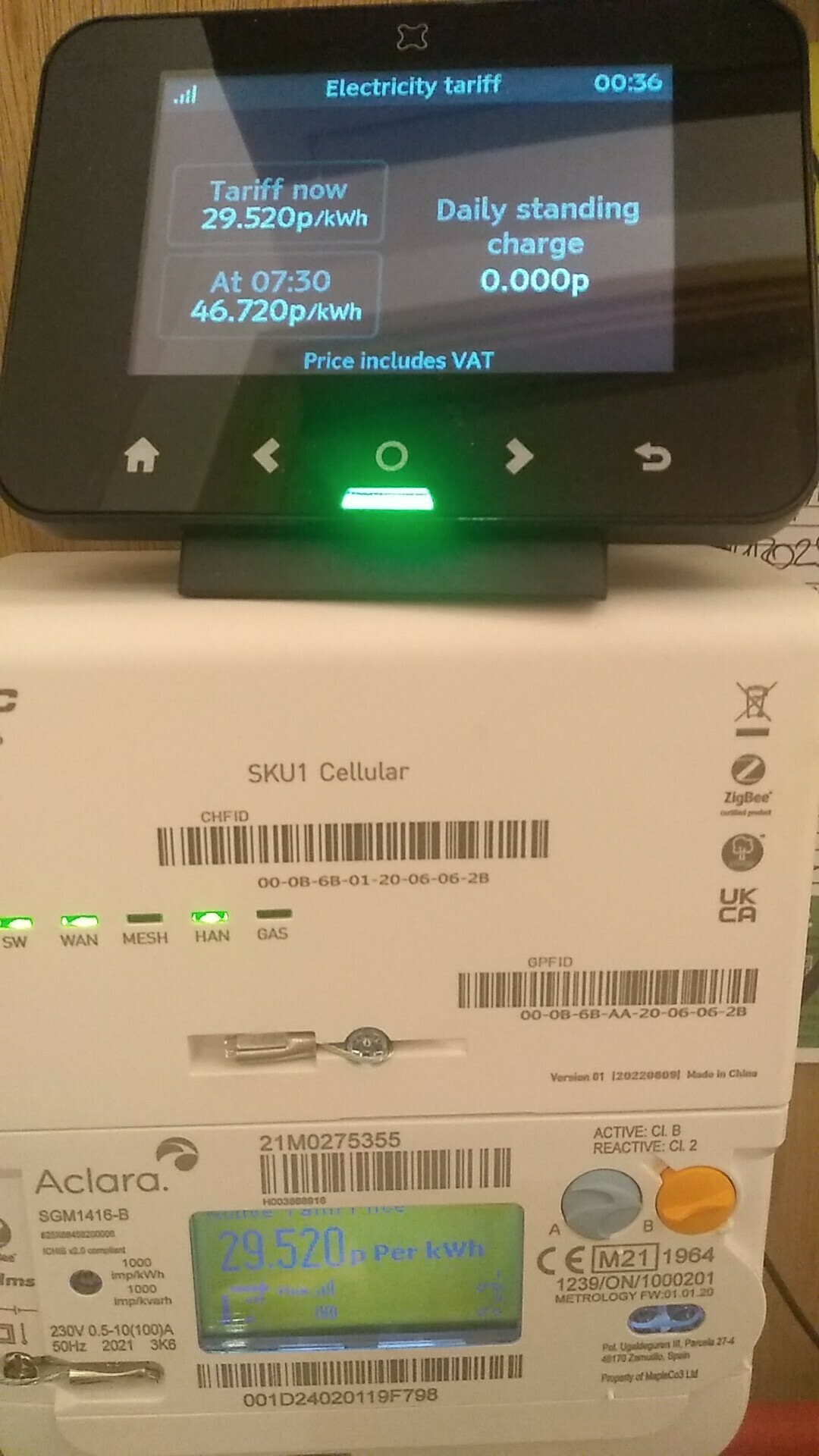
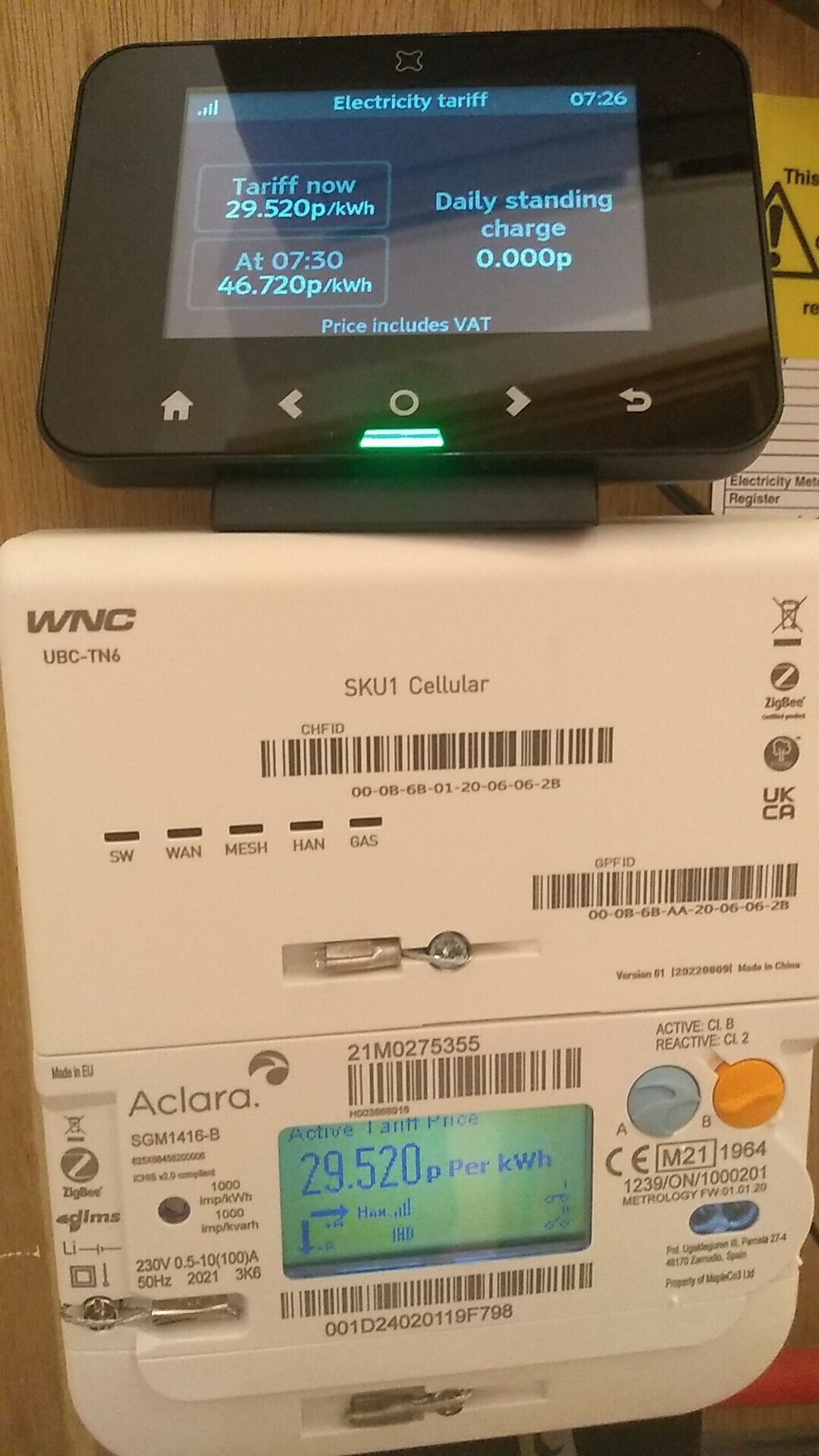
 

Apologies not easy to see but bottom right of digital display shows open switch symbol (o/o) for secondary contactor when it should show closed (o-o).  This taken just after 00:30 tariff change.
Much easier to see on this photo, bottom right of digital display, secondary contactor still open (o/o).  This taken just before tariff changes back to day rate.

Fortunately I had the installer’s mobile number, so called him, and he suggested it’s a faulty meter and needs to be sorted - but I’d need to go through customer service to organise this - which is proving a very difficult problem!!!  I seem only to be left with writing to Smart Customer Services at the Havant address, but this would seem to be a very long way around.

I’ve just messaged the installer to ask if he did an ECAUL and waiting a response - not sure though if he might go silent on me because he has plenty to be getting on with.  I know the tariff change may not exactly correspond to the secondary contactor change (hence the ECAUL query) but in this case it’s not activating at all, at any time throughout the day.

All help and guidance will be gratefully received.  Many thanks in advance.


PS You may also notice that the smart monitor is not fully configuring - showing 0.000p standing charge - that would be nice 😶

Best answer by Tim_OVO

Updated on 20/07/26 by Ben_OVO

*update on this @SteveBee :


I’m told that with smart meters connected with a 5th port,  the tariff and ALCS schedule are separate objects in the meter, and they both need to be set for the 5th terminal (or any ALCS connection) to work.


The team found your meter based on its serial number and they could see that the ALCS calendar wasn't set on that one, they're not quite sure why. It has been set now.


As a result, this should now be fixed. Please let us know.


39 replies

Newcomer
July 17, 2023

Hi @Tim_OVO ,

I have exactly the problem descibed above. I’m on an Economy 7 Tariff but the 5th terminal / night storage circuit isn’t being switched on overnight. Could the same fix be applied to my meter please? I’ve just moved in and switched my account to Ovo last week, I’m assured that all was working previously. Many thanks!

Photo of meter below.

Blastoise186
Super User
Super User
July 17, 2023

Hi @martincollett ,

Sure thing. The fastest way is for the Support Team to get the ECAUL/ALCS config set up for you via SMETS Commands. Forum volunteers like myself don’t have that power unfortunately (otherwise I’d do it right now!). Try Live Chat via https://help.ovoenergy.com .

Securing energy by zapping security bugs... For that is The Blastoise Way! Remember, I'm just like you - AI Powered Evil Geniuses aren't Staff!
Abby_OVO
Community Manager
Community Manager
July 18, 2023

Hey @martincollett 


Did you contact the Support Team to have them run the commands on the smart meter like Blastoise186 advised?

Currently Playing: She's Electric
Newcomer
July 18, 2023

Hi @Abby_OVO , yes I did. The person I chatted to didn’t really understand the problem but promised to escalate it. I can see this morning that the LC2 Switch is now being activated overnight, but not the second switch / fifth terminal. This is a different behaviour from previously, but sadly still not right. My immersion and night storage are wired to the fifth terminal, so still no hot water! I’ll try the chat again today, unless there is another way to progress this?

Abby_OVO
Community Manager
Community Manager
July 19, 2023

Hey @martincollett 


Sorry to hear you’re still having some trouble with this.


Did you manage to speak with the Support Team again yesterday? I know they can run the required commands but it’ll be escalated to a team with the right access to do so, they should be in touch soon to sort this with you unless they got it sorted yesterday, but it may speed things up by contacting them.

Currently Playing: She's Electric
Newcomer
July 19, 2023

Hi @Abby_OVO , yes I spoke to the Support Team yesterday, but again this morning the ‘Switch 2’ wasn’t activated overnight so still no hot water.

I used the chat to speak to them again just now. I was again told that this was being escalated with the ‘relevant team’ and that I could expect a response in 3 - 5 working days.

This is all very frustrating, the solution to the problem is right here in the forum but I can’t get it applied to my meter. I’m not getting any comms back to let me know how this is progressing within Ovo.

Newcomer
November 26, 2023

 I believe we have a similar problem with our meter readings. We are all electric with storage radiators on economy 10, last night the consumption on peak rate was, 17kwh whilst to off-peak consumption was only 3kwh! Despite having 5 hours of 'cheap' power, when power hungry storage radiators were on. Customer services don't really know anything, waiting for an off-peak time to see if LC2 activates!

Firedog
Super User
Super User
November 26, 2023

 I believe we have a similar problem with our meter readings. We are all electric with storage radiators on economy 10, ...


We have seen several customers with this problem here in the forum over the past year or so, and none that I can remember who have got it working properly. That’s not to say that there aren’t any, of course. 

The problem seems to be to get the meter to switch both the registers and the auxiliary load in the right direction and at the right times. One was seeing peak rates applied in the offpeak periods and vice versa, so this may be what you’re experiencing.

There are different models of meter involved in these cases, so it would be good to see a photo or two of yours, clearly showing the current rate and state of the load switches during both a peak and an offpeak period. It would also help to know which supply region you’re in, and if you’re really adventurous, what Time Pattern Regimes (TPR) have been set on the meter.*


*   It’s the TPR that specifies the peak and offpeak timings. To find yours on your computer:

  1. Using Microsoft Edge or Google Chrome, visit account.ovoenergy.com and sign in. 
  2. Open a new tab and copy this URL into the address bar:
    smartpaymapi.ovoenergy.com/orex/api/supply-points/account/1234567
    substituting your own account number for 1234567 at the end of it.
    This should show you a JSON file with some details of your meter configuration, including the TPRs for its registers. You might save the page contents in a text file for reference.
  3. If you want to know what these numbers mean, open this PDF: TPR Reference. Search (e.g. Ctrl-F) for the numbers (make it a bit easier by adding leading zeroes to make up five digits. I.e. if the TPR for Tier 1 is 374, search for 00374).

Does what you find tally with your experience?


Noel | I have no official status; I'm just a volunteer who comes here to help other customers. My gear: Aclara SGM 1416-B Electricity-only E7 meter; Chameleon IHD3-PPMID-AAA | It may look as if I know what I’m talking about, but don’t let that fool you. |
Emmanuelle_OVO
Retired Moderator
Retired Moderator
November 27, 2023

 I believe we have a similar problem with our meter readings. We are all electric with storage radiators on economy 10, ...


We have seen several customers with this problem here in the forum over the past year or so, and none that I can remember who have got it working properly. That’s not to say that there aren’t any, of course. 

The problem seems to be to get the meter to switch both the registers and the auxiliary load in the right direction and at the right times. One was seeing peak rates applied in the offpeak periods and vice versa, so this may be what you’re experiencing.

There are different models of meter involved in these cases, so it would be good to see a photo or two of yours, clearly showing the current rate and state of the load switches during both a peak and an offpeak period. It would also help to know which supply region you’re in, and if you’re really adventurous, what Time Pattern Regimes (TPR) have been set on the meter.*


*   It’s the TPR that specifies the peak and offpeak timings. To find yours on your computer:

  1. Using Microsoft Edge or Google Chrome, visit account.ovoenergy.com and sign in. 
  2. Open a new tab and copy this URL into the address bar:
    smartpaymapi.ovoenergy.com/orex/api/supply-points/account/1234567
    substituting your own account number for 1234567 at the end of it.
    This should show you a JSON file with some details of your meter configuration, including the TPRs for its registers. You might save the page contents in a text file for reference.
  3. If you want to know what these numbers mean, open this PDF: TPR Reference. Search (e.g. Ctrl-F) for the numbers (make it a bit easier by adding leading zeroes to make up five digits. I.e. if the TPR for Tier 1 is 374, search for 00374).

Does what you find tally with your experience?


Firedog has given some really helpful advice here.


Keep us posted @pegem. Let us know the results after the ‘off peak’. 


If this is still an issue you’ll need to escalate this to our support team

Renewable Energy? Big Fan.
Newcomer
November 27, 2023

The TPR appears to be correct in its timings, but There is something seriously wrong with the tariff on my Smart meter  We are all electric Storage heaters on Economy 10. Since putting the storage radiators on we have had the following readings.


                26 October                            26 November

Peak.         1078                                    1603                       525kwh      £153

Off-Peak     1717                                    1857                       140kwh     £30


Historically there is no way we have spent only £30 on high consumption things such as Storage heaters, and £153 on everything else! 

I believe the tariffs have been reversed. According to the Forums, a problem that OVO have had with other accounts that have migrated from SSE to OVO. The coding for the meter is switching the tariffs correctly, but the tariff number is wrong.  Tarif 1 has been linked to off peak and tariff 2 has been linked to peak. IMHO!

