Question

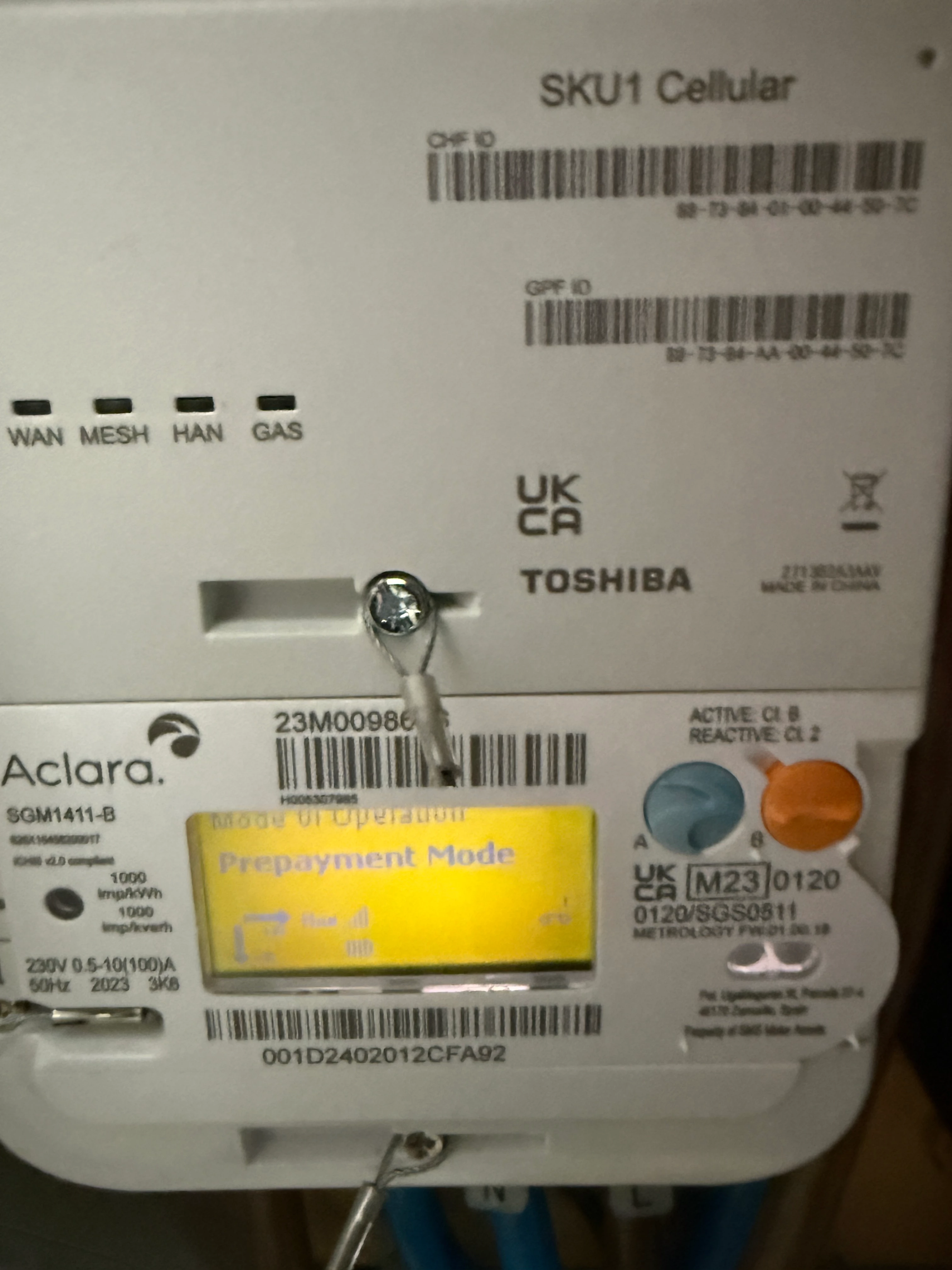
Changed from payg to pay monthly but meter is still in pre payment mode

  • April 11, 2026
  • 16 replies
  • 179 views

Hello, I have recently changed from payg to pay monthly but the smart meter is still in pre payment mode. I am worried that when the balance goes to 0 my electric will go off. How long does it take for the meter to change to credit mode and will the power go off when the balance reached 0. If it does run out is it possible to top up the meter now im on pay monthly. Thanks in advance for the info. 

16 replies

Blastoise186
Super User
Forum|alt.badge.img+9
  • Super User
  • April 11, 2026

Hi ​@andrewthomas4 ,

Usually it’s pretty quick as in within 24 hours or so! Sounds to me like the meter didn’t pick up the commands properly.

I’d definitely recommend letting OVO know ASAP via the details below - they’ll be back in on Monday or you can try OVO’s socials as they’re monitored at weekends.

If you lose supply before OVO can get back to you, call 105 and your DNO might be able to help.


Contacted OVO today they tell me the meter has been switched over at there end but it can take up to 10 days to change over to credit mode.

Ovo assured me my electric will not go off. Is this right.

Meter is definitely still in prepayment mode as I have seen it in the menus on the smart meter. What will happen if the balance reaches 0 before it enters credit mode. I have £10 left which is about 2 days supply. 


Blastoise186
Super User
Forum|alt.badge.img+9
  • Super User
  • April 13, 2026

Should usually be a bit faster than that - I’ll ask ​@Ben_OVO to swing by.


That would be great. Stressing out here as my wife uses a stairlift and I don’t want her to be stuck upstairs if the power goes off.


Blastoise186
Super User
Forum|alt.badge.img+9
  • Super User
  • April 13, 2026

No worries. Bear with me for a bit as I’m also digging something up at the moment that may help a bit.

This will take me a while as I need to dig my personal archives and Forum history - with over 9k  of my own comments on here, that’s a lot for me to dig. I’ll be back as soon as I can.


Did you manage to get any info regarding the issue with my smart meter stuck in pre payment mode. 


Blastoise186
Super User
Forum|alt.badge.img+9
  • Super User
  • April 13, 2026

Sorry for the wait! I’m not usually this slow - I just got bogged down because combing through 9.2k comments and all my other sources apparently takes longer than I predicted… My apologies for keeping you waiting. I think I found what I was after though. One of these days I will tidy up that library...

The best I can think of right now is to ask OVO to run a top-up via the Support Team in the morning so you at least get some more credit dumped onto the meter. If it doesn’t flip over in the next few days, definitely let OVO know so they can investigate further. Unfortunately, I don’ have the ability to speed that up as my access is limited purely to the Forum as a volunteer. The team has options to force a mode switch in case the automated command doesn’t go through properly.

As for the stairlift? That is of more concern… Please sign up for the Priority Services Register via https://www.ovoenergy.com/register-for-priority-services if you haven’t already done so. That’ll give OVO and your DNO more options if this issue kills the power.

I’ll keep digging in the meantime, if I have more suggestions, I’ll drop by again.

The Forum Moderators have been notified of this thread and they may (as in probably will) swing by with their own suggestions or to check in on you.


Appreciate all the info. I will ring ovo in the morning to get a top up done


Ben_OVO
Community Manager
Forum|alt.badge.img+4
  • Community Manager
  • April 14, 2026

Good morning ​@andrewthomas4, I hope you’re well.


I can see ​@Blastoise186 has stopped by with some great advice here, and I’d agree with him here that signing up to the Priority Services Register would be a great idea in your situation. It’s a free service, and means that the network operator will try and get your property back on with priority, should there be a power cut. They’ll also look to contact you to let you know of any panned outages.


Regarding the switch to Pay Monthly, this is definitely a good choice given that there’s a stairlift in your property. Pay Monthly means that there’s no risk of the meter running out of credit and the supply turning off. When we change a customer to Pay Monthly, this can take a little while, due to various different systems having to be updated. 10 days is too long though - it’s normally a lot quicker than this. The correct advice is up to 24 hours. I’m hoping that everything is now ok this morning, and your meter is no longer showing that it’s in prepayment mode?


Now that you’ll be a Pay Monthly customer, you’ll have access to our great online account and app. To log in, click ‘set up account, and enter your email address when prompted. You’ll receive an email containing a link from which to set a new password, after which you’ll have access. You can pretty much manage all aspects of your account online and on the app, and I’ve included a tutorial series below explaining how to use the different features. I’ve also included another article which gives you some more info on the Priority Services Register.


For more useful articles about your Pay Monthly account, I’d recommend heading over to our Forum Library section, which includes all your need-to-know info.


Thanks for the advice much appreciated. 
I have signed up to priority service but have yet to receive confirmation of it being approved. Down to the last few pounds on the smartmeter. Meter is still in pre payment mode. It will probably run out sometime today. Probably have to wait till it turns off before ovo do anything about it. Just hope wife isnt using the stairlift at the same time. Fingers crossed the meter switches over today. 


Blastoise186
Super User
Forum|alt.badge.img+9
  • Super User
  • April 14, 2026

You can actually ask OVO to do a top-up now - it’s a safer bet.


Just rang ovo they have confirmed they have received the priority service request. They also said the switchover of the meter to credit mode has been completed at there end and it will take unto 10 days for it to show up on my meter. They have 100% confirmed to me that when the electric/gas has reached 0 credit it will not go off. I hope there right. Thank you again for everyone’s help with this matter.


Nukecad
Super User
Forum|alt.badge.img+5
  • Super User
  • April 14, 2026

I’m wondering if the meter is just using up the credit already on there before switching itself to credit (pay monthly) mode?

If it’s smart enough and programmed to do that then it would save having to sort out a refund later.
If it can do that then whatever the meter reads when the current PAYG credit runs out would simply be the Start reading for your new Pay Monthly account.

I don’t know if that is what is actually happening, but to me it would seem a sensible way to do things (if the meter is smart enough).


Just got in from work and the smart meter has changed over to credit mode. 😓
just want to say thanks for everybody’s help and advice with my situation. 
Not sure if the meter changed to credit mode when it reached 0 balance like nukecad suggested. 


Blastoise186
Super User
Forum|alt.badge.img+9
  • Super User
  • April 14, 2026

Nice! :)

Sometimes this stuff just takes a while! But yeah, that’s exactly what I wanted to hear.

Just so you know, the meter would have sent OVO details like:

  • A meter reading at the point of mode switch
  • The final PAYG Credit Balance - OVO usually transfers this to your PAYM Balance
  • Any remaining Debt Balance - only if you had one
  • Any outstanding Emergency Credit balance owed - only if you had some outstanding
  • The last 100 top-ups
  • And a confirmation it was switching to Credit Mode

You won’t see those but they will be used to help number crunch the account and settle things up as part of the PAYG → PAYM swap. If you haven’t already, please go to https://my.ovoenergy.com/login and do Set Up Account to get full online access. We recommend you download the main OVO Energy app and uninstall the OVO Top Up app as the latter will no longer be useful to you. And please don’t do any further PAYG Top-Ups! You’ll want to do those via the main account from now on. :D

We’re here if ya need us. Enjoy the freedom of not having to top-up every week!


Ben_OVO
Community Manager
Forum|alt.badge.img+4
  • Community Manager
  • April 15, 2026

I’m wondering if the meter is just using up the credit already on there before switching itself to credit (pay monthly) mode?


@Nukecad I know that some improvements have been made recently in the meter mode-change space, however I’m not sure whether the meter running down the credit is yet a function - it hasn’t been previously. I will ask internally though! I’ve managed a large number of mode changes, and they always differ in how long they take, due to the strength of the comms signal.


@andrewthomas4 I’m really happy to hear everything is working for you now. Please don’t hesitate to ask any further questions about your new pay monthly set up - we’ve got a really helpful community here as you can see 😁.