



Answer

Which meter shows my solar panel energy generation for feed in tariff?
  • October 11, 2023
  • 5 replies
  • 5663 views

Forum|alt.badge.img

Good morning, I moved into our new home about a year ago and have really struggled with finding meter readings from the solar panels.

I don’t really k ow which box I should be looking at and what numbers they need. Any advice would be greatly received.


Best answer by BPLightlog

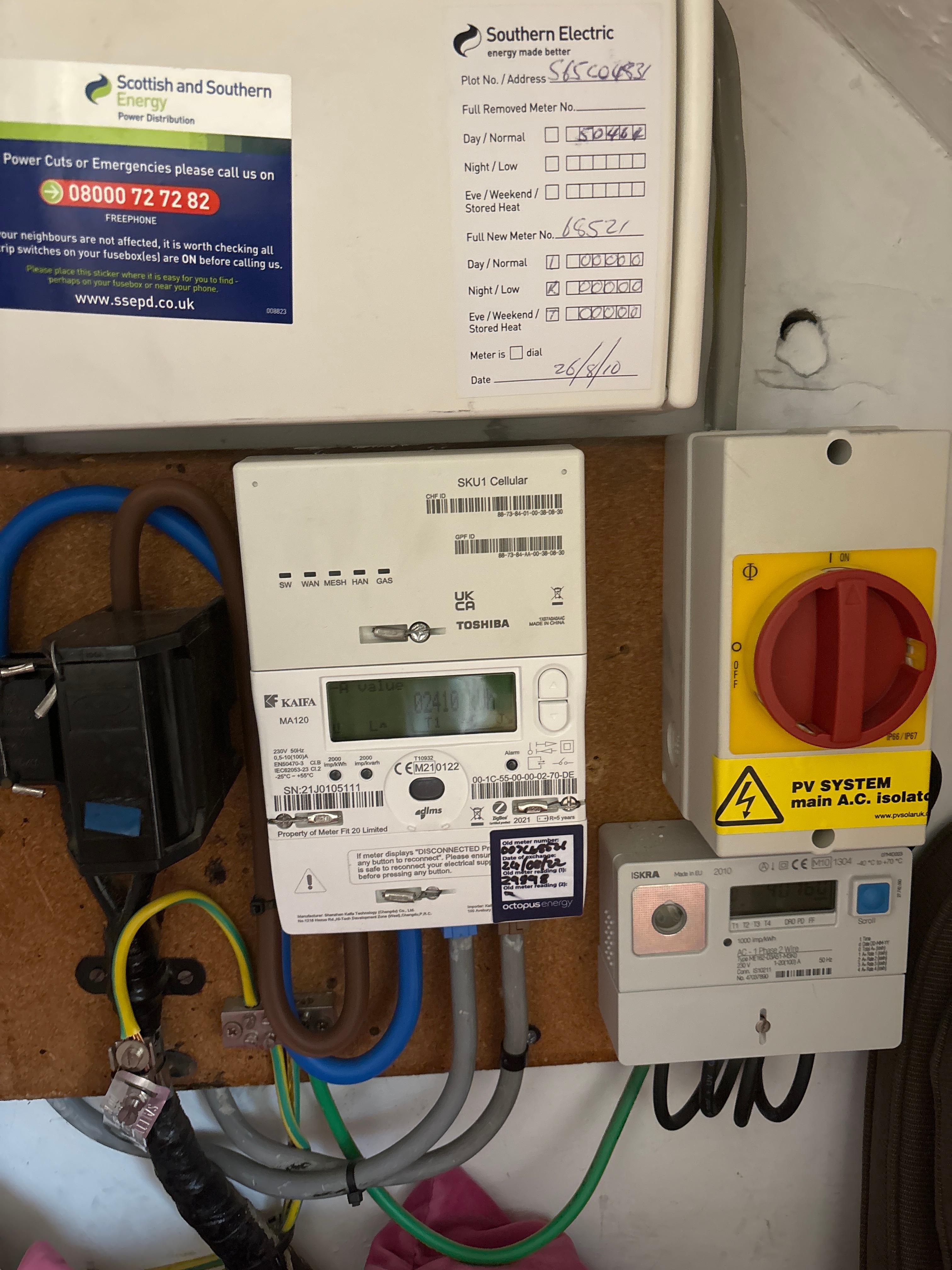
It does look as though the PV System isolator is linked into the grey meter bottom right.

It’s possible that that is being used as a generation meter (which is what you want for your FIT reading).

Looks like you’re on an Economy 7 tariff (or similar). Does the main meter (centre, cream colour) have your electricity readings for peak and off peak?

5 replies

Blastoise186
Plan Zero Hero
Forum|alt.badge.img+1
  • Plan Zero Hero
  • October 11, 2023

The grey one on the right is the more likely candidate. However, if you’re on FiT then there’s a third meter - the Generation Meter and that’s the one you’re actually looking for.


BPLightlog
Plan Zero Hero
Forum|alt.badge.img+5
  • Plan Zero Hero
  • Answer
  • October 11, 2023

It does look as though the PV System isolator is linked into the grey meter bottom right.

It’s possible that that is being used as a generation meter (which is what you want for your FIT reading).

Looks like you’re on an Economy 7 tariff (or similar). Does the main meter (centre, cream colour) have your electricity readings for peak and off peak?


Forum|alt.badge.img
  • Author
  • Carbon Cutter*
  • October 11, 2023


Forum|alt.badge.img
  • Author
  • Carbon Cutter*
  • October 11, 2023

I’m not going to lie, I really don’t know what I’m looking at or what the figures are that OVO want for FIT readings. 
 

As I scroll though pressing the blue button I have 

t 10:08:59 (guessing that’s the time but wrong as it’s 1103)

0 40760

d 11.10.23

1 01346

2 39413


Does that make any sense to anyone please? 


BPLightlog
Plan Zero Hero
Forum|alt.badge.img+5
  • Plan Zero Hero
  • October 11, 2023

On that meter, below the blue button, there’s a list of what each of those are. 
0 is total kwh

1 is rate 1 kWh and

2 is rate 2 kwh

if you add the readings for 1 and 2 together you will see that they add to the reading for 0


Are there any clues with a previous reading or serial number to check against?