Solved

Daikin high temperature heat pump

  • March 12, 2026
  • 11 replies
  • 134 views

Forum|alt.badge.img

 Hello, I have a DAIKIN ERSQ 011AAV1  16KW. I have a BRC21A52 controller and there is a code in the service manual 9-02 that is indicated as Thermo on/off admission with a range -5  till +5. Does anyone what exactly does it do? For example what's the difference between setting it at +5 and -5? There is also another code 9-03 that the step is every 0.2 and it can be set either until +5 or -5 but there isn't any explanation in the manual what is this code about. Any help would be nice. Thank you in advance.

Best answer by karas21

Hello. I sent an enquiry to Daikin.co.uk and that was their response.


The field settings you're referring to (accessed via the BRC21A52 wired remote controller in service mode) are part of the [9] group for automatic temperature compensation in Daikin Altherma high-temperature systems like your ERSQ016AAV1. These allow fine-tuning of thermistor readings and control logic by applying correction values to compensate for temperature differences or system behavior. The ranges and steps may vary slightly by firmware or regional manual, but based on the service documentation for this series, here's the breakdown:

[9-02]: Thermo ON/OFF Admission

  • Description: This setting defines the temperature compensation or hysteresis (deadband) for the thermostat's ON/OFF control logic. It adjusts the threshold at which the system admits (allows) operation based on measured temperatures (e.g., leaving water or ambient). Essentially, it prevents short-cycling by creating a buffer around the setpoint where the system won't toggle on/off unnecessarily. Positive values make the system less sensitive (higher threshold for activation), while negative values make it more sensitive (lower threshold).
  • Range: -5°C to +5°C
  • Step: Typically 1°C (though some variants allow 0.5°C increments, aligning with your example).
  • Default: 0°C (no compensation; standard logic).
  • Difference between +0.5 and -0.5:
    • +0.5°C: Increases the activation threshold. For example, in heating mode, the system might require the temperature to drop 0.5°C below the setpoint before turning ON, and it turns OFF at or above the setpoint. This delays activation for stability in milder conditions.
    • -0.5°C: Decreases the activation threshold. The system turns ON sooner (e.g., at 0.5°C above the setpoint drop) and may stay ON longer. This is useful for quicker response in colder or more demanding conditions but risks more frequent cycling.

[9-03]: (Likely Domestic Hot Water Tank Compensation Value or Related Offset)

  • Description: This code is not always explicitly detailed in user-facing manuals but appears to be a fine adjustment for temperature compensation, possibly related to the domestic hot water (DHW) tank thermistor or a secondary hysteresis/offset for room or water temperature control. It applies a correction to measured values to align with actual conditions, affecting when the system engages for DHW or space heating.
  • Range: -5°C to +5°C
  • Step: 0.2°C (as per your description; this allows precise tuning).
  • Default: 0°C.
  • Purpose: Similar to [9-02], it compensates for discrepancies (e.g., sensor placement or pipe losses). Positive values raise the effective setpoint, negative lower it. Without explicit manual explanation, it's often left at default unless calibration shows inaccuracies.

[9-04]: (Likely Thermo ON/OFF Admission or Time-Related Delay)

  • Description: This setting is tied to the thermo ON/OFF logic, potentially as an additional hysteresis or a time-based parameter for admission (e.g., minimum runtime or delay before ON/OFF to avoid rapid switching). In some contexts, it's a compensation value like the others, but your step/range suggests it may be a timer (e.g., anti-short-cycle delay in minutes). It ensures stable operation by delaying state changes.
  • Range: Up to 60 (likely minutes if time-based; or -5°C to +5°C if temp-based like the others).
  • Step: 10 (e.g., 10, 20, 30...60).
  • Default: 0 or model-specific.
  • Purpose: If temperature-based, similar to [9-02] for finer control. If time-based (matching your step/until 60), it sets a delay period for thermo transitions, preventing wear from frequent starts/stops.


11 replies

Forum|alt.badge.img
  • Author
  • Rank 2
  • March 12, 2026

 Hello, I have a DAIKIN ERSQ 011AAV1  16KW. I have a BRC21A52 controller and there is a code in the service manual 9-02 that is indicated as Thermo on/off admission with a range -5  till +5. Does anyone what exactly does it do? For example what's the difference between setting it at +5 and -5? There is also another code 9-03 that the step is every 0.2 and it can be set either until +5 or -5 but there isn't any explanation in the manual what is this code about. Any help would be nice. Thank you in advance.

The step in code 9-02 is every 0.5. Either +0.5 or -0.5


Peter E
Super User
Forum|alt.badge.img+9
  • Super User
  • March 12, 2026

Good morning ​@karas21 


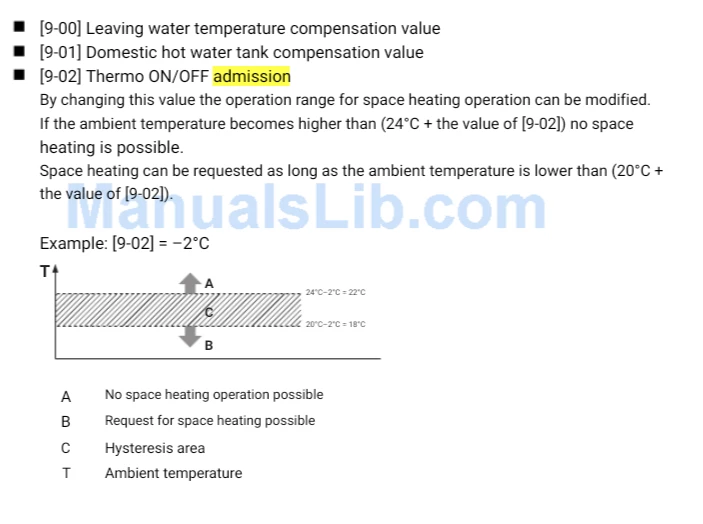
Out of curiosity I went and got the manual and had a look for the word ‘admission’ because it puzzled me and it seems that the word has the same meaning as ‘hysteresis’ which is the dead band that you can set where the system will temporarily not operate if the temperature is within the band. Have a look at the explanation below from page 109.


In most instances it's best to have the hysteresis set to zero for a heating or a cooling only system.


However, when you have heating and cooling available at the same time you don't want the cooling to come on immediately after the heating has gone off as it will just oscillate between the two wasting energy. Instead you set an admission (hysteresis) value greater than zero so you create a dead band in the middle where the system does nothing until it hits either the top value and starts cooling or the bottom value and starts heating. That seems to be what it's about.


The manual is here but it may not be the right one but it does explain the term.

https://www.manualslib.com/manual/606303/Daikin-Room-Air-Conditioners.html


Peter 


Forum|alt.badge.img
  • Author
  • Rank 2
  • March 12, 2026

Thank you for your answer. I have that manual and have read the same thing from code 9-02. I just couldn't understand what exactly does this mean. I have the heat pump just for heating (radiator panels). I have it functioning with a weather curve and settling the thermostat in my house at 21°C. I have tried setting the 9-02 at +0,5 some days and -0,5 other days. But to be honest I can't understand if there is a difference in the heat pump function. That's why I asked here in case anybody have the same heat pump or have tried something similar in their heat pump with a code like this I mentioned.


Also, the code 9-03 that my controller has, is not mentioned in the manual. Maybe something similar to the code 9-02? I don't know.


Ben_OVO
Community Manager
Forum|alt.badge.img+4
  • Community Manager
  • March 13, 2026

@karas21 thanks for your interesting post, and welcome to the OVO Forum. I’ve updated your profile with the heat pump badge so that other members can see the kit you have.


I’m glad to see ​@Peter E has stopped by with some great advice for you here. I’m unsure as to the 9-03 code myself. If you can’t find an answer via this Forum then it might be worth contacting Daikin: https://www.daikin.co.uk/en_gb/residential/contact-us.html.


If you do contact them and get an answer we’d appreciate you letting us know what they say on the Forum, as it could help others with the same question in future - cheers 😁.


Forum|alt.badge.img
  • Author
  • Rank 2
  • Solved
  • March 14, 2026

Hello. I sent an enquiry to Daikin.co.uk and that was their response.


The field settings you're referring to (accessed via the BRC21A52 wired remote controller in service mode) are part of the [9] group for automatic temperature compensation in Daikin Altherma high-temperature systems like your ERSQ016AAV1. These allow fine-tuning of thermistor readings and control logic by applying correction values to compensate for temperature differences or system behavior. The ranges and steps may vary slightly by firmware or regional manual, but based on the service documentation for this series, here's the breakdown:

[9-02]: Thermo ON/OFF Admission

  • Description: This setting defines the temperature compensation or hysteresis (deadband) for the thermostat's ON/OFF control logic. It adjusts the threshold at which the system admits (allows) operation based on measured temperatures (e.g., leaving water or ambient). Essentially, it prevents short-cycling by creating a buffer around the setpoint where the system won't toggle on/off unnecessarily. Positive values make the system less sensitive (higher threshold for activation), while negative values make it more sensitive (lower threshold).
  • Range: -5°C to +5°C
  • Step: Typically 1°C (though some variants allow 0.5°C increments, aligning with your example).
  • Default: 0°C (no compensation; standard logic).
  • Difference between +0.5 and -0.5:
    • +0.5°C: Increases the activation threshold. For example, in heating mode, the system might require the temperature to drop 0.5°C below the setpoint before turning ON, and it turns OFF at or above the setpoint. This delays activation for stability in milder conditions.
    • -0.5°C: Decreases the activation threshold. The system turns ON sooner (e.g., at 0.5°C above the setpoint drop) and may stay ON longer. This is useful for quicker response in colder or more demanding conditions but risks more frequent cycling.

[9-03]: (Likely Domestic Hot Water Tank Compensation Value or Related Offset)

  • Description: This code is not always explicitly detailed in user-facing manuals but appears to be a fine adjustment for temperature compensation, possibly related to the domestic hot water (DHW) tank thermistor or a secondary hysteresis/offset for room or water temperature control. It applies a correction to measured values to align with actual conditions, affecting when the system engages for DHW or space heating.
  • Range: -5°C to +5°C
  • Step: 0.2°C (as per your description; this allows precise tuning).
  • Default: 0°C.
  • Purpose: Similar to [9-02], it compensates for discrepancies (e.g., sensor placement or pipe losses). Positive values raise the effective setpoint, negative lower it. Without explicit manual explanation, it's often left at default unless calibration shows inaccuracies.

[9-04]: (Likely Thermo ON/OFF Admission or Time-Related Delay)

  • Description: This setting is tied to the thermo ON/OFF logic, potentially as an additional hysteresis or a time-based parameter for admission (e.g., minimum runtime or delay before ON/OFF to avoid rapid switching). In some contexts, it's a compensation value like the others, but your step/range suggests it may be a timer (e.g., anti-short-cycle delay in minutes). It ensures stable operation by delaying state changes.
  • Range: Up to 60 (likely minutes if time-based; or -5°C to +5°C if temp-based like the others).
  • Step: 10 (e.g., 10, 20, 30...60).
  • Default: 0 or model-specific.
  • Purpose: If temperature-based, similar to [9-02] for finer control. If time-based (matching your step/until 60), it sets a delay period for thermo transitions, preventing wear from frequent starts/stops.

Peter E
Super User
Forum|alt.badge.img+9
  • Super User
  • March 14, 2026

A really interesting reply. Thank you.


[9-02] I'm pleased they used the term hysteresis as being equivalent admission. At least that says age hasn't completely fried my brain.


But what surprises me is that they seem to be guessing what [9-03] and [9-04] are and they are supposedly the manufacturers. I wonder if this is a Chinese boiler which was produced to a generic spec and is badged Daikin. Who knows?


Peter 


Forum|alt.badge.img
  • Author
  • Rank 2
  • March 14, 2026

I replied to this email and asked about code 9-03 and 9-04 but they replied (maybe another one replied) that these codes are meant to be used by an expert so no possible damage can happen if I try to do something. So they suggested that I should call an expert at my house. 

I thought that I could do some settings through these codes so my heat pump doesn't start functioning if the thermostat in my house drops by 0.1. But I don't think I manages to change it. I set at 9-02 (+0.5), at 9-03 (+0.2) and at 9-04 (20)


Forum|alt.badge.img
  • Author
  • Rank 2
  • March 17, 2026

Good morning. After many days and trials I managed to find out what happens at least with the code 9-02 (Thermo on-off admission). If, for instance, I set the 9-02 at + 0,5 °C and have set the room thermostat at 22°C, the pump will continue functioning until the thermostat reaches 22 and will restart when the thermostat drops at 21,4°C. That's what I was thinking this code does.

However, the problem is that you need to have the BRC21A52 controller of the Daikin pump in your house as a room thermostat. This code doesn't work along with another room thermostat. This BRC21A52 controller is next to the inner unit of my heat pump, so it can't be used as a room thermostat. The heat pump is connected to two houses, so even if I wanted to put it in the main house, the heat pump won't work properly for the other house.

There is another code 8-00 in this controller that is

"[8-00] Remote controller temperature control - leaving water control

When using the remote control delivered with the unit, 2 types of temperature control are 

possible. Default [8-00] = 1 which means that the remote controller is used as room 

thermostat, so the remote controller can be placed in the living room to control the room 

temperature. Set [8-00] to 0 to use the unit in leaving water temperature control. "

So, to use the BRC21A52 controller of the heat pump as a room thermostat you need to set code 8-00 at "1" and put it in your house. If you set the 8-00 at "0" then the settings in code 9-02 don't matter.

That's all I have find out after searching and many trials with the controller.


BPLightlog
Super User
Forum|alt.badge.img+10
  • Super User
  • March 17, 2026

There is an option to use a remote thermostat connected to the controller which then would use this hysteresis setting - so that the system isn’t continually switching on and off.

Also as mentioned earlier in the thread, this is normally a setting for the installer rather than a user.


Forum|alt.badge.img
  • Author
  • Rank 2
  • March 17, 2026

I would like to ask another question if anybody knows. My heat pump is connected to two houses. One on the second floor (130sq.m) and another one on the ground floor (45 sq.m). The heat pump in on the ground floor. Is there a possibility that the heat pump sends more easily the leaving water for heating to the ground floor apartment and the leaving water to the second floor apartment can't reach the radiator panels easily, resulting in loss of heating of the radiators? If so, what could I do to fix this? Is there anybody that confronted such a problem and solved it? Thank you.


Peter E
Super User
Forum|alt.badge.img+9
  • Super User
  • March 17, 2026

The length of pipe directly affects the ability of any heat generator (HP or boiler) to get hot water to the furthest radiators. Ideally you would have the heat source as close to the middle of the system as possible.


With a gas boiler you could use thermostatic radiator valves, TRVs, to limit the flow to the nearest radiators so that the other radiators get more of the flow. You can also use the shield valves at the other end of the radiator as well to get a better balance. 


However, heat pumps generally don't like having the flow restricted and the COP can suffer as a result which is why you should consult a heating engineer for the best solution in your case. If your system already has TRVs you could try setting those a bit lower in temperature but you may reduce the efficiency if the system if you restrict the flow too much.


I have a gas boiler that is very happy to work with TRVs but when I enquired about an ASHP the heating engineer said TRVs are a bad idea. I stuck with my gas boiler but now have an A2AHP to do most of my heating. 


Peter 


PS The water leaving the heater / boiler is the Flow and what is coming back is the Return.