Question

IONIQ 5 N - OVO Anytime does not know when plugged in

  • April 6, 2026
  • 8 replies
  • 59 views

Forum|alt.badge.img

Hi,
 

I have used my dumb charger and a VW ID3 for over a year with charge anytime and had no real issues, only the odd no charge, probably due to VW servers failing.

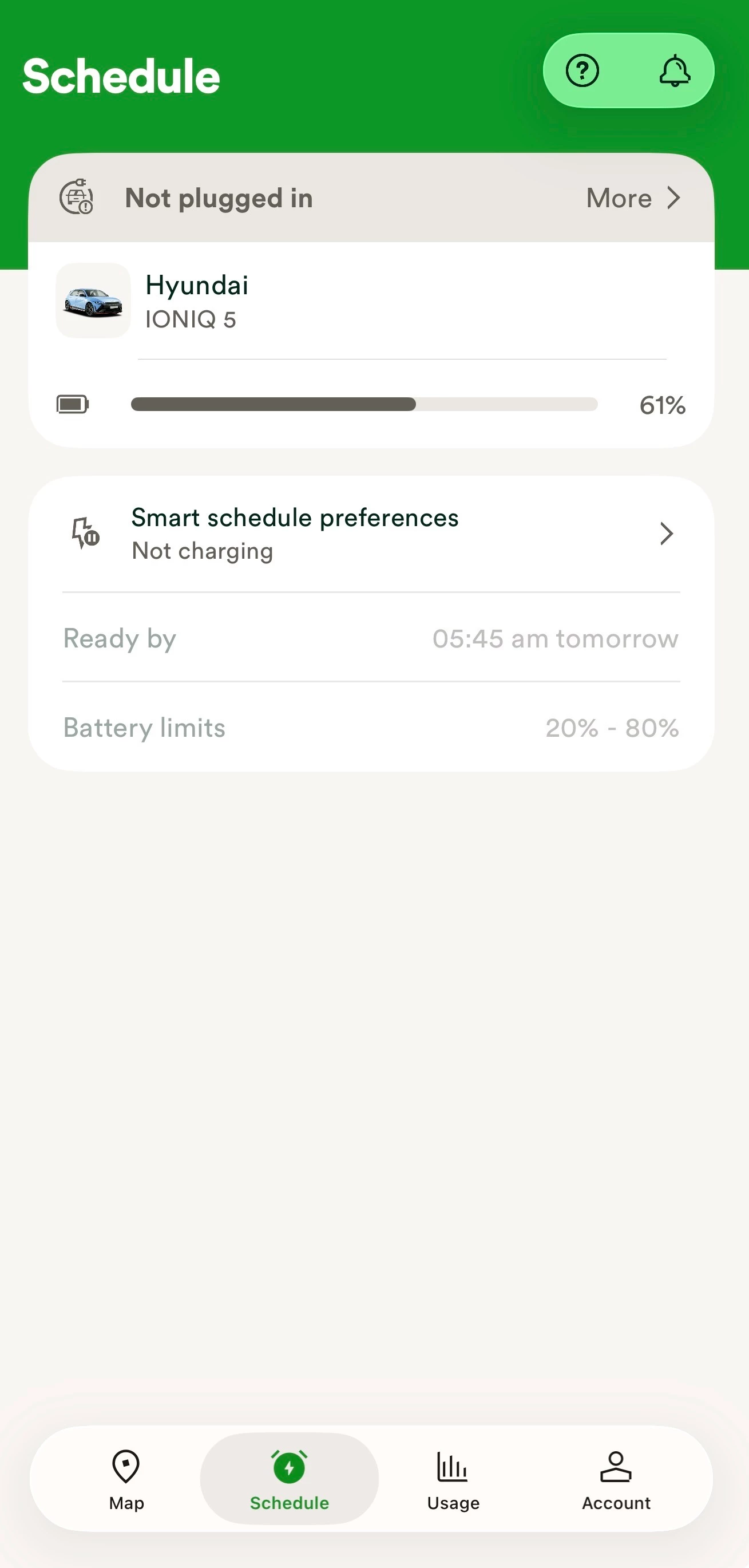
Now with a Hyundai (I appreciate it’s a beta car) the OVO app finds the Hyundai app and car all ok, reads the charge level and knows the charge is increasing if its charging so the data transfer is live between the car and OVO. Yet the OVO app says the car is not plugged in and therefore won’t schedule a charge.

Ive tried reconnecting the car several times, rebooting the charger (even although it is a dumb one) a different charger lead and also resetting the modem in the car.

No change. 
 

Any advice?

Thanks 


8 replies

Forum|alt.badge.img+2

There’s a previous discussion regarding the Ioniq 5 that you may find interesting here - 


Given the car is in beta, it may be worth making more direct contact with the Charge Anytime team on chargeanytime@ovo.com to see if they can help with the specific issue - it may be something that requires a bit of work behind the scenes to address.

One thing to note - how long are you waiting to see the ‘plugged in’ status change? It can take quite a while for my Cupra to update - sometimes well over 15 minutes before it registers it’s plugged in.


Forum|alt.badge.img
  • Author
  • Rank 1
  • April 6, 2026

Thank you

I will send them an email.


I have waited over an hour, car starts charging as expected but stays charging and does not offer a schedule. OVO app still says unplugged but the battery percentage goes up. So there is some communication.


Ben_OVO
Community Manager
Forum|alt.badge.img+4
  • Community Manager
  • April 7, 2026

@Mattb555 a warm welcome to the OVO Forum! I’ve added the EV badge to your account.


@divinemadness thanks for your great help here, and for linking the previous article. In that article the best answer mentions:


I heard back from the Charge Anytime development team, and they’ve fixed the issue you mentioned in a new app update. Could you please check if you have version 4.4.2 installed? If you’re already on that version and are still facing any problems, just let me know, and I’ll be happy to reach out to them for you. 


@Mattb555 if you’ve had the Charge app installed for a while it might actually be worth deleting it and reinstalling it, so that you’re definitely on the latest version. I’d recommend giving this a go to see if it fixes the issue whilst you’re waiting for the team to get back to you.


If this doesn’t work, please keep us updated as to what the Charge Anytime team do to fix this - it could help other Forum members in future! 


Cheers.


Forum|alt.badge.img
  • Author
  • Rank 1
  • April 8, 2026

Hi,

The OVO team contacted me today. Went through a few settings but nothing different to what I had done.

I deleted and downloaded the app again, although the version mentioned previously is not my download version, mine is still 4.4.1.

OVO contacted technical and they have indicated it could be a Hyundai issue with my app settings not telling them my car is plugged in. I cannot locate anything to change.


so no further forward currently.


Blastoise186
Super User
Forum|alt.badge.img+9
  • Super User
  • April 8, 2026

4.4.2 is probably on a rolling release - you’ll likely get access to it soon.


Ben_OVO
Community Manager
Forum|alt.badge.img+4
  • Community Manager
  • April 9, 2026

@Mattb555 what did OVO advise? Are you waiting to hear back from them about this?


Forum|alt.badge.img
  • Author
  • Rank 1
  • April 9, 2026

They are indicating it’s a car issue. Which I cannot see any setting or option to make a difference. 
I have asked them if technical are aware of any other reason for it not working.

So unfortunately I’m stuck with expensive charging, not knowing if they can solve the problem.


Blastoise186
Super User
Forum|alt.badge.img+9

Just to mention, I’ve checked in Apple Business Manager for a domain I manage and according to the App Store/Apple Apps & Books integration there, it’s still showing 4.4.1 as the latest available version I can push via an MDM Server - I suspect the rollout isn’t complete yet so that might explain why you can’t get 4.4.2 right now.

It’s common for app developers to do a rolling release where they start with say 1% of users and ramp up to 100% over several days - helps to catch critical bugs early before they tank literally everyone.