Tiptreejam
Rank 1
Rank 1
March 7, 2017
Solved

Can you tell me my day/night switching times for Economy 7?

  • March 7, 2017
  • 31 replies
  • 22087 views
To save energy I try and use the washing machine and dishwasher on my Economy 7 night tariff by the use of the inbuilt timers. The thing is that I assume the switchover occurs sometime around midnight and again at 7am in the morning. The Ovo Energy website says to check the actual times (which can vary) with your energy provider i.e. Ovo Energy. I can find no specific information on this online so would need to contact them. However because I manage my account online I don't think I am allowed to email them. Have tried before on another topic and never got a reply. Is there any easy way to get the info other than sitting by the meter and waiting for the click 😃

Best answer by Jess_OVO

Updated on 14/08/25 by Abby_OVO


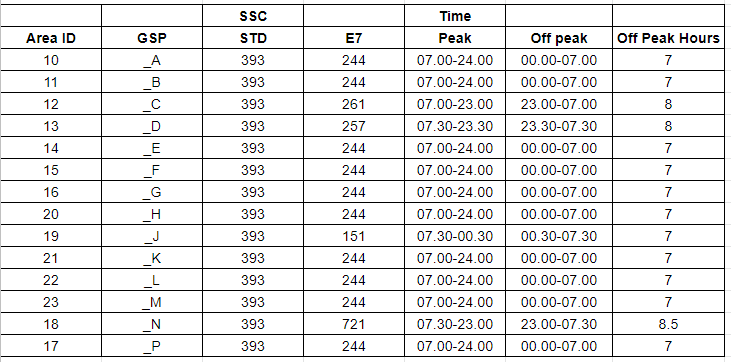
If you have traditional meters or Smart meters that were not installed by OVO the off-peak hours may vary. The best way to find out in this case would be reaching out to your supplier (or our Support Team if you’re an OVO member)


If you have a Smart meter installed by OVO the off-peak times can be worked out using your Meter Point Administration Number (MPAN). You can find your MPAN on the Plan page of your online account or OVO app (download for Android or iOS). You can find the ‘Plan details’ section by clicking on the person icon at the top right, then clicking into ‘Plans and rates’.


Then use this table below; the first two digits of your MPAN is the ‘Area ID’; the ‘Off peak’ times are on the column second from the right:


Please be advised that SecureAclara and Honeywell smart meters don't adjust for BST. The result of this is that during summer your off peak times will be an hour later than advised above. 


Hope this helps schedule your energy usage!


OVO member but not got a smart meter yet? - Book today!


Interested but not yet an OVO member? - Check out our plans!

31 replies

Jess_OVO
OVO Staff
Jess_OVOSolved
OVO Staff
January 25, 2022

Updated on 14/08/25 by Abby_OVO


If you have traditional meters or Smart meters that were not installed by OVO the off-peak hours may vary. The best way to find out in this case would be reaching out to your supplier (or our Support Team if you’re an OVO member)


If you have a Smart meter installed by OVO the off-peak times can be worked out using your Meter Point Administration Number (MPAN). You can find your MPAN on the Plan page of your online account or OVO app (download for Android or iOS). You can find the ‘Plan details’ section by clicking on the person icon at the top right, then clicking into ‘Plans and rates’.


Then use this table below; the first two digits of your MPAN is the ‘Area ID’; the ‘Off peak’ times are on the column second from the right:


Please be advised that SecureAclara and Honeywell smart meters don't adjust for BST. The result of this is that during summer your off peak times will be an hour later than advised above. 


Hope this helps schedule your energy usage!


OVO member but not got a smart meter yet? - Book today!


Interested but not yet an OVO member? - Check out our plans!

Powered by Re-knowable Energy!
Rank 1
September 12, 2022

Hello, I’m with OVO on an Economy 7 plan and I do have different rates of electricity usage on my bill, so my question is what exactly are the peak and off peak times? Can’t find them online anywhere. 

Blastoise186
Super User
Super User
September 12, 2022

Howdy @Nellyb !

We’ve got them all documented here:

To find your MPAN Area ID, check out 

Hope these help! Let me know if you get stuck.

Securing energy by zapping security bugs... For that is The Blastoise Way! Remember, I'm just like you - AI Powered Evil Geniuses aren't Staff!
Newcomer
September 12, 2022

If you pop over to the eon next forum you’ll be able to find an really excellent post on this topic.

Eon and EDF customer. Don't think smart meters are worth the expense.
Rank 5
September 12, 2022

Hi Nellyb, 

I'm also on Economy 7 and my rates are as follows.


When the clocks go back at the end at of October my  cheap rate/ off peak are from 12.00am to 7.00am. 

And when the clocks go forward at the end of March my times are 

1.00am to 8.00am cheat rate /off peak.

After than the remainder of the end is peak/higher rate.

Hope this helps 


Blastoise186
Super User
Super User
September 12, 2022

It’s worth remembering that while most of the UK shares the standard 12am to 7am times, some areas vary - and at least one area gets more than 7 hours! :)

Securing energy by zapping security bugs... For that is The Blastoise Way! Remember, I'm just like you - AI Powered Evil Geniuses aren't Staff!
Newcomer
October 28, 2022

I had a smart meter fitted whilst with SSE. They never explained how I was to read it myself. However, in March it stopped sending readings. I have in the meantime been switched to OVO who still cannot seem to receive any readings.  My question is I have two readings, rate 01 and rate 02, which is day, and which is night. Looking back from the last time meter readings were obtained, they were both around the same, now one is significantly higher than the other.

I have contacted OVO on multiple occasions with minimal response or answer to my question?

Has anyone else experienced this and can guide me? The internet tells me two different things!

Blastoise186
Super User
Super User
October 28, 2022

Can you post photos of the meter please @clare_mckee37 ?

We’ll be able to double check which one’s which for you!

Securing energy by zapping security bugs... For that is The Blastoise Way! Remember, I'm just like you - AI Powered Evil Geniuses aren't Staff!
Newcomer
October 28, 2022


Blastoise186
Super User
Super User
October 28, 2022

According to https://www.youtube.com/watch?v=WP7XzaNTGlM Rate 2 is Night, Rate 1 is Day for that particular meter.

Bear with me while I validate this against other sources! I’ve got other tricks up my sleeve if I still get conflicts.

Securing energy by zapping security bugs... For that is The Blastoise Way! Remember, I'm just like you - AI Powered Evil Geniuses aren't Staff!