Hi, we are having a bit of a saga here, about a month ago our water immersion heater that works on the economy 7 stopped working. We’ve had various plumbers and electricians at it and it’s still not working, but one of them suggested that we try and see if our storage heaters (which had been turned off for a while) were working. The storage heaters didn’t work either, so having tested everything he came to the conclusion that the problem must lie with the electricity meter. It’s an old one, probably still the original from when the apartments were built 25/30 years ago I think. The electrician said he was fairly sure that a smart meter would not work here, as we are in an apartment block. Have called OVO today to ask for someone to come and have a look at it. They were very insistent on booking an appointment to install a smart meter, which has duly been made, but will it work? And if, as seems likely, they can’t get a smart meter to work in my flat, what is my next possible course of action? At wits end, any advice from anyone who’s experienced a similar issue would be hugely appreciated
- Forum
- Green tech & greener living
- Smart meters
- Economy 7 not working through old meter - will smart meter work in apartment block?

Economy 7 not working through old meter - will smart meter work in apartment block?

- May 26, 2026
- 48 replies
- 393 views
48 replies
- Author
- Rank 2
- June 1, 2026
No, I was discussing smart meters with the original electrician who attended to test the water heater - he said smart meters sometimes don’t work correctly in apartment blocks, due to the large amounts of steel in the walls blocking whatever signals they use to communicate with the meter. For example, if it works on mobile signal, well I’m on the same floor as the meter room and my mobile signal, when unassisted by wifi, isn’t particularly good. Others on here didn’t agree about that - I’ve asked the neighbour that on the off chance he finally gets his phone call tomorrow to ask them outright if the problem is that they have been unable to send commands to the new meter.
I don’t think he should switch suppliers at this stage either, I’d give it a bit longer and see if any progress can be made - but he’s spending hours on the phone to them every day for absolutely no progress and you can see why he’s getting frustrated with it all. Next step we think is to try and canvas more neighbours (we have heard another flat might have had a problem with their storage heaters too) and see whether those that have had their meters changed previously still have their economy 7 supply or not
- Super User
- June 1, 2026
No, I was discussing smart meters with the original electrician who attended to test the water heater -
OK, I understand, thanks.
...ask them outright if the problem is that they have been unable to send commands to the new meter.
When a smart meter is installed, some of the configuration has to take place ‘over the air’ (OTA). The engineer who installed your neighbour’s meter said that he’d checked everything - that wouldn’t be possible if the meter wasn’t in communication with the network. Communication is two-way - the whole point of the smart meter revolution is that the meter can send energy data to the supplier when asked to.
Did your neighbour get an In-Home Display along with his new meter? He should have, and it could be helpful in diagnosing the problems he’s having.
- Author
- Rank 2
- June 1, 2026
He hasn’t mentioned one but I can ask - if so, what should he look for on it that might help?
- Super User
- June 2, 2026
He hasn’t mentioned one but I can ask - if so, what should he look for on it that might help?
Sorry, the sandman called before this response showed up …
It depends a bit on the type of IHD, but for example some of them show a convenient countdown to the next tariff change. The change should coincide with the heating circuit being switched on or off. The IHD may suddenly display a red traffic light when the heating equipment starts up just to show that the power draw has increased significantly. So there are two IHD signals that help the customer find out whether his meter is working properly to control offpeak heating.
IHDs don’t always work well in blocks of flats because of both the construction materials used and the distance between the meter and the IHD. But ’they have ways if making it talk,’ so it’s worth grumbling if the IHD - which has by law to be provided with any new smart meter - doesn’t work properly out of the box.
- Author
- Rank 2
- June 2, 2026
The latest from upstairs is that after another gruelling and lengthy phone call with what he now calls “the not-so-smart team”, the neighbour has been told they had checked the meter and found they could send signals to it, but it wasn’t sending anything back - I can only assume it needs to do that for the economy 7 to work - so the meter is being replaced again with a different type later in the week.
- Super User
- June 2, 2026
… they had checked the meter and found they could send signals to it, but it wasn’t sending anything back
That should have been checked on day 1, not ten days later! I wonder what the engineer meant when he said he’d checked everything.
I can only assume it needs to do that for the economy 7 to work
No, a smart meter properly set up for Economy 7 can do everything it needs to do to control the heating equipment and power everything else even if it can’t communicate with the mothership. It does mean that it will have to be read manually once a month to make sure that bills are as accurate as they can be.
- Author
- Rank 2
- June 2, 2026
Have read elsewhere that sometimes to get the economy 7 working with a smart meter some changes need to be made to the wiring connecting the meter with the flat - this kind of tallies with the engineers saying that the way it was connected up was odd. But the same comment said that the meter engineers aren’t allowed to touch that, and the landlords will have to sort that out.
The engineer on Saturday apparently pointed out another smart meter (an octopus-installed one) and said one like that would be your best hope, as it has a button on it allowing the engineer to send commands back to the network too. Neighbour is hoping that’s what they’re bringing this time.
- Author
- Rank 2
- June 3, 2026
Had a good nose around in the meter room myself this morning, another flat has had a meter installed by Octopus in the last couple of weeks which shows both day time and night time rates working, so clearly it is possible here - it’s just that OVO can’t get it right.
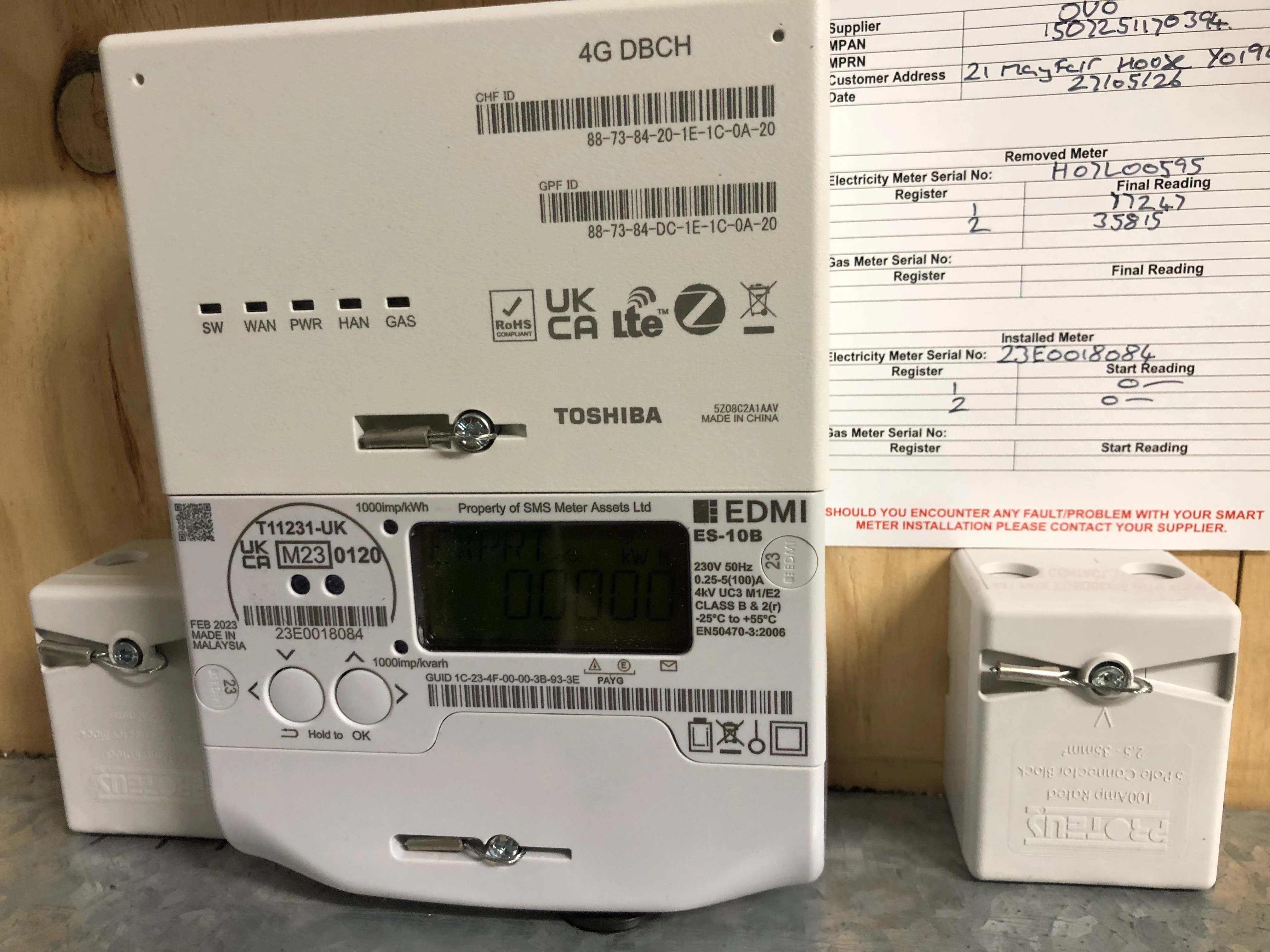
I’ve also had a closer look at the one they put in for my neighbour (that will be removed tomorrow apparently) - it doesn’t appear to have two separate rates on it. It shows only IMPRT, which as I understand it is power used by the customer, and EXPRT - which my research suggests is the amount of power sent back to the grid by customers who have solar panels etc. and can do so. Obviously that reads 00000 because nobody has that capability here. So as far as I can see, there’s no way to physically read separate daytime and nighttime rates off it. Surely this must be wrong? There’s no way anyone should accept having a meter they can’t physically take a proper reading off themselves
- Super User
- June 3, 2026
… it doesn’t appear to have two separate rates on it. It shows only IMPRT, which as I understand it is power used by the customer, and EXPRT -
If the meter is configured for peak and offpeak usage, there will be a sequence of button presses to see the contents of the two registers. We’d have to know the precise type of meter to be able to help with that - a photo would help a lot. That would also tell us what sort of communication it’s set up for, and the cables connected to it would tell us how it’s operating. It’s good to know that at least one recently-installed meter in the room is apparently working properly - although you can’t tell from looking at it whether it’s sending data back to HQ.
- Super User
- June 3, 2026
Unfortunate that we can't see the tails (the wires coming out of the the bottom of the meter) to see if there are 4 or 5 of them.
However is that your meter, the bloke upstairs meter, or the Octopus customers?
I ask because you said that yours was an old meter, but the one in the image has a brand new 4G communications hub and the card says it was fitted a week ago on the 27th May.
- Super User
- June 3, 2026
- Super User
- June 3, 2026
- Press the right-hand button and hold for a second. The display should change to Main Billing or similar;
- (I think) Do the same again, and again. This should take you to a screen headed Bill | My bills;
- Press the right hand button twice - with any luck, you’ll get to Bill Advancd;
- Press and hold the right hand button for a second. This will with any luck take you to Adv TOUMtrx.
- Press and hold again. You should now begin to see the register readings, headed RATE1 and RATE2. RATE1 should be the peak reading, RATE2 the offpeak one. Use the buttons to go up and down the list.
I said it’s complicated! It doesn’t matter much if you lose your way - just wait a bit and you’ll return automatically to the beginning again. If you get the same sort of meter, you’ll have had some useful practice.
PS The instructions are in this document, if you can make sense of it.
- Author
- Rank 2
- June 3, 2026
Yes it’s the neighbours soon-to-be-removed one. Yeah having had a crack at that nighttime rate still showing 00000. Let’s see what tomorrow brings…
- Super User
- June 3, 2026
Yeah having had a crack at that nighttime rate still showing 00000. Let’s see what tomorrow brings…
Congratulations on finding your way through that quagmire! If R2 is showing zero, that’s clear evidence that the tariff switching isn’t working, regardless of whether the ALCS is doing its job or not. Since neighbour doesn’t have any power to his heating equipment, it’s fairly obvious that the ALCS isn’t working either. Both of those are remotely configurable, so it sounds as if exchanging the meter is a good idea.
Did you notice any flashing green lights on the Communications Hub? They tell you whether the meter is in communication with the network or not. If things are as they should be, at least two of them (WAN and HAN) should flash at 5-second intervals. Anything else and something’s not right.
You might also spot a red light flashing occasionally just outside the top left-hand corner of the display screen. That just shows that current is flowing through the meter; the shorter the interval between flashes, the more power (kW) is being drawn.
- Author
- Rank 2
- June 3, 2026
Ok having had another bash through your instructions (think we did it wrong first time), it shows rate 2 as 00010. Economy 7 used to be rate 4 on our old meters though, could that be an issue? Have read somewhere that OVO charge all energy used during off peak hours (whether on an economy 7 appliance or not) at a cheaper rate on a smart meter, is that correct?

We’ve got four lights flashing as you say, the two you mentioned plus another that says SW and another that says PWR.
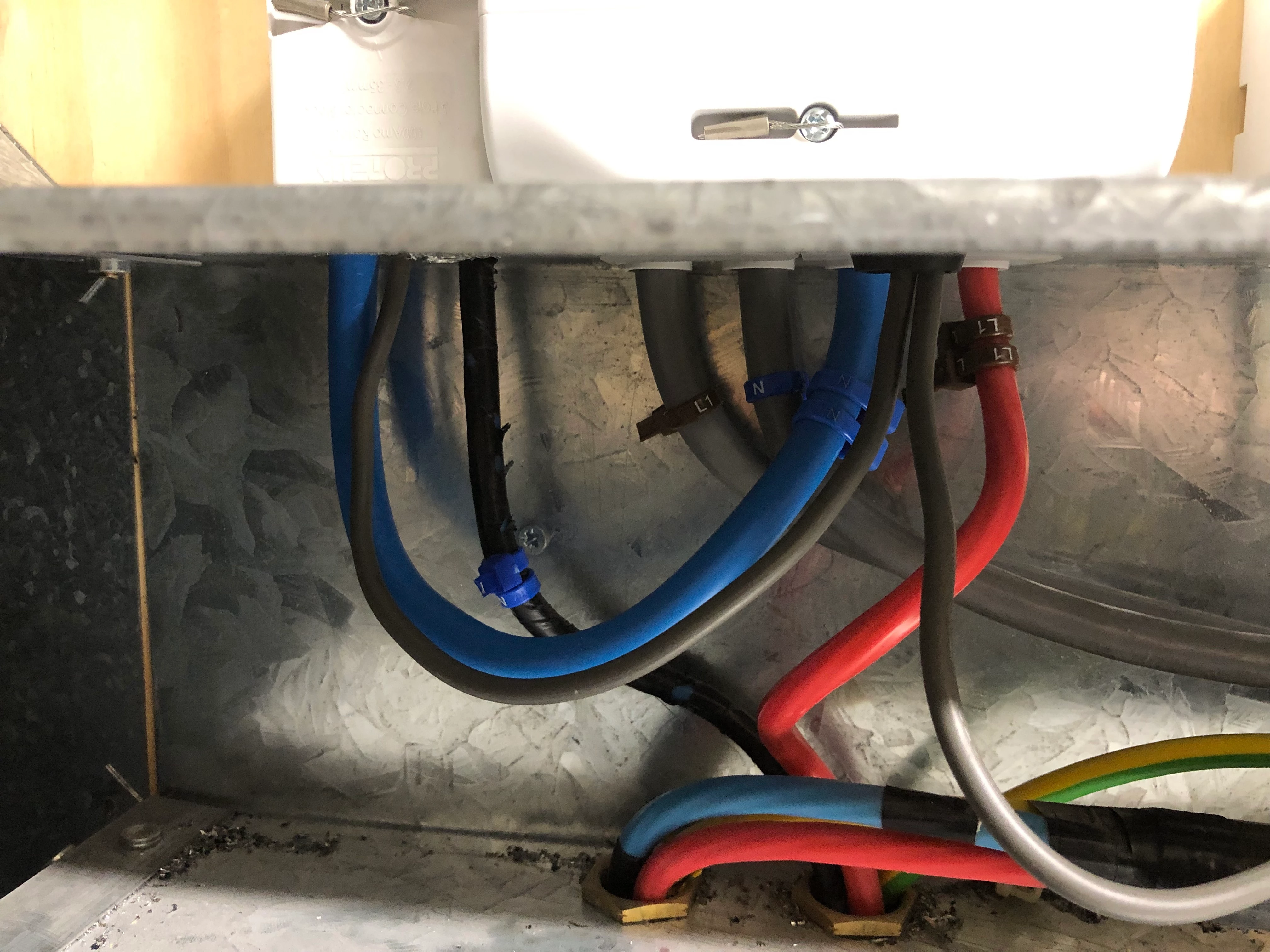
Here’s as good a pic of how it’s wired in as I could get
- Super User
- June 3, 2026
Here’s as good a pic of how it’s wired in as I could get
Great! I see what the engineer meant about switching the neutral: I don’t know enough about that sort of switchgear to be able to say how it should be done, but power to the heating equipment should be controlled by the little white box on the left. The thin grey cable alongside the blue one carries the signal from the meter telling the contactor in the white box when to switch on and off. It looks odd to me ...
it shows rate 2 as 00010. Economy 7 used to be rate 4 on our old meters though, could that be an issue?
If you’re seeing 10 kWh on RATE2, then that should be the offpeak reading. RATE1 gives the peak. So my remark about the tariff switching not working was wrong.
Have read somewhere that OVO charge all energy used during off peak hours (whether on an economy 7 appliance or not) at a cheaper rate on a smart meter, is that correct?
Yes. If the heating equipment (both space- and water-heating) was working, you’d be seeing quite a bit more than 10 kWh on RATE2. Those 10 kWh are just everything else running at night during the offpeak hours - fridges, freezers etc. - along with (perhaps) a kettle and toaster if they’re switched on before the end of the offpeak period, whenever that’s supposed to be. It could be 08:00 or even 08:30 - do you know?
We’ve got four lights flashing as you say, the two you mentioned plus another that says SW and another that says PWR.
That’s really good news. The 4G hub is apparently connecting to the network as it should. WAN is the smart meter network, HAN the home area network that’s supposed to connect to the In-Home Display I mentioned. Details here.
I wonder what the next engineer will say about that wiring. It could be all right, in which case it looks as if the problem is as I said before: the ALCS isn’t properly configured (if at all - we’ve seen that before, too!). I don’t know whether OVO’s extremely helpful tame meter guru has a moment to look this over, so we’ll ask anyway - are you up for it,
- Author
- Rank 2
- June 4, 2026
So rate 2 is now the off peak reading, but previously on the old meters it was rate 4. There is a rate 4 (and 3 for that matter) on the new smart meter showing 00000. Should the off peak not still be on rate 4 rather than rate 2?
- Author
- Rank 2
- June 4, 2026


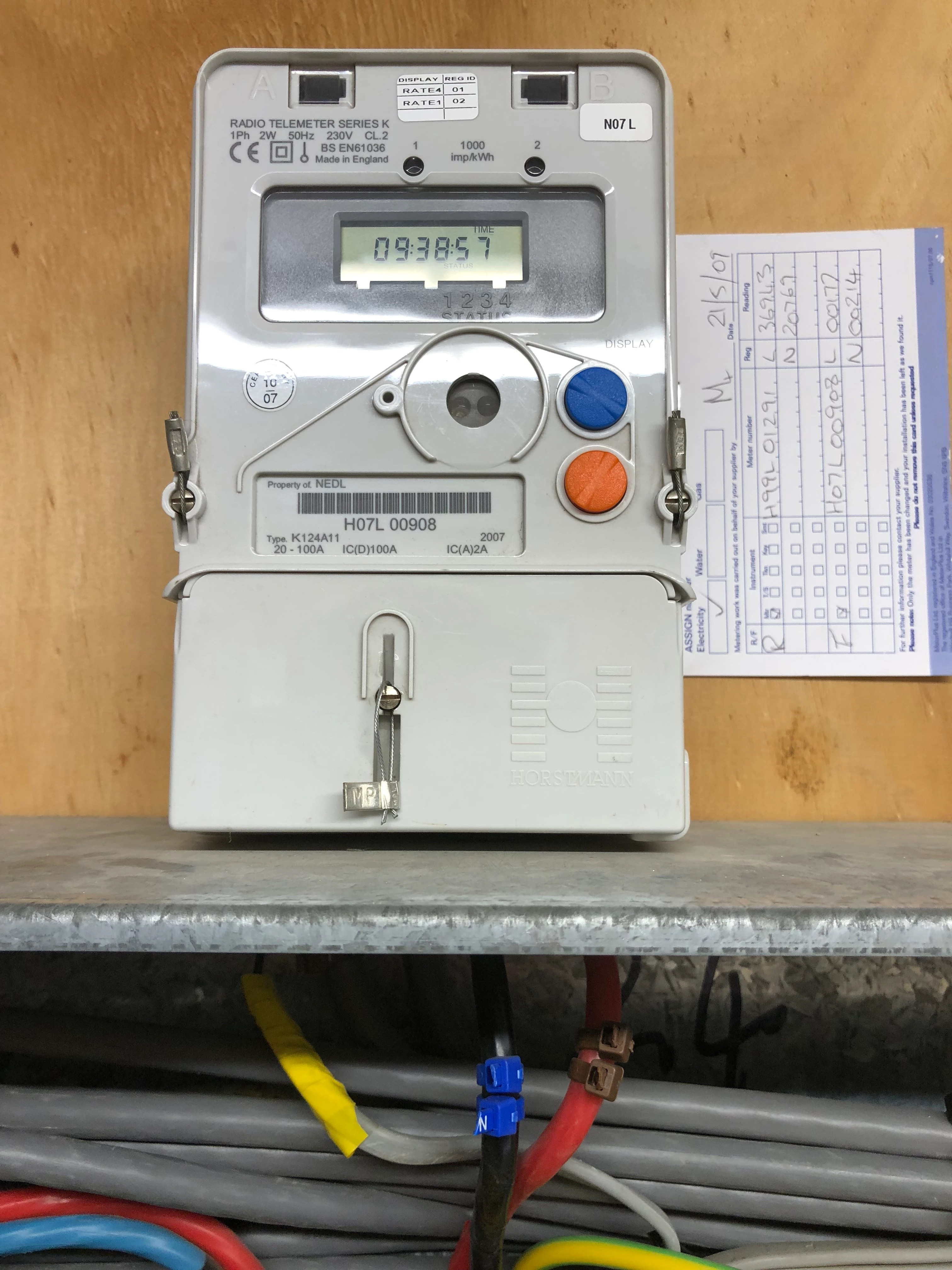
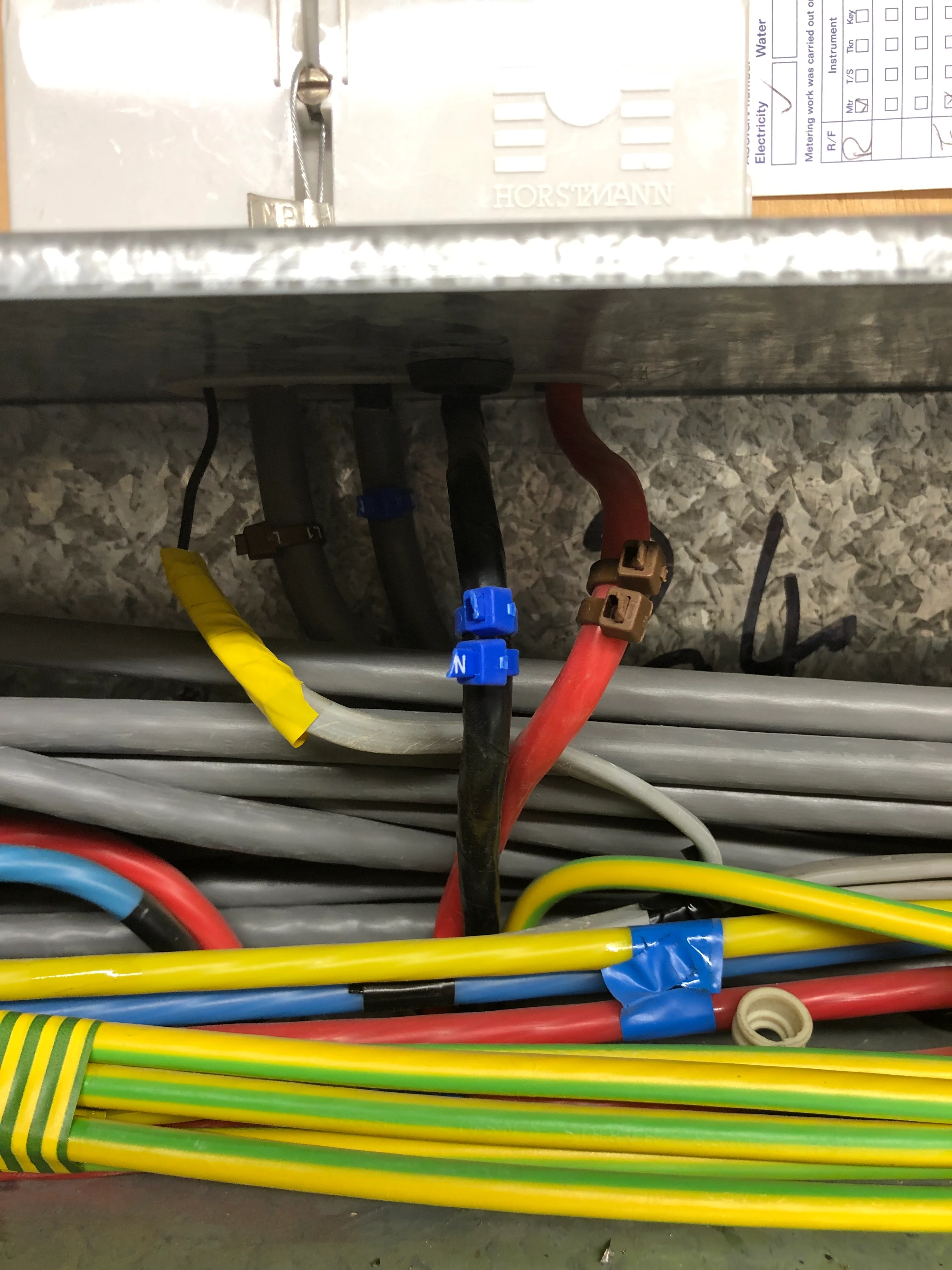
This is my meter (the original) and how it’s wired in if that’s any help
- Super User
- June 4, 2026
Should the off peak not still be on rate 4 rather than rate 2?
No! The wider system (i.e. the one that transmits data to your supplier via DCC’s secure gateway) works best if what the meter sends is either a single rate as Rate 1 or two with Rate 1 as peak and Rate 2 as offpeak. When meters were read manually, it didn’t much matter what the rates (often referred to as tiers) were called so long as you obeyed the meter manufacturer’s instructions to take the readings. Now with an automatic system it does matter!
- Author
- Rank 2
- June 4, 2026
News - OVO never arrived to replace the neighbours meter, they sent him a message to say that they’d escalated his complaint to a “Customer Resolution Specialist” and he’ll hear from them in the next five working days.
Meanwhile, I’ve been to see the neighbour with the new Octopus meter - he’s got the same story, the meter change hasn’t restored his economy 7, and it’s been in nearly a fortnight now.
I also finally managed to get in touch with another neighbour, who we’d heard from the building management company had had the same problem. They said that there’d been damage done to a cable in their flat (mentioned a “timing cable”) while some decorating was being done, but the cable had been repaired and now everything was functional again.
Can anyone glean any clues from any of that?
- Author
- Rank 2
- June 4, 2026
By the way Firedog, I asked the neighbour if he’d been given an IHD when I saw him earlier and no, he wasn’t given one. I thought they had to provide one, no?
- Super User
- June 4, 2026
Hello again Jim 👋 I hope you’re not getting even more confused by my ramblings!
Thanks for the picture of your meter. It’s one of the latest, and probably last, of the meters specially constructed for RTS. It seems to have been neatly installed, but you’d have to be a competent electrician to be sure - my archaic mechanical engineering degree doesn’t help me much here, I’m afraid.
The sticker at the top of it and the details on the Meter Exchange (MEX) label alongside it are quite revealing. The sticker shows that what the meter shows as RATE1 is registered as R02, while RATE4 is registered as R01. Then the meter engineer calls them L and N, meaning (I think) Low and Normal (price, that is). If you were told that RATE4 was offpeak, then the confusion is complete! I think it was normal for Economy 7 in those days for the first tier (R01) to be offpeak, Low register with the second (R02) for peak, Normal. The advent of the DCC meant that had to be reversed. I know - I ended up with months of discussion about this with my own meter, which eventually led to its being exchanged for a shiny new SMETS2 device in 2023. Even then, they got it wrong and the registers had to be reversed (remotely) a few days after installation. When your new meter is in place, you should take a moment to check that they’re the right way round for you. The MEX label also shows that your meter is a second-hand one, two years and several hundred kWh old on installation.
To your latest question, yes, I’m fairly certain that the supplier is required to provide an IHD with every new smart meter. It might be that the engineer just didn’t bother because it seemed obvious that it wouldn’t work in your block, or that he just didn’t have the necessary kit in his van to make it work. See the results of a Google search I just ran: smart meter installation code of practice - Google Search. While you should never take Google’s AI Overview as gospel, you might make note of it in anticipation of your own installation to come.
Need advice from other members?
Ask your question to our members - they have the experience you're looking for:
Ask our communityLog in to the OVO Forum
No account yet? Create an account
Enter your E-mail address. We'll send you an e-mail with instructions to reset your password.
Scanning file for viruses.
Sorry, we're still checking this file's contents to make sure it's safe to download. Please try again in a few minutes.
OKThis file cannot be downloaded
Sorry, our virus scanner detected that this file isn't safe to download.
OKContact us
Tips & advice
Resources
For business

OVO Energy Ltd, Floor 5, Crescent, Temple Back, Redcliffe, BS1 6EZ, (Company no. 06890795) registered in England and Wales.
OVO (S) Gas Limited is registered in England and Wales (Company No. 02716495) at Floor 5, Crescent, Temple Back, Redcliffe, BS1 6EZ.
OVO (S) Gas Limited is part of OVO Group Ltd