Hi, I have been running a Dimplex Quantum QM050RF for a year or 2. I have an energy monitoring system attached to most circuits in the house (Emporia Vue) and note that the Quantum only charges up at 700W (max) on the offpeak supply. As I am with Octopus Intelligent Go tariff, I only get 6 hours of charging per day ie the Quantum only charges up to (700W x 6 hours =) 4.2kWh per day. This is corroborated by the Quantum's own historical stats (accessible via the display and controls).
How can I get around this issue as I am not getting sufficient heat from 4.2kWh during winter to adequately heat the room in question (a small kitchen)?
- Forum
- Green tech & greener living
- Home and heating
- Quantum Dimplex Night Storage Heater Won't Charge at Max Rate

Quantum Dimplex Night Storage Heater Won't Charge at Max Rate

- May 18, 2026
- 43 replies
- 339 views
- Rank 2
43 replies
- Super User
- May 22, 2026
You still have a right under the Sale of Goods Act for a repair or replacement if the goods fail with within an unreasonably short period of time even though it might be outside of the warranty period. The difficulty of ‘unreasonably sort period of time’ is that it isn’t precise but for a relatively simple piece of equipment six years is usually taken to be a reasonable period.
CAB or Trading standards should be able to help but I think you have to contact the retailer in the first instance and that may or may not be possible.
Peter
- Author
- Rank 2
- May 22, 2026
(A bit of web research later...)
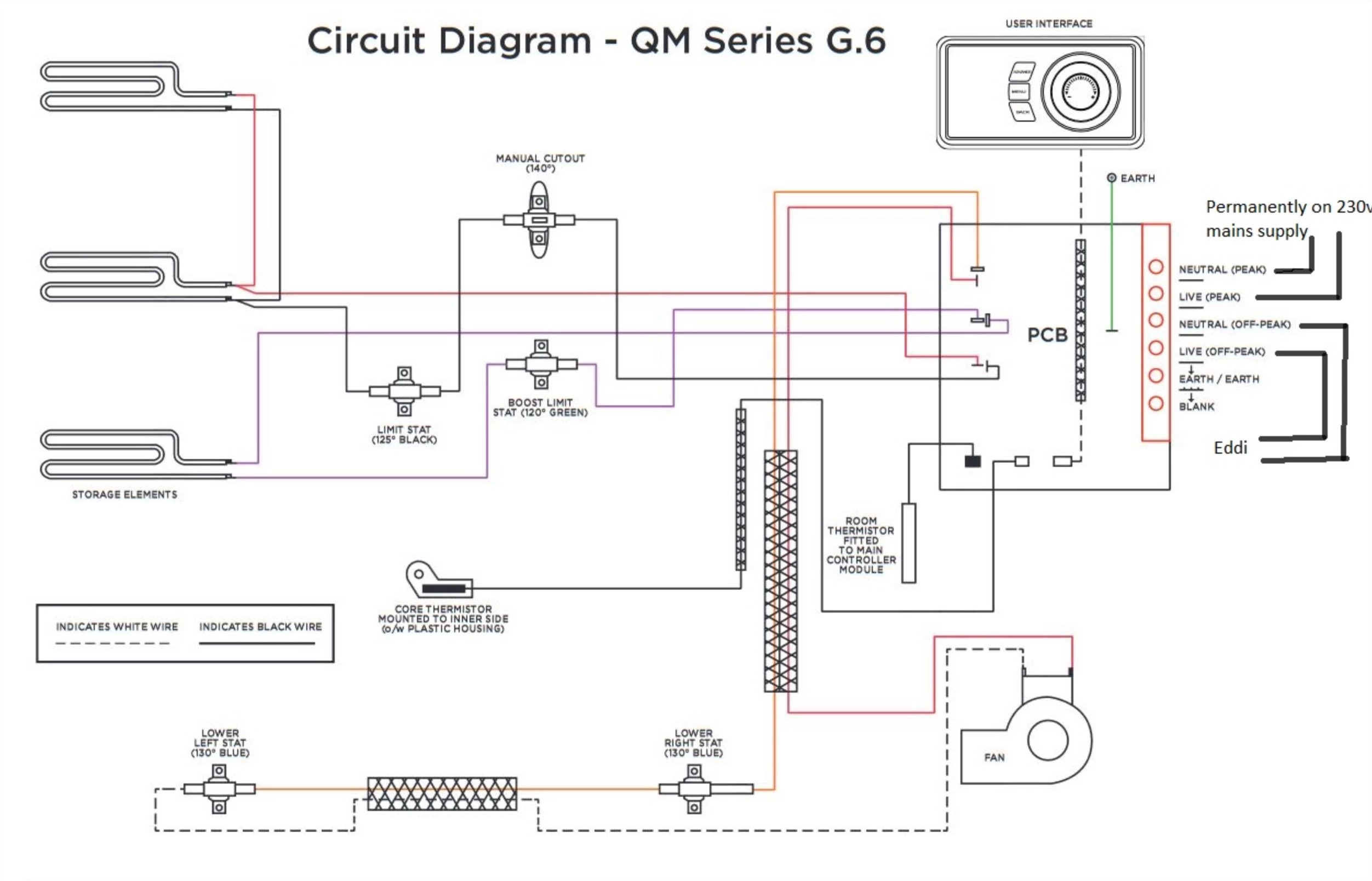
I think I have got to the bottom of it… This appears to be a relevant wiring diagram for the heater:

… although mine appears to be a ‘G10 series’ not a G6.. . According to https://electricspares.co.uk/product/dimplex-quantum-340w-element/ the 2 main elements are 340W each (x 2 = 680W which is actually what my energy app shows - not quite 700W). There is a 3rd ‘boost’ element of maybe the same rating which gives the max input power as ~1000W as the specs sheet says.
So, I don’t think there are any issues with the unit itself, just the design in terms of some modern eco overnight tariffs which can’t make the heater heat up fully at basic cheap rates… I doubt there is any possibility of taking advantage of, for example, Octopus Intelligent Go’s random daytime sessions and even if it were, I would almost certainly need to add the wifi hub (at another ridiculous £150, thanks very much indeed. Actually, I just found one on eBay for a ‘mere’ £80 and bought one 😊..)...
- Super User
- May 22, 2026
Ok, that's really useful and I can read that diagram (electronics deign engineer like forever). If your heater has an Off Peak terminal you just need to supply power to that (including the Neutral line). Two elements come off the Permanently On power and one from the Off Peak. Just give the Off Peak terminal some power. You can talk that through with an electrician.
The only thing I'm not certain of is what the symbols mean to the left of the word PCB. They are obviously relay contacts controlled by the PCB but there are only two types. Normally Open and Normally Closed but there are three different types of symbol which has me a bit confused.
More thinking required …
Peter
- Rank 1
- May 22, 2026
Hi, I have been running a Dimplex Quantum QM050RF for a year or 2. I have an energy monitoring system attached to most circuits in the house (Emporia Vue) and note that the Quantum only charges up at 700W (max) on the offpeak supply. As I am with Octopus Intelligent Go tariff, I only get 6 hours of charging per day ie the Quantum only charges up to (700W x 6 hours =) 4.2kWh per day. This is corroborated by the Quantum's own historical stats (accessible via the display and controls).
How can I get around this issue as I am not getting sufficient heat from 4.2kWh during winter to adequately heat the room in question (a small kitchen)?
Hi, I have been running a Dimplex Quantum QM050RF for a year or 2. I have an energy monitoring system attached to most circuits in the house (Emporia Vue) and note that the Quantum only charges up at 700W (max) on the offpeak supply. As I am with Octopus Intelligent Go tariff, I only get 6 hours of charging per day ie the Quantum only charges up to (700W x 6 hours =) 4.2kWh per day. This is corroborated by the Quantum's own historical stats (accessible via the display and controls).
How can I get around this issue as I am not getting sufficient heat from 4.2kWh during winter to adequately heat the room in question (a small kitchen)?
The tariff is probably not the limiting factor here, but rather the charge rate or installer settings of the heater. I would check the input/charge settings and also make sure it is wired for full charging capacity. 4.2kWh/day does seem quite low for winter heating, even for a small room,
- Super User
- May 22, 2026
As a matter of interest
- Author
- Rank 2
- May 23, 2026
As a matter of interest
A Chinese ‘smart-breaker’ - operating on a fixed schedule to coincide with my tariff’s main, fixed night cheap rate which is only 6 hours long. There are (as previously stated) additional daytime periods of the same cheap (7p/kWh) rates but they are random. I might be able to make use of these with something clever like Node Red (https://nodered.org/) but that’s a learning curve I’d like to avoid climbing for the time being.
- Author
- Rank 2
- May 23, 2026
Hi, I have been running a Dimplex Quantum QM050RF for a year or 2. I have an energy monitoring system attached to most circuits in the house (Emporia Vue) and note that the Quantum only charges up at 700W (max) on the offpeak supply. As I am with Octopus Intelligent Go tariff, I only get 6 hours of charging per day ie the Quantum only charges up to (700W x 6 hours =) 4.2kWh per day. This is corroborated by the Quantum's own historical stats (accessible via the display and controls).
How can I get around this issue as I am not getting sufficient heat from 4.2kWh during winter to adequately heat the room in question (a small kitchen)?
Hi, I have been running a Dimplex Quantum QM050RF for a year or 2. I have an energy monitoring system attached to most circuits in the house (Emporia Vue) and note that the Quantum only charges up at 700W (max) on the offpeak supply. As I am with Octopus Intelligent Go tariff, I only get 6 hours of charging per day ie the Quantum only charges up to (700W x 6 hours =) 4.2kWh per day. This is corroborated by the Quantum's own historical stats (accessible via the display and controls).
How can I get around this issue as I am not getting sufficient heat from 4.2kWh during winter to adequately heat the room in question (a small kitchen)?
The tariff is probably not the limiting factor here, but rather the charge rate or installer settings of the heater. I would check the input/charge settings and also make sure it is wired for full charging capacity. 4.2kWh/day does seem quite low for winter heating, even for a small room,
I’m afraid the tariff is most definitely one limiting factor - as clearly demonstrated by the screenshot of my energy monitoring kit above. I have 6 hours (avoiding the tariff’s random daytime ‘on’ sessions) to charge the Quantum’s ~7kW of storage from only 680W-worth of heating element (being the other limiting factor - the ‘symbols’ you refer to are just connections… and offpeak is connected to 2 elements not 1 and they appear to be - going from the look of the PCB - to be mosfet-driven, not relay-driven).
However, there is a feature in the advanced menu which talks about programming the Quantum to store more energy than normal but it is a bit obscurely written:
“Charging Settings
If the output of the storage heater is not able to deliver the required heat demand throughout the day, it is possible to force the heater to store additional energy. This will manually adjust the charge calculation to store more electrical energy during the charging period.
This setting displays the available charge times for the Heater to store off -peak energy. It is presented like the Timer setup screen, but without a Target Temperature or Day Selection. This allows the Installer to set up to 4 charging On and Off times.
Charge Times
This setting displays the available charge times for the Heater to store off -peak energy. It is presented like the Timer setup screen, but without a Target Temperature or Day Selection. This allows the Installer to set up to 4 charging On and Off times.
Default charge times (Standalone) are:
Period 1 00:00 - 00:00
Period 2 00:00 - 00:00
Period 3 00:00 - 00:00
Period 4 00:00 - 00:00
Charge times should remain at the default settings (as shown above) for twin supply installations. This setting
should only be used in single supply installations. Values entered here always take precedent.”
Fortunately, this doesn't help because I'm still stuck with only having access to the Fixed six hours overnight for charging unless the third element can be brought into play somehow but this is where the instructions are not very clear. It reminds me of Chinese-made devices which have lots of functionality but whose user-manuals are so badly written it's next to impossible to make use of them all.
So I think I will be looking into Node Red after all…
- Super User
- May 23, 2026
I use Home Assistant on ours (Solar inverter/tariff control) which hasn’t been too bad considering that I haven’t really coded since ‘Basic’ days. The HA community is very good at sharing code.
I do know of others using Node Red but I’ve not experienced it myself
- Super User
- May 23, 2026
“Charging Settings
“If the output of the storage heater is not able to deliver the required heat demand throughout the day, it is possible to force the heater to store additional energy. This will manually adjust the charge calculation to store more electrical energy during the charging period.
[…]
“This setting should only be used in single supply installations.”
We’re getting into the realm of the configuration settings I touched on. You haven’t told us, I think, whether this installation is single- or dual-supply. It is a common arrangement for Economy 7 installations to have two supplies to a night-storage heater: one for charging, energized only during offpeak hours, and the other constantly live to power the heater’s controls, its fan and its booster element.
Since you’re apparently on a half-hourly metered Time of Use tariff, it would be natural to assume that there’s only one, constant, supply to the heater. Your statement “I'm still stuck with only having access to the Fixed six hours overnight for charging” is a bit worrying - in what way is access limited? It would be if the meter were controlling a switched charging circuit, but that doesn’t make sense with the tariff you’re on.
It looks like the instructions you were given would solve the problem you’re facing, but you’ll have to come clean about how power is currently delivered to the heater.
- Author
- Rank 2
- May 25, 2026
Hi Firedog, Thank for your reply. I did mention in my second post that there is a separate 24hour supply on the ‘peak’ connection - which is on a different ‘day-time’ tariff.
My offpeak tariff (as also previously mentioned) has a fixed ‘on’ time from 2330 to 0530 every day. It is on 24 hours otherwise but if I use it outside the night period (or whatever random other daytime periods Octopus choose to provide and which I currently cannot take advantage of) then I pay more than 4 times more for the electricity, hence my reluctance to use it.
- Super User
- May 25, 2026
You have a dual supply to your heater, one - for charging - limited to six hours nightly, the other constant for the fan, controls and boost function. This is the normal arrangement for Economy n tariffs, where the meter controls the charging feed. Assuming you have a meter equipped with an ALCS, you are apparently not on a tariff like this, which when operating normally uses two distinct timetables:
- The tariff switching table, which tells the meter when to switch from recording on the offpeak and peak registers.
- The ALCS calendar, which controls the times when the time-limited (‘restricted’) circuit is energized.
Your Octopus tariff apparently ignores the meter registers and bills you according to the half-hourly usage data. I’m not sure quite how it controls the timings, but it may involve (a) remotely setting the ALCS calendar to the overnight period 23:30 - 05:30, and (b) remotely activating the meter’s Boost function to operate for the extra daytime hour, which can vary from day to day. It looks as if the restricted circuit only powers two of the three elements in the heater, so any ALCS override (‘Boost’) would draw 680W, but it wouldn’t affect the fan setting.
I think it’s time we saw some photos of your installation, ideally:
- a close-up of the meter itself (with the display lit up by touching a button if necessary) clear enough to be able to read the display and the markings on the meter itself;
- A view of the whole backboard so we can see the main supply cable coming in from outside, and all the cables to and from the meter itself;
- If it’s not clear from the previous photo, a close-up of the meter exchange label - the card left by the engineer giving the numbers and readings of both the old and new meters (assuming he did leave one, as he’s supposed to do);
- A view of each consumer unit (fuse box) clear enough to be able to read any labels the electrician may have left to say which breaker is which.
Before posting, please obscure part of the Meter Serial Number - a dodgy operator could use it to find your address.
I may ask for more if we need more clarification.
- Super User
- May 25, 2026
Peter
- Super User
- May 25, 2026
martinwinlow uses a smart switch programmed to coincide with the discount rate. Its further up the thread. So not using the smart meter to switch.
That’s what’s confusing me. Why would there be two separate constant feeds to the heater where one would do? The logical explanation is that there were - pre-Smart - two feeds, one constant and the other restricted, to give offpeak charging on an Economy tariff. The engineer who installed the smart meter would normally have acted accordingly and fitted a meter capable of doing the same thing.
This doesn’t work well with smart ToU tariffs like Octopus’ Snug or EV offerings, and some customers wanting to avail themselves of this type of tariff have asked whether the restricted feed could be ‘derestricted’ by setting the ALCS to ‘always on’. This is what Martin’s “My offpeak tariff ... has a fixed ‘on’ time from 2330 to 0530 every day. It is on 24 hours otherwise ...” looks like. The problem with that is, we’re told, that the secondary 100A contactor inside the meter is not rated for constant use*. A 2A relay controlling an external 100A contactor wouldn’t, I think, be subject to this limitation.
Switching to single-supply (which might just involve swapping jumpers inside the heater) would enable Martin to take advantage of the full 1020W available for charging, which is where this thread started.
Photos would really help …
* One customer managed to unearth a manufacturer’s spec sheet which showed that the secondary contactor in his meter is indeed rated for continuous service, but I haven’t seen the document itself. This may not be the case for all ALCSs.
- Super User
- May 25, 2026
- Author
- Rank 2
- May 27, 2026
Hi Peter E,
Sorry, but we do seem to be going around in circles, here! My original post was about the fact that the specs for the QM050RF state it has an ‘input rating’ of ~1kW and has ~7kWh of heat storage implying that it can, on an Eco7 tariff, fully charge its 7kW of bricks ‘overnight’. However, I can only see it charging at 700W max and therefore it does not ever fully charge, as confirmed by its own stored data; never charging more than ~4.2kW. I do appreciate I only have six hours but nevertheless it could be storing considerably more energy than it currently is.
I can’t get any sense out of Dimplex as to a understanding how the unit works better or a work-around and they have now stopped answering my emails. It is very disappointing. I am resolved to the prospect of trying to use something like Home Assistant to take advantage of the additional random daytime cheap periods of power but, as I say, I kind of feel like I have been mis-sold the heater.
- Super User
- May 27, 2026
… we do seem to be going around in circles, here!
That’s what tends to happen if you’re in the dark without a compass! It would really help to see the photos I asked for, to eliminate at least some of the guesswork.
- Super User
- May 27, 2026
Sorry… what photos…?
It’s not always easy to keep track! This is what I posted a couple of days ago:
| I think it’s time we saw some photos of your installation, ideally:
Before posting, please obscure part of the Meter Serial Number - a dodgy operator could use it to find your address. I may ask for more if we need more clarification. |
Need advice from other members?
Ask your question to our members - they have the experience you're looking for:
Ask our communityLog in to the OVO Forum
No account yet? Create an account
Enter your E-mail address. We'll send you an e-mail with instructions to reset your password.
Scanning file for viruses.
Sorry, we're still checking this file's contents to make sure it's safe to download. Please try again in a few minutes.
OKThis file cannot be downloaded
Sorry, our virus scanner detected that this file isn't safe to download.
OKContact us
Tips & advice
Resources
For business

OVO Energy Ltd, Floor 5, Crescent, Temple Back, Redcliffe, BS1 6EZ, (Company no. 06890795) registered in England and Wales.
OVO (S) Gas Limited is registered in England and Wales (Company No. 02716495) at Floor 5, Crescent, Temple Back, Redcliffe, BS1 6EZ.
OVO (S) Gas Limited is part of OVO Group Ltd